n8n Schedule Trigger Firing at the Wrong Time? A Self-Hosted Timezone Fix Guide

Self-hosted n8n defaults to America/New_York; fix scheduling drift with per-workflow or global timezone settings.
Self-hosted n8n's Schedule Trigger set for 9am firing at the wrong time is due to its default America/New_York timezone, causing an 8–13 hour offset for Asia-Pacific and Europe users, not a bad Cron expression. Fix it either by changing the Timezone in one workflow's Settings, ideal for a few key workflows, or via the GENERIC_TIMEZONE environment variable for a global config inherited by all non-overridden workflows, then restarting the instance. Cross-timezone tasks should be configured per workflow, and teams should document timezone variables.
The Symptom: A 9am Task Firing at the Wrong Time
If you're self-hosting n8n and you've set a Schedule Trigger node to run at 9am, but the actual output shows it firing at a completely different time—it's not because your Cron expression is wrong.
The root cause is that self-hosted n8n defaults to the America/New York timezone. When you don't explicitly configure a timezone, n8n interprets your schedule settings as New York time. In other words, you think you're setting local time, but you're actually configuring US Eastern time. For a user in Asia or Europe, this offset can be as much as 8 to 13 hours.
The Fix: Two Steps to Bring Scheduling Back to Local Time
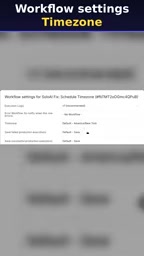
Step 1: Change the Timezone of an Individual Workflow
Open the problematic workflow, go to the workflow menu in the top-right corner, and select Settings. In the settings panel, find the Timezone option, which defaults to America/New York. Change it to your city or the corresponding timezone identifier, save, and re-run the workflow.
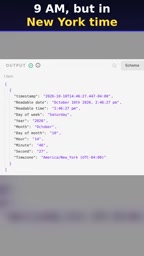
Once you've made the change, the 9am set in the Schedule Trigger really is 9am in your timezone. This is the most direct fix and works well when you only need to adjust a few critical workflows.
For the timezone in the workflow Settings, it's recommended to use IANA timezone database identifiers (such as Asia/Shanghai, Europe/Berlin, America/New_York) rather than offset notations like UTC+8. The reason is that IANA identifiers carry daylight saving time (DST) rules and can automatically adjust the offset when DST changes; a fixed offset, in regions that observe DST (such as Europe and North America), will cause the time to drift twice a year. For users in regions without DST (such as China), the result is the same either way, but consistently using IANA identifiers is the safer habit.
Step 2: Set a Global Timezone Variable
If you have dozens of workflows to modify one by one, the approach in Step 1 is clearly impractical. n8n supports unified configuration via a generic timezone variable, so that all newly created workflows—or any that don't override it individually—inherit the same timezone.
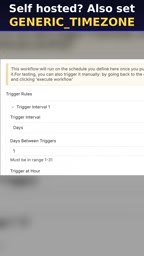
In a self-hosted environment (for example, deployed via Docker), setting the GENERIC_TIMEZONE environment variable is usually enough to complete the global configuration. The point of doing this is that not only will the Schedule Trigger follow that timezone, but the parts of n8n involving timestamps, logs, and expression evaluation will stay consistent as well, avoiding time-logic mismatches between different nodes.
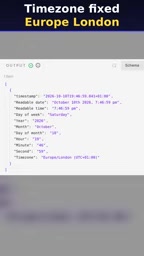
After setting it, restart the n8n instance. From then on, every workflow uses your configured local timezone by default, unless a workflow overrides it individually in Settings.
There's more than one commonly used variable related to time in n8n and its environment, and understanding the difference helps avoid configuration gaps: GENERIC_TIMEZONE determines the default timezone used at the workflow level (including the Schedule Trigger, logs, and time functions in expressions); TZ is the operating system/Linux container-level timezone variable, affecting how the Node.js process itself interprets the system clock. In a Docker deployment, setting only GENERIC_TIMEZONE and ignoring TZ can sometimes leave runtime log timestamps still inconsistent with the schedule trigger time. The safe approach is to set both to the same timezone identifier (such as Asia/Shanghai) and, after the container restarts, confirm the system time is correct with the date command.
Why This Pitfall Is So Common
n8n's self-hosted default of the UTC-5 timezone is virtually imperceptible to North American users, but for users in Asia-Pacific and Europe, it's almost inevitable. What's more troublesome is that the Schedule Trigger's execution log shows the time converted to the local timezone, while what you entered in the node is in another timezone—comparing the two side by side makes it easy to misjudge and blame the Cron expression.
There's really only one line of thinking for the solution: make the configured timezone align with your actual intent. Per-workflow settings solve local problems, generic variables solve systemic problems, and using them together works best.
For team collaboration scenarios, it's recommended to explicitly document the timezone variables in use in your project docs, so new members don't repeat the same mistake during deployment. If workflows involve cross-timezone scheduled tasks (for example, periodically fetching APIs from different regions), you need to set timezones at the per-workflow granularity rather than relying on global variables.
A Schedule Trigger's Cron expression itself doesn't carry timezone information—it's just a set of "minute hour day month weekday" fields. The timezone in which the Cron is interpreted depends entirely on the default timezone of the runtime environment executing it. This matches the behavior of traditional system crontab: the same 0 9 * * * fires at absolute times 12–13 hours apart on a New York server versus a Shanghai server. So when troubleshooting this kind of issue, first confirm "who is interpreting this Cron," then check the expression itself—usually you'll pinpoint it faster that way.
One-line Summary
Self-hosted n8n defaults to the America/New_York timezone, so fix scheduling drift with two steps: per-workflow or a global variable.
Paragraph Summary
A self-hosted n8n Schedule Trigger set for 9am firing at the wrong time is caused by its default America/New_York timezone, which produces an 8–13 hour offset for users in Asia-Pacific and Europe—not a broken Cron expression. There are two fixes: change the Timezone in an individual workflow's Settings to your local timezone, which suits a few critical workflows; or use the GENERIC_TIMEZONE environment variable for a global configuration so all non-overridden workflows inherit the local timezone, followed by an instance restart. Cross-timezone scheduled tasks should be configured back at the per-workflow granularity, and for team collaboration it's best to document the timezone variables in your project docs.
Related articles

Chain of Thought Isn't Just for AI: How Humans Can Use CoT to Improve Thinking Quality
Chain of Thought isn't just a prompt trick for large models. Starting from a Hacker News discussion, this article analyzes why CoT works for human thinking too, breaks down actionable ways to transfer it, and highlights the key differences between human CoT and machine CoT.
Cloudflare Teams Up with OpenAI: Closi…
Cloudflare Teams Up with OpenAI: Closing the Loop from Vulnerability Discovery to Defense with AI
Cloudflare uses OpenAI Daybreak to investigate security vulnerabilities and generate reviewable remediation plans, while developers use Codex to boost coding efficiency and quality.

Orca Multi-Agent Orchestration in Practice: A Guide to Parallel Collaboration with Claude and Codex
Orca is Stable AI's free open-source agent workbench supporting 34 agents like Claude Code and Codex in parallel. Learn its Git worktree isolation, multi-model orchestration, and mobile management.