Nearly 5,000 Affected! AI Coding Plugin Found with Backdoor, Officials Urgently Remove It

Claude Code's VS Code extension version 2.1.313 was tampered with to include a backdoor, potentially affecting up to 5,000 users.
A Bilibili video exposé claims that the installation package for Claude Code's VS Code extension version 2.1.313 was maliciously tampered with, implanting backdoor code that could affect up to 5,000 users. The malicious code collects device information, attempts to write the attacker's SSH public key, and sets auto-start on boot to establish a persistent remote access channel. Since the backdoor may exist independently of the plugin, uninstalling the plugin may not remove it; users should follow official guidelines to detect and manually clean up malicious keys and auto-start items. The incident is limited to a specific version—not all Claude Code plugins are compromised—but it reminds developers to prioritize supply chain security in plugin marketplaces.
AI coding tool security issues have raised alarms once again. According to a video exposé on Bilibili, a VS Code extension for Claude Code was maliciously tampered with, with attackers implanting backdoor code into the installation package, potentially affecting up to 5,000 users. This isn't a case of the model itself turning bad—rather, the plugin package downloaded locally was tampered with. It's like hiring a programmer and getting an uninvited "houseguest" thrown in.

Incident Recap: From Plugin Marketplace to Remote Control
The plugin in question came from the VS Code Marketplace, version 2.1.313. Attackers tampered with the installation package for this version, adding malicious code. Officials stated that up to 5,000 users may have downloaded the affected version, but emphasized this is not confirmation that 5,000 computers have been compromised—it's the potential scope of impact.
According to the video, the malicious code's behavior chain is quite clear: first collect device information, then attempt to implant the attacker's remote login key (SSH key) into the system, and set it to continue running after boot. In plain terms, it's like secretly making a copy of a key and installing a door that can be opened from the outside.

The VS Code Marketplace is an extension distribution platform operated by Microsoft, where developers can upload .vsix installation packages for one-click installation by users. Plugins have the same user permissions as the editor locally, allowing them to read and write files, execute commands, and make network requests. Therefore, once an installation package is tampered with, malicious code can run with the user's identity—this is the fundamental reason why such supply chain attacks are so dangerous.
Package integrity typically relies on publisher signatures, marketplace review, and hash verification. However, marketplace review is mostly automated scanning, which struggles to cover all variants. If attackers steal publisher tokens, hijack CI/CD pipelines, or directly replace distribution artifacts, they may bypass detection. The tampering of version 2.1.313 in this case represents a failure in the distribution chain, not a problem with the model or official source code itself.
Backdoor Behavior Breakdown: What Is It Trying to Do?
The attacker's goal is not to destroy the system but to establish a persistent access channel. Specific steps include:
- Information Collection: Obtain device identifiers, system information, etc., to prepare for subsequent attacks.
- Implant Remote Login Key: Attempt to write the attacker-controlled SSH public key into the authorization file, thereby allowing remote login.
- Set Auto-Start on Boot: Ensure the backdoor survives system restarts, maintaining long-term control.
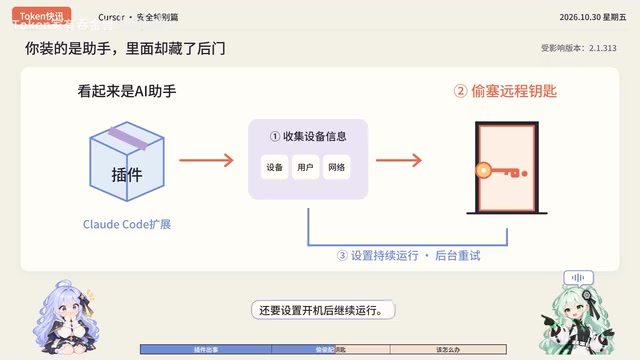
You may not have noticed that an attempted installation doesn't necessarily mean success. The video mentions that malicious code may fail due to insufficient permissions or environmental differences, but the risk still exists.
SSH public key authentication is the standard remote login method on Linux/macOS and some Windows environments. After a user writes a public key into ~/.ssh/authorized_keys, anyone holding the corresponding private key can log into that account without a password. By implanting their own public key, attackers essentially obtain a key that can be used long-term without triggering password login alerts.
Persistence is typically achieved through ~/.bashrc, ~/.zshrc, systemd user services, cron jobs, or Windows registry Run keys, allowing malicious processes to automatically recover after a restart. Since these locations are independent of the plugin directory, simply uninstalling the plugin cannot remove them. When investigating, check whether authorized_keys contains unfamiliar entries, whether auto-start items point to unknown scripts, and audit recent SSH login logs.
Cleanup Challenges: Deleted the Plugin, But Is the Backdoor Still There?
Many users' first reaction is: just delete the plugin, right? But the reality may not be that simple. The video warns that the backdoor may exist independently of the plugin—for example, written SSH keys and auto-start items will not be automatically removed when the plugin is uninstalled.
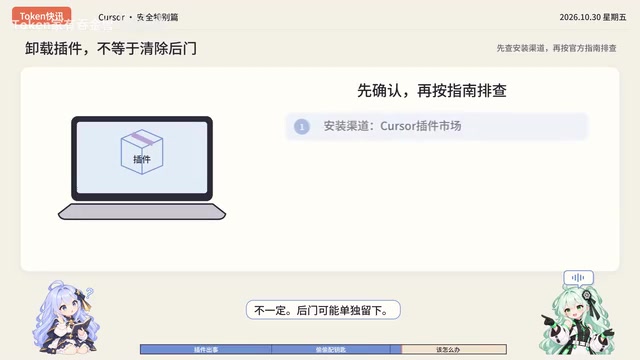
Therefore, the correct approach is:
- Confirm whether you have installed version 2.1.313 of the Claude Code extension from the VS Code Marketplace.
- Follow the official guide to check whether your system has been implanted with malicious keys or auto-start items.
- Manually clean up the malicious version and related remnants.
Currently, the malicious version has been removed and the attack server has been shut down, but users who have already downloaded it still need to self-check.
A supply chain attack refers to attackers not directly attacking the final target but instead compromising the software distribution chain it depends on—such as plugin marketplaces, package managers, build servers, or update servers—to deliver malicious code alongside legitimate software. Because users trust upstream channels, such attacks often have a wide impact and are detected late.
For developers, measures to reduce risk include: prioritizing installation from official marketplaces and verifying publisher identity; pinning dependency versions and verifying hashes; maintaining minimal installations of high-privilege plugins; and following official security advisories and version change logs. Enterprise environments can also restrict unvetted plugins through private extension sources, whitelists, and endpoint detection tools.
Don't Overgeneralize: Not All Claude Code Plugins Are Compromised
The video specifically emphasizes that this incident should not be expanded to mean "all Claude Code plugins are compromised." The problem is limited to the tampered installation package of a specific version (2.1.313); other versions and plugins downloaded from official channels are unaffected. Users don't need to panic, but they should remain vigilant.
For developers, this incident reminds us that supply chain security in plugin marketplaces cannot be ignored. Even extensions for well-known tools can become attack vectors. It's recommended to regularly check the source and version of installed plugins and avoid using installation packages from unknown sources.
Security Recommendations: How to Protect Yourself?
- Check Installation Records: If you use VS Code and have installed the Claude Code extension, immediately check whether the version number is 2.1.313.
- Follow Official Guidelines: Visit the official security advisory and follow the steps to detect and clean up.
- Monitor for Anomalous Behavior: Watch for unknown SSH login attempts or unusual auto-start items on your system.
- Stay Updated: Use the latest official version and avoid downloading plugins from third-party channels.
AI coding tools improve efficiency but also introduce new attack surfaces. This incident is a warning: while enjoying AI-assisted programming, don't forget to put a reliable lock on your "digital front door."
Related articles

AI Comic Drama with WorkBuddy from Scratch: A Step-by-Step Skill Pack Installation Guide
Learn how to create AI comic dramas with WorkBuddy from scratch. This guide covers installation, Skill pack import and invocation, plus a script generation demo with manual revision tips to get you through the first step from script to storyboard.

WorkBuddy Agent Runs the Entire GEO Database Mining Pipeline with a Single Prompt
WorkBuddy agent automates GEO database mining: from data search and curation to batch correction, differential analysis, co-expression networks, feature gene screening, and immune infiltration—a single prompt generates a complete bioinformatics report, greatly lowering the barrier to bioinformatics analysis.

PC Memory Wasted? Hacker News Debates Centralized Data Centers
Hacker News users argue that personal computer memory is wasted and should be centralized in data centers, sparking debate on centralized vs. distributed computing resource allocation. This article analyzes the logic behind the claim, the costs of centralization, and new tensions in memory resource allocation in the AI era.