New Vercel CLI Feature: Search Commands in Natural Language, Usable by Agents Too
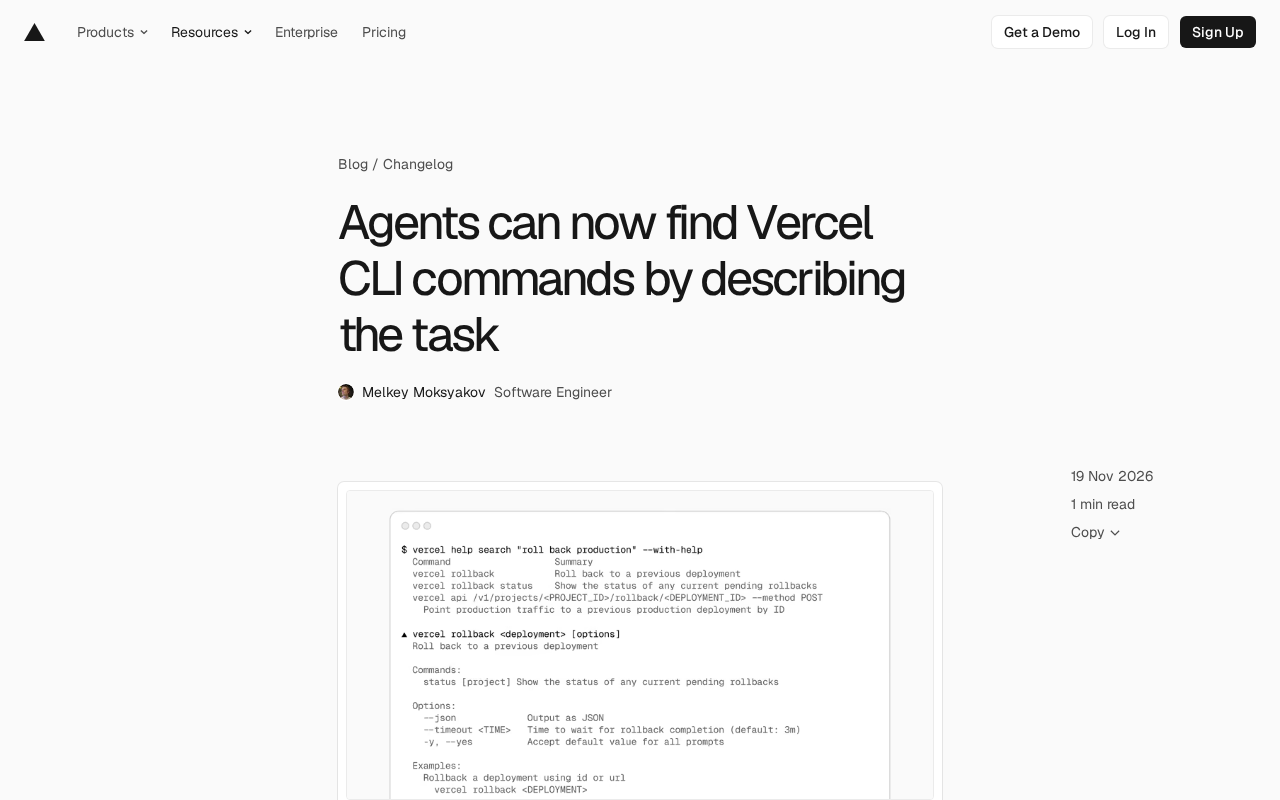
Vercel CLI adds natural language command search, optimizing command discovery for coding Agents
Vercel CLI launches `vercel help search`, allowing developers and coding Agents to describe tasks in natural language to find corresponding commands without memorizing exact spelling. With `--with-help`, a single call returns both the command and its help page; search also matches Vercel API endpoints, returning `vercel api` commands with paths and required placeholders pre-filled. To suit Agent workflows, the CLI offers `--json` structured output, wording and spelling fault tolerance, and a built-in skill guiding Agents to search first. Officially, search text is not logged, and `vercel upgrade` enables the feature.
From "Memorizing Commands" to "Describing Needs": Vercel CLI's Search-Based Interaction
Vercel CLI recently rolled out a capability that makes life easier for developers—especially coding Agents: vercel help search. You no longer need to remember or guess the exact spelling of a command; just describe the task you want to accomplish in a natural language sentence, and the CLI returns a list of matching commands.
This capability is designed directly for "Agent-first" workflows. When coding Agents automatically execute tasks, they often get stuck at the step of "knowing what to do, but not knowing which CLI command corresponds to it." The search-based entry point fills this gap.
Core Usage: Get Commands and Help in a Single Call
The basic form is straightforward:
vercel help search "roll back production"
It returns a set of matching commands. If you want your Agent to save a round trip, add --with-help, which brings back the help page for the first result—including options and examples. According to the official example, vercel help search "roll back production" --with-help directly returns the options and usage examples for vercel rollback.
This is significant for automation workflows: a single call solves both "finding the command" and "how to use it," reducing the chance of an Agent going off track across multiple rounds of interaction.
The "help page" returned by --with-help refers to the built-in documentation the CLI maintains for each subcommand, typically including a description of the command's purpose, all available options (flags), and several real invocation examples. Such help pages were originally obtained by users manually running vercel <command> --help; the role of --with-help is to merge that extra call into the search request, so the Agent gets both "which command to choose" and "how to pass parameters" information in a single round trip. For multi-turn conversational Agents, the number of round trips directly affects context length and call cost, so the benefit of this merged request isn't just being a bit faster—it significantly reduces the probability of misunderstanding command usage mid-way and then failing during execution.
Not Just Commands: API Endpoints Are Searchable Too
The search scope isn't limited to CLI subcommands. When a task description matches a Vercel API endpoint, the search returns a vercel api command with the request path already filled in and placeholders reserved for each required input.
This addresses the most error-prone part of an Agent calling APIs—path spelling and missing parameters. The Agent only needs to fill in values according to the placeholders, instead of inferring the endpoint structure from scratch. For automation scenarios that frequently switch between the CLI and REST APIs, this "endpoint templating" approach reduces the room for error.
Vercel's REST API is proxied through the vercel api subcommand, whose basic form is vercel api <path> followed by the request method, request body, and other parameters. The templated command returned by the search essentially pre-writes the endpoint path (such as /v1/projects/{id}/rollback) and its required path parameters and query parameters as placeholders, so the Agent only needs to replace the placeholder contents to initiate the request. This approach shifts "endpoint structure inference" from the model side to the tool side, preventing the Agent from piecing together an incorrect path from memory or missing required fields—these two types of errors often don't immediately raise an error but return hard-to-diagnose 4xx responses, making troubleshooting costly.
Three Details Prepared for Agents
JSON Output
--json makes search results return in JSON format, making them easy for programs to parse. Combined with --with-help, you can get the usage instructions, options, and examples for the first result in the same structured output. For Agent pipelines that need stable parsing, structured output is far more reliable than parsing human-readable text.
Fault-Tolerant Matching
Search can recognize common wording differences—for example, when the user says "show" but the command documentation says "list"—and also tolerates minor spelling errors. Such fuzzy matching is an experience optimization for human users, but for Agent scenarios it's a stability guarantee—the words Agents use to describe tasks aren't necessarily consistent with official documentation.
The fuzzy matching here typically relies on text similarity or semantic retrieval rather than strict keyword inclusion. When CLI command documentation uses list but the user describes it as show, the system can still establish a correspondence, indicating that the matching layer normalizes synonymous expressions. Spelling tolerance is generally based on approximate comparison such as edit distance. These two capabilities merely save humans the trouble of digging through documentation, but they're especially critical for Agents: the wording models use to describe tasks is highly variable, and occasional spelling deviations occur. If search required exact matches, Agents would frequently fall into a loop of "can't find it—try different words—still can't find it," consuming a large number of rounds.
Built-in Skill Guidance
The CLI also includes a built-in skill that prompts coding Agents: when looking for commands, start with vercel help search. This effectively cements "search first, then execute" as the Agent's default behavior pattern, rather than relying on developers to repeatedly emphasize it manually in prompts.
Privacy and Upgrading
Officially, Vercel explicitly states it does not log your search text. For teams that use internal task descriptions directly as query terms, this is worth noting.
Upgrading follows the usual approach: run vercel upgrade to update to the latest Vercel CLI and start using it.
Why This Kind of Feature Is Worth Attention
CLI tools have long operated on the assumption that "the user is a human who is willing to consult documentation." But when Agents become one of the primary callers of CLIs, the tool's interface design needs to be reconsidered: command discovery mechanisms, structured output, fault-tolerant matching, and guiding Agent behavior within the tool—these areas that originally belonged to "developer experience" are becoming the infrastructure of "Agent experience."
Vercel's approach this time is to turn command discovery from "memory + documentation lookup" into "description + search," and to shorten the Agent's execution chain with --with-help, --json, and the built-in skill. This isn't a stacking of feature points but an interface-layer adjustment of the CLI for Agent scenarios. For other tools that hope to be efficiently invoked by Agents, this approach offers valuable reference.
Related articles

Braised Meat Shop Forced Out by Rent Hike: A Life-and-Death Contest Between Craft and Location
Braised meat shop owner forced out by a 100,000 yuan rent hike moves overnight; landlord's daughter takes over with seasoning packets and overnight meat sickens customers. A tale of location versus craft.

AI One-Click Emotional Short Drama: Bilibili Creator Tests the "Beautiful Landlady" Script
Bilibili creator uses AI to produce the emotional short drama "The Beautiful Landlady Comes to Fix the Guy's Drain," testing everything from script generation to character consistency.

Braised Meat Stall Goes Viral, Landlord Raises Rent—She Leaves Gracefully by Contract While Rival Cuts Corners and Loses Everything
A braised meat stall's rent was hiked from ¥68K to ¥168K after going viral; the owner moved out by contract while her rival cut corners and lost it all.