No Code, All AI: Building a Cross-Platform Flashcard App for Android and iOS

A Bilibili creator builds a flashcard app with AI coding following a real product workflow, from design mockups to dual-platform verification.
Bilibili creator "Programmer Xiaocheng" uses a 17-minute, 48-hour tutorial to demonstrate building a flashcard app from scratch with AI coding, covering home list, card flip, flashcard creation, album management, and admin system across Android and iOS. Unlike typical demo tutorials, it follows a real product workflow: design mockups first, separate conversations for front-end/back-end/admin, front-to-back integration, and dual-platform real-device verification. The core standard: "browser success doesn't count — real-device and backend bidirectional verification is what counts."
A 17-Minute Video: Why It Took 48 Hours to Make
Bilibili creator "Programmer Xiaocheng" released a 17-minute, 48-hour production tutorial that walks through building a flashcard app from scratch using AI coding (Vibe Coding). The app includes a home flashcard list, card details, holographic 3D flip, flashcard creation, personal card album management, and more — covering both Android and iOS, plus an admin dashboard.
What sets this video apart from other AI coding tutorials: it's not a toy demo. It follows the exact workflow of real product development — starting with design mockups, moving through front-end static development, back-end API implementation, front-to-back integration, dual-platform real-device verification, and backend management configuration, with clear acceptance criteria at every stage.
The creator's core litmus test: Getting it running in the browser doesn't count. It has to run on a real Android device, a real iPhone, and when you change a recommendation in the backend and refresh the front-end, it has to show up. Only then is it truly working.
Vibe Coding is a concept proposed in early 2025 by AI researcher Andrej Karpathy. It refers to a programming approach where developers describe requirements in natural language and large language models generate the code. Its defining feature is that humans no longer type line by line — they act as "requirement describers" and "result validators," iterating through multiple rounds of conversation to approach the target product. In this mode, code quality depends heavily on prompt precision and the developer's ability to judge results. Therefore, techniques like "managing context across separate conversations" and "pointing out problems with specific descriptions" become key engineering practices.
Why Start from Design Mockups, Not Reference Screenshots
Previous tutorials started by taking a screenshot of some mini-program and having AI replicate it directly. This episode takes a different path: generate design mockups first, then hand the mockups and development specs together to the AI tool.
This change seems minor but has a big impact. Starting from a screenshot means AI can only imitate the visual result of an existing product. Starting from a design mockup is closer to the real product development flow of "design first, code second." The creator recommends generating multiple versions of design mockups and picking the best one as a development reference — this way, the AI's understanding of the target result will be more accurate in subsequent conversations.
The flashcard app was chosen as the hands-on project for a practical reason — it has a complete feature loop but is moderate in scope, including image upload, card generation, flip interaction, favorites management, and backend recommendations. Completing one project gives you a clear understanding of what modules a full product requires.
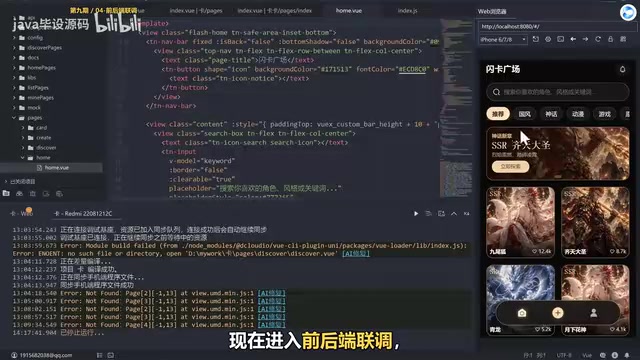
Tool Chain Design: Front-End, Back-End, and Admin Handled in Separate Conversations
This tutorial makes a noteworthy decision on the tool chain: the front-end continues to use UniApp, the back-end reuses an existing project, front-end and back-end are handled in different AI conversations, and the admin dashboard is generated separately.
The reason for separating them is straightforward — avoiding context interference. If front-end and back-end code are in the same conversation, the AI might get sidetracked by API logic while working on page styles, and vice versa. The creator repeatedly emphasizes "managing each context in separate conversations" — this is a practical technique for maintaining code quality when using AI coding tools.
Another key detail is the handling of sensitive configuration. Keys for object storage and similar services are only read locally — never hardcoded, never committed to the repository. The creator mentions plans to open-source the code later, so extra care is taken with configuration security.
The context window is the maximum amount of text a large language model can "remember" simultaneously in a single conversation. When front-end and back-end code share the same conversation, both consume this window together. The model can easily confuse page style logic with API logic when generating new code, or even forget earlier agreements. Separating conversations essentially isolates different modules into their own independent context windows, reducing information cross-talk and the probability of "forgetting" — consistent with the module decoupling principle in software engineering.
Front-End Development: From Static Pages to Core Flashcard Interactions
The front-end development pace is clear: first, have AI implement four main static pages — home, card details, creation page, and profile page — using the project's existing Tuni components. Once the page structure meets expectations, introduce the open-source flashcard skill to handle card creation and flip display.
The problems encountered along the way are very representative. The first round of static pages had a correct structure, but the image aspect ratio on the card back was wrong — the image was swapped but the display adaptation didn't keep up. The creator's approach was to put the reference image and the actual app output side by side for comparison, and describe the problem specifically, rather than vaguely saying "the back is wrong."
Real-device checks also revealed several typical issues: abnormal tab switching at the top of the creation page, layout problems on the profile page, and two back buttons appearing on the personal info page. These details are hard to catch in browser preview — only real devices expose them.
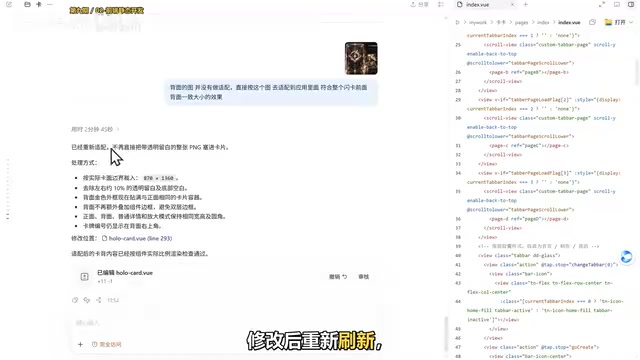
Front-to-Back Integration: One Bug Worth Remembering
Back-end API development also proceeded step by step: first, have AI analyze what APIs are needed based on the front-end pages, confirm the list, then start implementing. The APIs covered home categories, card details, generation status, style configuration, image upload, user profiles, card albums, and favorites.
During integration, a critical bug surfaced: after submitting a generation on the creation page, the corresponding flashcard didn't appear on the profile page. The creator didn't rush to have AI fix it — instead, they reproduced the issue through actual operations, confirmed it could be consistently reproduced, and then described the problem clearly before submitting it.
The AI pinpointed a very specific cause: the API only created a pending task but never actually generated a card record, so the album query couldn't find it. After adding the card record creation, re-running the upload and generation flow made the data appear correctly.
This bug's troubleshooting process illustrates an important principle in AI coding — "submission success" and "result visibility" are two different things and must be verified separately. Don't skip the next step just because a popup says "success."
Dual-Platform Real-Device Verification and Admin Dashboard
After browser integration passed, the creator deployed the app to a real Android device and a real iPhone for separate verification. On Android, the focus was testing the full chain of image upload, card generation, large image display, and album query. On iOS, the main features verified were category switching, search, card flip, favorites, and new card creation.
Real-device verification revealed problems invisible in the browser: the backgrounds of the home and profile pages were too dark, deviating from the design mockup's dark style. The creator's adjustment request was precise — keep the dark style, but don't make it solid black throughout.
The admin dashboard was initially misunderstood by AI in terms of form. The creator had to re-emphasize that "the admin dashboard should be an independent website," so the tool would separate the app login page from the admin dashboard pages and entry points. The core admin features include: viewing user-created flashcards, setting suitable cards for home display, managing user lists, and configuring home carousel images.
The final integration step verified bidirectional data flow: create a card in the app, open the backend and refresh — confirm the data appears in the list. Then set the card as a home recommendation, return to the app and refresh the home page — confirm the recommendation appears. With data flowing in both directions, the entire development cycle is complete.
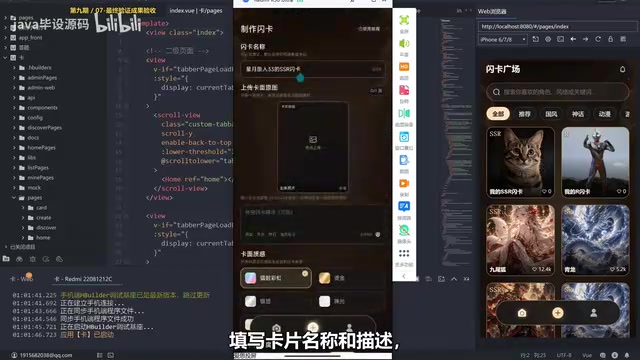
Browser preview and real-device execution are fundamentally different: browser rendering engines, viewport dimensions, and network request strategies all differ from mobile native containers. In cross-platform frameworks like UniApp, the same code compiles to call different native rendering layers on Android and iOS, so font metrics, safe areas, image decoding, and permission dialogs may behave inconsistently. Real-device verification is precisely meant to catch these issues that only surface in native environments — this is the technical basis for the judgment that "getting it running in the browser doesn't count."
From Learning Tech to Building Products: What This Step Means
In the summary, the creator pointed out the fundamental difference between this tutorial and the previous eight: the first eight were about learning technology. This one is about building a product. From design to development to verification, every step follows the standard workflow of real product development.
For developers who want to get started, the video ends with a homework assignment: open your AI tool and build a small product starting from a design mockup. Doesn't have to be complex — one page is fine.
The value of this tutorial isn't in showing how powerful AI is — it's in presenting a real AI coding workflow. You'll hit bugs, need to reproduce problems, need to describe phenomena precisely, need to verify module by module. AI coding lowers the coding barrier, but product thinking, problem-diagnosis ability, and acceptance criteria awareness still need to be developed by the developer.
Acceptance Criteria is a core concept in agile development — the verifiable conditions a feature must meet before it's considered "done." In this tutorial's context, it manifests as a series of specific checkpoints: after an API submission succeeds, the album must be able to query the record; after changing a recommendation in the backend, the front-end must show the change on refresh; both real devices must pass. Turning a vague "it's done" into a checkable acceptance list is what distinguishes AI coding from casually generating demos — and it's an effective means of ensuring AI output is usable.
One-line Summary
A Bilibili creator builds a flashcard app with AI coding following a real product workflow, advocating design-first mockups, module-by-module verification, and real-device testing as the bar for "done."
Paragraph Summary
Bilibili creator "Programmer Xiaocheng" uses a 17-minute, 48-hour tutorial to demonstrate building a flashcard app from scratch with AI coding, covering home list, card flip, flashcard creation, album management, and admin system across Android and iOS. Unlike typical demo-style tutorials, it follows a real product workflow: design mockups first, separate conversations for front-end/back-end/admin, front-to-back integration, and dual-platform real-device verification. The tutorial sets the core standard that "browser success doesn't count — real-device and backend bidirectional verification is what counts," and documents a typical bug — the API created only a pending task without generating a card record — emphasizing that submission success and result visibility must be verified separately.
Related articles

Python 3.15 New Feature: Is the sentinel Type Better Than None?
Python 3.15 adds the sentinel type, using named unique sentinel objects to replace None and bare object(), resolving confusion among missing values, explicit emptiness, and invalid input while avoiding type hint failures.

Deep Learning's Three Architectures and the Universal Approximation Theorem: A Complete Guide to MLPs, CNNs, and Transformers
Explaining the inductive bias differences among MLP, CNN, and Transformer, the existence meaning of the Universal Approximation Theorem (UAT), and the role of Taylor expansion in approximation analysis, while clearing up common misconceptions.

GitLab Emergency Patch Release: Analysis of Critical Security Fixes
GitLab releases critical patch 19.5.1, sparking 355 points of discussion on Hacker News. This article analyzes the background, upgrade steps for self-hosted instances, and verification points to help DevOps teams respond quickly to security updates.