No-Code Research: Using AI Coding Tools to Complete the Full Machine Learning Pipeline

Use AI coding agents to run full ML experiments with natural language — no coding required.
AI coding tools like OpenAI's Codex and Anthropic's Claude Code are enabling researchers without programming backgrounds to complete full machine learning pipelines — from data cleaning to model training and visualization — using only natural language instructions. This article demonstrates the workflow, explains key concepts like data leakage and AUC, and provides a beginner-friendly setup guide.
From Data Spreadsheets to Research Results: What AI Has Changed
For many researchers outside of computer science, programming has always been the barrier standing between raw data and publishable findings. Traditionally, a complete workflow — from data cleaning to model training to result visualization — could take days or even months. Today, thanks to Vibe Coding tools like OpenAI's Codex and Anthropic's Claude Code, researchers can complete a full machine learning experiment in minutes using nothing but natural language instructions.
What is Vibe Coding? The concept was introduced by former OpenAI research scientist Andrej Karpathy in early 2025. It describes a new programming paradigm where developers rely entirely on natural language to interact with AI for code generation and debugging, rather than writing code line by line. Codex is OpenAI's code-generation model built on the GPT series and was once the underlying engine of GitHub Copilot. Claude Code is Anthropic's command-line AI coding assistant that can directly manipulate the file system, execute terminal commands, and perform multi-step autonomous reasoning — making it an "AI Agent" that proactively plans tasks, breaks them into steps, and executes them independently, rather than simply answering questions like a traditional chatbot.
Bilibili creator Qian Yu demonstrated this in a hands-on video: faced with a clinical dataset in CSV format, he didn't write a single line of code. Through text instructions alone, he had the AI complete everything from data exploration to model training to chart generation. This paradigm shift carries transformative implications for research workflows.
How AI Autonomously Runs a Complete Experiment
Step 1: Data Understanding and Task Assessment
The first instruction in the demo was refreshingly simple: "Help me analyze the data in the current folder and see what research tasks are possible." The AI immediately launched an autonomous analysis process.
It started with a basic data check — identifying variable types, class distributions, and missing values. The dataset contained 303 samples, 13 features, and a binary classification label (disease or no disease). The AI clearly noted that the small sample size would make it difficult to support a high-impact publication, but that it was sufficient to build an interpretable clinical prediction model. It recommended a specific task: binary heart disease classification.
What's easy to miss here is that the AI didn't just suggest a task — it proactively flagged methodological rigor points, such as the option to add a separate external validation set, or to partition an internal test set from the existing data if external data wasn't available. This "research advisor" style of feedback is precisely what sets it apart from a basic code generation tool.
Step 2: Rigorous Experimental Design
After user confirmation, the AI followed a standard research workflow: an 80/20 train-test split with the 20% held out as an internal test set; 5-fold cross-validation within the training set; and removal of duplicate records to prevent data leakage.
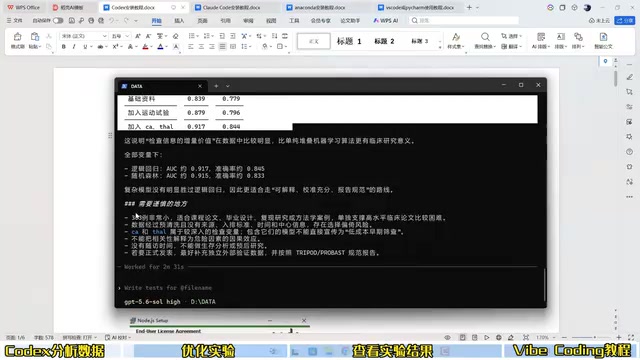
Why is data leakage so dangerous? Data leakage is one of the most destructive systematic errors in machine learning experiments. It occurs when information from the test set "leaks" into the training process in some form, causing inflated evaluation results that don't reflect true generalization ability. Common scenarios include: performing global normalization before splitting the dataset, having duplicate samples appear in both the training and test sets, or conducting feature selection outside of cross-validation. The AI's choice to "isolate the test set first, then perform cross-validation within the training set" aligns with international clinical prediction model reporting standards like TRIPOD — and it avoided this classic pitfall without any prompting. It then automatically wrote and ran training code, comparing multiple algorithms including logistic regression, random forest, SVM, and gradient boosting.
Results: Complete and Reproducible
After the experiment, the best-performing model was logistic regression with an AUC of 0.89 — close to the 0.9 threshold.
Understanding AUC: AUC (Area Under the ROC Curve) is one of the most widely used comprehensive evaluation metrics for binary classification models, ranging from 0.5 (random guessing) to 1.0 (perfect classification). In clinical prediction modeling, AUC of 0.7–0.8 is generally considered moderate discriminative ability, 0.8–0.9 is good, and above 0.9 is excellent. Reaching 0.89 on a 303-sample dataset represents strong performance. It's also worth noting that clinical contexts require careful attention to the trade-off between sensitivity (true positive rate) and specificity (true negative rate), since the clinical cost of missed diagnoses versus false positives is often highly asymmetric — which is why both metrics are included in the experimental output.
More importantly, the AI didn't just hand over a single evaluation number. It generated a complete, structured set of experimental outputs.

Opening the newly generated experiment folder (viewable in VS Code), the contents are remarkably comprehensive:
- Training code: fully open, readable, and editable;
- Label distribution chart: class 0 and class 1 are relatively balanced;
- ROC curves: comparing model performance across algorithms;
- Confusion matrix, average predicted probabilities, and feature importance plots;
- Model weight files, data split records, and experiment logs;
- Metrics comparison table: covering ROC, AUC, sensitivity, specificity, and more.
The completeness of this output is nearly equivalent to a set of experimental materials ready for a paper's first draft.
Extensibility: From Tabular Data to More Complex Scenarios
Flexibly Adding Models and Interpretability Analysis
The greatest advantage of this workflow is its iterability. If a researcher wants to add more powerful models like XGBoost or incorporate SHAP interpretability analysis, a single instruction to the agent is all it takes — no understanding of the underlying implementation required.
Why is interpretability critical in medical AI? SHAP (SHapley Additive exPlanations) is currently one of the most mainstream methods in machine learning interpretability, introduced by Lundberg and Lee in 2017, with theoretical foundations in Shapley values from game theory. It assigns a contribution score to each feature for each predicted sample, intuitively answering "which features influenced this prediction the most, and in what direction." In medical AI, interpretability is not just an academic requirement — it's a regulatory one. The EU AI Act explicitly categorizes high-risk medical AI systems as requiring explainable decision-making. While ensemble models like XGBoost offer stronger predictive performance, they are inherently "black boxes." Pairing them with SHAP analysis effectively bridges this gap, making model conclusions more persuasive to clinicians.
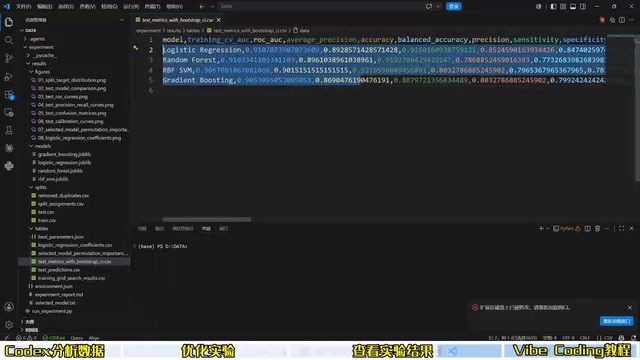
This entire demo was completed "without a single line of code — just text input" to obtain both the results and the corresponding code. Notably, this capability isn't limited to structured tabular data. For image data, text data, and other more complex scenarios, AI agents can equally handle the full pipeline of analysis, modeling, and visualization independently.
Getting Started: Environment Setup Is Straightforward
For researchers who want to try this, the toolchain setup is relatively clear.
Installing Node.js and Command-Line Tools
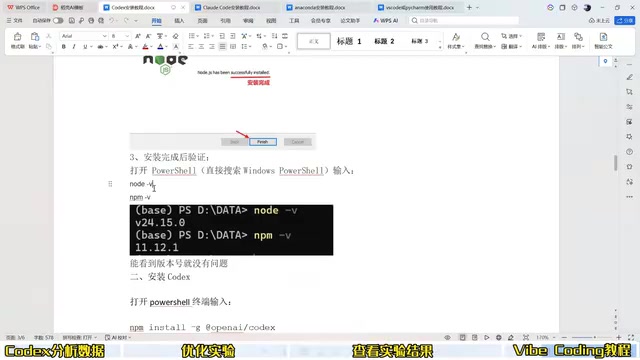
- Install Node.js: This is the foundational environment for running Codex and Claude Code. Follow the installation wizard step by step;
- Install Codex / Claude Code: Open a terminal (Windows users can search for PowerShell; Mac has its own instructions) and enter the corresponding command to complete installation;
- Verify the installation: Use a terminal command to confirm the tool was installed successfully.
What role does Node.js play here? Node.js is a JavaScript runtime environment built on Chrome's V8 engine, originally designed for web backend development and now a standard distribution infrastructure for many AI command-line tools. Tools like Codex CLI and Claude Code use Node.js as their runtime primarily because the npm (Node Package Manager) ecosystem is mature, cross-platform compatibility is strong, and the installation and deployment process is standardized. Researchers don't need to deeply understand Node.js itself — just treat it as "the underlying environment for running AI tools," similar to how Python serves as the foundation in data science.
Model Access and Editor Configuration
For login, you can use either the official API or a relay service. The demo mentioned solutions similar to CNC Switch for connecting to various models including the GPT-5 series. The generated code can be opened, viewed, and debugged in VS Code or PyCharm — choose whichever fits your workflow.
Conclusion: The Bar for Research Is Being Redefined
This demo reveals a trend that is actively unfolding: AI coding tools are progressively removing "knowing how to code" as a prerequisite for research. Researchers can invest more energy in problem definition, result interpretation, and scientific judgment, while delegating the tedious engineering work to AI.
That said, keeping a rational perspective on this trend is equally important. AI-generated experiments still require researchers to have a basic grasp of methodology — judging whether sample sizes are sufficient, whether metrics are appropriate, and whether conclusions are reliable. These remain irreplaceable human contributions. AI lowers the execution barrier, but it does not lower the standard for scientific thinking. For researchers in data-intensive fields who lack a programming background, no-code research tools are undeniably a new path worth seriously exploring.
Key Takeaways
Related articles

Adaptive Development with Jetpack Compose: Media Query, Grid, and Nav3 in Practice
A deep dive into new Jetpack Compose adaptive development tools: Media Query capability APIs, Grid 2D layout, Flexbox, Navigation 3 scene strategies, and Compose Adaptive Skill, with large-screen adaptation benefits and case data.

Google Launches Connected Apps Platform: Build Once, Integrate with Gemini and Search
Google launches Connected Apps: developers build once with a declarative schema and MCP to integrate app capabilities into Gemini and Google Search, with remote MCP and Android MCP paths, Developer Mode testing, and risk-tiered confirmation.

Lightbuild: A Declarative Android Build Built for AI Agents
Google releases Lightbuild, an experimental Android build tool that replaces executable scripts with declarative configuration for fast IDE sync and first-class AI agent support.