Adaptive Development with Jetpack Compose: Media Query, Grid, and Nav3 in Practice

Android enters the Compose First era, building adaptive UIs with Media Query, Grid, and Nav3.
Google announced in a technical talk that Android development has officially entered the Compose First era. At the platform level, Android 16 ignores orientation and aspect ratio locks on large screens, and Android 17 removes the temporary opt-out flag, making adaptivity a baseline requirement rather than a best practice, with over 580 million potential large-screen users. Compose's core advantage over the traditional View system is that configuration changes are just ordinary recomposition rather than destroying and rebuilding the view hierarchy. The new toolchain includes: a mediaQuery API inspired by CSS, using UI capabilities like window size, fold posture, pointer precision, and keyboard type to replace device type checks; stable 2D Grid and 1D Flexbox layouts that parameterize layout configuration; and Navigation 3 based on back stack and scene strategies. Additionally, apps migrating to Compose see token usage drop by over 30%, and Compose Adaptive Skill can automate adaptive refactoring.
Why Adaptivity Is No Longer Optional
The Android ecosystem has long since ceased to be a phone-only world. From foldables, tablets, and Chromebooks to TVs, in-car infotainment systems, and even XR devices, a single APK must contend with a wide variety of window sizes and input methods. In a technical talk, Google systematically laid out the new toolchain Jetpack Compose offers for adaptive development and delivered a clear conclusion: Android development has officially entered the Compose First era.
The platform-level signals are unmistakable. Starting with Android 16 (SDK 36), the system simply ignores orientation locks, aspect ratio locks, and accessibility flags on large screens, providing only a temporary manifest flag to opt out of the orientation override; by Android 17, even that escape hatch will be gone. In other words, building adaptive UIs has gone from a best practice to a baseline platform requirement.
The engineering payoff is equally concrete. According to the talk, Android apps can potentially run on over 580 million active large-screen devices, and multi-device and foldable users are among the most engaged groups on Android. Two case studies were cited as evidence: after large-screen adaptation, the self-care journaling app Gratitude saw daily installs from tablets and foldables grow by 100%, with the share of large-screen installs rising from 7% to 10%; and the F1 companion app BoxBoxClub recorded a 7.6% increase in overall active users and a 54% increase in engagement time.
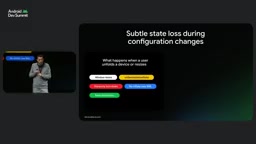
The problem with the traditional View system is the coupling of state and UI. XML layouts have no conditional logic, so the only option is to duplicate entire hierarchy trees across resource directories like layout, layout-sw600dp, and layout-land. The same input field gets scattered across multiple files, and attribute drift is nearly unavoidable. When the window crosses a threshold, the system destroys and recreates the view hierarchy, restoring state by View ID via onSaveInstanceState. A mistyped ID silently loses user input, and the restoration timing easily forms a callback loop with ViewModel observers.
Compose's model is completely different: a configuration change is just an ordinary recomposition. When the window widens or the device unfolds, the composable reads the new size, and only the parts that depend on it re-execute.
Window Size Classes are the viewport breakpoint standard introduced by Material Design, dividing window width into buckets such as compact (<600dp), medium (600–839dp), and expanded (840dp and above), with corresponding divisions for height. Their significance is not precise measurement but rather discretizing continuously changing window sizes into a finite set of tiers, so that developers only make structural layout switches when crossing bucket boundaries while keeping responsive fine-tuning within a bucket. This is precisely the app-level architectural foundation recommended in the article: use Grid/Flexbox for within-bucket adaptivity on a single screen, and only change navigation form or pane count when crossing buckets.
derivedMediaQuery is a derived query relative to an ordinary media query: an ordinary media query triggers recomposition every time a dependency value changes, and window size can change frame by frame during desktop drag-resizing; derivedMediaQuery only notifies downstream when the computed result actually changes, making it suitable for carrying tiered signals like size classes and preventing the app-level scaffold from being overwhelmed by high-frequency recomposition.
Media Query: Decide by Capability, Not Device Type
The talk repeatedly emphasized a counterintuitive point: don't ask "am I on a phone or a tablet?" When the same Pixel phone is plugged into an external monitor, the same app process goes from a 16-inch portrait screen to a 32-inch widescreen, complete with a physical keyboard and mouse; in multi-window mode, the app may occupy only 400dp of width. Neither static device type nor physical display metrics can describe the actual current environment.
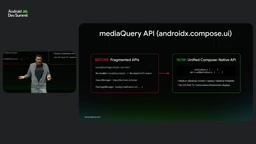
The correct abstraction is UI capabilities: window width and height, fold posture, pointer precision, keyboard type, camera and microphone availability, and viewing distance. In the past, obtaining these signals required stitching together five or six APIs—Configuration, WindowMetricsCalculator, WindowInfoTracker, InputManager, PackageManager—and manually converting them into Compose state.
The new mediaQuery API borrows from CSS media queries, providing a single declarative entry point in AndroidX Compose UI. UIMediaScope exposes properties including: windowWidth/windowHeight (dp), windowPosture (flat, tabletop, book), pointerPrecision (fine for mouse, stylus, and trackpad; coarse for touch; blunt for joystick or gamepad), keyboardKind, hasCamera, hasMicrophone, and viewingDistance.
Previously, detecting desktop mode required getting the Context, instantiating WindowInfoTracker, collecting the WindowLayoutInfo Flow, converting it into lifecycle-aware Compose state, and then traversing display features to determine whether a half-open horizontal fold feature exists. Now it's just a single expression checking windowPosture inside the lambda receiver scope of mediaQuery.
Practical usage is also intuitive: when pointer precision is fine, tighten padding from 8dp to 2dp, because the user isn't using fingers and touch targets can be smaller; show or hide the video call button in the chat input bar dynamically based on hasCamera and hasMicrophone; when keyboardKind == Physical, hint at Control-Enter to send. Testing benefits too—media query resolves to the LocalUIMediaScope CompositionLocal, so previews and UI tests can simply provide a fake scope without actually bending a foldable to 90 degrees or plugging in a mouse.
CompositionLocal is the mechanism in Compose for implicitly passing data down the composition tree, akin to a scoped form of dependency injection. LocalUIMediaScope is the CompositionLocal that carries the current UI capabilities: at real runtime the framework populates it with window and input device information, while in previews and tests you can provide a manually constructed UIMediaScope instance outside the composition tree to simulate any environment—a half-open foldable, an external mouse, a physical keyboard. This replaceability is the key to turning "environment detection" from imperative API calls into declarative composition, and it also frees UI tests from depending on real hardware posture.
Grid and Flexbox: Parameterizing Layout Configuration
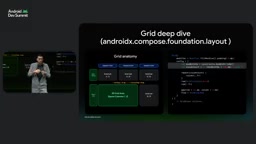
What querying capabilities solves is "knowing the environment"; what Grid solves is "how to arrange." This two-dimensional layout primitive, now stable in AndroidX Compose Foundation Layout, lets you accumulate tracks via column and row in a config block, batch-generate them with standard Kotlin loops like repeat, set gutters, and control auto-placement direction via gridFlow.
A key architectural detail: the config block executes during the measure phase, and GridConfigurationScope implements Density and exposes constraints, so you can directly read constraints.maxWidth to compute tracks inside config with zero extra recomposition. Children automatically flow into the next cell by default; when explicit control is needed, use Modifier.gridItem with 1-based coordinates that support negative indices (row(-1) means the last row), plus rowSpan for spanning and overlapping stacking—when overlapping, Z-order is determined by composition order, with later-declared items drawn on top, behaving like Box.
The video player example from the talk best illustrates the value. The traditional approach requires defining two composables, defaultLayout and tabletopLayout, then branching—yet both have identical content, and the only difference between player and controller is their arrangement. Grid allows the layout configuration itself to be a parameter: define named regions with an enum, associate player and controller with region IDs via Modifier.gridItem, configure the default layout with one row and one column where both region names point to the same cell (controller overlaid on player), and configure desktop mode with two rows and one column, stacked vertically. The result is a single VideoPlayerLayout composable that uses media query directly in the Grid config to switch dynamically.
Flexbox is also stable, filling in the one-dimensional scenarios: when you need intelligent space distribution, shrinking, or multi-line wrapping, it replaces the two-container flowRow plus flowColumn approach, with direction changeable dynamically inside the config block without rebuilding child composables. It implements the full CSS flexbox algorithm, including wrap, justifyContent, alignItems, and gap, with children getting basis, grow, shrink, and alignSelf via Modifier.flex.
The difference between the measure phase and recomposition is a prerequisite for understanding Grid's performance advantage. Compose's layout process has three steps: composition (deciding which nodes exist), measurement (deciding how big each node is), and placement (deciding where nodes go). Grid's config block executes during the measurement phase, by which point the parent-provided constraints are already available, so track counts can be computed based on available width without triggering a new round of composition. Conversely, if you read window width during the composition phase to decide column count, any size change requires re-executing the composable function and rebuilding the node tree, which is significantly more expensive. That's why the article emphasizes "zero extra recomposition."
From Single Screen to Global: Window Size Classes and Navigation 3
Above single-screen layout lies app-level architecture. The talk recommends using standardized viewport breakpoints—Window Size Classes—so that each screen viewport falls into the same size bucket, staying responsive within a bucket and making structural changes only between buckets: for example, compact shows only the list, while expanded shows both list and detail. You can implement this by defining extension properties directly on UIMediaScope, but use derivedMediaQuery rather than an ordinary media query: window width and height may change every frame during desktop drag-resizing, whereas the app-level scaffold should only recompose when actually crossing a breakpoint.
Multi-pane switching is handled by Jetpack Navigation 3. Nav3 was designed from the ground up around Compose state and scenes: the back stack is just a list of nav keys, flexible and easy to save as state; each key resolves to a nav entry containing a composable and metadata; NavDisplay doesn't hardcode how to draw but instead evaluates a series of scene strategies. Inside a strategy, you can inspect UI capabilities (like window size class) and the back stack to decide whether to render a single entry in a single pane, render multiple at once, or stack them. Size class also determines navigation component choice: bottom navigation bar for compact, navigation rail for medium, and full navigation drawer for expanded.

Scene strategy is the core abstraction of Navigation 3. Traditional navigation libraries hardcode "one destination maps to one full-screen UI," forcing multi-pane setups to be hacked together with nested navigation graphs or custom containers. Nav3 separates the rendering decision from NavDisplay: the back stack only describes "which destinations the user is at," while the scene strategy maps those keys to concrete visual layouts—single pane, side-by-side dual pane, or a stacked list-over-detail structure. Because strategies are ordinary functions, they can read UI capabilities like window size class and fold posture, and the same back stack can be reused across tablets and phones—which is precisely why Navigation 3 fits naturally with Compose's state model.
Compose in the Agent Era: Fewer Tokens, Stronger Skills
One data point from the talk is worth noting: apps that migrate to Compose see token usage drop by more than 30%. Smaller, more understandable codebases mean agents process Compose code with better efficiency and lower cost.
The accompanying Compose Adaptive Skill could already migrate phone layouts to larger window sizes in early versions, and its capabilities have now expanded further: explicit end-to-end state management (tested against real state-loss defects for preserving navigation, scroll position, media playback, and partially entered text), fold posture optimization (automatically restructuring media and camera UIs into tabletop mode), and input support audits—discovering and implementing keyboard shortcuts, custom pointer cursors, hover states, and tooltips.
In a live demo, an app with overly wide layouts that lost entered text on window resize was transformed with a single prompt—"make the app adaptive"—by Gemini 3.0 Flash combined with the skill, automatically modifying 11 files, moving navigation to the side, activating Grid, and restoring working filters. The run took about 20 minutes and consumed roughly 200,000 tokens.
Three conclusions to close: adaptivity lets apps serve more devices and users and prepares for an expanding ecosystem; Android development is Compose First, with new tools, libraries, and skills all built for Compose; and Compose suits both adaptive layouts and agent development.
Related articles

Vaani Developer Platform: Build Human-Like Voice AI Agents with Zero Code
Vaani Developer Platform tops Product Hunt with 175 upvotes, offering zero-code construction of human-like voice AI agents with flow design, tool and knowledge base connections, real phone deployment, and structured call data output.

Knocket AI: A Lightweight Tool That Lets Visitors Chat with Zero Friction
Knocket AI is a lightweight tool that lets visitors start real-time chats via a website or link without registering, targeting founders, creators, and small teams.

XWiki Launches Open-Source MCP Server: Let AI Read Your Wiki
XWiki's open-source MCP Server extension connects your Wiki knowledge base to AI agents like Claude Code and GitHub Copilot, supporting Q&A, page editing, and structured data—self-hosted to keep data control.