No More Command Line: OpenTandem Brings Claude Code to Your Phone and Browser

OpenTandem wraps Claude Code in a browser and mobile UI, requiring the terminal only once for initial setup.
OpenTandem is a graphical interface layer for Claude Code designed to eliminate the command-line barrier. Users run a single terminal command once to connect their machine; after that, everything happens in the browser or on mobile. The tool also provides a unified project and task list with pinning and drag-to-reorder, solving the chaos of multiple terminal sessions. Cross-device continuity lets your phone act as a remote control for Claude Code running on your desktop — ideal for long-running coding tasks. Security and stability details remain unclear from the single demo source available.
Why OpenTandem Exists
Sonnet 3.5 has earned rave reviews since its release, with many developers calling it a game-changer. But to actually tap into its full capabilities, the official path routes through Claude Code — which runs entirely in the terminal. For anyone who doesn't touch the command line in their daily workflow, that barrier often kills the experience before it even starts. You haven't seen what the model can do, but you're already stuck wrestling with unfamiliar terminal commands.
That's exactly the pain point OpenTandem aims to solve. It moves the Claude Code experience out of the terminal and into a browser and mobile interface, making Sonnet 3.5 accessible to non-technical users while enabling seamless task handoffs across devices.
Claude Code is Anthropic's official AI coding assistant that runs in the terminal (command-line interface). It lets developers instruct an AI using natural language to directly read and write code files, execute shell commands, debug programs, and more. Its power lies in actually doing things in your local project — not just generating code for you to copy and paste. But this workflow inherently requires some comfort with the command line: knowing how to open a terminal, install dependencies, and maintain a persistent session. For designers, product managers, or people just getting into programming, learning that workflow often costs more effort than learning the AI itself. Sonnet 3.5 is Anthropic's flagship coding model, delivering standout results across multiple programming benchmarks. That gap between high capability and high barrier to entry is exactly what drives demand for "access layer" tools like OpenTandem.
One-Time Setup, Browser From Then On
As demonstrated by a Bilibili creator, OpenTandem's onboarding is refreshingly minimal — you only need the command line once.
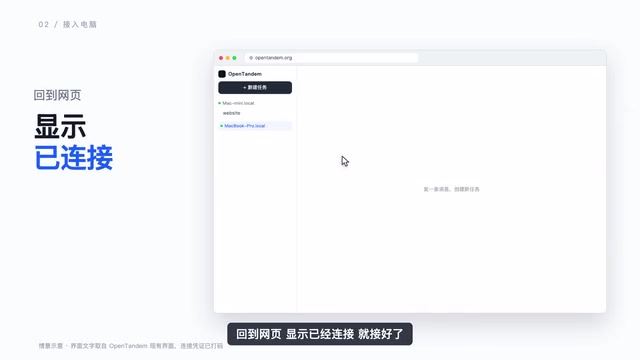
The process: click "Add Computer" on the desktop interface, select your operating system, and the page generates a single command. Paste it into your terminal, hit enter, return to the browser, and when the interface shows "Connected," you're done.
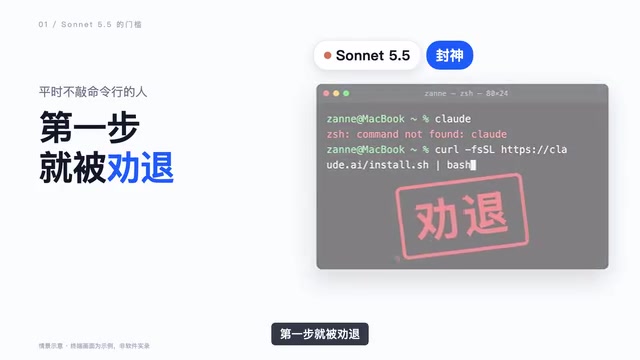
This is the only moment in the entire experience where you have to touch a terminal. The design philosophy is clear: compress the command-line friction into a single one-time action, then return all future interactions to a graphical interface.
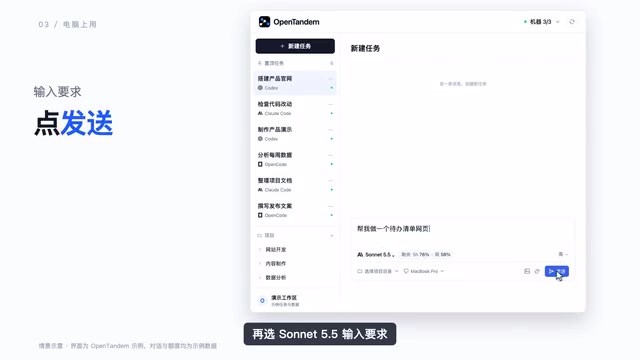
After connecting, you simply open the browser, select Claude Code, choose Sonnet 3.5, type your request, and hit send. The model does its work in the background while you watch the results from the browser.
Managing Projects and Tasks with a List View
A common frustration with Claude Code in practice is that as tasks pile up, terminal windows become a mess — multiple sessions stacked on top of each other with no easy way to tell what's running, what's finished, or what's waiting.
OpenTandem addresses this by consolidating projects and tasks into a unified list. Frequently used tasks can be pinned to the top, and items support drag-and-drop reordering. At a glance, you can immediately see what matters most and what's already done. This visual task management is a clear step up from juggling a stack of terminal tabs.
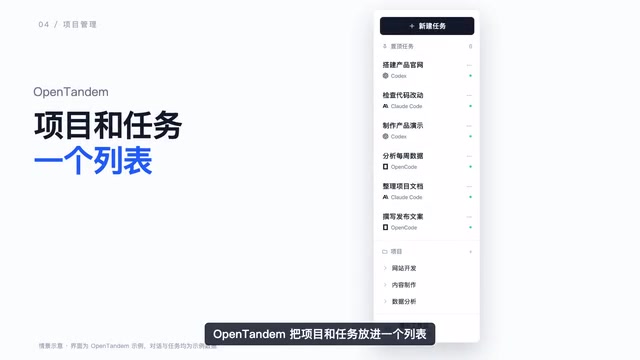
For developers running multiple projects simultaneously, this structured list can significantly cut the cognitive cost of context switching — keeping you oriented even as the task count grows.
Cross-Device Handoff: Keep Going When You Leave Your Desk
Another standout capability in the demo is cross-device continuity. When you step out, you can open OpenTandem on your phone, find the same task you had running on your computer, and keep sending messages — while Claude Code continues executing on your desktop.
This means tasks are no longer tethered to a single device or terminal window. You can kick off a complex task on your computer, then check progress and add instructions from your phone while away from your desk, with the actual compute still running locally. This "phone as remote, computer as engine" model is especially practical for long-running coding tasks.
This kind of remote-control-over-local-machine architecture typically relies on a persistent background agent (daemon) running on your computer. It maintains a long-lived connection to OpenTandem's servers, receives instructions from the browser or mobile client, and executes them locally. The approach is conceptually similar to VS Code Remote or Tailscale — "instructions travel through the cloud, computation happens locally." The upside: your code and files never have to leave your machine; your local environment (filesystem, installed dependencies, private keys) stays intact. The potential risk: the agent runs with significant local permissions, and if the communication channel has any security vulnerabilities, a remote party could potentially execute arbitrary actions on your machine. That's why the article's closing note about reviewing "connection method and permission boundaries" is worth taking seriously — users should understand what account-level permissions the agent runs under, whether communication is encrypted, and whether the service provider can see what's being transmitted.
Who It's For
Based on the demo, OpenTandem's core value isn't replacing Claude Code — it's wrapping it in a friendlier shell:
- Users unfamiliar with the command line who still want access to Sonnet 3.5 can reduce terminal exposure to a single one-time step.
- Developers juggling multiple coding tasks can use the list view and pinning instead of managing a tangle of terminal windows.
- Mobile workers can check in and send follow-up instructions from their phone whenever they're away from their desk.
One caveat worth noting: the information above comes from a single Bilibili demo. The video focuses on the workflow itself and doesn't cover the tool's stability, security, or how data is transmitted between devices. For any tool that gives a web or mobile interface remote control over your local machine, it's worth understanding the connection model and permission boundaries before diving in. If you've been put off by Claude Code's command-line requirements, OpenTandem offers an approach worth exploring.
Related articles

Chain of Thought Isn't Just for AI: How Humans Can Use CoT to Improve Thinking Quality
Chain of Thought isn't just a prompt trick for large models. Starting from a Hacker News discussion, this article analyzes why CoT works for human thinking too, breaks down actionable ways to transfer it, and highlights the key differences between human CoT and machine CoT.
Cloudflare Teams Up with OpenAI: Closi…
Cloudflare Teams Up with OpenAI: Closing the Loop from Vulnerability Discovery to Defense with AI
Cloudflare uses OpenAI Daybreak to investigate security vulnerabilities and generate reviewable remediation plans, while developers use Codex to boost coding efficiency and quality.

Orca Multi-Agent Orchestration in Practice: A Guide to Parallel Collaboration with Claude and Codex
Orca is Stable AI's free open-source agent workbench supporting 34 agents like Claude Code and Codex in parallel. Learn its Git worktree isolation, multi-model orchestration, and mobile management.