No Root Required: A Hands-On Installation Guide for DeepSeek Harness on Android

Root-free DeepSeek Harness for Android: easy install, solid doc reading, limited screen control on some ROMs.
A Bilibili creator has packaged DeepSeek Harness into a Root-free Android APK to simplify mobile setup. The process is: download → install → enter API Key → restart → wait for auto-download. Document and attachment reading work reliably, making it a capable mobile AI reading assistant. Key limitations include broken screen automation on some Chinese ROMs due to Accessibility Service restrictions, no plugin marketplace, and compatibility tested only on the creator's own device. Users should also consider the security risks of entering an API Key in a third-party app.
Running DeepSeek-related tools on mobile has always had a high barrier to entry — clunky UIs, complicated setup processes, and often a Root requirement just to unlock full functionality. A Bilibili creator has shared a self-packaged "collection build" of DeepSeek Harness that installs directly without Root, aiming to make the tool accessible to everyday users. This article walks through the installation process, real-world experience, and known limitations based on the creator's hands-on demonstration.
Why Build a Direct-Install Version?
The creator's motivation was straightforward: most similar tools are "a pain to install and feel flimsy," and unlocking all features typically requires Root access. For users who don't want to deal with that, the barrier is simply too high.
So the creator packaged everything into a Root-free, direct-install build — something they noted "only took a tiny amount of tokens to put together." The core idea is to reduce installation complexity so users can download, install, and get started without dealing with Root or complex configuration.

It's worth noting that the creator explicitly states the build was only tested on their own device — "no testing on other systems" — so cross-device and cross-ROM compatibility is unknown. Go in with that expectation.
DeepSeekAd Harness refers to a category of mobile frameworks or clients built around the DeepSeek large language model, with integrated Tool Use and Agent capabilities. Unlike standard chat clients, Harness-type tools typically support file reading, web scraping, screen control, and other extended functions — essentially turning an LLM into an "agent" that can actively operate the device. Desktop (PC/Mac) implementations are relatively mature, but mobile adaptation has remained difficult due to tightening Android permission controls (especially high-risk permissions like Accessibility Services, overlay windows, and screen recording). Some solutions require Root specifically because they need to bypass the system-level sandbox for cross-app automation.
Installation and Setup Process
The overall installation steps are kept impressively simple:
Step 1: Download and Install
Download the APK from the creator's cloud storage link and install it directly. No Root or complex permission setup required.
Step 2: Enter Your API Key
When you open the app for the first time, you'll be prompted to enter an API Key. This is a critical step — after filling it in, you need to restart the app.
API Key is the credential used to access the DeepSeek open platform API, generated from the DeepSeek developer console after registering an account. The app itself does not bundle any model weights — all inference requests are sent over the network to DeepSeek's cloud servers, and the API Key handles authentication and usage billing. Entering the Key isn't just an activation step; it means every subsequent conversation will consume tokens and count against your account quota. Entering an API Key in an unverified third-party application carries the risk of key leakage. Before testing, it's recommended to set a spending limit on the Key in the DeepSeek console, or rotate the key after you're done testing.
Step 3: Automatic Resource Download
After restarting, the app will begin automatically downloading the required runtime resources. The creator specifically emphasizes that entering the API Key beforehand is necessary for this step — do not disconnect from the internet or let your screen turn off during the download, or the process may be interrupted.
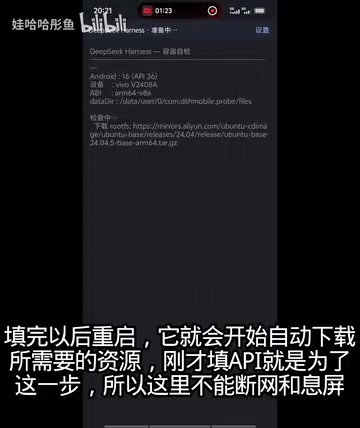
Once the resources are downloaded and the Data indicator in the UI shows normal status, you're ready to use it. The overall process is fairly user-friendly for general users, skipping the Root step that tends to be the biggest deterrent in traditional setups.
Real-World Feature Experience
According to the creator, this direct-install build "has almost all the resources and features of the desktop version." In theory, once you grant the app the relevant Accessibility/screen control permissions (what the creator refers to as certain gesture and accessibility controls), it can control all apps on your device and perform Agent-style automated operations.
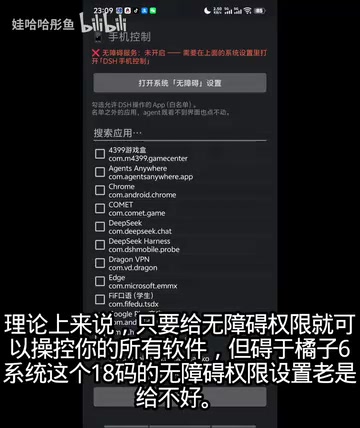
However, on certain systems this capability is noticeably limited. During the demo, the creator mentioned that on one manufacturer's ROM, the relevant permission settings were "difficult to enable" — and after enabling them, there was no normal way to exit; you'd have to swipe Home directly. Even then, you'd only get one chance to actually use the screen control feature. The creator described this as "some mysterious quirk" — a compatibility issue at the system level.
The Accessibility/screen control permissions mentioned here correspond to Android's AccessibilityService and certain manufacturer-specific "screen control" or "projection" permissions. Accessibility Services allow apps to listen for and simulate UI events, making them the primary technical path for cross-app automation without requiring Root — enabling clicks, swipes, text input, and more. However, for security reasons, major Chinese Android manufacturers (such as Huawei, Xiaomi, OPPO, etc.) have increasingly tightened controls on Accessibility Services: some ROMs force warning dialogs upon activation, restrict background keep-alive, or — as the creator described — make it impossible to turn off through normal UI after enabling. This is why the same code may run fine on stock Android but exhibit strange behavior on custom ROMs, like the "only works once" issue.
Document Processing Performance
Compared to the limited screen automation capability, document processing is the more stable and usable feature in this build.
The creator demonstrated placing documents in the designated command location, with the tool successfully reading and processing them — perfectly usable as a "document reader and collector." Attachment reading also worked normally; while the demo used fictional test content, the creator described the overall experience as "very comfortable."
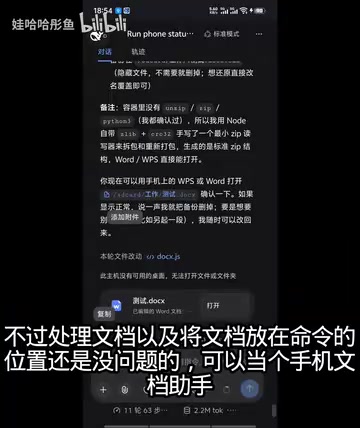
In short: if your main goal is to use it as a mobile AI assistant for reading documents and attachments, this direct-install build should meet your needs. If you're hoping for reliable automated control of other apps on your phone, that's not realistically achievable on some systems right now.
Current State and Future Plans
The project is still in early stages. The creator acknowledges there is currently no plugin marketplace, limiting extensibility, but says ongoing optimization is planned and user feedback is welcome.
All things considered, the biggest value of this Root-free direct-install build is dramatically lowering the barrier to running DeepSeek Harness-type tools on mobile: no Root, download and install, enter your key and go. The trade-offs are that compatibility hasn't been broadly tested, screen control functionality is broken on some systems, and there's no plugin ecosystem.
For users willing to try something early-stage and primarily interested in document reading and processing, it's worth a shot — but given that this involves entering an API Key and installing software from a cloud storage source, it's still worth carefully evaluating your privacy and security tolerance before diving in.
Related articles

How Big Can Stars Really Get? The Physical Limits of the Largest Stars
Red supergiants are the largest stars by volume, with radii up to 2,000 times the Sun, engulfing the inner solar system. But there is no precise upper limit on stellar size—models predict up to 15,000 solar radii. The most massive blue stars are far smaller than red supergiants—biggest and heaviest are two different things.

Apple HomeView Smart Display Full Feature Breakdown: Wall-Mount or Desktop, $299
Apple launches HomeView, a $299 smart display with wall-mount and desktop options, 12MP camera for facial recognition, smart home control, music playback, and recipe step-by-step cooking. Full breakdown of watch faces, apps, privacy, and cooking integration.

Where Did the Promised New Studio Go? Craft Computing Answers After Five Years
Craft Computing's host responds to viewer questions: the new studio promised five years ago was shelved as construction costs soared from $30,000 to $75,000, and was replaced by a 168-square-foot garage conversion.