No Tokens, No API! EAgent Wenxin Edition: Turn Wenxin into a Computer Operation Assistant

EAgent Wenxin Edition turns Wenxin web version into a token-free local operation assistant via browser debugging protocol, but no sandbox requires caution.
EAgent Wenxin Edition is a tool modified from the open-source project EAgent. It simulates operations on the Wenxin web version through the browser debugging protocol and converts AI intent into PowerShell commands executed locally, forming a closed loop. It provides zero-cost access—no tokens, no API, no web proxy—giving the web version of AI operating system permissions. Usage is simple: run the single exe as administrator, follow the guide to select a working directory, and start a conversation. However, the tool has no security sandbox; AI-generated commands are executed directly, posing risks. Avoid frequent use to prevent platform risk control. The uploader specifically warns against clicking update, as it would switch to a DeepSeek version requiring login. The project follows GPL3.0 and is suitable for tech enthusiasts to try.
Introduction: When Wenxin Learns to Operate Your Computer
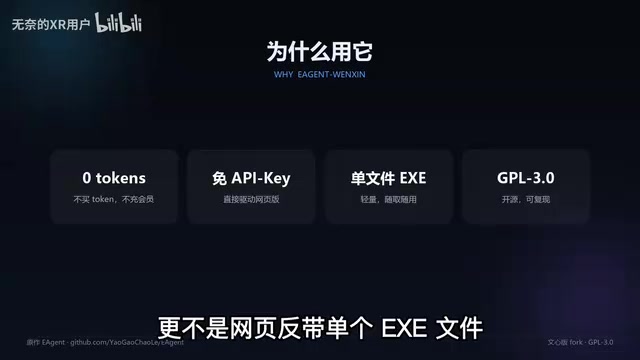
An intelligent assistant that requires no token purchase, no API application, and is not a web proxy—EAgent Wenxin Edition is gaining attention on Bilibili. It turns Baidu Wenxin's web version into an e-agent that can directly operate your computer. A single exe file, run with administrator privileges, is all you need. It sounds like a hacker tool, but the actual principle isn't complicated and is based on a modified open-source project.
Core Principle: Browser Debugging Protocol + PowerShell
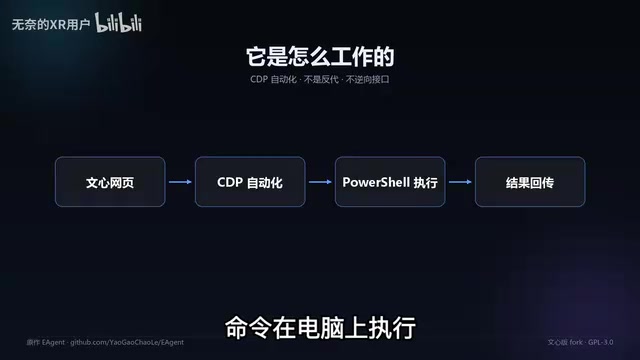
The core mechanism of EAgent Wenxin Edition is simulating real operations through the browser debugging protocol. The specific process: the program automatically opens a browser and navigates to the Wenxin page; the user clicks to start a new conversation; after the AI analyzes the prompt, messages can be sent. Whatever the AI wants to do is converted into PowerShell commands executed on the computer, and the results are sent back to the AI, forming a closed loop.
This design bypasses API call restrictions, directly leveraging the web version of Wenxin's conversational capabilities while granting it operating system permissions through the debugging protocol. According to the Bilibili uploader, the program automatically selects the working directory, and users only need to follow the interface guidance.
Browser Debugging Protocol (such as Chrome DevTools Protocol, CDP) is a debugging interface exposed by Chromium-based browsers. Developers can send commands to the browser via a WebSocket connection to open pages, click elements, read the DOM, execute JavaScript, etc. EAgent uses this mechanism to let the program "see" the content of the Wenxin page and simulate user input, thereby interacting with the AI without calling the official API. Compared to automation tools like Selenium, using CDP directly is more lightweight, but interface details may change with browser versions.
PowerShell is Windows' built-in task automation and configuration management framework, including a command-line shell and scripting language. It can directly call .NET class libraries, access the file system, modify the registry, manage processes, etc., with extremely high privileges. EAgent translates the AI's intent into PowerShell commands and executes them locally, essentially turning the AI's "thinking" into actual control over the operating system. This also explains why the program needs administrator privileges—many system-level operations are denied under normal user permissions.
Usage Steps and Precautions
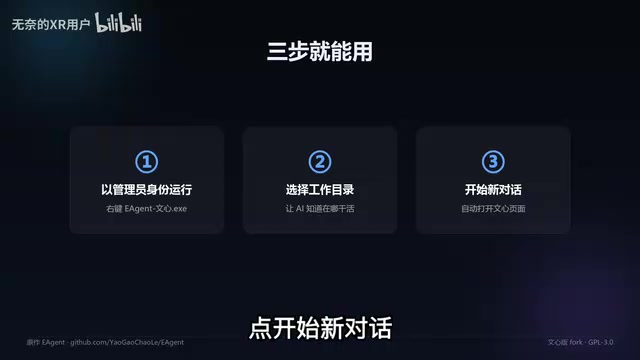
- Run the program: Right-click the single exe file and run as administrator.
- Select the working directory: The program will automatically open a browser and navigate to the Wenxin page.
- Start a new conversation: Wait for the AI to finish analyzing the prompt, then send messages.
- Execution and feedback: The PowerShell commands generated by the AI are executed on the computer, and the results are sent back to the AI.
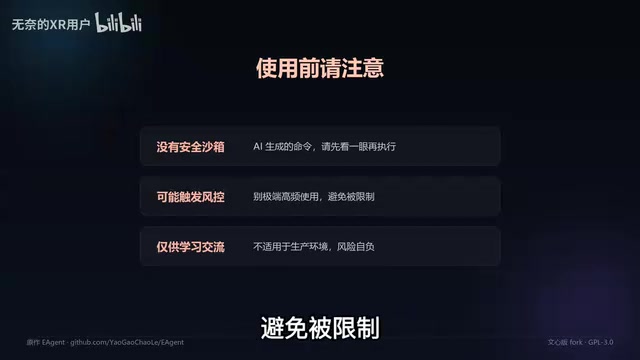
Special attention: EAgent Wenxin Edition has no security sandbox. The commands generated by the AI may include risky operations; it is advisable to review them before execution. Also, avoid extremely frequent use to prevent being restricted by the platform.
Key Warning: Never Click Update
The uploader particularly emphasizes: never click the update button. After updating, the program becomes the original DeepSeekAd version and requires login to use. This means losing the advantages of the Wenxin Edition—no login and no tokens.
Open Source Background and Copyright
This project is modified based on the open-source project EAgent. The original author and repository address are noted below the video, and it follows the GPL3.0 license. This means the code is public, and users can review and modify it themselves, but must also comply with the corresponding open-source license.
GPL3.0 (GNU General Public License v3.0) is a strong copyleft open-source license. It requires that any derivative work based on GPL3.0 code, when distributed, must also be open-sourced under GPL3.0 with the complete source code attached. This means if a user modifies EAgent and releases it, they cannot close-source it or switch to another license. At the same time, GPL3.0 explicitly grants users the freedom to run, study, modify, and redistribute, but copyright notices and license texts must be retained upon distribution.
In-depth Analysis: Balancing Convenience and Risk
The appeal of EAgent Wenxin Edition lies in zero-cost access—no need to purchase tokens, apply for APIs, or use web proxies. It directly turns the web version of AI into a local operation assistant, lowering the barrier to use. But this also brings security risks: no sandbox isolation, and the AI-generated commands are executed directly on your computer. If the commands are erroneous or malicious, they may cause data loss or system damage.
From a technical perspective, this browser debugging protocol-based solution depends on the stability and page structure of the web version of AI. If Wenxin's web version is redesigned, the program may fail. Also, frequent use may trigger the platform's risk control mechanisms.
For users who want to try it out, it is recommended to test in a virtual machine or backup machine and carefully review each generated command. The GPL3.0 license also means that if you distribute a modified version, you need to open-source your modifications.
Conclusion
EAgent Wenxin Edition is an interesting experimental tool that demonstrates how to turn the web version of AI into a local operation assistant through the browser debugging protocol. It is suitable for tech enthusiasts to explore, but ordinary users should be cautious about security risks. Remember: don't click update, and review commands before executing.
Related articles
 Tech Frontiers
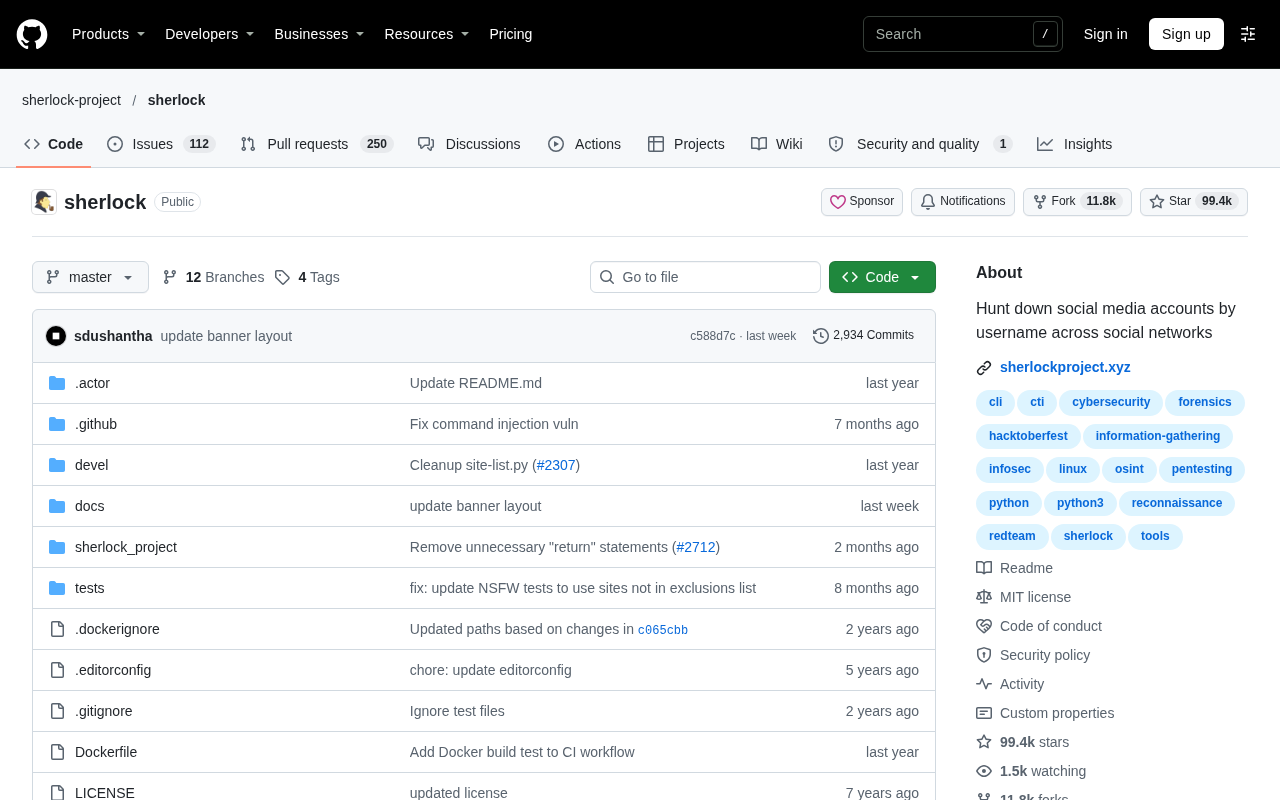
Sherlock: An Open-Source Tool for Tracking Usernames Across Social Networks
Sherlock is an open-source Python tool that tracks social accounts across networks by username. This article covers its core features, why developers love it, typical use cases, and privacy compliance considerations.
 Tech Frontiers
GitHub Daily·Nov 07: Agent-Ready and Context Compression
GitHub Trending Nov 07: meta's agent-ready design system astryx, billion-context's 5x context compression, sherlock nearing 100k stars, plus local-first localthings and bare-metal GPU orchestration nvke.
 Tech Frontiers
Buoyant Open-Sources Kinference: An Inference Control Plane for vLLM on K8s
Buoyant open-sources Kinference, an inference control plane for vLLM on Kubernetes, with declarative routing, KV-cache-aware load balancing, and per-tenant metrics—claiming 95% lower median TTFT in official benchmarks.