Nobody Uses What Vibe Coding Builds? Coding Is Easy, Products Are Hard
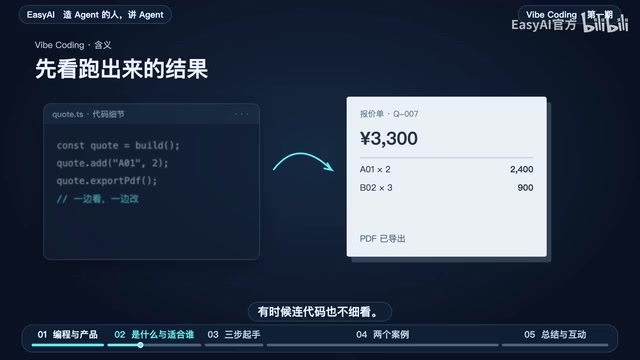
AI makes coding easy, but whether a tool gets used repeatedly depends on entering a real workflow and fitting specific scenarios.
Based on a Bilibili Vibe Coding talk, the article argues coding is easy but products are hard: AI can quickly produce a working demo, but a demo and a product people will reuse are two different things. Vibe Coding benefits those who understand the business most. The quote tool example shows that without reusable price lists, resumable orders, and searchable old quotes, a tool can't enter a real workflow. It offers a three-step path and uses Agent Hub's one-handed polish to show product details only surface through real use.
Title
Nobody Uses What Vibe Coding Builds? Coding Is Easy, Products Are Hard
Meta Description
Vibe Coding makes AI coding easy, but a working demo doesn't equal a usable product. From quote tools to one-handed Agent Hub operation, this breaks down why coding is easy and products are hard, and offers a three-step method for building usable tools without technical expertise.
Article Content
AI is getting better and better at writing code, so why is it that the little tools people build with AI get a demo running, yet nobody wants to open them a second time? In a Bilibili talk about Vibe Coding, the speaker pointed out an easily overlooked fact: coding is easy, products are hard.
What Vibe Coding Is, and Who It Really Helps
Vibe Coding originally referred to a more hands-off way of building—you describe what you want to an AI in an Agent chat box, it writes the code, you run it, and wherever something's wrong you tell it what to fix. You mostly look at the results and sometimes don't even read the code closely. Today the term is also often used broadly to mean "writing software together with AI using natural language."
So who does it help most? The speaker's judgment is people who understand the business. You know which step gets done every single day, you know where things are most troublesome, and you know whether the result is right—you understand these judgments better than the AI does. By contrast, someone with no exposure to the business, even if they get the AI to write working code, will struggle to judge whether it actually solves the problem.
This also answers a common question: now that AI can write code, are programmers still needed? To build a small tool that validates an idea, you can just get started; but for something used every day, you need to connect the price list, save unfinished orders, and still look up old quotes after prices update. These details require both business judgment and engineering experience.
Vibe Coding was coined by OpenAI co-founder Andrej Karpathy in early 2025, originally meaning "go entirely by feel," as opposed to the traditional line-by-line code review. Its technical foundation is a large language model Agent with tool-calling capabilities: the model can not only generate code, but also execute it locally, read errors, and modify itself autonomously. A neighboring concept is "low-code/no-code," but the latter relies on preset graphical components, whereas Vibe Coding directly generates runnable source code—more flexible, and also more dependent on the user's ability to verify it. Understanding this distinction helps you judge: Vibe Coding doesn't eliminate engineering complexity; it shifts the complexity from "how to write it" to "how to define correctness and how to verify it."
Why a Quote Tool Runs but Nobody Uses It
The speaker used a quote tool as an example: tell the AI to select products, enter quantities, and export a quote sheet. The code gets written, the PDF downloads, the demo runs. But when a customer asks for a quote again tomorrow, the price list has to be re-entered, and yesterday's sheet has to be redone from scratch—are you still willing to open it?
This kind of "working industrial garbage" isn't rare. The real dividing line isn't whether the code runs, but whether it enters a real workflow. Hand the tool to a salesperson who quotes every day, and their first question might be: the price list is already in Excel, so why do I have to enter it again? If I'm halfway done today, can I pick it up again tomorrow? Prices have updated—can I still look up last month's quote?

None of these questions fall under "writing code," yet they determine whether the tool survives. The criterion is simple: when a salesperson actually quotes an order, which step did they do less of than before? If the original spreadsheet was smoother, the new tool has to offer a reason people are willing to switch.
"Entering a real workflow" is often described in software engineering as crossing from prototype to production-ready. A prototype only verifies whether the core logic can run; production-ready requires data persistence, recoverable state, traceable history, and exception handling. What the quote tool lacks is exactly the persistence layer—the price list isn't stored in a database or reusable spreadsheet, half-finished orders don't save intermediate state, and historical quotes have no version records. Technically, these capabilities are all routine engineering practices, but they require designing the data model and storage plan in advance rather than letting the AI "just add it" in the conversation. This also explains why there are often several times the workload between a demo and a product.
Without Technical Skills, How to Build a Usable Tool with AI
The speaker offered a three-step path, the core of which is to define "doing it right" clearly rather than rushing the AI to write code.
Step 1: Pick a Small Thing You Keep Running Into
First clarify who will use it, what they have on hand, and what result they need in the end. Take quoting: you have the price list, and you know how the result of 3,300 yuan is calculated, so the task boundary is clear.
Step 2: First Decide What Counts as Correct
Try it with several examples whose answers you already know: the normal case has to work, and when something's missing or filled in wrong, the user also needs to know how to handle it. "A01 was originally quoted for two units but mistakenly entered as twenty; the program still computes 24,900 yuan—the formula is right, but the order is wrong"—this is exactly the verification scenario that needs to be designed in advance.
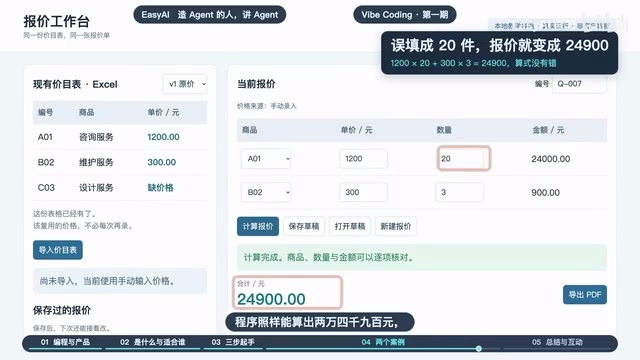
So the unit price, quantity, and total all need to be displayed, letting the user verify before exporting. Correctness isn't just "it can calculate a number"; it also means letting people spot when the number is wrong.
Step 3: Let the Person Who Actually Does This Job Use It Once
Don't coach them from the side—see whether they can finish it on their own, and whether, the next time the same task comes up, they'll open it on their own initiative. That's more convincing than a successful run during a demo.
This method is called "formative usability testing" in usability engineering: let real target users complete tasks independently without instruction, and observe whether they can finish smoothly, where they get stuck, and whether they're willing to use it again. Its key difference from demo-style acceptance is that it removes verbal hints and on-the-spot rescues, exposing steps that designers take for granted but that are unfriendly to users. The sample doesn't need to be large—usually about 5 users can surface most serious usability problems. For an individual developer, handing the tool to a colleague who quotes every day to actually do one order costs very little, yet answers "is this tool worth continuing" better than any feature list.
From Right Hand to Left Hand: Polishing Agent Hub Around Specific Scenarios
The speaker also demonstrated a self-built Agent Hub: you can operate Codex on multiple computers from your phone, connected computers are all in a list, tap to switch, and continue viewing drawings or issuing commands.
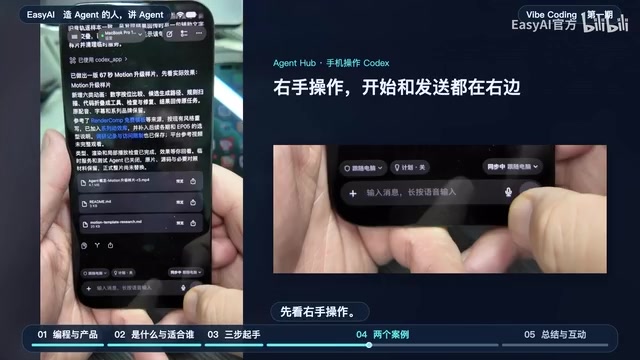
Once the features run, the problems are just beginning. When operating with the right hand, the microphone is on the right; tap to start recording, tap the right side again to stop, then send once the text appears. Start and send are both on the right, which is handy for the right hand. But what if you're lying in bed used to holding the phone with your left hand and want to operate one-handed? Start recording and send are both at the far right, so the left thumb has to reach over.
The fix is to rearrange the three steps around the input area: press and hold directly in the input area to start recording, so the left thumb can speak without leaving its spot; when done, tap the waveform to end recording and start transcription, then glance at the text to check the recognition; after confirming the text, swipe up in the input area and release to send. Enter drawing mode and check Codex's processing status—the left hand can then chain start, transcribe, and send all around the input area.
This example shows that product polish often comes down to very specific scenarios like "which hand" and "where you're lying," and these details never appear in a requirements document—they can only be exposed through real use.
Three Reusable Conclusions
Connect the three points: pick a topic from the small tasks you repeat every day, and first get one small task clearly done; polish around specific scenarios—being usable with the right hand doesn't mean it's usable one-handed with the left; press-and-hold to record, tap the waveform to transcribe, and swipe up to send are the changes that make it actually usable; hand the tool to the people who really use it, don't coach them first, let them finish a quote on their own, and see whether they'll open it again next time—that's more convincing than a demo.
The better AI gets at writing code, the biggest beneficiaries may not be the people who write code, but the people who best understand business pain points and are willing to keep iterating around scenarios. Is there a little tool you built with AI that you still use? If you stopped using it, which step was the most troublesome?
One-line Summary
AI makes coding easy, but whether a tool gets used repeatedly depends on whether it enters a real workflow and fits specific scenarios.
Paragraph Summary
Based on a Bilibili talk about Vibe Coding, the article argues that coding is easy but products are hard: AI can quickly write code that gets a demo running, but a demo and a product people are willing to use repeatedly are two different things. Vibe Coding lowers the barrier to coding, and those who benefit most are people who understand the business, because they can judge whether results are right and which step is most troublesome. The quote tool example shows that if the price list can't be reused, orders can't be resumed, and old quotes can't be looked up, the tool can't enter a real workflow. The article offers a three-step path: pick a topic from daily repetitive tasks, first define what counts as correct, and hand it to real users to complete independently. Finally, using the left/right-hand polish of Agent Hub as an example, it shows that product details can only be exposed through real use.
Related articles

Bilibili Creator Teases Fireworks Vlog: A New Trend in AI Tech Content Creation?
A Bilibili creator posts an Urdu dialogue clip teasing an upcoming fireworks vlog. The material lacks substantive AI tech content; this article honestly analyzes its informational limits and explores content creation teaser strategies.
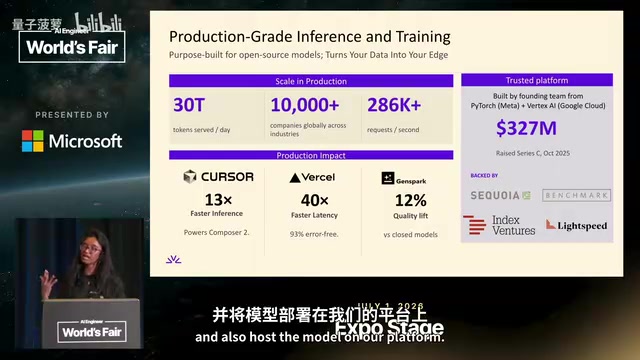
Fireworks AI: How Open-Source Models Rival Closed-Source Through a Training-Deployment Flywheel
Fireworks AI's Jet explains how open-source models rival closed-source via a custom inference engine, three training modes, and a same-platform data flywheel.

The "Hansi rok kar dikhao" Meme Among Bilibili Creators: Interaction Codes and Lessons for AI Content Creation
Analyzing the Bilibili video "Hansi rok kar dikhao"—its title-Hindi mismatch, short-video interaction tactics, and lessons for AI content creation to avoid form over substance.