Non-Rust Developer Builds Windows File Manager with AI, Lands on Microsoft Store

A product manager used Claude Code to build the 2.5MB open-source file manager Dirwise and get it onto the Microsoft Store.
The article tells how a product manager who doesn't know Rust used Claude Code to build the Windows file manager Dirwise almost from scratch and list it on the Microsoft Store. Built on Tauri 2 and React, the installer is about 2.5MB with no telemetry. The author rejects one-liner prompts and distills five methods: phase-based tasks, a separate planning conversation, plan review before code, rules in CLAUDE.md, and manual testing of every build. It also covers WebView2 drag-and-drop, thumbnail performance, granular elevation, and two store rejections over naming and Mac-style buttons.
Title
Non-Rust Developer Builds Windows File Manager with AI, Lands on Microsoft Store
Meta Description
A product manager who doesn't know Rust built the open-source Windows file manager Dirwise using AI coding agents like Claude Code and got it onto the Microsoft Store. This article breaks down his AI collaboration methods—phased prompting, plan-first workflow, rules files—plus real-world pitfalls around drag-and-drop, permissions, and store review.
Article Content
A product manager who doesn't know Rust used AI coding agents to build a Windows file manager that's now listed on the Microsoft Store. It sounds like marketing spin, but Dirwise's GitHub repo, Microsoft Store page, and the author's detailed retrospective make it worth taking seriously.
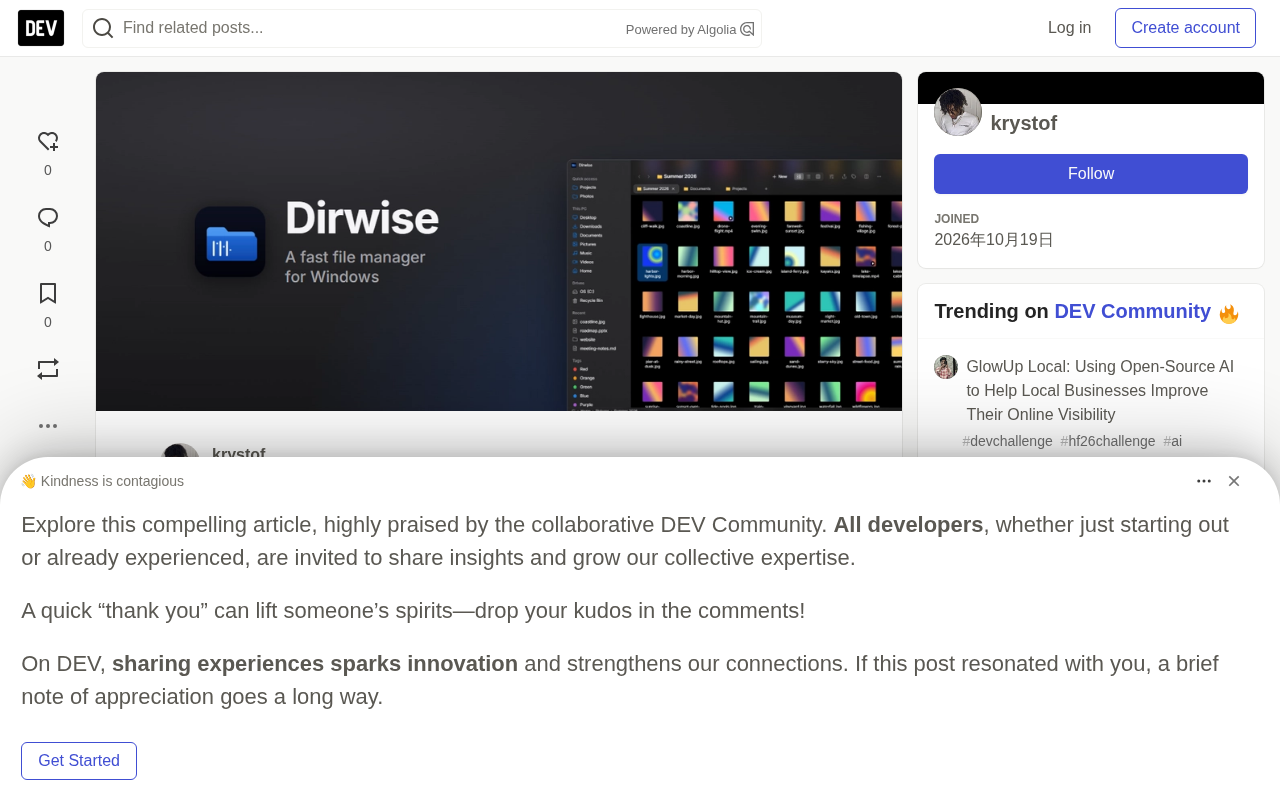
A Product Person's "Boundary-Crossing" Experiment
In the project introduction, the author says outright that he'd had enough of Windows' built-in File Explorer. He wanted column view, instant preview, tabs, and a command palette—all in a small, fast app that doesn't secretly upload your data. That's how Dirwise was born: a free, open-source (MIT license) file manager for Windows 10/11.
The tech stack is Tauri 2: Rust on the backend, React for the UI. The installer is only about 2.5MB, with no telemetry—the only network activity is an optional once-daily GitHub API update check. That size and privacy posture is itself a product statement in an era when Electron apps routinely weigh in at over a hundred MB.
The key point: the author is a product person, not a Rust developer. Nearly all the code was written by an AI coding agent (Claude Code). His job was designing features, writing specs, testing every build, and deciding what ships. That division of labor is more worth discussing than "AI writes code" itself.
Tauri 2 is an open-source framework for building desktop apps with Rust, positioned similarly to Electron but architecturally very different. Electron bundles an entire Chromium browser and Node.js runtime into the app, so installers easily balloon past a hundred MB; Tauri reuses the OS's built-in WebView (WebView2 on Windows, WKWebView on macOS) and only packages your business code and Rust backend, which is how it achieves a few-MB footprint. The trade-off is that frontend rendering depends on the system WebView, so subtle differences can appear across platforms—one reason the WebView2 drag-and-drop issue discussed later is especially thorny. Tauri 2's biggest change from 1.x is official mobile support (iOS/Android) and a refactored plugin and permission system, letting backend capabilities be granted on demand rather than all exposed to the frontend at once.
Treat AI Like an Engineer, Not a Wishing Well
The author explicitly rejects one-liner prompts like "build me a file manager." His exact words: that gets you a demo, not a product. The approach that actually works boils down to five points.
Break things into phases, not one giant prompt. Each version was split into small phases with clear goals: "column view with keyboard navigation," "tabs," "recycle bin," "store release." Each phase had its own prompt and acceptance criteria—i.e., what "done" actually means.
Use a second conversation for planning. He kept a dedicated conversation for thinking: writing prompts, reviewing the agent's reports, deciding priorities. The coding agent got clean, specific instructions instead of his stream-of-consciousness rambling. This approach separates "thinking" from "doing" at the tool level.
See the plan before touching code. Nearly every prompt ended with "show me the plan first, don't commit until I say OK." These plans often caught problems before any code was written: a privacy leak, a failed build, a feature that would mistakenly delete files.
Write the rules into a file. The repo has a CLAUDE.md listing rules the agent must always follow. Some rules came from hard-won experience, like: never touch items in the real recycle bin that this app didn't put there.
Test every version yourself. He installs it, clicks around, tries to break it. AI is fast, but AI doesn't use the app. That sentence nails the core weakness of current AI coding: agents lack real hands-on experience with their own output.
CLAUDE.md is a project-level instruction file conventionally used by AI coding agents like Claude Code, typically placed in the repo root, which the agent reads automatically at the start of each session. It works like team conventions for a newly onboarded engineer: tech stack conventions, code style, prohibitions, test commands, and directory structure notes can all go in. Compared to repeating instructions in every prompt, hardcoding rules into a file has three benefits: they persist across sessions, they can be version-controlled and reviewed alongside the code, and they reduce context waste from long prompts. Rules like "never touch items in the real recycle bin that this app didn't put there" are a classic "write it into the contract after you get burned" usage—turning a one-time correction into a long-term constraint.
The Hard Bones Even AI Can't Chew
If this article only covered the successes, its credibility would suffer. The difficulties the author lists are actually more informative.
Drag-and-drop between WebView2 and the rest of Windows was the first hurdle. Web views inherently don't speak Windows' drag-and-drop language, and it took several rounds to solve. Fast thumbnails for video and PDF were the second: not freezing the UI in large folders is a real test of the rendering pipeline.
Permission handling shows real design skill. Copying into C:\Program Files requires elevation, but running the whole app as administrator is a bad idea. Dirwise calls the Windows file operation API and requests permission only for that one operation. This granular control wasn't randomly generated by AI—it was a product decision.
There's also a rather ironic episode: Windows 11's acrylic transparency effect stopped working on his own machine, and after a long investigation, it turned out to be caused by some desktop customization mod, not a code problem. He lost a night's sleep for nothing.
WebView2 is Microsoft's embedded browser control based on Chromium, preinstalled on Windows 11 and the rendering foundation for Tauri on Windows. It runs in a relatively isolated process, with a boundary layer between web content and the host window and operating system. Drag-and-drop is the interaction most obviously affected by this boundary: HTML5's drag-and-drop event model and Windows' OLE drag-and-drop (IDropTarget and other COM interfaces) are two different languages. When a file is dragged from Explorer into WebView2, the host side must intercept system messages and translate them to the web layer—and the reverse direction is even harder. This is why a feature that's mundane in a browser becomes a hard bone requiring repeated debugging in a hybrid desktop app.
Rejected Twice by the Microsoft Store, and It Taught a Product Lesson
The app was originally called Finder-Win. The problem with the name isn't hard to guess.
The store gave two rejection reasons: the name contained another company's product name, and the app looked like something from a Mac—the colored window buttons in the top-left corner. The author admits this was fair. Version 1.6.0 adopted the new name Dirwise, switched to proper Windows 11 window buttons with Snap Layouts, and cleaned out every visual element borrowed from other platforms. The second rejection was just because an old screenshot was left in the listing. The third time, it passed.
His takeaway is blunt: if you're inspired by another platform, take the idea, not the look and name. This lesson applies to any team building cross-platform products, regardless of whether they use AI.
Snap Layouts is the window-snapping enhancement introduced in Windows 11: hovering the mouse over a window's maximize button pops up various split-screen layouts, letting users quickly snap windows to a region of the screen. It relies on the app drawing standard system window chrome (non-client area); once an app draws its own title bar or uses nonstandard window buttons, the hover menu may fail or misalign. The article cites "switching to proper Windows 11 window buttons with Snap Layouts" as a fix for passing store review. In essence this isn't just a visual style issue—it's about reconnecting the app to OS-level window management conventions, which is exactly what's most easily overlooked when porting across platforms and most likely to be judged by the platform as "not looking like an app for this platform."
A Few Hard Recommendations for AI Coding Practitioners
The author's closing advice can be condensed into four points. Be the product owner: decide what to build and what counts as "done"—AI is good at answering "how," but "what" and "why" must be on you. Have it show its work: plans, test results, screenshots—trust but verify. Keep each step small; small phases mean small mistakes. Finally, be transparent: the code is public, the README explains how it was built, and he'd rather face honest code review than pretend.
The repo also lists a few beginner-friendly tasks suitable for Hacktoberfest: German translation, Rust unit tests, and some UI work. The author especially welcomes real Rust developers to do code review.
The value of this case isn't in proving "AI can write code"—that no longer needs proving. It shows a more realistic path: someone who understands product but not systems programming uses AI to push their delivery capability a big step forward, while keeping testing, decisions, and taste firmly in their own hands. Dirwise's installer is only 2.5MB, but the collaboration model behind it carries far more weight.
One-line Summary
A product manager used Claude Code to build the 2.5MB open-source file manager Dirwise and get it onto the Microsoft Store.
Paragraph Summary
The article recounts how a product manager who doesn't know Rust used Claude Code to build the Windows file manager Dirwise almost from scratch and successfully list it on the Microsoft Store. The stack is Tauri 2 plus React, with an installer of only about 2.5MB and no telemetry uploads. The author rejects one-liner prompts and distills five methods: break tasks into phases, use a separate conversation for planning, review the plan before writing code, hardcode rules in CLAUDE.md, and manually test every version. The article also honestly documents difficulties like WebView2 drag-and-drop, thumbnail performance in large folders, and granular elevation, plus the lesson of being rejected twice by the store over the name and Mac-style buttons. The core conclusion: AI handles "how," but the product owner must firmly control "what," acceptance criteria, and taste.
Related articles

Chain of Thought Isn't Just for AI: How Humans Can Use CoT to Improve Thinking Quality
Chain of Thought isn't just a prompt trick for large models. Starting from a Hacker News discussion, this article analyzes why CoT works for human thinking too, breaks down actionable ways to transfer it, and highlights the key differences between human CoT and machine CoT.
Cloudflare Teams Up with OpenAI: Closi…
Cloudflare Teams Up with OpenAI: Closing the Loop from Vulnerability Discovery to Defense with AI
Cloudflare uses OpenAI Daybreak to investigate security vulnerabilities and generate reviewable remediation plans, while developers use Codex to boost coding efficiency and quality.

Orca Multi-Agent Orchestration in Practice: A Guide to Parallel Collaboration with Claude and Codex
Orca is Stable AI's free open-source agent workbench supporting 34 agents like Claude Code and Codex in parallel. Learn its Git worktree isolation, multi-model orchestration, and mobile management.