Nookdeck: Turn Your Old Phone into a Stream Deck Control Panel
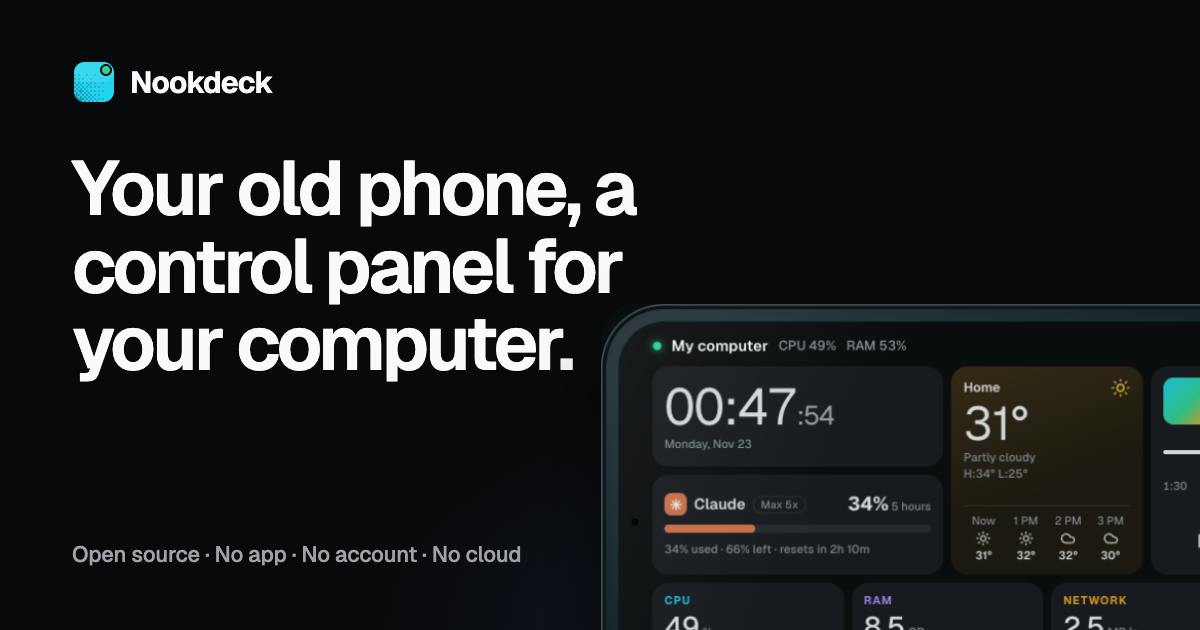
Nookdeck turns old phones into computer touch panels—free, open source, and feature-rich.
Nookdeck is a free open-source tool that transforms idle old phones or tablets into touch control panels for Mac/Windows computers via Wi-Fi, requiring no phone-side app or account. It supports shortcuts, macros, media controls, live dynamic tiles (system status, weather, media info), Home Assistant integration, and even Claude and Codex usage display. MIT-licensed, created by Howz Nguyen, with 70 upvotes on Product Hunt and iOS 12 compatibility. Potential concerns include Wi-Fi latency and old browser compatibility.
A Second Life for Old Phones: Nookdeck Makes Touch Panels Accessible
Do you have an idle old phone or tablet lying around? Instead of letting it gather dust in a drawer, why not turn it into a Stream Deck for your computer? That's exactly what Nookdeck does—it transforms old devices into touch control panels for Mac or Windows computers via Wi-Fi, with no app installation required on the phone and no account registration or cloud services. According to its Product Hunt page, even an old iPhone running iOS 12 can handle it.
The project's core philosophy is "lightweight, local, and open." A small application runs on your computer and serves the control panel to your phone through the browser, with all operations completed on your local network. This means your data never leaves your own devices, ensuring better privacy and lower latency. For users who want efficiency without buying additional hardware, this is undoubtedly an attractive solution.
Feature Breakdown: More Than Just Shortcut Buttons
Nookdeck's capabilities go far beyond simple shortcut triggers. It supports creating buttons for keyboard shortcuts, applications, media controls, and macros, letting you execute complex operations with a single tap. It also offers live dynamic tiles that display system status, currently playing media information, and weather conditions—these update as your computer's state changes, turning your phone screen into a small information hub.
Even more impressively, Nookdeck integrates Home Assistant control, meaning you can manage smart home devices through this panel. It can even display usage for Claude and Codex, which is very practical for developers who rely on these AI tools. Plugin and theme pack support allows the panel's appearance and functionality to expand infinitely, meeting personalized needs.
Home Assistant is an open-source smart home automation platform where users can manage smart devices from different brands (such as lights, thermostats, sensors, etc.) through a unified web interface and automation engine. It emphasizes local control and privacy protection, supporting thousands of device integrations. Nookdeck's Home Assistant integration means the panel can directly call its service API, turning your phone screen into a smart home remote hub—for example, executing a "home mode" or adjusting light brightness with one tap.
Live dynamic tiles draw inspiration from Windows live tiles and Stream Deck's icon update mechanism, fetching system status, media metadata, and weather information from the computer via WebSocket or polling, then rendering them on buttons in real time. This design upgrades static shortcut buttons into information display windows, but requires the server to continuously push data, placing certain demands on network stability.
Open Source and Free: Unlimited Possibilities Under the MIT License
Nookdeck uses the MIT License and is completely free and open source. This means developers can freely view, modify, and distribute the code, and even build their own derivative works based on it. The power of the open-source community is expected to drive the prosperity of the plugin ecosystem, allowing users to develop new button types or integration services according to their needs.
According to Product Hunt data, the project received 70 upvotes, ranking 18th for the day. Although there are only 3 comments, considering its relatively niche audience, this level of attention is quite impressive. The project was created by developer Howz Nguyen and is now open-sourced on GitHub.
The MIT License is a permissive open-source license that allows users to freely use, copy, modify, merge, publish, distribute, sublicense, and sell copies of the software, with the sole condition of retaining the copyright notice and license notice. This means developers can use Nookdeck's code in commercial projects or even closed-source products without disclosing their modifications. This licensing model greatly lowers the barrier to secondary development, helping attract community contributions and commercial integration, but it may also lead to fragmented derivative versions and ecosystem fragmentation.
Multi-Source Perspectives: Community Feedback and Potential Considerations
Although discussion on Product Hunt is limited, looking at similar project discussions on other platforms (such as GitHub and Reddit), users generally show strong interest in these kinds of "repurposing old devices" tools. Nookdeck's cross-platform nature (supporting both Mac and Windows) and its clean design requiring no phone-side app are key advantages that distinguish it from competitors (such as Stream Deck's official software or third-party phone controllers).
However, some users may be concerned about network stability and latency. Since it relies on Wi-Fi transmission, button response may be affected in environments with poor signal. Additionally, while iOS 12 support expands the range of compatible devices, older browser versions may not perfectly render all modern web features, and developers may need to make trade-offs in compatibility. These details are not explicitly stated in the original materials but are worth noting for potential users.
Claude and Codex usage display: Claude refers to the large language model series developed by Anthropic, while Codex is OpenAI's early model for code generation (some capabilities are now integrated into the GPT series). Developers typically access these services via API keys and are billed by token count. Nookdeck's ability to display usage statistics suggests it may integrate API request monitoring or read local logs, helping developers track cost consumption and call frequency in real time to avoid overuse.
Getting Started and Outlook: Who Is It For?
Nookdeck is ideal for the following groups: efficiency enthusiasts with idle phones or tablets, users who want a low-cost Stream Deck experience, Home Assistant smart home enthusiasts, and developers who need quick access to system status or AI tool usage. The installation process is simple: run the server application on your computer, then access the specified address through your phone's browser.
With the spread of remote work and multi-device collaboration, the idea of repurposing old hardware aligns with the sustainable technology trend. Nookdeck's open-source model also leaves ample room for future development—if the community can contribute more plugins and themes, it could very well become an active small ecosystem. For those interested in trying it out, it's worth visiting its GitHub repository to take a look.
Stream Deck is a hardware control panel launched by Elgato that triggers shortcuts, macros, scene switches, and other operations through customizable LCD buttons, widely used in live streaming, design, and office scenarios. Nookdeck replicates its core experience through software, using an old phone's touchscreen to replace physical buttons at almost zero cost. However, compared to hardware, touch operations lack physical feedback and rely on Wi-Fi transmission, which may be less stable than wired hardware in scenarios requiring millisecond-level response (such as live stream switching).
One-line Summary
Nookdeck turns old phones into computer touch panels—free, open source, and feature-rich.
Paragraph Summary
Nookdeck is a free open-source tool that transforms idle old phones or tablets into touch control panels for Mac/Windows computers via Wi-Fi, with no phone-side app installation or account registration required. It supports shortcuts, macros, media controls, live dynamic tiles (system status, weather, media info), Home Assistant smart home integration, and even displays Claude and Codex usage. Under the MIT License, developers can freely modify and distribute it. Created by Howz Nguyen, the product received 70 upvotes on Product Hunt and is compatible with old iOS 12 devices. Potential concerns include Wi-Fi latency and old browser compatibility. Suitable for efficiency enthusiasts, low-cost Stream Deck alternative users, and smart home enthusiasts.
Related articles

Michael Nielsen Takes Down His Classic Neural Network Textbook, Sparking Community Discussion
Michael Nielsen's classic free textbook Neural Networks and Deep Learning has been taken offline, sparking discussion on Hacker News about the reasons and impact.

Inside the AI Training Data Market: The Trade-off Between Exclusivity and Discounts
G2i founder Gabe Greenberg reveals the dual-track pricing of the AI training data market: labs pay a premium for exclusive data or accept discounts that allow others to buy it.

SessionGraph: Unifying All Coding Agent Sessions in One Interactive Graph
SessionGraph aggregates coding agent sessions into an interactive graph, helping developers review, debug, and manage AI coding workflows across sessions. This article examines its positioning, value, and open questions.