NotchOwl: Turning Your Mac's Notch Into a Productivity Workspace

NotchOwl turns the MacBook notch into a hover-activated productivity panel with tasks, notes, timers, and calendar.
NotchOwl is a macOS productivity tool that converts the MacBook's notch — typically wasted screen space — into a functional productivity hub. A simple hover reveals to-do tasks, quick notes, a focus timer, and upcoming calendar events, all without switching apps. Built around a zero-friction, minimal-interruption philosophy, it keeps your desktop clean by default while staying instantly accessible. Currently in very early stages with only 10 ProductHunt upvotes, its feature depth and stability are unproven. It's best treated as a lightweight productivity layer rather than a replacement for dedicated task management tools.
Apple's notch has been a design controversy since it first appeared on the MacBook — it occupies prime real estate at the top of the screen, yet sits as nothing more than a blank black void most of the time. A tool called NotchOwl, featured on ProductHunt, aims to change that: it transforms this overlooked strip into an always-accessible productivity workspace.
What Is NotchOwl
NotchOwl is a macOS productivity tool with a straightforward premise — integrating tasks, notes, a focus timer, and calendar events into the Mac's notch area, expandable with a single hover. It converts that otherwise idle stretch of screen real estate into a persistent yet unobtrusive information panel.
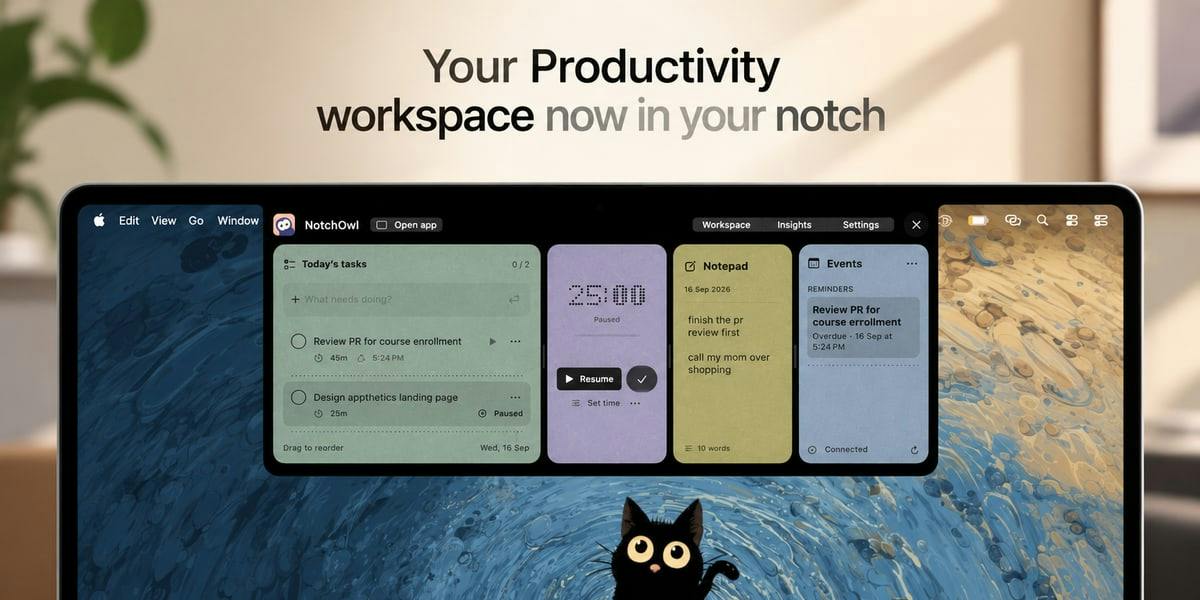
In terms of positioning, it sits across three categories: Task Management, Notes, and Time Tracking. Developed by Aditya Jaiswal, the product currently has 10 upvotes and 2 comments on ProductHunt, ranking 14th — firmly in early-stage, niche tool territory.
Core Features Breakdown
NotchOwl consolidates four high-frequency productivity scenarios into a single notch-based entry point:
Tasks and Notes
Keeping to-do items and quick notes at the very top of your screen means you can capture and review them without switching application windows. For users who habitually jot down ideas or fleeting tasks, this "zero-context-switch" interaction reduces the cognitive cost of jumping between apps.
Focus Timer
The built-in focus timer keeps methods like the Pomodoro Technique permanently within your field of view. The timer lives in the notch area — always visible without taking up workspace the way a standalone window would.
The Pomodoro Technique, invented by Francesco Cirillo in the late 1980s, breaks work into 25-minute focused units (one "pomodoro") separated by 5-minute short breaks, with a longer 15–30 minute break after every four pomodoros. Its psychological basis lies in how fixed time boxes lower the resistance to getting started, while the rest rhythm helps sustain cognitive resources. Embedding the timer in the notch means it stays at the periphery of your vision rather than in the foreground — you don't need to interrupt your focus just to "check how many minutes are left." This creates a subtle but meaningful difference compared to keeping a timer in a floating window or on your phone.
Calendar Events
Upcoming schedule items are surfaced directly in the notch, so users can glance up to confirm their next meeting or deadline without repeatedly opening the Calendar app.
Why "Notch Tools" Are Worth Paying Attention To
Apps that make use of the Mac notch have gradually formed a small ecosystem in recent years — from early tools that turned it into a media control center, to more recent ones integrating to-dos, clipboards, and AirDrop. NotchOwl's differentiator is its focus on the "productivity" use case specifically, consolidating scattered efficiency features from multiple apps into one entry point.
The core value of this category of tools is essentially: leverage dead-zone screen space + reduce interaction friction. The notch is naturally positioned above the visual center of the screen. A hover-triggered interaction keeps things clean by default while allowing information to be pulled up quickly when needed. For users who want a minimal desktop without stuffing the Dock and menu bar full of icons, it's a reasonable middle ground.
Among the pioneers of the Mac notch tool ecosystem, Notchmeister and TopNotch initially focused on visual customization, while later products like NotchNook and Notchmeow began adding functional utility — the former expanding the notch into an island-style panel for widgets, which has since accumulated a meaningful base of paying users. This ecosystem owes its existence to macOS's openness around the Accessibility API and screen rendering layers, allowing developers to "draw" content around the notch at the system level without breaking sandbox constraints. NotchOwl enters a track that already has competition; its productivity-focused strategy is essentially seeking differentiation on the functional dimension rather than the visual one.
Real-World Limitations
To be realistic: NotchOwl is still at a very early stage. With only 10 community votes, it hasn't been validated at any meaningful scale. Feature depth, stability, and the degree of integration with native Calendar and Reminders all remain to be seen. There's also an inherent constraint with notch tools: the expanded area is limited in size, and complex task management needs will likely still require a dedicated app.
It's better positioned as a lightweight productivity add-on rather than a full-featured task management system. Whether it's worth incorporating into your daily workflow depends on how much you value "always within reach," and whether frequent context-switching is a genuine pain point in how you currently work.
Summary
NotchOwl represents a pragmatic product philosophy: not trying to reinvent the wheel, but making a sensible connection between wasted screen space and high-frequency productivity needs. For MacBook users — especially those who've always felt vaguely bothered by the notch "just sitting there" — it offers a low-commitment option worth trying. As an early-stage product, its potential and its shortcomings are equally visible. Worth keeping an eye on, with measured expectations.
Related articles

JobRunner MCP Server: AI Agents Can Now Fix Failed Java Jobs
JobRunner launches an open-source MCP server enabling AI agents to view cluster status, diagnose failures, and recover Java jobs—incident response from any cloud coding environment or existing agent.

MLAI Digital Launches 9 Security Agents: MCP Server Safeguards the Full Lifecycle of Agentic AI
MLAI Digital launches Security MCP Server with nine built-in specialized security agents covering vulnerability discovery, attack simulation, prompt injection detection, API and infrastructure assessment, and accelerated remediation—embedding security validation across the full Agentic AI lifecycle from development to production.

Running Isaac Lab on H100 GPUs: Exploring Better Approaches
Exploring optimization methods for running Isaac Lab on NVIDIA H100 GPUs, including MIG configuration, mixed precision, TensorRT acceleration, and community experience to improve robotics simulation and reinforcement learning efficiency.