NowRouter Configuration Tutorial: Connect Multiple Free AI Models to the PI Coding Assistant

Use NowRouter to connect 29+ free AI models to the PI command-line coding assistant in one setup.
This tutorial walks through configuring NowRouter as a unified model routing gateway to connect multiple free AI models (including Gemini Flash) to the PyCoding Agent (PI) command-line coding assistant. It covers installing all three required components, properly configuring the local connection URL and API Key, avoiding common errors, and switching between models for different coding tasks.
Connect Your Coding Assistant to a Wealth of Free Models
As AI coding assistants become more widespread, a growing number of developers want to call various large language models from their local terminal environment to help with coding. However, subscribing to APIs from OpenAI, Google, Anthropic, and other providers one by one is not only expensive but also quite tedious to configure—different providers have different API formats, authentication methods, and rate limits, and the engineering cost of maintaining multiple configurations is far greater than you'd expect.
This article introduces a more efficient approach: using NowRouter as a unified model routing middleware layer to connect dozens of free AI models to the command-line coding assistant PyCoding Agent (PI) all at once. Based on a hands-on demonstration by a Bilibili creator, this setup can call nearly 30 models locally, some of which (like the Gemini Flash series) are completely free with no additional cost.
For developers looking to experience a multi-model coding assistant at low cost, this is a path worth exploring.
What Is NowRouter: A Model Routing Gateway Explained
NowRouter is essentially a model routing gateway that runs locally (on localhost), managing multiple model providers and exposing a standardized API endpoint.
The concept of a model routing gateway draws from the design philosophy of API gateways in microservice architectures (such as Kong or Nginx Gateway). Its core responsibility is to abstract multiple heterogeneous downstream AI services into a single standard interface, shielding upstream callers from underlying differences. In practice, OpenAI uses Bearer Token authentication, Google's Gemini API passes an API Key as a parameter, and Anthropic has its own unique x-api-key header format. The routing gateway encapsulates these authentication and invocation format differences internally, exposing only a single unified endpoint compatible with the OpenAI Chat Completions format, so clients don't need to worry about underlying complexity.
Pain Points NowRouter Solves
Traditionally, every new model requires a separate set of keys and calling logic. NowRouter centralizes provider management so the coding assistant only needs to connect to one NowRouter endpoint to access all configured models behind it.
In testing, the NowRouter panel came pre-configured with multiple providers, and the coding assistant successfully identified 29 available models. Additionally, NowRouter supports toggling "reasoning" on or off for each model individually, making it easy to switch flexibly based on task complexity.
The "reasoning" feature here corresponds to Chain-of-Thought reasoning mode in large language models. When reasoning mode is enabled, the model generates an internal reasoning process (thinking tokens) before outputting its final answer. This significantly improves accuracy for mathematical calculations, logical inference, and complex code debugging, but at the cost of longer response times and higher token consumption. OpenAI's o1/o3 series, Anthropic's Claude with extended thinking, and Google's Gemini thinking mode all fall into this category. For simple code completion or formatting tasks, disabling reasoning saves time and cost; for algorithm design or bug hunting, enabling reasoning yields more reliable results.
Installation Steps in Detail: Three Components, All Required
The entire configuration process breaks down into three key parts: installing the coding assistant, installing NowRouter, and installing the bridge extension that connects them.
Step 1: Install PyCoding Agent (PI)
Go to the PyCoding official website, where the homepage lists installation commands for various environments. If you're using the PNPM package manager, copy the corresponding command and run it in your terminal to complete the installation.
PyCoding Agent (abbreviated as PI) belongs to the emerging category of command-line AI coding assistants, competing in the same space as Cursor, GitHub Copilot CLI, Aider, and similar tools. Compared to graphical IDE plugins, the core advantages of command-line coding assistants include: direct use on servers connected via SSH, extremely low system resource usage, and easy integration into automation scripts and CI/CD pipelines. The fact that PI installs via PNPM/NPM means it's built on the Node.js ecosystem, and its support for extension Packages indicates it uses a plugin-based architecture, allowing community developers to contribute various provider connectors and feature enhancement modules.
Developers using npm or other package managers can select the corresponding command—the installation process will automatically download all dependencies.
Step 2: Install NowRouter
Go to the NowRouter official website, where the landing page provides a global installation command similar to npm install -g 9router. Run this command to complete the installation.
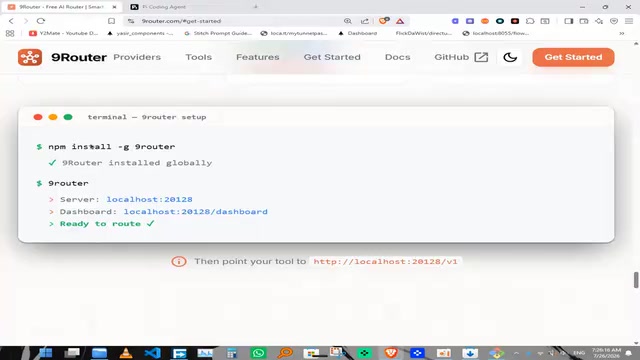
Step 3: Install the Bridge Extension Package
Having both tools alone isn't enough—you need a dedicated extension package to connect them. Go to the coding assistant's Packages interface, type 9router in the search box, and press Enter to find the corresponding extension.
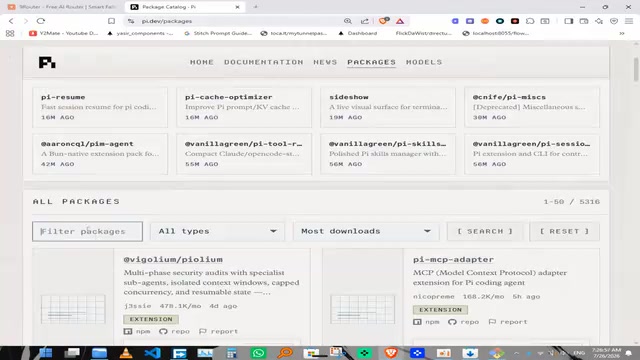
Click to copy the installation command and execute it. After installation, it's recommended to update the coding assistant to the latest version to ensure compatibility.
Startup and Connection Configuration: Avoiding Common Errors
After installing all three components, you move into the actual connection configuration phase. This is the step most prone to errors and requires special attention.
Starting the NowRouter Local Service
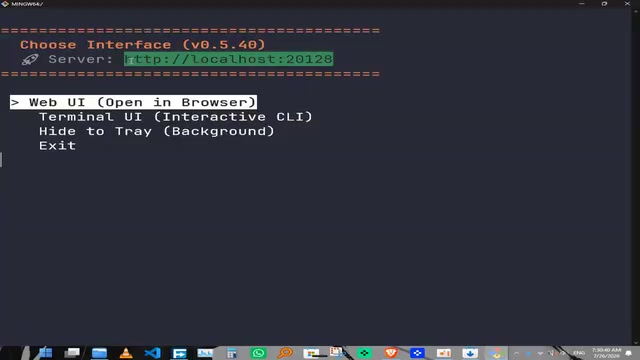
Type 9router in the terminal and press Enter. NowRouter will start a service on a local port. The default password may be a simple combination—change it immediately to a strong password for security.
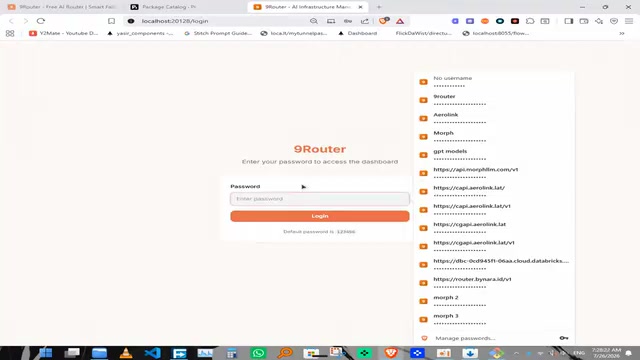
A note on security: NowRouter running on localhost means it listens on the machine's loopback address (typically a port on 127.0.0.1). While external networks cannot directly access services on 127.0.0.1 by default, if NowRouter binds to 0.0.0.0 (all network interfaces), other devices on the local network or even the public internet may be able to access the service. This is why you must change the default password—once an API Key is leaked or brute-forced, an attacker can consume the API quotas of all model providers you've configured through your NowRouter, causing financial loss. It's recommended to use operating system firewall rules to restrict access to the port.
Once started, enter the Provider panel to view all configured model providers.
The Correct Way to Connect the Coding Assistant to NowRouter
Open another terminal and type pi to start the coding assistant. It will automatically discover the NowRouter service in the background. After selecting it, you'll enter the connection page where the system asks for a URL and API Key.
Common error point: The default URL filled in is often wrong because it's not the remote port. The correct approach is to go back to the terminal where NowRouter is running, copy the actual local port address it's listening on, paste it into the URL field, and fill in the corresponding API Key.
After configuration, run 9router status to check the connection status. If everything is working properly, it will display "9 Router connection updated" and show the 29 models it has identified.
Usage Experience: Freely Switching Between Multiple Models
Once connected, type the set models command in the coding assistant to see a list of all available models configured in NowRouter.
Real-World Test Results
Selecting the Gemini Flash model and sending a test message produces a normal response. This means developers can switch between different models at any time within the same terminal environment—using the lightweight Flash model for simple tasks and a model with stronger reasoning capabilities for complex logic.
Notably, Google's latest Gemini series models are completely free to use with no additional cost, which is especially friendly for cost-conscious individual developers. Google's Gemini Flash series models launched in 2024 (such as Gemini 2.0 Flash, Gemini 1.5 Flash) employ an aggressive free-tier strategy: Google AI Studio provides a free allowance of 15 requests per minute, accumulating up to 1,500 requests per day, which is more than sufficient for an individual developer's daily coding assistance needs. The Flash series is a lightweight version of the Gemini family optimized for low-latency and high-throughput scenarios. Although it has fewer parameters than the Pro version, it still performs excellently on tasks like code generation and text summarization. Google's business logic behind this move is to attract developers into its ecosystem through the free tier, naturally converting them to paid users once their usage exceeds the free allowance.
Summary: A Low-Cost Multi-Model Coding Assistant Solution
The "NowRouter + PyCoding Agent" combination uses a unified routing layer to significantly lower the barrier to multi-model integration. Its core value includes:
- Unified management: Configure once, use everywhere—avoid repetitive configuration of multiple API setups
- Flexible switching: Switch models with a single command in the terminal, with reasoning mode toggle support
- Cost-friendly: Access numerous free models, especially the Gemini Flash series
During configuration, the two details requiring the most attention are correctly filling in the connection URL and promptly changing the default password.
For developers looking to explore AI coding assistants at low cost, this solution is well worth trying hands-on.
Key Takeaways
Related articles

Chain of Thought Isn't Just for AI: How Humans Can Use CoT to Improve Thinking Quality
Chain of Thought isn't just a prompt trick for large models. Starting from a Hacker News discussion, this article analyzes why CoT works for human thinking too, breaks down actionable ways to transfer it, and highlights the key differences between human CoT and machine CoT.
Cloudflare Teams Up with OpenAI: Closi…
Cloudflare Teams Up with OpenAI: Closing the Loop from Vulnerability Discovery to Defense with AI
Cloudflare uses OpenAI Daybreak to investigate security vulnerabilities and generate reviewable remediation plans, while developers use Codex to boost coding efficiency and quality.

Orca Multi-Agent Orchestration in Practice: A Guide to Parallel Collaboration with Claude and Codex
Orca is Stable AI's free open-source agent workbench supporting 34 agents like Claude Code and Codex in parallel. Learn its Git worktree isolation, multi-model orchestration, and mobile management.