Obsidian + Agent Skills in Practice: One Sentence Lets AI Organize Your Notes Automatically

Using Obsidian plugins plus Agent Skills and large model interfaces, one sentence lets AI organize your notes.
The article introduces a nearly code-free AI note organization workflow: manually install a Claude-type plugin in Obsidian, set up the Node.js runtime environment, connect to official or domestic large models via API Key and environment variables, and then load the three official Agent Skills. Once installed, users simply issue a one-sentence instruction to complete Markdown reformatting with tag extraction, whiteboard mind map generation, and automatic classification and view creation after reading through an entire clipping folder. The article also points out limitations: complex formulas may go wrong and require multiple rounds of correction, skill invocation consumes API fees, and the solution is better suited to users who already have a stable workflow rather than being a zero-cost universal fix.
The more notes you take, the messier the structure gets—this is a dilemma many people run into when using bi-directional linking note tools like Obsidian. A tutorial on Bilibili offers a new approach: using Agent Skills together with the Claude plugin to hand "organizing notes" over to AI, with virtually no coding required throughout. The core of this method isn't any single tool, but rather stringing plugins, model interfaces, and pre-built skills into a reusable workflow.
What Exactly Makes Up This Solution
According to the video, the solution relies on three pieces: first, a Claude-type plugin in Obsidian that opens up an AI conversation entry point inside the note-taking app; second, Agent Skills, vividly described as "instruction manuals written for AI in advance," with three official skills already prepared, corresponding to the three tasks of formatting, whiteboard, and database; third, the underlying large model interface, which can be swapped for domestic models when the official channel is inconvenient.

Once these three are installed, the way users interact with note organization changes—no longer manual cut-and-paste, but issuing instructions in a single sentence. This "skills as capability packages" design philosophy essentially solidifies prompt engineering, so ordinary users don't have to repeatedly tune prompts.
Agent Skills is a capability extension mechanism Anthropic launched for Claude, understandable as "skill packs" packaged in folder form: each skill contains a SKILL.md description file (describing trigger conditions and execution steps), optional scripts, and reference materials. During conversation, the model automatically determines whether to invoke a skill based on task content, without the user needing to manually switch modes. This design solidifies operational norms that were previously scattered across prompts into reusable, shareable assets, and also lets non-technical users directly reuse official or community-written workflows without having to tune prompts from scratch.
Breaking Down the Six-Step Installation Process
Step 1: Prepare the Node.js Environment
In the video, you first download and install Node.js from the official website, then type node -v in the terminal—seeing the version number output means the environment is ready. Next, complete the installation with a single npm command, and enter the startup command to run it. This is the foundation of the entire chain; users unfamiliar with the command line are advised to follow along once and confirm everything is correct before moving on.
Node.js is a JavaScript runtime based on Chrome's V8 engine that lets JavaScript run locally outside the browser. In recent years, a large number of AI toolchains, CLI clients, and plugin server sides have been distributed based on Node.js, so it often becomes a prerequisite for "installing AI tools." node -v is used to print the currently installed version number and is a common means of verifying whether the environment is configured successfully; npm is the package manager bundled with Node.js, and the npm command mentioned in the article pulls and installs the target program and its dependencies from the software source.
Step 2: Manually Install the Claude Plugin
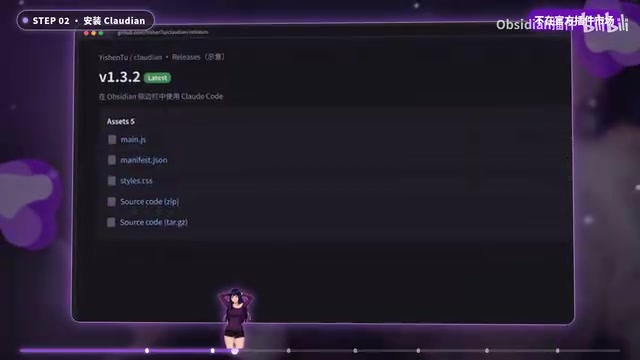
This plugin isn't in Obsidian's official marketplace, so you need to download three files from GitHub. The specific operation is to create a new Claude folder inside the repository's hidden folder, drag the files in, restart Obsidian, and then enable it in the third-party plugin list. Manually installing a plugin is a bit tedious, but once configured you won't have to fiddle with it again.
Step 3: Connect to a Domestic Large Model
When the official interface is inconvenient to use, you can switch to DeepSeekAd or Zhipu. The process is to top up on the open platform, create an API Key, and then fill the interface address and model name into environment variables. This step is the only part of the whole solution that involves "spending money," and the video also reminds that skill invocation consumes API fees.
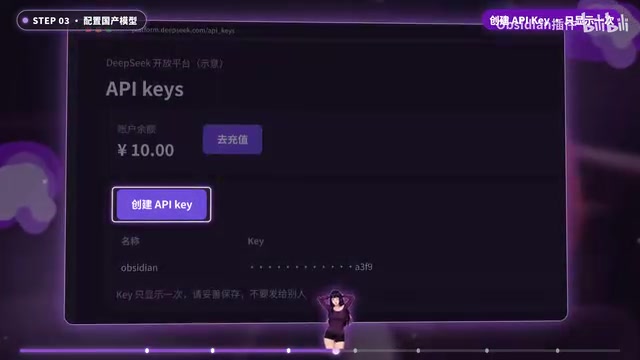
API Key is the identity credential for calling large model services, shaped like a long string of characters, by which the server identifies the caller and bills accordingly, so it should not be written into the body of notes or public repositories. Environment variables are key-value configurations stored at the operating system level, automatically read when a program starts; placing the interface address (Base URL) and model name here avoids hardcoding in code or plugin configuration and makes it easy to switch between different models. It's worth noting that the OpenAI-compatible protocol has become the de facto standard, and most domestic model platforms provide compatible endpoints—as long as you point the Base URL to the corresponding address and fill in the correct model identifier, plugins originally designed for Claude or OpenAI can be turned to call domestic models.
Step 4: Load the Three Skills
Download the official skills repository as a package from GitHub, create a new Skills folder inside the repository's .claude folder, and drag the three skills in. After that, asking AI a question will show that the skills have been recognized. Once this step is complete, AI truly possesses the three specialized capabilities of "formatting," "drawing whiteboards," and "building databases."
How the Three Skills Actually Perform
Markdown Formatting: Automatically Extract Key Points and Add Tags
When faced with a poorly formatted article, you can ask AI to reformat it using the markdown skill—it will extract key points and automatically add tags and callout blocks. This is the most frequently used capability in daily use, suitable for handling long articles clipped from the web and fragmented content jotted down casually.

Whiteboard Mind Map: Generate a Connection Diagram in One Sentence
With another sentence of instruction, a whiteboard mind map with clear connections is generated. The video doesn't elaborate on the complexity and editability of the mind map, but judging from the demonstrated positioning, it's more suitable for quickly sorting out content relationships than as a replacement for fine manual drawing.
Bases Database: Read an Entire Folder and Auto-Classify
The last skill is used to aggregate databases—it reads through the entire clipping folder, automatically classifies, and builds views. For people with large clipping volumes, the value of this step lies in turning "accumulation" into "searchable structure."
Bases is a native database view feature Obsidian introduced in recent years; it treats note frontmatter properties (fields such as tags, dates, status, etc.) as data table columns, thereby filtering, sorting, and grouping notes in table, card, and other forms—similar to layering a structured query on top of plain-text notes. For AI to automatically "build views," the prerequisite is that the notes themselves carry recognizable property fields, so the value of such skills isn't just classification, but also conveniently filling in metadata, making subsequent retrieval and statistics possible.
Realistic Issues to Know Before Use
The video doesn't avoid the limitations: complex formulas occasionally get processed incorrectly and need to be fixed several times. This suggests that AI organization isn't one-and-done—complex content still requires manual review. In addition, skill invocation consumes API fees, and the video explicitly says this solution is more suitable for people who already have a stable workflow—in other words, if your note volume isn't large, the configuration cost may not be worth it.
From installation, plugins, models to skills and practice, after six steps, your note system gains an AI workflow. Its significance isn't to replace thinking, but to outsource mechanical labor like formatting and classification.
FAQ
Is the command line mandatory? Installing Node.js and starting the service require terminal operations, but all subsequent note organization is done through conversation.
Can I avoid using official models? Yes, the video demonstrates two alternatives, DeepSeek and Zhipu, configuring the interface address and model name through environment variables.
What if a skill makes an error? Scenarios like complex formulas may go wrong, and multiple rounds of correction are possible; important content is recommended to be manually checked before archiving.
One-line Summary
Using Obsidian plugins plus Agent Skills and large model interfaces, one sentence lets AI organize your notes.
Related articles

AI Coding Enters the Team Collaboration Era: Interpreting Three Major Moves from Meta, GitHub, and Mistral
Meta acquires Conductor, GitHub Copilot Fusion becomes available, Mistral opens Large 4 weights—three moves show AI coding shifting from code generation to organizing development workflows. This article explains task orchestration, model collaboration, and cost control for developers.

Building a RAG Assistant with Dify: A Practical Guide to Knowledge Bases, Workflows, and Agent Nodes
How should knowledge bases, workflows, and Agent nodes connect in a Dify RAG assistant? We break down the division of labor and wiring logic for a shippable app.
 Tech Frontiers
The AI Industry Doesn't Lack Marketing—It Lacks Good Products
AI faces market selloffs and public skepticism—is marketing really the problem? This analysis of market signals and product experience argues the core困境 is incomplete products and a gap between promises and experience; the only way to change perceptions is to ship better products.