Obsidian + Claudian: A Practical Guide to Building a Personal Knowledge Base for AI

Use Obsidian plus the Claudian plugin to let AI consult your notes before answering, with setup guide and hands-on tests.
Based on Bilibili creator Lan Shu's sharing, this article introduces a practical solution for connecting general large models to a personal knowledge base: using Obsidian as a local Markdown knowledge base and the Claudian plugin to drive Agents like Codex, Claude Code, and DeepSeek to retrieve relevant notes before answering. It covers the differences between general and knowledge-base AI, three routes with cost and privacy trade-offs, complete setup steps, and hands-on tests. It also notes boundaries like mobile unavailability and cloud data-export risks.
Large language models hold vast general knowledge, but they don't necessarily know your specific work habits and project conventions. Bilibili creator Lan Shu shares a solution: use Obsidian as a local knowledge base and the Claudian plugin to connect AI, so that AI consults your notes before answering questions. This article is based on that video, breaking down the configuration process, real-world results, and cost considerations.
Why General AI Needs Your Knowledge Base
In the video, Lan Shu gives two contrasting examples. The first question is "What is my AI work record archiving process?" — without a knowledge base, even with internet access allowed, AI can only offer generic advice; with the knowledge base connected, AI can accurately state the specific process: "extract records → hand over → incremental archiving → return values → read back and verify." The second example concerns version number management for a small Bilibili tool: general AI can only discuss version management principles, while AI that has read the project specifications can give definite rules — modifying program code requires bumping the patch number, while updating only data keeps the tool version and uses timestamps to distinguish data packages.
The root of the difference: the decisions you've made, the reasons you chose a particular method, and the conventions already established in a project — this information is not in the model's training data. The role of the knowledge base is to preserve these "information worth keeping long-term," retrieve relevant notes through tools when you ask questions, and then generate answers based on the materials. The whole process involves no retraining of the model, nor sending the entire library to AI each time.

Answer quality depends on the materials themselves and the retrieval results, so Lan Shu emphasizes preserving sources, dates, and pending items for easy verification.
Three Knowledge Base Routes and the Logic of Choice
The video divides solutions into three categories: online services (file upload with a Q&A interface), local files plus cloud AI, and local files plus local models. Lan Shu chooses the second route, citing the balance of cost, capability, and data autonomy.
Obsidian is essentially a folder, with notes saved as Markdown text that can be opened and modified with any text editor. This means that even if you switch models or tools in the future, the main content remains usable, with minimal migration cost. Local storage doesn't mean being locked to one computer — the knowledge base folder can be placed in sync directories like iCloud or Google Drive, with the cloud service handling multi-device synchronization.
Note that multi-device sync doesn't mean AI capabilities are available on all devices. The Claudian plugin used here only supports desktop Obsidian; on mobile you can manually query the knowledge base but cannot use AI capabilities.
Agent is the key concept here. Unlike simply calling a model API once, an Agent is a runtime framework that can autonomously plan steps, call tools (such as reading and writing files, searching notes), and iterate actions based on results. Claudian doesn't talk to the model directly; it drives an Agent, which decides when to retrieve from the Obsidian library, which notes to read, and whether to write or modify files. Codex, Claude Code, DeepSeekAd Harness, and Grok Build mentioned in the article are all Agent runtimes that can be invoked by the plugin, so configuration requires filling in their respective command-line paths. Understanding this helps clarify: AI can "organize materials itself, modify two files while preserving history" thanks to the Agent's file read/write capabilities, not because the model itself has memory.
RAG (Retrieval-Augmented Generation) is the general paradigm behind knowledge base solutions: first retrieve fragments relevant to the question from the material library, then hand the fragments along with the question to the model to generate an answer. The article emphasizes "no retraining of the model, nor sending the entire library to AI each time" — precisely the typical characteristics of RAG. It separates "memorizing knowledge" from "reasoning and answering": knowledge lives in editable local files, and the model reads it only when needed. This is also why answer quality depends on the materials themselves and the retrieval results — if retrieval fails or the materials are vague, the model can only fall back on general common sense.
Cost and Privacy: Where the Money Goes, Where the Data Goes
Obsidian itself is free, and Claudian is open-source and free. Possible costs come from two places: model services (billed by subscription or usage) and sync services (your choice). Model access is flexible — it can be foreign models like Claude or GPT, domestic models like DeepSeek, or even locally deployed small models.
There's a key distinction regarding privacy: local storage of materials only means the files are managed by you. If you connect to cloud AI, the question content and the relevant content that tools read and provide to the model may still be sent to the corresponding service provider. Users with high privacy requirements should choose to connect locally deployed small models, keeping both data and inference entirely local.

Building from Scratch: Installation and Knowledge Base Initialization
Lan Shu's demo environment is a MacBook Air; Windows and Linux are also supported. The process is roughly as follows:
- Download the Obsidian installer for your system from the official website and install it.
- Create a new vault, give it a name, and choose a location. If you need cross-device sync, place it in a sync drive directory. The "file sync service conflict" prompt can be ignored since the official Sync service is not used.
- Go to Settings → Third-party plugins, disable Restricted Mode, search for Claudian in the community plugin marketplace, install and enable it.
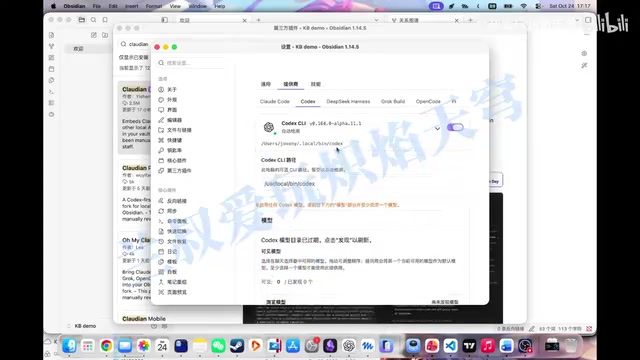
- Switch to Chinese in the plugin options, go to the provider page, enable agents like Codex, Claude Code, DeepSeek Harness, Grok Build as needed, and configure their corresponding command-line paths.
- Click "Discover models" and the plugin will list the models available for the current agent; select one or more.
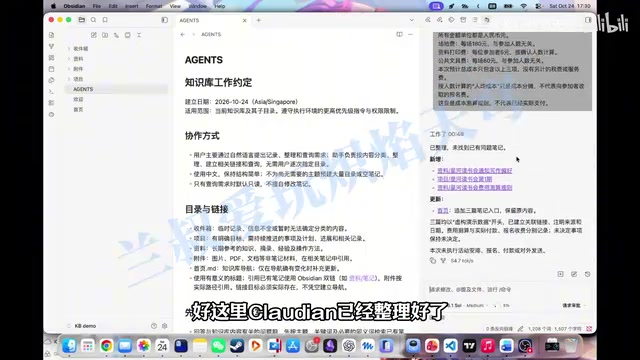
After configuration, the Claudian panel appears in the sidebar. Lan Shu recommends not having users manually create directories, but instead letting AI initialize the knowledge base: create folders like Inbox, Projects, Materials, Attachments, and generate a homepage explaining each directory's purpose and providing navigation.
Then have AI write the organization and query rules into a file, such as agents.md in the root directory, stipulating "check relevant notes before answering, prioritize merging new materials, and clarify when information is insufficient or conflicting." After a new session is established, verify that the rules have been loaded.
Obsidian's "Vault" is not a database or proprietary format — it's just an ordinary folder that Obsidian indexes and displays as a workspace. Notes are stored as pure Markdown text, and images and other attachments are placed in the same directory tree. So "creating a new vault" is essentially choosing a directory, and "switching tools" or "migrating" is just opening the same folder with different software. The "file sync service conflict" prompt mentioned in the article occurs because Obsidian's official Sync service detects that the directory has been taken over by a third-party sync tool like iCloud, and simultaneous syncing by both may cause conflicts — so it can be ignored when not using the official Sync.
Restricted Mode is Obsidian's security switch, which by default disables the running permissions of third-party plugins to prevent unreviewed code from accessing local files. Claudian needs to read and write notes, so Restricted Mode must be disabled before installing and enabling it from the community marketplace. Correspondingly, enabling third-party plugins also means handing read/write permissions of the vault to the plugin and the Agent it invokes; when choosing plugins and Agents, pay attention to their source and permission scope.
Hands-On: Letting AI Take Notes, Cross-Session Queries, and Updates
The demo uses a fictional book club dataset containing writing preferences, event preparation information, and cost rules, deliberately written as chatty, scattered paragraphs. Handed to AI, it automatically completes categorization: writing preferences, first-session project files, and cost calculation rules each go to their proper place, and the homepage generates an index.
The key test is cross-session querying: after creating a new session without pasting materials or specifying which note to open, directly ask "When is the book club meeting, how far along is the preparation, and how much will it cost with the current number of people?" AI needs to find the project records and cost rules itself to calculate the result — 12 people, estimated total cost 300 yuan, 25 yuan per person, with 60 yuan of budget remaining. The video also points out a detail: the materials explicitly state that the fee plan is undecided, so AI cannot set the fee standard for users just because it calculated the per-person cost — the result comes from records, not common-sense guessing.
The second round tests information updates: change the number of people from 12 to 16 and delay the start time by half an hour, stating only the changes. AI modifies two files and preserves the change history; in a new session, it queries 16 people, a 2:30 PM start, total cost 320 yuan, and 20 yuan per person. Total cost rises while per-person cost falls because venue and shared stationery are fixed costs — AI needs to understand both the change in headcount and the cost rules to calculate correctly.
Applicable Boundaries and Next Steps
The barrier to this solution is lower than you might think: users don't need to learn Markdown first, nor design a complex note system — they only need to provide information, express goals, and confirm facts when necessary; organization and querying are left to AI.
The limitations are equally clear: AI capabilities are unavailable on mobile; cloud models carry data-export risks; answer quality is constrained by material completeness and retrieval effectiveness. Lan Shu previews the next episode on how to let other agent tools share the same knowledge base — reading existing configurations and decisions before acting, and writing results back afterward, forming a closed loop.
One-line Summary
Use Obsidian plus the Claudian plugin to let AI consult your notes before answering, with configuration process and hands-on tests.
Paragraph Summary
Based on Bilibili creator Lan Shu's sharing, this article introduces a practical solution for connecting general large models to a personal knowledge base: using Obsidian as a local Markdown knowledge base, and through the Claudian plugin driving Agents like Codex, Claude Code, and DeepSeek to retrieve relevant notes before answering questions. The article uses two cases — archiving processes and version number management — to illustrate the difference between general AI and knowledge-base AI, compares three routes (online services, local plus cloud, local plus local models), and provides complete steps from installation and directory initialization to writing agents.md rules. Hands-on tests show AI can automatically categorize scattered materials, retrieve and calculate across sessions, update records based on partial changes while preserving history. The article also points out boundaries: unavailable on mobile, data-export risks with cloud models, and answer quality constrained by material completeness.
Related articles

Will GitHub Die? Open Source Maintainer Burnout and the Collaboration Crisis in the AI Era
Lex Fridman podcast discussion on open source maintainer burnout and GitHub's predicament: massive pull requests overwhelm core maintainers, and AI worsens code bloat. Using math journal peer review and Poincaré conjecture verification as analogies, the article analyzes why verification in knowledge production must be deliberately slow, and how open source communities can avoid the failure mode of maintainers exiting.

Stop Building Cookie-Cutter AI Websites: 3 Tools That Transform Your Coding Agent
Three tools that boost AI coding agents: FFmpeg skill for local video editing in Claude Code and Cursor, Hallmark's 50 design themes to fix cookie-cutter AI sites, and Jailbreaks' 25+ model prompts.

How America's Gerontocracy Squeezes the Younger Generation
Americans over 55 hold nearly three-quarters of national wealth, alongside an 80-year-old president and elderly congressional leaders. The Atlantic's Idrees Kahloon explains how gerontocracy drives up housing costs, squeezes opportunities for the young, and explores zoning reform and child poverty reduction as practical fixes.