October Open-Source Gem: The Complete Guide to Local Stable Diffusion Deployment

A step-by-step guide to deploying Stable Diffusion locally for free, turning one consumer GPU into a private AI art engine.
The article notes that many paid AI art platforms are built on the free, open-source Stable Diffusion, and that local deployment bypasses paywalls, queues, and censorship for unlimited offline generation. The tutorial starts with verifying installer integrity, stresses that software, archive, and model folders must all use pure English paths to avoid loading failures and crashes, then explains copying ControlNet models into the Models\ControlNet subfolder. The software installs with a lightweight one-click process and auto-detects environment and hardware on launch before opening the browser UI. For creation, it notes only one general model ships by default, advanced styles require manual import, and prompts and parameters need fine-tuning.
AI painting tools often charge hundreds of yuan per month, but you may not know that the core technology behind most of these platforms comes from a completely free open-source project—Stable Diffusion. This article walks you through local deployment step by step: no internet connection required, unlimited generation, and a single consumer-grade graphics card is all it takes to make AI capability your own private asset.
Why Choose Local Deployment of Stable Diffusion?
Many commercial AI painting platforms on the market are essentially Stable Diffusion wrapped in a login screen, paywall, and queueing mechanism, then sold at several times the price. Local deployment lets you use the technology at its source: fully open-source, completely free, entirely local—no queues, no limits, no internet, no censorship. Whether you're a creative professional, an e-commerce seller, or just an ordinary person curious about AI, you can use it for commercial-grade creation.

Stable Diffusion is a Latent Diffusion Model released in 2022 by the CompVis team at LMU Munich in collaboration with Stability AI. Its core idea is to first compress images into a low-dimensional latent space, then perform the denoising diffusion process within that latent space, greatly reducing VRAM and compute requirements—this is precisely the technical precondition that allows ordinary consumer-grade graphics cards to run it. The model weights are released under open licenses such as Creative ML Open RAIL-M, permitting personal and even commercial use, which is why it has become the technical foundation for a large number of commercial painting platforms. So-called "local deployment" means downloading the model weights and inference program to run on your own computer, with all computation performed on your local GPU; prompts and generated results never pass through any server, which is why it inherently offers privacy and freedom from censorship.
Installation Preparation: Verify Files and Path Conventions
Before starting, confirm that the downloaded installation package is complete and undamaged, to avoid a corrupted archive caused by an interrupted download. Right-click the main program installer and select install to launch the official wizard. The software uses a lightweight, minimalist installation mechanism that runs automatically from start to finish with no manual parameter tuning—even complete beginners can do it in one click.
After installing the main program, extract the model archive into a dedicated folder you've reserved. Once extracted, it contains the complete model files and a detailed operations guide. It's recommended to read the document in full first, as it clearly specifies where files should be placed, effectively preventing issues like model loading failures.
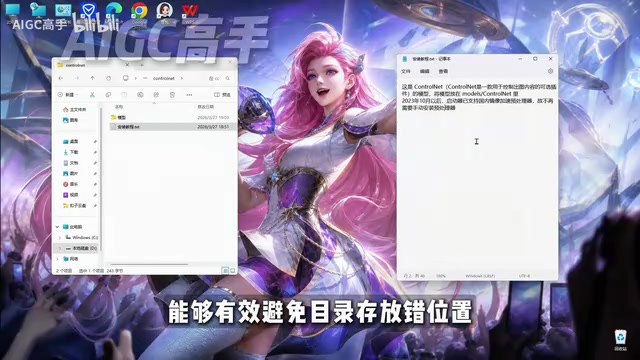
When migrating models, open the extracted model folder, press Ctrl+A to select all and Ctrl+C to copy, then go to the Models\ControlNet subfolder under the software installation directory and press Ctrl+V to paste. If matching files already exist, simply skip the overwrite.
Core rule: the software installation path, the archive storage directory, and the model storage folder must all use pure English paths. Chinese characters, spaces, and special symbols are strictly prohibited. Non-standard paths can easily cause model loading failures, rendering errors, program crashes, and other problems.
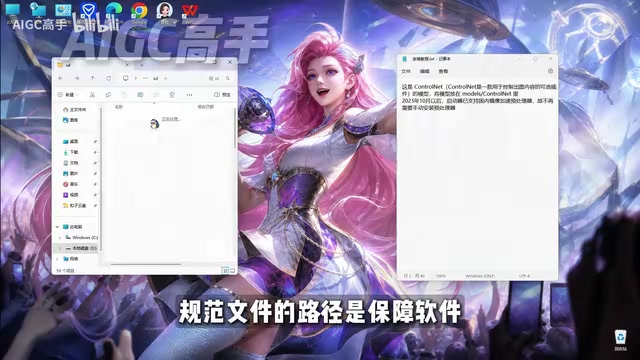
ControlNet is an extension control module for Stable Diffusion, proposed by lllyasviel in 2023. Regular text-to-image relies solely on prompts to "describe" the image, whereas ControlNet allows an additional reference image (such as a line drawing, pose skeleton, depth map, or edge map) as input, precisely constraining composition and character poses by locking in this structural information. It is implemented by copying part of the diffusion model's encoder and adding zero convolution layers, so training does not damage the original model's capabilities. The article requires placing model files into the Models\ControlNet subdirectory precisely because the main program looks for these control models at that path; placing them in the wrong location results in the "installed but unselectable" situation. For creators who need to fix poses or reuse line drawings, ControlNet is often the key component that determines whether the output is usable.
Launch and Initialization: Lightweight, Easy to Use, Beginner-Friendly
After completing model deployment, return to the software root directory and double-click the icon to launch. The software focuses on being lightweight and easy to use, requiring no manual environment configuration or dependency plugin installation; upon launch it automatically performs environment detection and initialization, greatly lowering the entry barrier to AI painting.
Two practical auxiliary features are built in: a smart hardware detection tool that automatically reads graphics card information and matches optimal rendering parameters, and an integrated model management module that supports adding, deleting, and updating models within the software without manually manipulating folders.
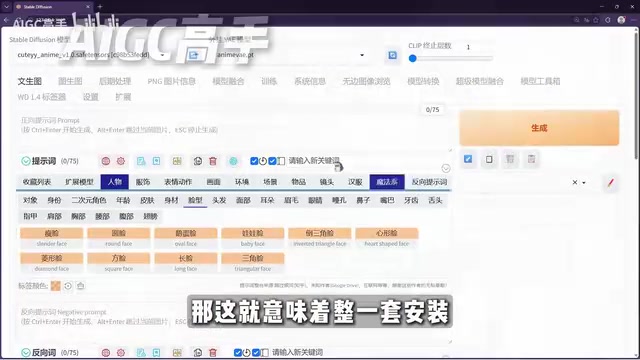
During launch, the console displays resource loading progress in real time. Once the runtime environment and all models are fully loaded, the browser interface pops up automatically, indicating that deployment is complete.
The "runtime environment" mentioned in the article typically refers to the whole set of dependencies including the Python interpreter, the PyTorch deep learning framework, and the CUDA/cuDNN graphics driver libraries. Native Stable Diffusion requires users to install Python themselves, configure a virtual environment, and choose the PyTorch version corresponding to their graphics card model; when versions mismatch, error messages are often obscure and hard to understand—this is the main barrier that drives beginners to give up. Integrated launchers package these steps in advance, automatically detecting at launch whether the local machine has a usable environment and, if missing, silently installing or invoking a built-in version. Graphics card detection relies on NVIDIA's NVML interface to read VRAM capacity and compute capability level, which determines the resolution ceiling and whether to enable half precision (fp16) or VRAM optimization strategies. Understanding this makes it clear why the same software performs noticeably differently on different graphics cards.
Start Creating: Model Import and Generation Workflow
Beginners often find there is only one built-in model—this is normal, as the software ships with just one general-purpose model by default; advanced models for Chinese-style art, special effects, and creative styles must be imported manually. Each model comes with a preview image and suits different creative styles; choosing on demand reduces repeated testing.
When creating, fill in precise image prompts, adjust generation parameters, and click generate to automatically render the image. The workflow is clear and easy to understand—as long as you avoid path issues, you can build a stable AI painting environment. Once proficient, you can freely combine models, refine prompts, and produce high-quality work in batches.
Prompts are the primary way to communicate with diffusion models, typically composed of descriptors for subject, style, quality, and composition along with weighting syntax; negative prompts are used to exclude unwanted elements such as deformed hands, watermarks, and low clarity. Among generation parameters, sampling steps determine the number of denoising iterations—too few steps yield rough images, while too many give diminishing returns; CFG Scale controls how closely the model follows the prompt—too high causes oversaturated colors and rigid composition; the random seed determines the initial noise, and fixing the seed allows you to reproduce results under the same prompt, making it easy to tune parameters one at a time. Understanding how these parameters interact will help you produce high-quality images more reliably than blindly piling up prompts.
Conclusion
Local deployment of Stable Diffusion not only saves you the cost of ongoing payments but also gives you full control. Follow path conventions and read the documentation carefully, and even complete beginners can get started quickly. Start now and make AI your own private creative engine inside your computer.
Related articles

Firebase AI Logic + Gemini Nano 4: A Practical Guide to Android AI Development
How Firebase AI Logic and Gemini Nano 4 help Android developers ship generative AI: App Check and prompt templates ensure security, hybrid routing cuts latency and cost, Spend Caps control budgets, and AI monitoring provides observability.

Microsoft AI Agent Breakthroughs: More Efficient, Better at Code and Weather Forecasting
Microsoft Research Focus Issue 97: ForkPilot cuts agent inference costs, Cabra reveals coding agents' code-understanding gap, Teletune learns workflows from logs, PBC improves extended forecasts, BioEMU-2 opens preview.

Prime Intellect Releases Prime Mega MoE: Trainable Fused MoE Kernel with 3.11x Forward Speedup
Prime Intellect releases Prime Mega MoE, adding backpropagation to DeepSeek's fused Mega MoE kernel for trainability. Up to 3.11x forward speedup and 34% faster Qwen3 MoE training steps in prime-rl.