Ollama + DeepSeek + Dify: A Complete Guide to Building a Local AI Agent

Complete walkthrough for building a local AI agent with Ollama, DeepSeek, and Dify on Windows.
This guide covers the full stack for running a local AI agent on Windows: understanding the four agent components (perception, decision, action, memory), choosing Dify over consumer platforms like Coze for enterprise use, deploying Docker and Dify, connecting Ollama with DeepSeek-R1, and orchestrating a travel assistant agent using prompts, a RAG knowledge base, and live weather tools. Key pitfalls — Chinese paths, registry mirrors, incomplete Ollama URLs — are all flagged.
Want to build a truly capable AI agent on your local machine — not just a chatbot that makes small talk? This guide is based on a hands-on tutorial by Bilibili creator "固化科技," walking through the complete process of deploying the DeepSeek large language model with Ollama on Windows, then using the open-source platform Dify to build an enterprise-grade travel assistant agent with a knowledge base. From concept to working deployment, step by step.
What Exactly Is an Agent?
The most intuitive way to understand an AI agent is to think of Jarvis from Iron Man: you give it a command, it breaks that command down, calls the right tools, and achieves the goal. At its core, an agent is "an intelligent entity capable of perceiving its environment, making decisions, and taking actions."
The tutorial author offers a helpful framework — think of an agent as a digital mapping of human behavior. A person sees dark clouds (perception), decides it might rain (decision), gets up to grab an umbrella (action), and later remembers to check the forecast next time (memory). An agent abstracts these four human modules — perception, decision-making, action, and memory — into a machine-executable workflow.
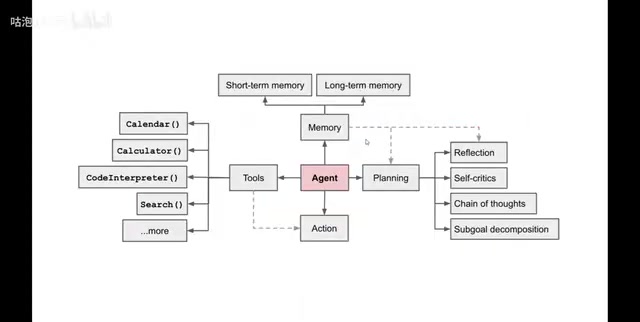
In this architecture, the large language model plays the most critical role: the "brain." Traditional machine learning handled analytical decision-making, while today's LLMs can make generative decisions and create content. It's precisely the maturity of LLMs that has taken agents from concept to real-world application.
The Four Core Components of an Agent
Based on the classic framework proposed by OpenAI engineers, a complete agent consists of four parts:
- Planning: Analyzing and breaking down complex problems into steps — usually implemented via prompts and chain-of-thought reasoning
- Memory: Storing information from interactions, split into short-term and long-term memory
- Tools: Calendars, calculators, code interpreters, search engines, weather APIs, etc. — the agent chooses which to call based on context
- Action: Executing specific tasks for each decomposed sub-problem
Take "什么值得买" (a Chinese shopping recommendation platform) and its assistant Xiaozhi as an example: a user types "I want to buy a phone under 5,000 RMB," and the agent understands the need, aggregates information from across the web, and delivers a curated recommendation — essentially moving the in-store sales associate experience online. Medical consultation, financial analysis, and DingTalk assistants are all mature agent use cases.
Background: Chain-of-Thought, ReAct, and RAG
Chain-of-Thought (CoT) is a prompting technique that encourages a large model to output its reasoning process step by step before giving a final answer. Research shows that when models are asked to "think step by step," accuracy on complex tasks improves significantly. DeepSeekAd-R1 has this reasoning mechanism built in — it goes through a "thinking" phase before delivering a conclusion, making it more reliable in the Planning stage than standard dialogue models.
ReAct (Reasoning + Acting) is another common agent framework that has the model alternate between reasoning and tool use: first "think" about what to do next, then "act," then review the result and "think" again — until the task is complete. This pattern is especially suited to complex multi-step tool-calling tasks, such as querying weather, checking venue opening hours, and calculating transport costs for a travel itinerary.
Why Choose Dify?
There's no shortage of agent platforms out there — Wenxin Agent Platform, ByteDance's Coze, Tencent Yuanqi, and others all emphasize no-code construction. They're largely similar in approach, functioning more like a "App Store" ecosystem aimed at consumers.

Dify occupies a different niche. It's an open-source LLM application development platform that combines Backend as a Service (BaaS) with LLMOps principles, enabling non-technical team members to participate in defining AI applications and managing data operations. Crucially, it offers a community edition that supports local deployment — meaning organizations can build internal knowledge bases and custom agents around their own data and model infrastructure, entirely within a private network.
One-line distinction: Coze and similar platforms are great for individual Agent experimentation, while Dify is built for enterprise-grade production use.
Background: LLMOps, BaaS, and RAG
LLMOps (Large Language Model Operations) applies DevOps principles specifically to LLM applications, covering the full lifecycle: model version management, prompt iteration, logging, monitoring, and performance evaluation. BaaS (Backend as a Service) means delivering backend capabilities — databases, authentication, file storage — directly to developers via APIs, eliminating the need to build a backend from scratch. Dify combines both: developers get ready-to-use infrastructure while being able to continuously iterate and monitor their LLM applications without building the entire engineering stack themselves.
RAG (Retrieval-Augmented Generation) is the underlying mechanism behind Dify's knowledge base feature: uploaded documents are chunked, vectorized, and stored in a database. When a user asks a question, the system retrieves relevant passages and injects them as context into the prompt, allowing the model to "cite" content from private knowledge bases and reducing hallucinations.
Environment Setup and Deployment
The tutorial demonstrates the following environment. Matching it closely will save you a lot of debugging:
- OS: Windows 11
- Runtime: Docker
- LLM deployment: Ollama + DeepSeek-R1
- Dify: Open-source community edition 0.15.3
- Minimum hardware: CPU ≥ 2 cores, RAM ≥ 4GB
Step 1: Install Docker
Download the Windows version (AMD64) from docker.com and run the installer. During setup, you'll need to enable WSL or Hyper-V virtualization support; restart when prompted. On first launch, Docker may prompt you to update WSL (Windows Subsystem for Linux) — just press Enter to proceed.
Note: If deploying inside a VM, you may run into virtualization-related issues. You'll need to enable virtualization in BIOS and turn on Hyper-V — this tutorial doesn't cover those steps in detail, so search for a solution specific to your VM setup.
Background: WSL, Hyper-V, and Docker on Windows
WSL (Windows Subsystem for Linux) is Microsoft's official compatibility layer that lets you run Linux binaries directly on Windows without a virtual machine. Docker Desktop on Windows relies on either WSL 2 or Hyper-V to create a lightweight Linux container environment — containers are fundamentally isolated processes running on a Linux kernel, so Windows needs Linux-running capability first. Hyper-V is Windows' built-in hardware-level virtualization platform; WSL 2 achieves lower resource usage and faster file I/O through a highly optimized lightweight VM. Either works, but WSL 2 is recommended on modern Windows 11 systems. If your host machine is itself a VM (e.g., VMware), you'll need to check "Virtualize Intel VT-x" in VMware settings and manually enable Hyper-V under "Turn Windows features on or off" — otherwise Docker Desktop won't be able to start containers.
Step 2: Deploy Dify
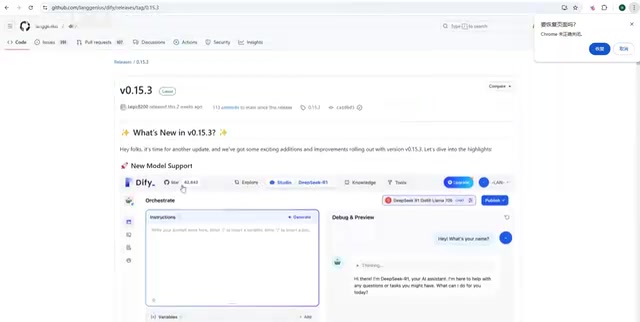
Download the release 0.15.3 source archive (tar.gz or zip) from the Dify GitHub repository and extract it to a path that contains only English characters — paths with Chinese characters are a common source of cryptic errors.
Navigate into the docker directory and copy the environment config file:
cp .env.example .env
Since Windows doesn't support the cp command, just manually copy .env.example and rename it .env. Then run:
docker compose up -d
Almost everyone hits image pull failures here because the default registry is inaccessible. The fix: open Docker Desktop → Settings → Docker Engine, add a Chinese open-source mirror registry under registry-mirrors in daemon.json, click Apply & Restart, then re-run the command.
Among the downloaded images, Worker, API, and Web are Dify's business services; nginx, Sandbox, SSRF, DB, and Redis are the supporting infrastructure components. Once everything is up, run docker compose ps — all containers should show a status of up.
Step 3: Access and Initialize
Open a browser and go to http://localhost/install to complete initialization and set up your admin account. If Dify is deployed on a remote server, replace localhost with the server's IP address.
Connecting a Local Model and Building an Agent
Configuring the Ollama Model
Installing Ollama is straightforward — download the Windows installer from ollama.com and run it. Launch a model with ollama run deepseek-r1; on first run it will download the ~4.7GB 7B model. Use ollama list to view downloaded models.
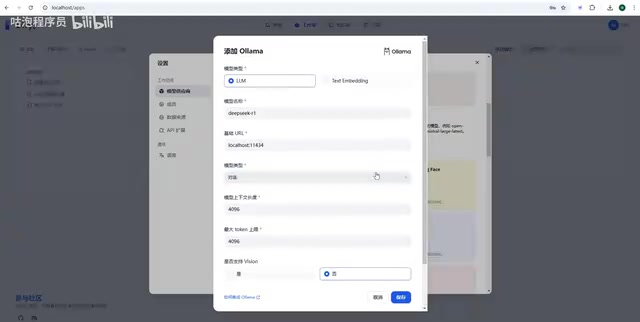
In Dify, go to Settings → Model Providers, select Ollama, and add a model. Set the base URL to http://localhost:11434 (when Dify runs inside a container, it needs the full address), set the model name to deepseek-r1, choose the chat type, and save.
Two common errors: the URL is incomplete, or the model name is misspelled (e.g., missing -r1). If Ollama is deployed on a separate server, you'll also need to set the OLLAMA_HOST environment variable to allow external access and restart the application. For any errors, just paste the error message into a search engine — solutions are almost always available.
Orchestrating the Travel Assistant Agent
Click Create Blank App, select the Agent type, and name it "Travel Assistant." The key orchestration components are:
- Prompt: Defines the agent's role and behavior; complex tasks are broken down via chain-of-thought (corresponds to Planning)
- Variables: If you need to pass context into the agent via API, add text/paragraph/numeric variables here
- Context (Knowledge Base): Populate with past travel plans and expertise to make responses more informed (corresponds to RAG/Memory)
- Tools: LLMs can't query weather natively — integrating a weather tool lets the agent fetch real-time data when designing itineraries (corresponds to Tool + Action)
When publishing, you can also configure the agent's reasoning mode (e.g., ReAct, chain-of-thought, sub-task decomposition). Test it with a prompt like "I'm in Shanghai and want to travel to Tokyo for seven days — can you design a travel itinerary?" DeepSeek will think through the problem before responding.
One caveat: a locally run 7B model has limited reasoning capacity and may not deliver the quality you're hoping for. For better results, either use higher-end hardware to run a larger model, or connect a third-party model API — token costs are actually quite low and offer much better value.
Wrap-Up
The Ollama + DeepSeek + Dify stack provides a path to building AI agents where data stays local and the organization stays in control. Ollama handles local model serving, Dify manages application-layer orchestration and knowledge base operations, and DeepSeek-R1 provides the reasoning-capable decision core. For teams looking to build private knowledge bases or domain-specific agents within an internal network, this is a low-barrier starting point for rapid validation.
The real challenge isn't deployment — it's everything that comes after: prompt design, knowledge base quality, and tool orchestration. Those are what determine whether your agent is actually smart.
Related articles

How Big Can Stars Really Get? The Physical Limits of the Largest Stars
Red supergiants are the largest stars by volume, with radii up to 2,000 times the Sun, engulfing the inner solar system. But there is no precise upper limit on stellar size—models predict up to 15,000 solar radii. The most massive blue stars are far smaller than red supergiants—biggest and heaviest are two different things.

Apple HomeView Smart Display Full Feature Breakdown: Wall-Mount or Desktop, $299
Apple launches HomeView, a $299 smart display with wall-mount and desktop options, 12MP camera for facial recognition, smart home control, music playback, and recipe step-by-step cooking. Full breakdown of watch faces, apps, privacy, and cooking integration.

Where Did the Promised New Studio Go? Craft Computing Answers After Five Years
Craft Computing's host responds to viewer questions: the new studio promised five years ago was shelved as construction costs soared from $30,000 to $75,000, and was replaced by a 168-square-foot garage conversion.