Ollama Modelfile in Practice: Deploy Your Own Custom DeepSeek-R1 Model Locally

Build a custom local DeepSeek-R1 model using Ollama Modelfile for offline AI with full data privacy.
This guide walks through using Ollama's Modelfile to create a custom DeepSeek-R1 7B model that runs fully offline. It covers key Modelfile instructions, the significance of the 0.7 temperature parameter, DeepSeek-R1's chain-of-thought reasoning capabilities, and built-in commands for managing conversation flow — offering a practical path to private, customizable local AI deployment.
As demand for local deployment and customization of large language models continues to grow, Ollama has become a go-to tool for developers and AI enthusiasts alike. This article walks through a complete hands-on example, breaking down exactly how to use a Modelfile to create and run a custom model based on DeepSeek-R1 — achieving both powerful reasoning capabilities and full data privacy.
Ollama and Modelfile: The Core Mechanism for Local Model Customization
Ollama was launched in 2023 as an open-source local model runtime built on top of llama.cpp — a C++ inference engine developed by Georgi Gerganov. Through quantization, llama.cpp compresses model weights from 32-bit floats down to 4-bit or 8-bit integers, making it possible to run large models on everyday consumer hardware. Ollama builds on this foundation with a Docker-like model management experience, including a built-in model registry, REST API, and cross-platform support — dramatically lowering the barrier to local deployment.
What makes Ollama powerful is how it wraps complex deployment workflows into clean command-line operations. The Modelfile is the heart of the customization system — similar to Docker's Dockerfile, it's a declarative config file where you specify the base model, parameter presets, system prompts, and other key settings to quickly spin up a tailored model.
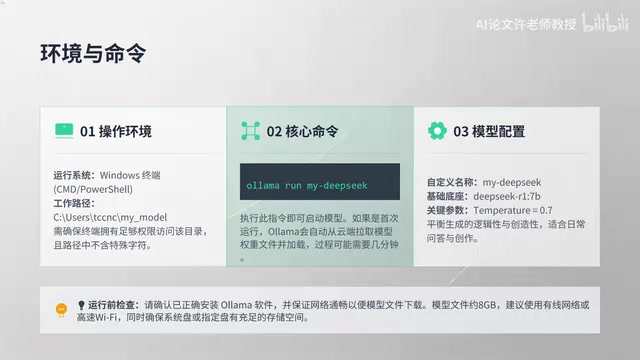
The demo environment shown here runs on Windows, with the working directory set to a My_Model folder under the user's home directory. The core launch command is:
ollama run my-deepseek
This command starts the custom model built earlier via Modelfile — based on DeepSeekAd-R1 7B with a preset temperature of 0.7. The temperature parameter originates from the Boltzmann distribution in statistical mechanics. In language models, it controls how "flat" the probability distribution from the Softmax function becomes: as temperature approaches 0, the model nearly always picks the highest-probability token, producing highly deterministic but potentially repetitive output; as temperature rises, lower-probability tokens get more chances, resulting in more diverse but potentially less coherent output. The value of 0.7 is an empirically optimal sweet spot in engineering practice — it preserves enough logical consistency while avoiding overly mechanical output, making it ideal for reasoning tasks where some flexibility is desired.
Typical Modelfile Structure
A standard Modelfile usually contains the following key instructions:
FROM: Specifies the base model, e.g.,deepseek-r1:7bPARAMETER: Sets runtime parameters, e.g.,temperature 0.7SYSTEM: Defines a system-level prompt to shape the model's role and behaviorTEMPLATE: Customizes the conversation template format
Just a few lines of config are enough to wrap a general-purpose model into a specialized assistant with a defined personality and tuned parameters — that's the core value of the Modelfile mechanism.
Hands-On Demo: DeepSeek-R1's Step-by-Step Reasoning
DeepSeek-R1 is a reasoning-enhanced large language model released by DeepSeek in early 2025. Its core innovation lies in adopting a reinforcement learning training paradigm — specifically the GRPO (Group Relative Policy Optimization) algorithm — which teaches the model to "think before answering" without relying on large amounts of manually annotated chain-of-thought data. The R1 series comes in sizes ranging from 1.5B to 671B parameters. The 7B version strikes an excellent balance between low hardware requirements and strong reasoning performance that approaches early GPT-4 levels, making it the most cost-effective choice for personal deployment.
Once the model is running, the demonstrator poses a specific math problem, asking the model to work through it step by step. Upon pressing Enter, the terminal first displays a Thinking state — a hallmark of the DeepSeek-R1 series, indicating the model is performing internal reasoning rather than jumping straight to an answer.

The model's response is thorough: from invoking the Pythagorean theorem, to step-by-step calculation, to logical verification — the entire reasoning chain is clearly visible. This ability to "show its thinking" is the core advantage of DeepSeek-R1 as a reasoning model.
Why Visible Reasoning Matters
The "step-by-step reasoning" capability demonstrated by DeepSeek-R1 is formally known as Chain-of-Thought (CoT) reasoning. The concept was introduced by Google researchers Wei et al. in 2022, who found that simply prompting a model to "think step by step" could dramatically improve accuracy on complex reasoning tasks. DeepSeek-R1 goes a step further by internalizing CoT as a native model behavior — through reinforcement learning, the model learns to autonomously expand its reasoning process within <think> tags before outputting a final answer.
Compared to traditional models that output conclusions directly, a visible reasoning chain delivers two practical benefits: first, it increases answer credibility, as users can verify each logical step; second, it aids debugging and learning — in domains like math, code, and logical reasoning where accuracy is critical, an explicit thought process effectively reduces hallucination risk. This kind of explicit reasoning chain also carries significant auditability value in high-stakes fields such as healthcare, law, and finance.
Three Key Highlights: Parameter Customization, Reasoning Power, and Local Privacy
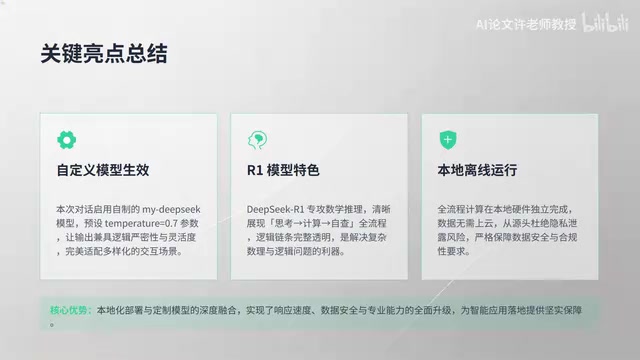
This hands-on demo highlights three standout value points:
First, custom parameters work reliably. The 0.7 temperature preset in the Modelfile was confirmed to be active during actual interaction, validating the reliability of Ollama's customization mechanism. Developers can lock in complex configurations once, then fully reproduce them with a single command.
Second, DeepSeek-R1's reasoning capability is on full display. The step-by-step math solution demonstrates that even a 7B-scale model is quite capable on reasoning tasks — perfectly suited for running locally on a personal computer.
Third, everything runs offline locally — your data stays private. The entire inference process requires no internet connection; data never leaves your machine. Local LLM deployment carries significant weight in terms of enterprise compliance and data governance. Under regulations like GDPR and China's Data Security Law, sending sensitive data to third-party cloud AI services can introduce compliance risks. A local deployment naturally satisfies the requirement to keep data on-premises, making it especially well-suited for use cases like medical record analysis, legal document processing, and internal enterprise knowledge base Q&A. Running offline also eliminates API call latency and costs, offering a meaningful TCO (total cost of ownership) advantage in high-frequency usage scenarios.

Efficient Interaction: Essential Conversation Control Commands
Ollama provides a set of built-in commands for managing conversation flow. Getting comfortable with these can significantly boost your productivity:
/clear: Clears the current context and starts a fresh conversation. Very useful when switching topics or when the context grows too long./bye(orexit): Exits the current session./show: Displays the current model's configuration details, including parameters, template, system prompt, and more.
These commands bring the local model experience closer to a polished command-line tool. /show is particularly handy — you can verify at any time that the model loaded your custom configuration as expected, saving you from repetitive troubleshooting. It's also worth noting that /clear flushes the model's context window cache: during a conversation, LLMs continuously accumulate message history as input. An overly long context not only slows down inference but can also cause the model to "forget" earlier instructions. Clearing the context periodically helps maintain interaction stability and response efficiency.
Conclusion: A Practical Path to Building Your Own Local AI
This hands-on walkthrough lays out a clear, actionable path to local AI deployment: using Ollama's Modelfile mechanism, anyone can wrap an open-source reasoning model like DeepSeek-R1 into a custom tool with minimal friction — and enjoy powerful reasoning capabilities in a fully offline environment.
For users who want to balance data security, cost control, and customization flexibility, the Ollama + DeepSeek-R1 combination is a solution worth taking seriously. It not only dramatically lowers the barrier to running large models locally, but also makes "owning an AI assistant that's truly yours" a concrete reality.
Key Takeaways
Related articles

DeepCell: One-Click AI Generation of Documents, Spreadsheets, and Slides
DeepCell tops Product Hunt with one-click generation of documents, spreadsheets, and slides, using the .deepcell format for linked updates, designed for System 2 tasks like modeling and sales reviews.

Doneas: 15-Minute Daily Accountability Calls That Keep Indie Developers From Procrastinating
Doneas is a daily accountability tool for indie developers: plan tasks on Monday, join a 15-minute call with five builders each day, and log deliveries on a public progress page. This article analyzes its core mechanics, effectiveness, and potential issues around retention and matching.

Fastlane 2.0: Fully Automated AI Ad Campaigns, From Creative to Optimization
Fastlane 2.0 is an AI ad automation tool: enter your website and it learns your brand, generates video and image ads, and runs and optimizes them on Meta, TikTok, Instagram, and YouTube.