OMLX 0.7.1 Integrates Splash: Major Speedup for MLX Model Inference on Mac

OMLX 0.7.1 integrates Splash as an external engine, bringing standard MLX model decode speed on par with custom setups.
OMLX 0.7.1 makes Splash an external inference engine, enabling standard Qwen 3.6 35B MLX models to match the decode speed, time to first token, and prefill speed previously achievable only with Splash-custom models. The integration relies on three conditions: Splash no longer requiring Inco.ai custom models, Paper Nook's Splash.M1 port enabling M1/M2 support, and OMLX 0.7.1 RC1's external engine option. Setup requires enabling external engines, installing Splash 1.3.0+, and downloading the matching D-Flash2 draft model; real-world tests reach 92.8 tokens/s. The author keeps OMLX for its router capability to flexibly schedule models of different sizes.
In the field of local large-model inference, Mac users have long faced an awkward trade-off: either tolerate slower decode speeds or use model versions customized for a specific engine. A recent key update to OMLX changes this—by using Splash as an external inference engine, standard MLX models can now achieve speeds previously available only to custom models.
From Behind to On Par: The Benchmark Shift
According to tests by the YouTube channel Joe Metalone, Splash (an inference engine from Inco.ai) previously led OMLX clearly on three metrics when running its custom Qwen 3.6 35B: decode speed, time to first token, and prefill speed. At the time, the author also noted that OMLX's developers iterate extremely quickly and would likely catch up soon.
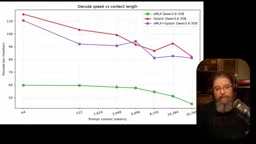
The latest benchmark confirms this. After setting Splash as an external engine in OMLX 0.7.1 and using the standard Qwen 3.6 35B MLX model (rather than the custom version), decode speed is essentially on par with the Splash custom setup, and time to first token and prefill speed have also caught up with the previous leader. This means users no longer have to choose between "speed" and "general-purpose models."
Decode speed, time to first token, and prefill speed
These three metrics capture different aspects of the local inference experience. Prefill refers to the stage where the model reads the entire prompt and builds the KV cache, determining the processing time before generation begins after a question is asked; time to first token (TTFT) is the total latency from sending a request to emitting the first token, directly corresponding to the "responsiveness" of interaction; decode speed (tokens/s) is the subsequent per-token generation rate, determining the overall wait time for long answers. In multi-turn conversations, the KV cache can be reused, diluting prefill overhead, so in daily use decode speed often affects perceived performance more—which is why this article uses 92.8 tokens/s as the main comparison basis.
Three Key Changes Made Integration Possible
According to the video analysis, this integration depends on three conditions being met simultaneously:
First, the Splash repository no longer requires Inco.ai's custom models. According to the author, any variant of Qwen 3.6 35B or Qwen 3.8 27B can be used with Splash.
Second, an unofficial port called Splash.M1 (from Paper Nook) has appeared, allowing the Splash inference engine—which originally did not support M1/M2 chips—to run on older Apple Silicon.
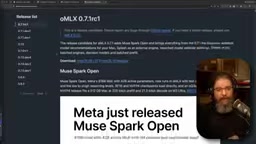
Third, OMLX 0.7.1 release candidate 1 introduced the "Splash as an external engine" option. This version is currently in the dev release channel, with the stable release usually following soon.
Draft Model and Speculative Decoding
The D-Flash2 draft model mentioned repeatedly in the article corresponds to the "speculative decoding" technique in large-model inference. The basic idea is: use a much smaller, faster draft model to first "guess" several subsequent tokens, then have the target large model verify them in parallel in one pass; correctly verified tokens are accepted directly, and incorrect ones are rolled back and recomputed from the first mismatch. Since one verification step can cover multiple tokens, overall decode throughput improves significantly while the output distribution remains consistent with the target model. D-Flash2 is the small model paired with Qwen 3.6 35B, so the external engine checks whether it is in place before enabling—without the draft model, the acceleration chain cannot be established.
Configuration Steps: A Few Settings to Activate
After confirming in the OMLX settings panel that the version is 0.7.1 RC1, go to Integration Settings and enable external engines. OMLX will automatically detect the installed Splash and prompt whether an upgrade is needed—according to the video, Splash requires at least version 1.3.0, which can be updated via the same brew install command.
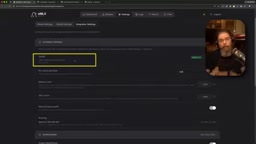
Next, download the matching D-Flash2 draft model. For the Qwen 3.6 35B A3B used by the author, search for the corresponding D-Flash2 version from IncoAI in the model downloader and add it. Then, in the model settings' advanced options, enable "use external engine" and select Splash (currently the only option); the system will automatically verify whether the draft model is in place.
After completion, the OMLX dashboard shows token generation speed reaching 92.8 tokens/s. The author says this far exceeds the usual level when running standard OMLX, and in practice it even feels faster. For Qwen 3.8 27B, the author expects a similar improvement, but performance on their 36GB memory machine is insufficient for daily use, so they did not test it.

Why Choose OMLX Instead of Using Splash Directly
The author's reasoning is quite practical: OMLX still acts as a router and can schedule other models. In the software he builds, many specific tasks switch to smaller specialized models rather than always using Qwen 3.6 35B for "overkill" inference. Keeping OMLX as a unified entry point while enjoying Splash's inference acceleration is a more flexible choice.
The significance of this integration is that the local inference toolchain is moving from "each doing its own thing" to "pluggable engines." For Mac developers, the combination of standard models plus external acceleration engines lowers the barrier to trying new inference technologies.
The Positioning Difference Between MLX and Inference Engines
MLX is Apple's unified-memory machine learning framework built for Apple Silicon, with models distributed in MLX format; OMLX and Splash are inference runtimes built on top of it, responsible for engineering aspects such as scheduling, batching, caching, and sampling. The same MLX weights can be loaded by different runtimes, yet performance can differ noticeably—this is precisely the premise that makes "standard models + external engines" viable. Making the engine a pluggable external component means the model format remains universal and acceleration capabilities evolve independently, so users do not have to lock themselves into a specific engine's custom weights in pursuit of speed.
Practical Recommendations
If you are on an M1/M2 device, first verify compatibility using the Splash.M1 port; M3 and newer chips can use the official Splash directly. Be sure to confirm that the Splash version is at least 1.3.0, and download the D-Flash2 draft model for the corresponding model in advance; otherwise the external engine option will not take effect. If you prefer not to use the dev channel, you can wait for the OMLX stable release before upgrading.
Related articles

Running Uncensored AI Locally on Your Phone: LFM3 Hands-On Test and Guide
Learn how to run Liquid AI's LFM3 1.7B uncensored model locally on iPhone and Android—no GPU or network needed. Includes On Device LLM and Layla steps, speed tests, and privacy benefits.

Claude Launches Collaborative Sheets and Whiteboards, Taking On Microsoft and Google Directly
Anthropic rolls out beta Claude Sheets and Whiteboards to paid users, enabling one-prompt spreadsheets with formulas and turning verbal plans into collaborative boards—taking on Microsoft and Google directly.

Generate a Spreadsheet with One Sentence? A Deep Dive into Claude Sheets and Pitfall Guide
Claude Sheets beta review: generate collaborative spreadsheets with formulas and dropdowns from one sentence, but the 100,000-cell cap and plan usage limits may bottleneck you sooner than expected. Includes three business scenarios, compliance limits, and a five-step pitfall checklist.