One Command to Deploy a Local AI Server: The Complete ODS Guide for LLM, RAG, and Image Generation

ODS deploys a complete local AI stack — LLM, RAG, image generation — with a single command, eliminating self-hosting friction.
ODS (Osmatic Deployment System) is an open-source local AI stack that deploys LLM inference, a web chat interface, RAG, voice agents, workflows, and image generation with a single command. It supports Linux (NVIDIA/AMD/Intel Arc), Windows (WSL2), and macOS (Apple Silicon), and eliminates port conflicts through pre-set conventions like fixing OpenWebUI at localhost:3000. Licensed under Apache 2.0 with ~6,300 GitHub stars, the current stable release is V6.0. The article also addresses the real costs of going local: cloud bills are replaced by electricity, hardware, and time, VRAM is the key bottleneck, and privacy claims should be verified through your own network monitoring.
Picture this: it's Saturday morning, you sit down with your coffee ready to run a local AI on your own machine, and four hours later you've got seven browser tabs open, your terminal is screaming port conflicts, three half-installed tools refuse to talk to each other, and the config files look like they were written in a language humans were never meant to read. If that scenario feels familiar, an open-source project called ODS (Osmatic Deployment System) might be worth your attention. Its goal is straightforward: eliminate the friction of standing up a self-hosted AI environment with a single command.
What ODS Is: A One-Command Local AI Stack
ODS is a fully local AI stack covering LLM inference, a ChatGPT-style web chat interface, voice agents, workflows, RAG (Retrieval-Augmented Generation), image generation, and privacy tooling. The core pitch: run one command, and it installs and wires all these components together on your own hardware.
Platform support is refreshingly specific rather than vague:
- Linux: NVIDIA, AMD, and Intel Arc GPUs
- Windows: NVIDIA and AMD via WSL2
- macOS: Native Apple Silicon support (via Metal)
The traditional approach requires you to install models manually, wrestle OpenWebUI into a Docker container, bolt on document search, a separate voice component, a workflow engine, and an image generator, then manually wire them together so they can talk to each other — which is exactly why most people bail out on Saturday afternoon. ODS handles the entire environment, model selection, service startup, and underlying configuration in one shot.
A few of the core components are worth explaining individually. RAG (Retrieval-Augmented Generation) is a technique that lets a language model search an external document library in real time when answering questions — it solves the problem that a pure language model's knowledge is frozen at its training cutoff. RAG lets the model "consult" your own private documents or knowledge base to produce more accurate, source-grounded answers without retraining the model. OpenWebUI is an open-source ChatGPT-style web interface that connects to local inference backends like Ollama, and is currently one of the most popular frontends in local AI deployments. The voice agent component typically covers both speech-to-text (STT) and text-to-speech (TTS), enabling voice interaction rather than text-only input. In traditional manual deployments, each of these components has its own dependency environment and config format with no standardized interface between them. That's precisely where ODS adds value: it handles the integration layer between these heterogeneous services so you don't have to.
How It Ends "Docker Port Hell"
The real headache usually isn't running the model itself — it's figuring out which service is fighting over which port. ODS addresses this with predetermined conventions, which is one of its most practically useful details.
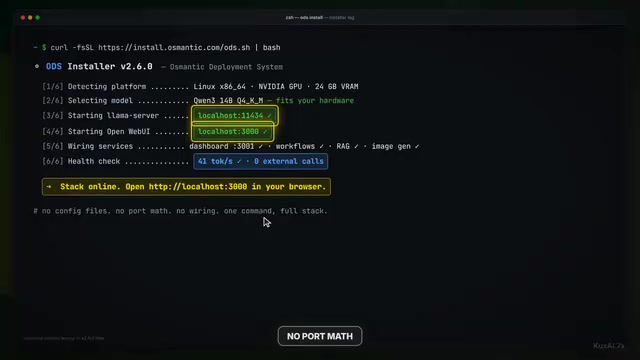
On Linux, Docker defaults to placing the Llama server at localhost:11434, with containers communicating with it internally. macOS uses native Metal. Windows routes through port 8080 (unless manually overridden). OpenWebUI consistently stays at localhost:3000. In other words, those port conflicts you once spent an entire afternoon debugging — ODS has already mapped them out for you. That single detail alone is worth quite a bit.
The workflow is compressed to its bare minimum: choose your OS → copy the command → run it in a regular terminal → ODS installs the full environment, selects an appropriate model for your hardware, starts all the services, and hands you a local web interface.
Credibility: Who's Behind It and How Active Is It
Healthy skepticism about "a stranger's script" is the right instinct. ODS is backed by the US company Osmatic, whose Odyssey repository turns a PC, Mac, or Linux machine into an AI server.
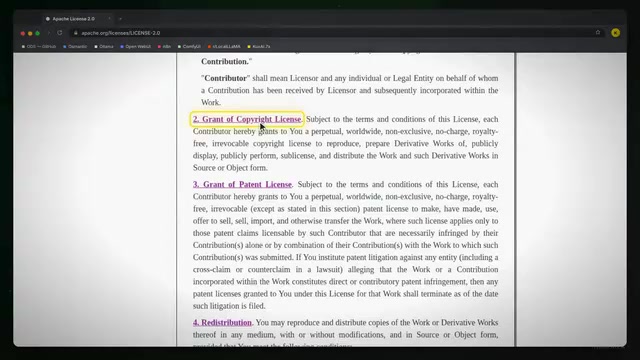
The project is licensed under Apache 2.0, has approximately 6,300 GitHub stars, and saw its most recent active update on September 10 (2026). Consistent active updates matter more than star counts — a repository with a beautiful README that's been abandoned is the kind of trap that actually ruins your weekend.
The lead maintainer's background carries weight too: previously managed over $65 million in annual operations before pivoting to AI infrastructure and local deployment, won the AMD Lemonade SDK Challenge, and has made SDK contributions. This isn't an amateur toy — it's a serious attempt to make self-hosted AI genuinely boring in the best possible sense.
Stable vs. Main Branch: A Rare Moment of Honest Advice
One versioning detail worth keeping in mind: V6.0 is the current stable release, while the main branch moves fast and is suited for active development.
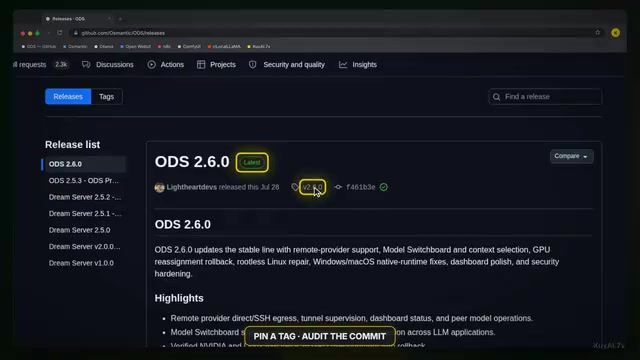
The project explicitly recommends that for anything resembling a lab or near-production environment, you should pin to a tagged release or an audited commit, and maintain your own verification records. This kind of candor — "don't run the bleeding edge in serious environments" — is genuinely uncommon in open-source project marketing, and it's a sideways signal of the project's maturity.
Why Go Local-First: The Cost and Lock-In Math
The case for local deployment goes beyond technical preference.
The business model of hosted cloud AI naturally trends toward "charging rent": when every prompt you send travels through a hosted API, you're not just paying per token — you're feeding a meter that never stops. The more insidious issue is vendor lock-in: your prompts, fine-tunes, embeddings, and even your team's operational habits gradually get bound to someone else's dashboard. By the time prices quietly creep up, migration costs are already substantial.
ODS is free and open-source under Apache 2.0, meaning you can use it commercially, modify it, and build on it without worrying about auto-renewing subscriptions. That's what genuine freedom actually looks like.
But Local Isn't "Magically Free"
To be direct: local deployment is not zero-cost. You're simply trading a cloud bill for electricity, hardware, and your own time. Without a capable GPU, inference runs on CPU alone, and it will be slow. So before you copy any command, do the unglamorous homework: check your GPU, check your VRAM, check available disk space — a full model suite plus image generation has a substantial appetite for storage.
Practical Advice: Getting Started Intelligently
If you decide to give it a try, here's a sensible path forward:
- Start from the stable release, not the main branch. For anything you care about, pin to a tagged release or an audited commit.
- Run it on a spare machine or a fresh environment so that failed experiments don't wreck your primary setup.
- Stress-test with real workloads after launch. Visit
localhost:3000to open the WebUI and validate with actual tasks before canceling any subscriptions — the goal is "a working replacement," not getting stranded halfway. - Treat privacy as a feature to verify, not a promise to take on faith. Image generation running locally, prompts not being sent to hosted APIs — confirm these by observing your own network traffic, not by taking anyone's word for it (including the author of any article or video).
Closing Thoughts
The convenience economy has conditioned a generation to believe that owning tools is harder than renting them. But the genuinely hard part has always been just setup friction — and that's exactly what projects like ODS are designed to eliminate. Once the wiring is automated, the balance tips in your favor: your models, your data, your machine, your configuration — no meter quietly spinning while you sleep.
That said, the choice is still yours: are you happy paying monthly for zero hassle, or do unpredictable bills keep you up at night? There's no universal right answer — it mostly reflects your own relationship with control.
Background: The Technical Context
Understanding why port conflicts are so common in local AI deployments requires a bit of background. Docker's containerization mechanism lets each service run in isolation, but all containers ultimately expose ports through the host machine's network interface. When multiple services like Ollama, LiteLLM, OpenWebUI, and Stable Diffusion WebUI run simultaneously, if they all try to use the same default port (say, multiple services competing for 8080), binding conflicts cause startup failures. The more subtle problem is service discovery: the WebUI needs to know the inference backend's address, the workflow engine needs to call the RAG service's API — if these internal dependencies aren't planned out consistently, inter-container communication breaks down. ODS solves this by pre-specifying a port allocation scheme and generating the corresponding network configuration, turning something that had to be manually re-solved every fresh deployment into a one-time solved problem.
VRAM is the most critical hardware constraint in local LLM inference, and it's worth understanding concretely. To use mainstream open-source models as a reference point: a 7B-parameter model running at 4-bit quantization requires roughly 4–6 GB of VRAM; a 13B model needs around 8–10 GB; a 70B model often requires 40 GB or more even when quantized. If VRAM is insufficient, inference automatically falls back to CPU or offloads layers to system RAM, and throughput can plummet from tens of tokens per second to single digits or slower — a massive difference in practice. Image generation (such as Stable Diffusion) typically needs an additional 4–8 GB of VRAM to run a base model. This is why, before running ODS, confirming your available VRAM with nvidia-smi (for NVIDIA) or the equivalent AMD tool, then cross-referencing against your target model's quantization specs, is the necessary first step to avoiding "installation succeeds but nothing runs" frustration.
Related articles

FastAPI: A High-Performance Python Framework and a Production-Ready API Development Powerhouse
FastAPI is a high-performance web framework based on Python type hints, supporting async and automatic OpenAPI docs. With over 100k GitHub stars, this article analyzes its core strengths, production readiness, and selection advice.

Tesla Optimus Begins Mass Production: Can the Goal of 20,000 Units Per Week Be Achieved?
Tesla Optimus officially begins mass production as Musk sets a target of 20,000 units per week. This article analyzes the supply chain challenges behind mass production, the real gap in capacity ramp-up, and the competitive landscape for humanoid robots.

PCL: A Minecraft Launcher with 8.5k Stars — Why Was It Written in VB.NET?
An in-depth analysis of PCL, the GitHub Minecraft launcher with 8,500+ stars: why it chose VB.NET, its features and China network advantages, and the limits of Windows-only.