Open Design: A Deep Dive into the 39K-Star Open Source Local Agent Design Engine

Open Design: an open-source platform that orchestrates local AI Agents for engineered design production
Open Design is a 39K-star open-source project that uses an orchestration layer architecture to connect local AI Agents (such as Claude Code, Cursor, etc.) as design engines. It includes 31 built-in Skills covering web, mobile, presentations, posters, videos, and more. Through Design System constraints that eliminate the generic "AI look" and a requirements questionnaire plus self-review mechanism, it delivers an engineered design workflow from requirements to delivery — representing the evolution of AI design tools from crude generation to structured production.
Project Overview: More Than Just Another AI Design Tool
A highly anticipated open-source project has recently emerged on GitHub — Open Design, which has already garnered 39K Stars. You can think of it as an open-source version of Claude Design, but its core philosophy is fundamentally different from typical AI design tools.
Open Design doesn't train its own AI model. Instead, it connects to the Agents already available on your machine and uses them as the design engine. Supported Agents include Claude Code, Codex, Cursor Agent, Gemini, Open Code, Copilot, and even DeepSeekAd. As long as these tools are available in your local environment, Open Design can transform them into design productivity.
This "plug into existing Agents" architecture is essentially an Orchestration Layer design approach. Unlike traditional AI tools that encapsulate model capabilities within the product, Open Design positions itself as an Agent orchestrator rather than a capability provider. The engineering advantage of this architecture is clear: users can switch underlying models at any time, benefiting from the latest AI capability iterations without waiting for the tool itself to update. Claude Code, Codex, Cursor Agent, and similar tools are fundamentally AI Agents with code generation and execution capabilities. Open Design's innovation lies in wrapping these general-purpose Agents with a "design-specific" prompt framework and workflow constraints, transforming them from general programming assistants into professional design production tools.

What It Can Do: 31 Built-in Skills Covering All Scenarios
Open Design comes with 31 built-in Skills (design workflows) that cover virtually every common design scenario:
- Website Prototypes: SaaS landing pages, admin Dashboards
- Mobile Interfaces: App UI design
- Visual Content: Social media carousels, magazine-style posters
- Documentation: Product docs, PM requirement documents
- Presentations: PPT creation
- Dynamic Content: Motion videos (exported as MP4 via Motion Frames + HyperFrames)
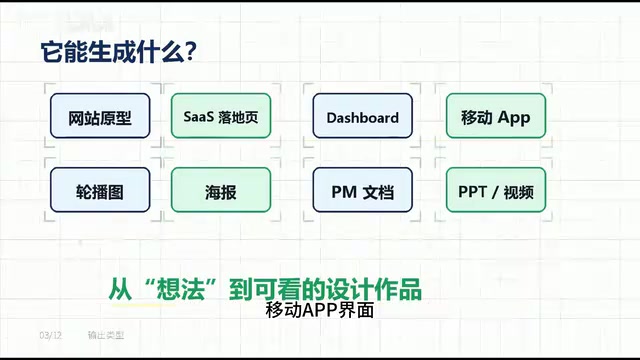
These Skills aren't just for show — they correspond to different design workflows. For example, if you're building a webpage, it follows the Web Prototype process; for mobile, the Mobile App process; for presentations, a dedicated PPT Skill. This means the AI no longer "freestyles" — it works according to process: first determining the design type, then matching the corresponding workflow, adhering to specific constraints, and finally outputting in the specified format.
Core Mechanism: Design System + Requirements Questionnaire
Built-in Design System: Eliminating the "AI Look"
Open Design includes multiple built-in Design Systems that encompass color, typography, spacing, components, motion, brand voice, and other visual specifications.
Design Systems are a core infrastructure concept in modern UI/UX engineering, first systematically promoted by major tech companies — Google's Material Design, Apple's Human Interface Guidelines, and Salesforce's Lightning Design System are all classic examples. It's not merely a set of visual guidelines but an engineering practice that codifies design decisions: by defining Tokens (design tokens such as color variables, spacing units, type hierarchy), component libraries, and interaction rules, it ensures visual consistency across different pages and team members.
Previously, when AI generated UI, it often produced a typical "AI aesthetic" — gradient backgrounds, rounded cards, glowing buttons — all looking the same. This happens because AI without Design System constraints tends to generate "eye-catching" designs due to training data saturated with visual gimmicks. With Design System constraints, the AI's output space is confined within the brand's permitted visual range. The Agent no longer designs pages by feel but generates designs according to a clear set of visual rules, ensuring outputs align with brand identity. This dramatically improves the usability and professionalism of the results.
Requirements Questionnaire: Lock the Direction Before Starting
Before actually generating a design, Open Design first asks you to fill out a questionnaire that includes:
- What type of interface are you building?
- Who is the target audience?
- What tone and style?
- Are there brand constraints?
- What level of fidelity is needed?
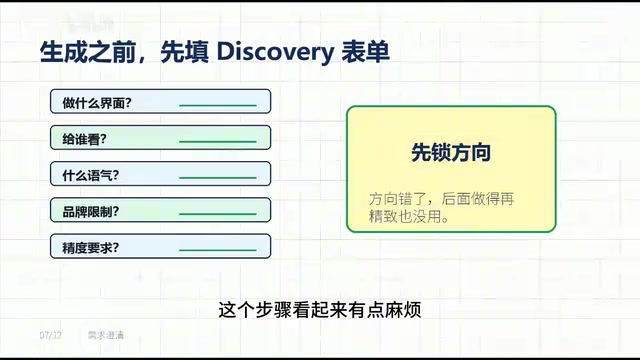
This step may seem tedious but is actually crucial. This mechanism essentially simulates a professional designer's "Kickoff Meeting," transforming vague requirements into executable design specifications (Design Brief) through structured questioning. The most common failure point in AI design is not locking down the direction at the start — with traditional AI tools, users input a single sentence, the AI outputs results based on probability distribution, and directional deviations can't be corrected early, leading to massive iteration costs. Open Design's approach is to clarify requirements first, then let the Agent start designing.
Complete Workflow: From Requirements to Delivery
Open Design's complete workflow can be summarized as:
- Requirements Gathering: Clarify design objectives through the questionnaire
- Plan Generation: AI develops the design plan
- Skill Loading: Match the corresponding design workflow
- Apply Design System: Apply visual specifications
- Self-Review: AI audits its own output quality
- Render Preview: Display results in a sandbox environment
- Export & Deliver: Supports HTML, PDF, PPTX, ZIP, or MP4 formats

Step 5, the "Self-Review" phase, is particularly noteworthy — it borrows from the concept of unit testing in software development, having the AI audit itself against preset standards before delivery. In the field of Prompt Engineering, this is an applied variant of "Self-Critique," which effectively reduces the probability of low-quality outputs. The entire process represents a fundamental departure from the early "one-prompt generation" approach, more closely resembling a structured development process with clearly defined phases in software engineering.
You can continue modifying and iterating during the preview phase, or export directly as real, usable files. It's like having a process-aware design assistant, rather than a chatbot that only generates images based on gut feeling.
Ecosystem Integration: A Modular Design Platform
It's worth mentioning that Open Design also directly integrates Gzang-PPT-Skill — a dedicated Skill for creating magazine-style presentations. This indicates that Open Design isn't positioned as an isolated tool but as an extensible design platform where various specialized Skills can be plugged in as modules.
Open Design's choice of the open-source route and its extensible Skill module system follows strategic logic highly similar to the VS Code plugin ecosystem and the Figma plugin marketplace — the platform provides the core runtime and standard interfaces, while the community contributes specialized capabilities for vertical domains. From a broader perspective, this also reflects an important trend in the AI application layer: as underlying model capabilities become increasingly commoditized, the real differentiation will occur at the "workflow orchestration" and "domain knowledge crystallization" layers — whoever can better structure best practices from specialized domains into AI-executable processes will build moats in vertical scenarios. The rapid accumulation of 39K Stars is a testament to the developer community's strong endorsement of this direction.
As the community contributes more Skills and Design Systems in the future, Open Design has the potential to become a true AI design ecosystem where design needs across different domains can find corresponding solutions.
Summary: The Next-Generation Agent Workbench
Open Design represents an important evolutionary direction for AI design tools: it's not about having AI write code or draw pictures, but about having Agents systematically produce websites, presentations, prototypes, posters, and videos according to Skills, Design Systems, and clearly defined workflows.
It elevates design from the crude "one-prompt generation" mode to an engineered mode of "requirements → process → specifications → self-review → delivery." For product managers, content creators, designers, or anyone who needs to quickly turn ideas into visual outputs, this project is well worth following closely.
Key Takeaways
- Open Design is a 39K-Star open-source project that uses an orchestration layer architecture to connect local AI Agents (such as Claude Code, Cursor, etc.) as design engines, rather than building its own model
- 31 built-in Skills cover full-scenario design workflows including web prototypes, mobile UI, presentations, posters, and videos, ensuring AI works by process rather than freestyling
- Design System constraints (design tokens + component specifications) eliminate the generic "AI look" and ensure brand-consistent, professional outputs
Related articles
 Product Reviews
The Programmer's Desk Setup Guide: Building a Workspace That Feels Like Home
Discover how programmers build productive, comfortable workspaces. From multi-monitor setups to ergonomic design, explore the desk philosophy that drives focus and flow.
 Product Reviews
Qoder vs Cursor Real-World Comparison: Which $20/Month AI IDE Is Better?
Hands-on comparison of Qoder vs Cursor AI IDEs: Agent autonomy, human interaction count, and architecture decisions. Qoder needed only 2 interactions vs Cursor's 8.
 Product Reviews
Cursor Cloud Agent Demo: Eliminating Bottlenecks Across the Entire Software Development Lifecycle
Deep analysis of Cursor's Cloud Agent demo showing how cloud VMs, automated test artifacts, and a full-chain control plane systematically eliminate human bottlenecks across the software development lifecycle.