Open Inspector: The Open-Source Tool That Lets You Inspect Any Website's Design System by Hovering

A zero-permission, open-source browser extension for inspecting any website's design system and exporting design tokens.
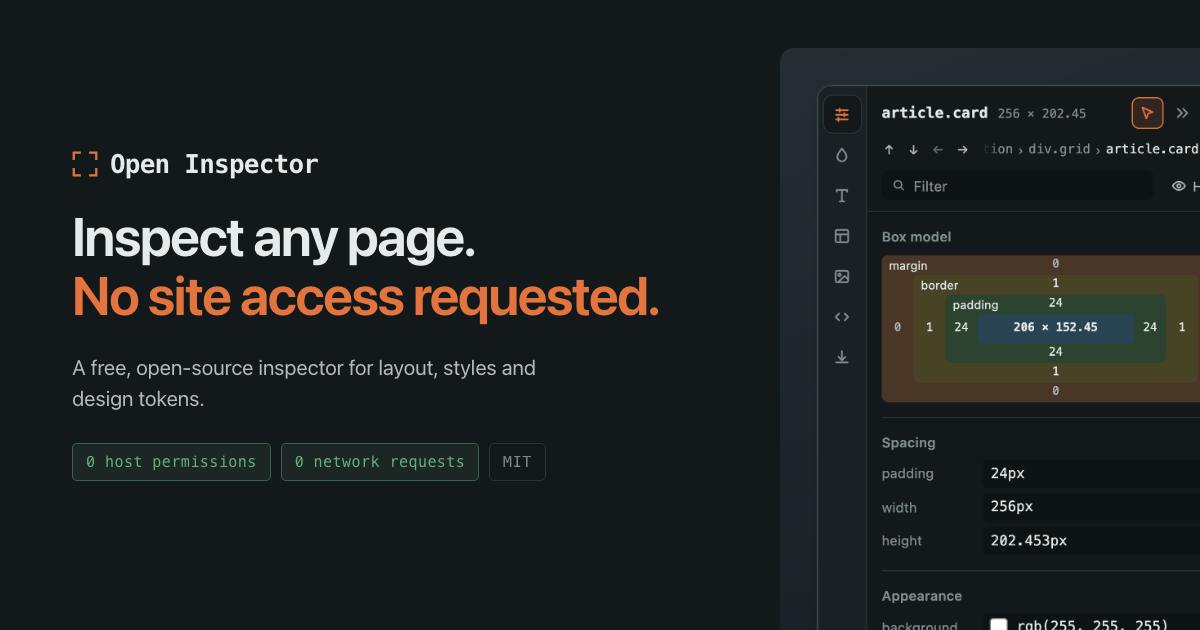
Open Inspector is a free, MIT-licensed browser extension for front-end developers and UI/UX designers. It lets you hover over any web element to instantly access layout, CSS styles, colors, fonts, and assets — and supports bulk exporting of design tokens for design system work. Its key differentiator is its security posture: it requests no site access permissions, makes zero network requests, and keeps all inspection data entirely within the local browser environment. The MIT license makes this promise verifiable through code review rather than blind trust.
A Web Inspection Tool That Requires Zero Permissions
Inspecting a website's layout, styles, colors, and fonts is a routine task for front-end developers and designers working on design implementation. There are already plenty of similar extensions on the market, but most require site access permissions and some even make background network requests — a concern for developers who care about privacy and security. Open Inspector was built specifically to address this pain point.
This browser extension, launched on Product Hunt, sums up its core value proposition in one sentence: hover over any website to extract its design system, with no permissions required. It's free, open-source, released under the MIT license, and requires no account to use. It currently ranks 13th on the daily leaderboard with 82 upvotes.
What It Actually Does
Open Inspector's features revolve around web element inspection, covering the dimensions most commonly needed in design implementation workflows:
- Layout: View the structural arrangement and box model information of page elements
- Styles: Read the CSS styles applied to any element
- Colour: Extract the color palette used on the page
- Type: Identify fonts, font sizes, and other typographic properties of text
- Assets: View images and other media assets referenced by the page
Beyond that, it also supports exporting design tokens from any page. For design system engineers, this means you can quickly extract a live page's color palette, type scale, and other variables as a reference or starting point for migration — no more manually digging through DevTools one property at a time.
Design Tokens are named variables used in design systems to store design decisions. At their core, they abstract visual properties like colors, font sizes, spacing, and border radii into platform-agnostic key-value pairs (e.g., color-primary: #0066FF, font-size-body: 16px). This mechanism allows design and engineering teams to share a common "design language" and maintain consistency across Web, iOS, Android, and other platforms. The W3C is actively working on a related standardization draft through the Design Tokens Community Group, and tools like Figma and Style Dictionary have widely adopted the concept. Open Inspector's ability to export design tokens directly from live pages means that even without access to a public Figma file or documentation, you can quickly reverse-engineer a site's design specifications — dramatically reducing the manual effort involved in competitive analysis and design migration.
A Privacy Promise: Zero Permissions, Zero Network Requests
The most fundamental difference from similar popular tools lies in its security posture. According to creator Patryk Lasek, Open Inspector requests no site access permissions and makes zero network requests.
These two points are especially significant in the browser extension ecosystem. Many free extensions monetize by requesting excessive permissions or uploading data in the background. A tool that explicitly declares "no network calls, no permissions" means everything you inspect stays in your local browser environment and is never sent to any server. For developers working on corporate intranets or sensitive projects, this design fundamentally eliminates the risk of data leakage.
Open Source Means Verifiable
Claims like "makes no network requests" can only be taken on faith with closed-source software. Open Inspector uses the MIT open-source license, making its code publicly auditable. Developers can review the source code themselves to verify that its behavior matches what's advertised — and this transparency is exactly the core competitive advantage of open-source tools over commercial alternatives. The no-account, no-login design also lowers the barrier to entry even further.
Permissions that browser extensions request at install time fall into two main categories: host permissions allow an extension to read and modify page content and network requests for specified websites; API permissions allow access to browser internals (such as tabs, bookmarks, clipboard, etc.). Numerous well-known extensions have triggered privacy scandals by requesting excessive host permissions and uploading user browsing data in the background — the Avast subsidiary data-selling incident being a prime example. Open Inspector claims to require no host permissions. Its inspection capability relies instead on the browser's native content script injection mechanism, which only executes DOM queries and CSS calculations locally when the user actively triggers it, entirely within the browser's sandbox environment. This means it presents no attack surface for data leakage.
Who It's For, and Is It Worth Trying?
Open Inspector's target users are front-end developers, UI/UX designers, and design system maintainers. It's useful whenever you need to quickly understand a competitor's visual specifications, reverse-engineer the implementation behind a design mockup, or find reference material for your own design system.
In terms of product positioning, it takes a "focused and privacy-first" approach — not trying to be a feature-packed Swiss Army knife, but doing web inspection and design token export in a clean, low-friction way. As a free, MIT-licensed Chrome extension, the cost of trying it is essentially zero.
It's worth noting that the information currently available comes primarily from the Product Hunt listing. Details such as export format accuracy and how well it handles complex pages will need to be validated through real-world use. But given its clear differentiated positioning around "zero-permission inspection + design token export," it offers a compelling option for privacy-conscious professionals who frequently need to inspect web pages.
Related articles

Chain of Thought Isn't Just for AI: How Humans Can Use CoT to Improve Thinking Quality
Chain of Thought isn't just a prompt trick for large models. Starting from a Hacker News discussion, this article analyzes why CoT works for human thinking too, breaks down actionable ways to transfer it, and highlights the key differences between human CoT and machine CoT.
Cloudflare Teams Up with OpenAI: Closi…
Cloudflare Teams Up with OpenAI: Closing the Loop from Vulnerability Discovery to Defense with AI
Cloudflare uses OpenAI Daybreak to investigate security vulnerabilities and generate reviewable remediation plans, while developers use Codex to boost coding efficiency and quality.

Orca Multi-Agent Orchestration in Practice: A Guide to Parallel Collaboration with Claude and Codex
Orca is Stable AI's free open-source agent workbench supporting 34 agents like Claude Code and Codex in parallel. Learn its Git worktree isolation, multi-model orchestration, and mobile management.