Open-Source English Grammar Visualization Tool: AI Sentence Parsing, Grammar Analysis, and Built-in Dictionary

A single-file open-source tool that visualizes English grammar structure with AI analysis and a built-in dictionary.
This open-source English grammar visualization tool, developed by a Bilibili creator and distributed as a single HTML file, supports text pasting or photo upload via DeepSeek API for smart image recognition and AI grammar analysis. Its standout feature color-codes grammatical components like subjects, predicates, and objects while distinguishing main clauses from subordinate clauses by hierarchy. A built-in ~23,000-word local dictionary handles word inflections with one click, while double-clicking invokes context-aware AI explanations. A "Grammar Deep-Dive" mode breaks down nested clause structures layer by layer. Lightweight and practical for exam preparation, though AI analysis may occasionally err.
From Text to Structure: An Upgraded English Grammar Analysis Tool
Bilibili creator "WaterBlood水" recently released an upgraded version of an open-source English grammar visualization web tool. Compared to its predecessor, this version is far more feature-complete, with a core focus on helping English learners — especially those preparing for reading comprehension exams — visually break down complex sentence structures and look up unfamiliar vocabulary.
The entire tool is distributed as a single HTML file. Users can either download it locally via the link in the video description or access it directly through the author's shared online link. The only configuration required is a DeepSeekAd API Key — simply register on the DeepSeek open platform and create one — which powers the text recognition and AI analysis features.
Flexible Input: Paste Text or Snap a Photo
The tool supports two input methods. The first is straightforward: paste a block of English text directly. The second is more interesting — upload a photo. In the demo, the author uploads a photo of an actual exam reading passage, complete with handwritten annotations. Using DeepSeek's API for image recognition, the tool intelligently extracts only the printed text, ignoring handwritten notes.
The author emphasizes that this AI-based recognition is smarter than traditional OCR's brute-force approach. After recognition, unwanted content can easily be removed before proceeding to analysis.
Traditional OCR (Optical Character Recognition) uses pixel-level pattern matching to identify printed characters and has low tolerance for handwriting, skewed angles, or mixed layouts. When printed text and handwritten annotations appear together, it tends to process everything indiscriminately. In contrast, multimodal APIs based on large language models (such as DeepSeek's vision interface) handle images through "understanding" rather than "matching" — the model can semantically determine which content is formally printed exam text and which is handwritten notes, extracting only the former. This distinction means that even heavily annotated photos produce relatively clean recognition results, eliminating the need to manually remove extraneous content.
Core Highlight: Color-Coded Grammar Component Visualization
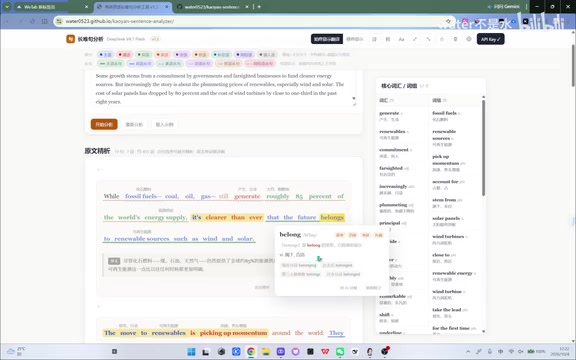
The most practically valuable feature of this tool is its visual presentation of grammatical components. After clicking "Start Analysis," the tool reads through the full text, segments it by period, then breaks down the grammar and phrases sentence by sentence.
Different font colors represent different sentence components: subject, predicate, object, predicative, attributive, adverbial, complement, appositive, parenthetical, and more — all clearly distinguished. Clicking "Subject" highlights all subjects across sentences; when a subject clause appears, the subject within the clause and the subject of the main clause are further differentiated by color shade, helping users untangle the hierarchy between main and subordinate clauses.
Yellow-highlighted sections represent the main clause skeleton (such as subject-verb-object or subject-linking verb-predicative structures), letting you instantly grasp the sentence's backbone. Various clause types — subject clauses, object clauses, predicative clauses, attributive clauses, adverbial clauses, and appositive clauses — each have their own markers. Clicking "Attributive Clause" highlights the entire clause, even lengthy ones.
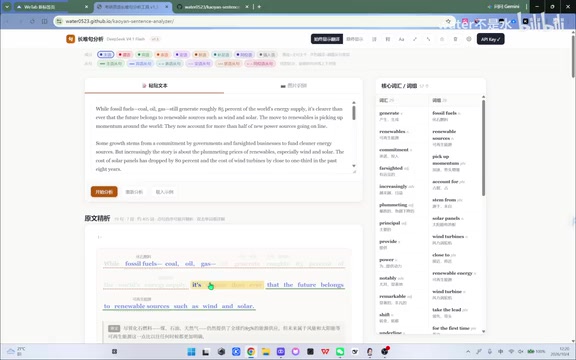
The author acknowledges that since the analysis is AI-driven, errors are inevitable and recommends treating results as a reference. He also mentioned considering further subdivision of subject-verb-object within subordinate clauses but ultimately abandoned the idea to avoid cluttering the interface.
Built-in 20,000-Word Open-Source Dictionary: Click Any Word to Look It Up
Another major highlight of this upgrade is the built-in local dictionary. Clicking any word returns a definition from the dictionary, which can also recognize common word forms — whether plural nouns, third-person singular verbs, or past tenses, all are correctly matched to their root form.
This dictionary comes from an open-source project on GitHub and contains approximately 23,000 entries. The author considers this sufficient to cover the vast majority of exam reading needs; words that can't be found are typically proper nouns like names of people or places that aren't included.
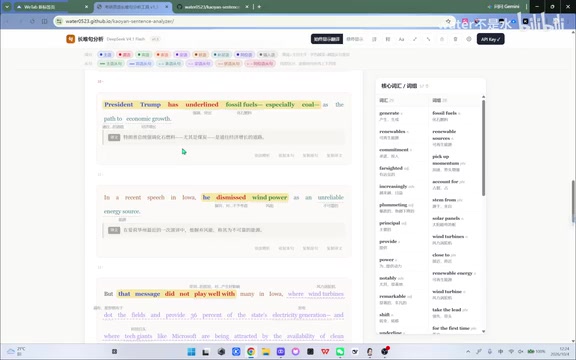
If the local dictionary isn't preferred, users can double-click a word to invoke AI-based lookup. In the demo, double-clicking "Trump" prompts the AI to explain it in context — identifying it as a proper noun (former U.S. President Donald Trump) rather than a dictionary definition of the common word. This kind of context-aware explanation is something a local dictionary simply can't provide.
Lemmatization is one of the fundamental tasks in natural language processing — mapping various inflected forms of a word back to its base form (lemma). For example, "goes," "went," and "going" all map to the lemma "go," and "mice" maps to "mouse." The tool's ability to recognize plural nouns, third-person singulars, past tenses, and other inflected forms and look them up correctly relies on preprocessing or lookup table mapping of English morphological rules. This is a key advantage of the local dictionary over simple string matching — users don't need to enter the base form; clicking any inflected word in the text returns the correct definition, dramatically reducing lookup friction.
AI Grammar Deep-Dive and Translation Tips
For complex sentences where color-coding alone isn't enough, the tool offers a "Grammar Deep-Dive" feature. After clicking it, the AI breaks down the sentence structure layer by layer, using level labels like L0 and L1 to annotate the nesting relationships between main clauses and subordinate clauses, and identifies the subject-verb-object components at each level.
In the author's demo, a long sentence is broken down with impressive clarity, with even multi-level nested clauses fully annotated. There are also "Translation Tips" that suggest how to approach translating such complex sentences. For handling long, difficult sentences, the author considers this feature "extremely worthwhile."
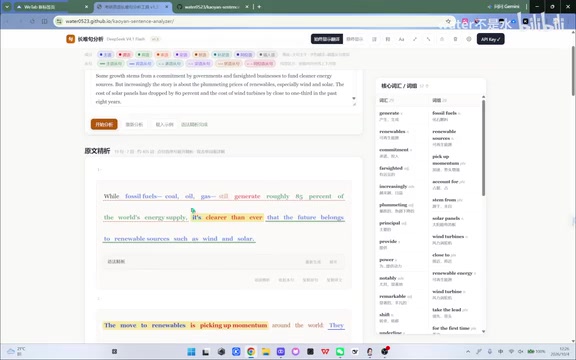
The tool also offers a range of personalization options: the prompt for word explanations and the prompt for grammar analysis can both be edited; translations and definitions can be hidden for self-testing vocabulary practice; fonts can be switched; and analysis results can be exported as PDF (with potentially minor formatting issues).
Level labels like L0 and L1 are a common way to flatten parse trees. L0 typically represents the top-level main clause, L1 represents clauses directly nested within the main clause, and L2 represents clauses nested deeper within L1, and so on. Multi-level nested attributive or adverbial clauses in long English sentences are a primary obstacle in reading comprehension. Level numbering helps readers "unpack" a sentence: first clarify the L0 backbone, then layer in the subordinate modifications level by level to reconstruct the full meaning. This decomposition approach is aligned with the principles of Phrase Structure Grammar in linguistics, but presented in a more accessible numbered format suitable for non-specialist readers.
Lightweight Use Case: Quick Vocabulary Lookup
Beyond deep analysis, the tool also accommodates lightweight usage. If users simply want to quickly pick up unfamiliar words in a passage, they don't need to run a full grammar analysis — just click any unknown word in the original text to query its meaning via the built-in dictionary, making it very convenient for side-by-side reading.
Summary
This tool addresses two major pain points in learning long, complex English sentences — unclear grammatical structure and the friction of vocabulary lookup — by combining visual color-coding with AI analysis. Being open-source, distributed as a single file, featuring a free local dictionary, and offering optional AI enhancement make it a lightweight and practical choice for exam reading preparation. The author has also indicated plans to keep optimizing based on user feedback and welcomes suggestions via direct message.
One caveat: since grammar analysis relies on AI, results may still contain errors. It's best used as a supplementary reference rather than a definitive answer.
Related articles

JobRunner MCP Server: AI Agents Can Now Fix Failed Java Jobs
JobRunner launches an open-source MCP server enabling AI agents to view cluster status, diagnose failures, and recover Java jobs—incident response from any cloud coding environment or existing agent.

MLAI Digital Launches 9 Security Agents: MCP Server Safeguards the Full Lifecycle of Agentic AI
MLAI Digital launches Security MCP Server with nine built-in specialized security agents covering vulnerability discovery, attack simulation, prompt injection detection, API and infrastructure assessment, and accelerated remediation—embedding security validation across the full Agentic AI lifecycle from development to production.

Running Isaac Lab on H100 GPUs: Exploring Better Approaches
Exploring optimization methods for running Isaac Lab on NVIDIA H100 GPUs, including MIG configuration, mixed precision, TensorRT acceleration, and community experience to improve robotics simulation and reinforcement learning efficiency.