OpenAI Agent Builder Shutdown Countdown: Comparing Four Migration Paths

OpenAI Agent Builder shuts down Nov 30; only two official migration paths exist, the rest require manual rebuilds.
OpenAI Agent Builder was deprecated June 3, 2026, and shuts down November 30, 2026. In the same notice, the Evals platform becomes read-only October 31 and goes offline November 30, while Kit and the embeddable chat frontend remain. OpenAI offers only two official migration paths—Agent SDK and ChatGPT workspace agents—with n8n, Zapier, and Make requiring manual rebuilds since no export channels exist. The article recommends exporting TypeScript or Python from the Code menu and screenshotting the canvas beforehand, since the export doesn't convert the workflow graph and only serves as a spec of prompts and settings. It then breaks down all four paths across node mapping, approval gates, file retrieval, hosting, and cost, noting that approval gates and file retrieval are the hardest to replace, and provides a selection framework matched to team situations plus four pre-shutdown preparation steps.
OpenAI's Agent Builder is about to take its final bow. According to the official announcement, the product was deprecated on June 3, 2026, and is scheduled to be fully shut down on November 30, 2026. If you've built customer service triage, lead classification, or approval flows on it, you need to start planning your move now.
What makes this trickier is that the shutdown isn't an isolated event. In the same notice, the Evals platform will become read-only on October 31, and will go offline on November 30 along with reusable prompt objects. That means if you rely on the Evaluate tab in Agent Builder for testing, that data needs to be backed up in advance too.
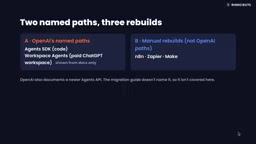
The good news is that Kit remains available—what's disappearing is the visual canvas, not the embeddable chat frontend. OpenAI officially offers only two migration paths: the Agent SDK and ChatGPT workspace agents. Meanwhile, n8n, Zapier, and Make—which get a lot of community attention—are strictly speaking manual rebuilds; OpenAI's documentation provides no export channel to these platforms. Below, we break things down across five dimensions: node mapping, approval gates, file retrieval, hosting, and cost.
Before You Start: Export First, Screenshot Second
No matter which path you ultimately choose, the first thing to do is open your workflow while you can still log in, click Code in the top navigation, select Agent SDK, then choose TypeScript or Python, and copy the entire export.
Be clear-eyed about this: the export does not convert your workflow graph into code, nor does it guarantee that every behavior migrates as-is. So be sure to screenshot the canvas as well, and treat the export file as a spec sheet—it records your prompts, tools, and settings, not a directly runnable equivalent. Even if you plan to migrate to n8n, Zapier, or Make, this export is still valuable as a reference.
OpenAI Vector Store is a managed retrieval component in the Assistants API / Responses API ecosystem: you upload documents as Files, attach them to a vector store object, and OpenAI handles chunking, embedding, and indexing. At runtime, the agent retrieves relevant snippets by vector store ID through the file_search tool. This explains the significance of "reusing by ID" mentioned in this article—files and embeddings are stored on the platform side, so when migrating via SDK, you only need to point the tool parameters at the original vector store ID to preserve retrieval capability without re-embedding. Conversely, once you migrate to third-party platforms like n8n, Zapier, or Make, their knowledge base features each use their own embedding models and index structures, and cannot directly reference OpenAI's vector store IDs. You'll have to re-upload documents and let those platforms re-embed them, which changes both cost and retrieval quality.
Path One: Agent SDK—The Orthodox Choice for the Code Crowd
The Agent SDK is open source under the MIT license, installable via npm or pip, and lets you define and run an agent using instructions and tools. Because everything is code, node mapping is actually the most direct: if, else, and while become ordinary conditional statements and loops; guardrails become input, output, or tool-level guardrails; and file retrieval can reuse your existing OpenAI vector store by ID, out of the box.
Approval gates are implemented by tagging write tools with a "requires approval" flag; the run pauses at the interruption point, and you approve or reject before it resumes. After approval, the run stops at the write step, and that record is the final result—it won't execute twice.
The trade-off is clear: hosting, user interface, and deployment are all on you. OpenAI explicitly states that going the SDK route means you must verify the runtime environment, tools, authentication, permissions, and deployment yourself.
Guardrails are validation and interception mechanisms that an agent runtime applies to inputs, outputs, or tool calls. Typical uses include blocking prompt injection, filtering sensitive content, restricting tool parameter formats, and preventing unauthorized operations. Unlike writing "please don't do X" in a prompt, guardrails are enforced at the code level: when validation fails, the run halts or falls back to a preset response rather than passing non-compliant content directly to the model or user. The Agent SDK supports mounting guardrails at three separate levels, making it more flexible than a single validation node on a visual canvas—but it also means developers must write and maintain these rules themselves.
Path Two: n8n—The Closest Canvas Analog
In terms of form factor, n8n is the closest alternative to the Agent Builder canvas experience. The community edition can be self-hosted for free, and the license permits internal commercial use. There's a naming trap here: n8n's own settings page for its new agent feature is also called Agent Builder—that's n8n's product, not OpenAI's.
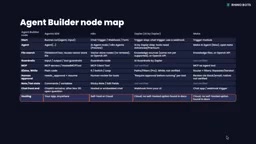
Node-level correspondence is fairly clear: the chat trigger maps to Start, the AI Agent node maps to Agent; guardrails use n8n's built-in guardrail node plus a failure branch; and for approval gates, you make the AI Agent only "propose" records, insert a chat step in the main flow that shows you the content and waits, and only write in the next step after approval—rejection writes nothing.
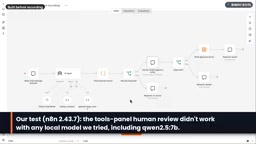
There are two practical issues in testing: restarting at the AI tool level is a key step to success, because the notification system doesn't show emails; and AI tool-level approval didn't work on any local model we tried—small models occasionally drop fields or scramble them. So having a human review each record before writing is the safer approach.
On cost: on n8n Cloud, each chat message counts as one execution, so a ten-turn conversation is ten executions; self-hosting has no execution bill—you only pay for the server and the model.
Human-in-the-loop refers to inserting a pause point in an automated flow that requires human confirmation. The flow suspends there, waiting for approval, rejection, or modification before continuing. It's the core difficulty of this migration because OpenAI Agent Builder made it a native capability: just check "requires approval" on a tool in the canvas, no extra orchestration needed. Once you leave that platform, most alternatives lack an equivalent first-class node—n8n requires inserting a wait step in the main flow, Zapier requires a separate request-approval step, and Make can only use a workaround of messaging a human for review. Additionally, paused runs consume execution records and may time out if unanswered for long periods, so you need to consider default behavior after timeout in your design.
Path Three: Zapier—The Product Itself Is Migrating
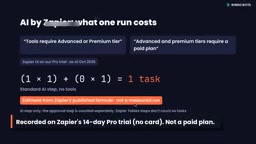
Zapier's standalone agent product is being folded into AI by Zapier, becoming an AI step within a Zap. No official date has been set for shutting down the standalone agent. On the free plan, you can only preview AI by Zapier steps in unpublished Zaps, so we completed our recording during a 14-day Pro trial—that's a trial, not a purchase.
Its model selector offers only one option: Standard, one task. Standard is pure prompt mode—text in, output fields out. Approval relies on a human-in-the-loop request-approval step that pauses the Zap and sends you the draft; after approval, the next step writes to a Zapier table, and rejection stops it.
As of October 2026, Zapier's menu notes that tools require a Professional or paid tier, so this approval is a separate Zap step rather than a tool setting. There are two other known gaps: chat-triggered agents have no direct equivalent trigger, so you have to use a webhook instead; and some knowledge sources (including HubSpot, Asana, Zendesk, Zoom, and Jira) are not yet supported, with official plans to support them in Q4 2026.
Path Four: Make—Free to Try, Approval Must Be Built Yourself
Make's AI agent is in public beta and available on all plans, using Make's own AI provider. Connecting your own provider (e.g., an OpenAI key) requires a paid plan, so on the free plan, the model is chosen by Make, not by you.
At the module level, the AI Agent module maps to the agent, the two tools are Make modules running on data stores, and branching is handled by routers. Approval is where the biggest difference lies: Make's best-practices guide suggests using a tool to send output to you for review, e.g., to Slack. We didn't find a native agent approval step in Make's docs, but that's an open question rather than a definitive absence.
On cost, each agent run consumes one credit per operation, and when using Make's provider you also pay extra for AI tokens. The free plan includes 1,000 credits per month.
Side-by-Side: Approval Gates and File Retrieval Are the Hardest to Replace
Looking at all four paths together, two things are genuinely hard to replace: approval gates and file retrieval.
Agent SDK, n8n, and paid-tier Zapier each have documented approval mechanisms, and Make has a documented workaround. For file retrieval, the SDK is the easiest—reuse your existing OpenAI vector store by ID; switching to n8n, Zapier, or Make means either calling the OpenAI API yourself or re-embedding documents into their respective knowledge features.
Hosting is another dividing line. SDK and n8n can run on your own servers; Zapier and Make are cloud services, and we found no self-hosting option in their documentation.
On price (as of October 18, 2026): the Agent SDK itself is free—you only pay for model tokens, e.g., GPT-6 Luna at $0.10 per million input tokens and $0.50 per million output tokens. n8n Community self-hosted is free; Cloud Starter is €20/month billed annually, including 2,500 executions. Zapier Pro is $19.99/month billed annually or $29.99/month billed monthly, including 750 tasks; a standard AI step counts as one task per the official formula—this is an estimate, not a measurement. Make's free plan includes 1,000 credits, and the comparison page lists paid plans starting at $9/month—confirm the billing cycle before purchasing. Workspace agents are billed in ChatGPT credits, with the official price list citing a typical run at 5 to 25 credits.
Self-hosting means deploying software on servers or containers you control, so data and run logs don't pass through a vendor's cloud. For agent workflows, this is both a compliance advantage and a turning point in cost structure: self-hosting typically has no per-run execution bill, replaced by fixed server overhead plus token fees you pay directly to the model provider. However, self-hosting also transfers responsibility for availability, upgrades, backups, and authentication to your team, requiring ongoing maintenance. Before choosing, confirm whether the license permits your use case and whether the vendor provides support and security updates for self-hosting.
How to Choose: Match Your Team's Situation
A few questions can narrow down the choice. Does anyone on your team want to take ownership of code? If yes, the Agent SDK is OpenAI's official path, and you can start from the file you exported. If not, are you already using ChatGPT Business, Enterprise, or EDU? Is your workflow more conversational than deterministic? If so, workspace agents are the official no-code path—but don't forget OpenAI's warning about potential distortion when migrating strongly deterministic workflows.
All other cases are rebuilds: if you need self-hosting or the closest experience to the original canvas, start with n8n; if your app ecosystem is already in Zapier, use AI by Zapier, but tool-level approval requires a paid tier, so budget by task count; if you want a visual builder with free testing credits, try Make, but plan your approval steps yourself.
Before November 30, remember to do four things: export your code, screenshot your canvas, list your vector stores, and save your evaluation data before it becomes read-only on October 31.
Related articles

Android ML Kit On-Device AI: Performance Optimization and Quality Breakthroughs
A full breakdown of Google Android ML Kit on-device AI: Gemini Nano cuts memory via 2-bit quantization and shared KV cache, a 2B model rivals last year's 27B, plus speech translation, function calling APIs, and an end-to-end scam detection demo.

Firebase AI Logic + Gemini Nano 4: A Practical Guide to Android AI Development
How Firebase AI Logic and Gemini Nano 4 help Android developers ship generative AI: App Check and prompt templates ensure security, hybrid routing cuts latency and cost, Spend Caps control budgets, and AI monitoring provides observability.

Microsoft AI Agent Breakthroughs: More Efficient, Better at Code and Weather Forecasting
Microsoft Research Focus Issue 97: ForkPilot cuts agent inference costs, Cabra reveals coding agents' code-understanding gap, Teletune learns workflows from logs, PBC improves extended forecasts, BioEMU-2 opens preview.