OpenAI Agents SDK in Practice: Using Agents as Tools

How to use OpenAI Agents SDK's Agents as Tools pattern for controlled multi-agent orchestration.
This article explains the Agents as Tools pattern in the OpenAI Agents SDK. Unlike Handoff, which fully transfers control to another agent, Agents as Tools keeps the main agent in charge while delegating tasks to sub-agents via `.as_tool()`. It covers default single-field input, structured parameters using `dataclass`, and custom output extraction. Scripted models enable offline testing, with seamless transition to live OpenAI API calls.
What Are Agents as Tools
In the OpenAI Agents SDK ecosystem, multi-agent collaboration follows two main patterns: Handoff and Agents as Tools. While they may seem similar on the surface, they differ fundamentally in how control flows between agents.
With Handoff, the original agent passes the entire conversation context to a specialist agent, which then returns the final answer directly to the user — control is fully transferred. Agents as Tools works differently: the original agent always stays in charge, treating another agent as a regular "tool function" to call. It receives the sub-agent's result and handles all further processing itself, ultimately returning the response to the user.
In other words, under the Agents as Tools pattern, the "specialist agent" being called is only responsible for doing its job — not for communicating with the user. The agent that initiated the call is always the one interacting with the user. This distinction is the key to understanding the entire mechanism.
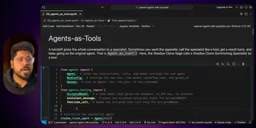
In the video example, the author uses scripted model, assistant message, and function call to construct fixed test responses. This allows the entire tool-calling pipeline to be simulated and verified without consuming any real LLM API calls.
Handoff passes the complete conversation history (including the system prompt, past messages, etc.) to the target agent at a low level. The target agent has full context and generates the final response directly — control never returns to the original agent. This pattern fits "one-shot delegation" scenarios, such as a customer service bot handing off a complaint case entirely to a specialized team. Agents as Tools is more like a function call: the main agent constructs a structured request, the sub-agent executes it in an isolated context and returns a result, and the main agent then decides what to do next. The advantage here is that the main agent can chain multiple sub-agents, post-process results, or retry on failure. The entire orchestration logic remains under the main agent's control, making this pattern better suited for complex, multi-step workflows.
Converting an Agent into a Tool
The first step is to create an agent as you normally would. In the example, a specialist agent called shadow clone summoning specialist is created with the instruction "summon shadow clones from defeated enemy ninjas and report their rank," stored in the variable shadow_clone_agent.
The key step is calling the .as_tool() method to convert this agent into a tool:
tool_name:summon_shadow_clonetool_description: a description of what the tool does- The returned tool object is assigned to
summon_tool
Once converted, this specialist agent becomes a callable tool that other agents can invoke.
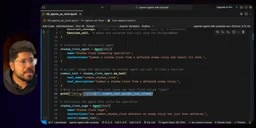
Inspecting the tool's schema reveals an important detail: if no parameters are explicitly passed, the tool defaults to accepting a single text field named input. This is the SDK's default behavior — understanding it is essential for handling structured inputs later.
Next, a second agent shadow clone sage is created with the instruction "use the summon shadow clone tool whenever an enemy ninja is defeated," with summon_tool passed in the tools parameter. This allows the second agent to invoke the first as a tool.
A scripted model is a testing utility provided by the OpenAI Agents SDK that lets developers pre-define a fixed sequence of responses. At runtime, the SDK returns these preset responses in order without making any real LLM API calls. This is similar to the mock/stub mechanism in unit testing — you can verify an agent's control flow, tool-calling order, and parameter passing locally, offline, and at zero cost, without waiting for or paying for real GPT requests. An assistant message simulates a text reply from the LLM, while a function call simulates the invocation instruction the LLM generates when it decides to call a tool. Together, they can fully reproduce a real tool-calling interaction.
Running and Verifying the Call Chain
The author writes an async function demo_as_tool and uses a scripted model to construct a simulated operation sequence: first a function call (i.e., a tool call to summon with the default input as the parameter), then a tool response message "summoning successful, rogue ninja zone in," and finally an LLM message: "the rogue ninja shadow clone has joined your ranks."
The execution is triggered via await runner.run(), passing in shadow_clone_sage, the query "the rogue ninja has been defeated," and a run config containing the scripted model and workflow name.
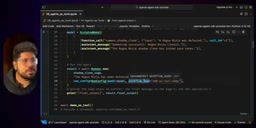
The output shows "the rogue ninja shadow clone has joined your rank" with no errors, confirming that one agent was successfully called as a tool. The default schema input and the correct final output are both visible, validating the entire pipeline.
Passing Structured Parameters (Typed Input)
A single input field is often insufficient in practice. Real-world scenarios typically require passing structured parameters to the converted tool. This is where dataclass comes in.
The example defines a data class shadow_clone_input with two fields: enemy_name and enemy_rank. The core approach involves three steps:
- Define the data class: describe the input structure
- Write an input builder callback: receives the structured inputs and concatenates them into a prompt string (e.g., "summon a shadow clone from enemy_name and enemy_rank") to pass to the LLM
- Pass it into
as_tool(): useshadow_clone_inputas the parameter type andinput_builderas the conversion function
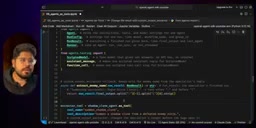
After running, the final output is still "the rogue ninja shadow clone has joined your ranks," but the key change is visible: the tool's properties have shifted from the default input to enemy_name and enemy_rank. This confirms that structured input is being passed correctly. Note that this mechanism relies on a fixed structure — arbitrary string inputs may not map directly.
In Python, a dataclass is a lightweight struct defined using the @dataclass decorator. The compiler automatically generates methods like __init__ and __repr__, eliminating boilerplate code. In the context of as_tool() in the Agents SDK, passing a dataclass type causes the SDK to automatically map its fields to properties in the JSON Schema, which the LLM uses when generating a function call — this is exactly why the tool's schema changes from a single input field to two fields: enemy_name and enemy_rank. The input_builder callback acts as a bridge between "structured data" and "natural language prompt": after the LLM fills in the structured fields, the callback concatenates them into a readable instruction string that gets passed to the sub-agent for execution, balancing type safety with the LLM's natural language comprehension.
Processing Tool Output with a Custom Output Extractor
The SDK also allows you to process a tool's output before it's returned to the original agent. This is done through a custom output extractor.
The author defines an async extraction function extract_enemy_name that accepts a RunResult parameter and extracts information from final_output. Since the example's output has a fixed structure (e.g., "summoning successful: rogue ninja zone"), the function splits on a colon :, takes the appropriate index, strips whitespace, and returns the extracted part — "rogue ninja."
With this in place, what gets returned to the original agent after the tool call is no longer the raw, full output — it's a concise, extracted result. The "tool output after extraction" displays as "rogue ninja."
RunResult is the SDK object that encapsulates the result of a single agent run. It includes fields such as final_output (the final output text or structured data), messages (the full message history), and last_agent (the last agent instance that executed). The motivation behind Custom Output Extractor is that a sub-agent's raw output is often a complete, human-readable sentence (e.g., "summoning successful: rogue ninja Zabuza zone A"), while the main agent's downstream logic may only need a key entity (e.g., "Zabuza"). By doing the extraction at the tool layer rather than having the main agent parse it on its own, you reduce the main agent's context overhead while keeping the extraction logic centralized, reusable, and easy to test. The extractor is designed as an async function, meaning it can perform additional async operations inside — such as calling another API for entity validation or format conversion.
Live Testing with a Real LLM Call
All previous examples used a scripted model for offline simulation. The author finishes by demonstrating a live call using the real OpenAI API.
The flow starts by loading the OpenAI API Key, then defining a live output extractor extract_name_live that converts run_result.final_output to a string and extracts the ninja's name. Inside the demo_live function, it checks whether the API Key is available — if so, it proceeds with a real call; otherwise, it falls back to the fixed-structure extraction.
The agent shadow clone page has the instruction "use summon shadow clone whenever an enemy ninja is defeated," with the specialist agent passed in as a tool. The query is "team 7 just defeated the zone rank rogue ninja Zabuza as mission 05."
The result shows: the last agent is shadow clone stage, the extracted tool output is "Zabuza" (correct), and the final output is "shadow clone summoned from defeated rogue ninja is Zabuza." Under a real LLM call, agent-as-tool collaboration works just as expected.
A Key Insight: Who Is the "Specialist Agent"?
The video closes by addressing a common point of confusion: the agent you run directly with runner.run() is not the specialist agent — the one you converted into a tool and passed in as a tool is the specialist agent.
In the example, the one running directly is shadow clone sage/page, which handles user interaction. Meanwhile, shadow clone summoning specialist — converted into a tool and passed in — is the one actually doing the specialized work. Getting this hierarchy straight is essential for correctly assigning responsibilities when building multi-agent systems.
Summary
Agents as Tools offers a more controllable pattern for multi-agent orchestration: the main agent retains control of the conversation while delegating specialized tasks to sub-agents wrapped as tools. Combined with typed input and custom output extractors, developers can precisely control the format and processing of inputs and outputs. The scripted model enables low-cost offline debugging, and the setup can seamlessly switch to a real LLM environment when needed.
Related articles

Chain of Thought Isn't Just for AI: How Humans Can Use CoT to Improve Thinking Quality
Chain of Thought isn't just a prompt trick for large models. Starting from a Hacker News discussion, this article analyzes why CoT works for human thinking too, breaks down actionable ways to transfer it, and highlights the key differences between human CoT and machine CoT.
Cloudflare Teams Up with OpenAI: Closi…
Cloudflare Teams Up with OpenAI: Closing the Loop from Vulnerability Discovery to Defense with AI
Cloudflare uses OpenAI Daybreak to investigate security vulnerabilities and generate reviewable remediation plans, while developers use Codex to boost coding efficiency and quality.

Orca Multi-Agent Orchestration in Practice: A Guide to Parallel Collaboration with Claude and Codex
Orca is Stable AI's free open-source agent workbench supporting 34 agents like Claude Code and Codex in parallel. Learn its Git worktree isolation, multi-model orchestration, and mobile management.