OpenAI Codex App In-Depth Review: 38 Open-Source Skills Explained with Hands-On Experience

OpenAI launches Codex App with multi-task parallelism, automation workflows, and 38 open-source Skills.
OpenAI officially releases Codex App, an AI programming tool combining multi-task parallel processing, Plan Mode for structured coding, automated workflows, and 38 open-source Skills. Paid users get doubled rate limits for two months, and free users can also try it out. The tool merges AI-native editor and autonomous Agent approaches, supporting Worktree branch management, voice input, real-time notifications, and more, currently available on Mac.
Codex App Officially Launches: Paid Users Get Double Quota for Limited Time
OpenAI has officially launched Codex App — an AI programming tool integrating multi-task parallel processing, automated workflows, and a rich Skills ecosystem. To celebrate the launch, OpenAI CEO Sam Altman announced: all paid users' rate limits are doubled for two months, and free users can also experience Codex App.
Background: The Evolution of AI Programming Tools OpenAI Codex originally debuted in 2021 as the underlying model for GitHub Copilot, primarily available as an API for developers. The launch of Codex App represents a paradigm shift from "model-as-a-service" to "complete development environment." Prior to this, the AI programming tool market had formed three main paths: the IDE plugin approach represented by Copilot, the AI-native editor approach represented by Cursor/Windsurf, and the autonomous Agent approach represented by Devin. Codex App attempts to merge the latter two — retaining human approval checkpoints while possessing the ability to autonomously execute long-running tasks. Its multi-task parallel architecture essentially upgrades the traditional single-threaded "human-AI dialogue" into a "human-AI collaboration pipeline."
Codex App currently supports Mac, with a Windows version coming soon. If you were already using ChatGPT and logged in, you can download Codex and directly select a workspace to quickly enter the development environment — virtually zero onboarding friction.
It's worth noting that OpenAI's "doubled rate limits" involves two dimensions: RPM (Requests Per Minute) and TPM (Tokens Per Minute). For programming scenarios, TPM is more critical — a medium-sized codebase context often consumes tens of thousands of tokens, and Codex App's multi-task parallel feature means multiple tasks simultaneously consume token quota. The doubled quota in practice means developers can run more parallel tasks simultaneously or handle larger codebases within a single task.
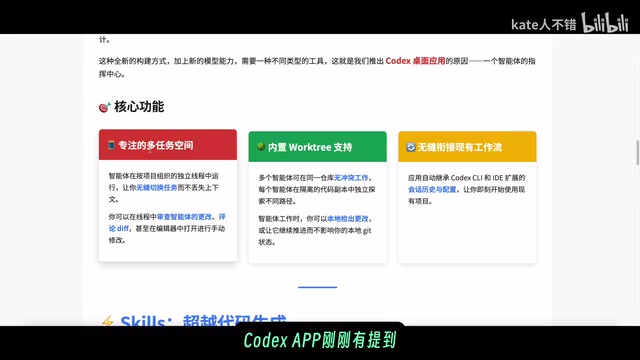
Four Core Features of Codex App Explained
Multi-Task Parallelism and Seamless Switching
Codex App's most prominent feature is its multi-task parallel processing capability. It automatically inherits session history and configurations from Codex CLI and IDE extensions, allowing users to seamlessly switch between different projects. You can have Codex handle multiple programming tasks simultaneously without waiting for one to complete before starting another.
Additionally, Codex App supports voice dictation input and has built-in work data management. The Worktree feature at the bottom of the interface makes it easy to create branches, while the right side provides quick access to different editors with intelligent collaboration and correction support. Clicking the rightmost icon enters mobile real-time preview and adjustment mode.
The Technical Essence of Worktree The Worktree feature in Codex App isn't an entirely new concept — it's a visual wrapper around Git's native worktree capability. Git worktree allows developers to simultaneously check out multiple branches into different directories within the same repository, eliminating the need to frequently switch branches or clone multiple copies. In AI programming scenarios, this feature is particularly important: when Codex processes multiple tasks in parallel, each task can operate in an independent worktree, avoiding code contamination between branches. This design makes the workflow of "having AI simultaneously fix three bugs and develop two new features" engineering-feasible, rather than merely multi-tab switching in the UI.
Plan Mode: Plan First, Code Later
Codex App supports Plan Mode, which can be activated by clicking the plus icon in the left sidebar. Codex will first ask you questions to clarify requirements, ultimately generating a detailed plan document. Only after you confirm satisfaction does it execute — this "plan first, code later" approach significantly improves output quality.
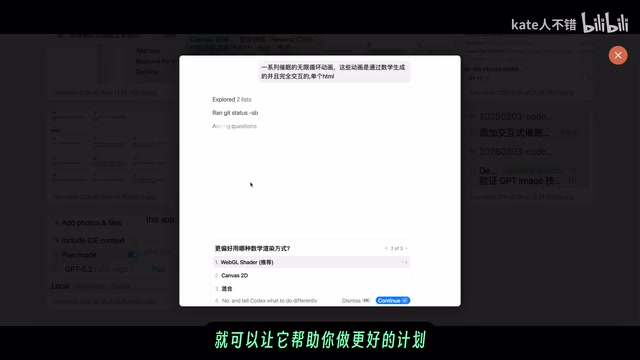
When presenting options, Codex marks certain options as "Recommended" to help users make faster decisions. Users can also set Codex's response style to concise, pragmatic, or conversational-empathetic, adapting to different use cases.
Chain-of-Thought Reasoning Behind Plan Mode At a technical level, Plan Mode corresponds to the engineering implementation of the "Chain-of-Thought" (CoT) reasoning paradigm in large language models. Unlike directly generating code, Plan Mode forces the model to first output a structured execution plan, a process that activates deeper reasoning capabilities. Research shows that having models "think before acting" significantly reduces error rates in complex tasks, because the planning phase exposes ambiguities and contradictions in requirements, completing clarification before execution. OpenAI's heavy investment in "Test-Time Compute Scaling" with the o1/o3 model series is an extension of this approach — Plan Mode can be seen as presenting this reasoning capability in a productized form to everyday developers.
Automated Workflows (Automations)
The left sidebar of Codex App includes an Automations entry for setting up automated workflows. Codex adds discovered issues to an inbox and automatically archives run records with no reported content. It's understood that OpenAI internally already uses Automations to handle daily issue triage, finding and summarizing CR failures, generating daily release briefings, checking bugs, and other routine tasks.
The Boundary Between Automations and AI Agents Codex App's Automations feature positions it firmly in the AI Agent (intelligent agent) category. Traditional automation tools (such as GitHub Actions, Zapier) rely on predefined rules and triggers, while Codex's Automations introduces a semantic understanding layer — it can understand vague instructions like "find the reasons for CR failures" rather than only executing precise script commands. This closely aligns with the industry definition of "software engineering Agents": autonomous systems that can perceive environments, formulate plans, execute actions, and adjust strategies based on feedback. The Automations inbox mechanism retains human approval checkpoints, embodying the "Human-in-the-Loop" design philosophy that balances autonomy with controllability.
Real-Time Notifications and Sound Alerts
Codex App's notification system is quite refined — real-time notifications paired with sound alerts, with sufficiently detailed notification content. Even if you step away from your desk temporarily, returning to the home page will clearly show in the left sidebar which project needs your approval, ensuring no critical information is missed.
Complete Breakdown of 38 Open-Source Skills
OpenAI states that hundreds of Skills have been built internally, with 38 currently shared publicly, covering system administration, deployment, design, documentation, coding, security, and many other domains. These Skills can be used not only within Codex App but also ported to other AI programming tools.
Skills Ecosystem and MCP Protocol Technical Architecture The Figma MCP server integration mentioned in this article involves the MCP (Model Context Protocol) proposed by Anthropic in late 2024, which has gradually become an industry standard. MCP is essentially a standardized "AI tool invocation interface
Related articles
 Product Reviews
The Programmer's Desk Setup Guide: Building a Workspace That Feels Like Home
Discover how programmers build productive, comfortable workspaces. From multi-monitor setups to ergonomic design, explore the desk philosophy that drives focus and flow.
 Product Reviews
Qoder vs Cursor Real-World Comparison: Which $20/Month AI IDE Is Better?
Hands-on comparison of Qoder vs Cursor AI IDEs: Agent autonomy, human interaction count, and architecture decisions. Qoder needed only 2 interactions vs Cursor's 8.
 Product Reviews
Cursor Cloud Agent Demo: Eliminating Bottlenecks Across the Entire Software Development Lifecycle
Deep analysis of Cursor's Cloud Agent demo showing how cloud VMs, automated test artifacts, and a full-chain control plane systematically eliminate human bottlenecks across the software development lifecycle.