OpenAI Codex Cloud Hands-On: Picking Up Development Tasks Across Devices in the Cloud

OpenAI Codex Cloud moves coding tasks to the cloud for multi-device continuity, voice interaction, and automated PR workflows.
OpenAI's Codex Cloud marks a significant shift for AI coding tools: developers can launch tasks in the cloud and close their local machine entirely while work continues in the background. Mobile instruction and voice interaction free development from the desktop entirely. A chat-based onboarding flow creates named environment snapshots that teams can reuse without repeated setup. Upon completion, the AI can automatically create PRs, run tests, and flag items needing human approval — forming a complete loop from idea to merged code.
Cloud Environment: Running Dev Tasks Without Being Tied to a Local Machine
OpenAI's Codex Cloud introduces a fundamentally new development experience — offloading coding tasks to the cloud rather than binding them to your local machine. The most intuitive takeaway from the video demo: once you kick off a task in the cloud, you can close your local window entirely and the task keeps running in the background.
The demonstrator captured the feeling perfectly: "That feels so good, it's so freeing." In the past, developers had to stare at a terminal waiting for builds or tests to finish. Now, that time-consuming work can be fully handed off to the cloud, and you can check back in whenever you're ready.

The core value here is continuity — a relay handoff between devices. Once a task is running in the cloud, it's no longer dependent on any single machine. You can kick it off on your laptop, add follow-up instructions from your phone, or supplement requirements mid-run without ever interrupting execution.
Multi-Device and Voice Interaction: Development No Longer Confined to the Desktop
One of Codex Cloud's most novel aspects is breaking the development workflow free from the desktop environment. The demo shows developers stepping in from a mobile phone to append instructions to an actively running task — without interrupting it.
Taking it further, the system also supports voice interaction. The demonstrator described a surprisingly futuristic scenario: put on your headphones, head out for a walk, kick off a dev session by voice, let the task run in the cloud, and get notified when it's done. Writing code no longer requires sitting at a computer — inspiration can be captured and acted on the moment it strikes.
The philosophy behind this design is clear: developers never know when ideas will hit, so the tooling should always be ready to catch them and do the work in the background.
Environment Configuration: A Snapshot Mechanism That's Set Once and Reused by the Whole Team
Codex Cloud has made meaningful improvements to environment setup. When creating a new environment, the system offers a chat-based onboarding flow: you provide the repository you want to work with, and the flow automatically researches that repo's configuration requirements.
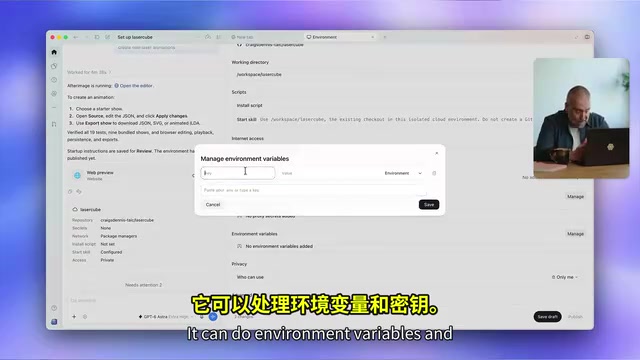
The configuration capabilities are quite comprehensive, covering network settings, environment variables, and secrets. For team-sharing scenarios, it supports letting individual users override settings with their own keys — either inline or pulled from a personal vault.
Once configured and published, you get a named environment from which you can launch new tasks. The key detail: it's a snapshot — you never have to repeat the setup process again.

Multiple independent tasks can run in parallel within the same environment, and the entire team can share the same configuration. The demonstrator compared this to the old way of doing things and called it "a huge improvement" — a direct fix for the pain point of repeatedly rebuilding environments.
The snapshot mechanism in cloud development environments deserves some elaboration. Under the traditional approach, every time a new task is started or a new team member joins, the environment initialization script has to run from scratch — installing dependencies, setting environment variables, configuring network policies. These steps are time-consuming and error-prone, and are a root cause of the infamous "it works on my machine" problem. The core idea behind a snapshot is to freeze a validated environment state as an image, so all subsequent tasks start from that known-good baseline rather than building from zero. This mirrors the thinking behind container technologies like Docker images, but Codex Cloud wraps it in a conversational onboarding flow to lower the configuration barrier. The personal vault override mechanism addresses security in team-sharing scenarios: the team shares an environment template, but each member's API keys, access credentials, and other sensitive information are injected separately from their personal vault — eliminating the risk of hardcoding secrets into a shared configuration.
Code Review and Automation: A Complete Loop from Task to PR
Once a task finishes in the cloud, Codex Cloud offers several paths forward. Developers can have it create a PR and go through the normal review flow, or use the new code review flow — something the demonstrator specifically said they love.
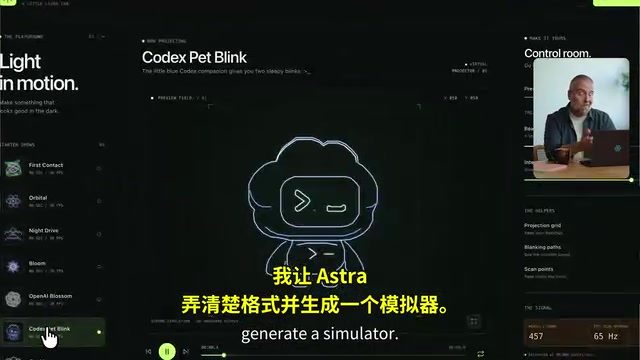
Even more compelling is the automated delegation capability. In the demo, the developer simply instructs the AI assistant "Dot" to create a PR for documentation, make sure everything is working, run the tests, and flag anything that needs human approval. The developer can then step away and handle other things.
This forms a relatively complete closed loop: from idea inception and cloud execution, to code generation, test verification, PR creation, and human approval. The AI isn't just writing code — it's also handling process management and identifying the points in the quality review workflow that genuinely require human judgment.
A Pull Request (PR) is a standard collaboration node in modern software development. After a developer commits code changes to a separate branch, they open a PR to request a merge into the main branch. Other team members can review the code, leave comments, trigger CI/CD pipelines, and only after approval does the change get merged. The value of this mechanism is that it provides a quality gate for code changes while preserving a complete change history. The long-standing challenge for AI tools entering the PR workflow is understanding the intent of changes, judging whether test coverage is adequate, and recognizing which decisions exceed their scope and need human confirmation — rather than quietly skipping them or making unauthorized calls. The ability to "flag items requiring human approval" shown in the Codex Cloud demo is precisely an attempt to give AI a triage role in the process: automating the mechanical work while proactively surfacing risk points.
Impact on the Development Workflow
This demo makes it clear that Codex Cloud is trying to redefine the relationship between developers and their coding tasks. Under the traditional model, development is tightly bound to local environments and desktop devices. With cloud-based execution, tasks gain three new characteristics: persistence, mobility, and shareability.
For individual developers, this means more flexible working patterns and lower wait-time costs. For teams, reusable environment snapshots and shared configurations can significantly reduce repetitive overhead. Of course, this is an official demonstration — the real-world stability of cloud environments, the complexity of configuration, and cost performance all still need to be validated in actual projects.
Overall, Codex Cloud represents one direction in the evolution of AI coding tools — from "local assistant" to "cloud collaborator" — letting developers focus on the creative work itself while offloading setup, execution, and portions of the review process to the cloud.
Related articles

Felix Rieseberg Personal Homepage
Felix Rieseberg's personal homepage sparks attention on Hacker News. This article covers the Slack engineer's technical background, the rise and fall of nativefier, and the value of a developer homepage as a tech calling card.

@ai-sdk/vue 3.0.306 Patch Release Syncs with [email protected] Update
@ai-sdk/vue 3.0.306 released, synced with [email protected]. A routine patch release for the Vercel AI SDK ecosystem with no public API changes; the Vue adapter layer stays version-aligned with the core package.

Gemini 4 Argon API Launches: The Era of Million-Token Output Begins
Google launches Gemini 4 Argon with sparse MoE architecture, up to 1M output tokens, and a 68.90% Vals Index score, available across API, AI Studio, and the Gemini app.