OpenAI Codex Desktop Pet Feature: Customize Your Desktop Companion with Emis Pixel Art

OpenAI Codex's desktop pet feature lets you create custom anime companions that watch you code.
OpenAI's Codex coding agent now includes a desktop pet feature that went viral on Bilibili. A content creator demonstrated how to feed Emis pixel sprite sheets into Codex to auto-generate a custom desktop companion. Despite initial skepticism about a coding tool having pet features, the emotional value of a personalized character watching you work proved to be a killer experience.
OpenAI Codex Desktop Pet Feature: Customize Your Desktop Companion with Emis Pixel Art
Back in the day, the Rising Antivirus lion kept you company while scanning for viruses. Now, your 2D waifu keeps you company while you code — this is probably the ultimate form of technological progress. Recently, the Codex desktop pet feature went viral on Bilibili, where a content creator threw Emis pixel art into it and generated a desktop companion that sits with them while they code at work. The result was so good that viewers couldn't help but exclaim, "OpenAI, you nailed it!"
Today, let's talk about how this feature actually works, whether it's any good, and why a programming tool adding desktop pets somehow became a killer experience.
Codex Has a Built-in Desktop Pet Feature?
First, some background. Codex is a cloud-based AI coding agent tool launched by OpenAI in 2025, integrated into ChatGPT. It can autonomously write code, fix bugs, and handle multiple programming tasks in parallel within a sandbox environment — sounds like about as serious a productivity tool as they come.
But this ultra-serious tool recently quietly launched a desktop pet feature. In simple terms: while you're working in Codex, a little character pops up on your desktop that "watches" you work and can even display your coding progress for the day.
OpenAI spent billions of dollars training a super AI, and the ultimate killer app turns out to be... a desktop pet. Honestly, I'm not surprised at all. After all, humanity's core need has always been solving "is anyone keeping me company" before solving "can someone help me do work."
Remember Microsoft's Clippy, asking "It looks like you're writing a letter, need help?" — the whole world wanted to shut it off. Now Codex says "let me raise a little character to watch you code," and everyone loses their minds. What's the difference? The difference is that Clippy looked like a paperclip, while your desktop pet can be your waifu. The technology hasn't changed — aesthetics have evolved.
How to Make a Custom Desktop Pet with Emis
The content creator's workflow is actually pretty straightforward:
- Find assets: Get Emis pixel-style sprite sheets — character sprite assets showing different action states (standing, walking, sitting, etc.)
- Feed it to Codex: Hand these assets to Codex's built-in desktop pet Skill for processing
- Auto-generate: Codex slices up the sprite sheets, aligns the animation frames, and generates a complete desktop companion
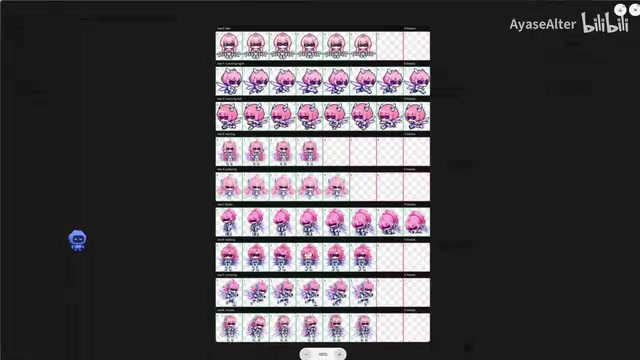
Just appreciate this workflow for a moment — a cloud AI agent capable of autonomously fixing bugs and handling multiple programming tasks in parallel is now diligently slicing up your 2D waifu's pixel art and aligning animation frames, all so she can bounce around in the corner of your screen.
This is probably the definition of "overkill" in the AI world, but who says overkill can't be a form of happiness?
Speaking of desktop pets, this concept actually has deep cultural roots in the Chinese internet. From the early Rising Antivirus lion and Ukagaka, to various anime character desktop pet programs later on, "raising a little character on your desktop" has always had a dedicated audience. What Codex does is essentially combine this traditional concept with an AI programming tool, and because Codex itself can write code, the barrier to customizing a desktop pet has been reduced to virtually zero.
From "What's the Point" to "This Is Actually Amazing" — A Classic Conversion Story
The content creator themselves admitted that at first they thought a coding tool with desktop pets couldn't possibly be useful. But after adding a few more features, the experience completely exceeded expectations, and their final verdict was "absolutely unbeatable."
This change of heart is a classic — it's the exact same reaction curve as the first time you opened short-form video saying "what's even interesting about this" and then scrolled until 3 AM.
Thinking about it more carefully, it makes sense. A desktop pet on its own is admittedly just a toy. But when it's embedded in a programming environment you use eight hours a day, can display your work progress in real-time, and is customized with a character you personally chose — the emotional value becomes completely different.
OpenAI probably didn't even realize that the ultimate solution to making programmers willingly work overtime isn't higher salaries, isn't a better IDE — it's a pixel character in the corner of the screen watching you write code.
Final Thoughts
From the Rising Antivirus lion to Clippy to AI desktop pets, humanity spent twenty years to finally figure out one thing: what we've always wanted isn't an assistant who can do work, but an audience willing to watch us do work.
The endpoint of productivity tools is emotional value. And when it comes to combining 2D characters with productivity tools, Chinese internet users are always at the forefront.
If you're already using Codex, give the desktop pet feature a try. Throw in a pixel art of a character you like — you might just be the next convert.
Related articles
 Product Reviews
The Programmer's Desk Setup Guide: Building a Workspace That Feels Like Home
Discover how programmers build productive, comfortable workspaces. From multi-monitor setups to ergonomic design, explore the desk philosophy that drives focus and flow.
 Product Reviews
Qoder vs Cursor Real-World Comparison: Which $20/Month AI IDE Is Better?
Hands-on comparison of Qoder vs Cursor AI IDEs: Agent autonomy, human interaction count, and architecture decisions. Qoder needed only 2 interactions vs Cursor's 8.
 Product Reviews
Cursor Cloud Agent Demo: Eliminating Bottlenecks Across the Entire Software Development Lifecycle
Deep analysis of Cursor's Cloud Agent demo showing how cloud VMs, automated test artifacts, and a full-chain control plane systematically eliminate human bottlenecks across the software development lifecycle.