OpenAI Codex Launches on Mobile: Hands-On Testing Remote Programming Control from Your Phone

OpenAI Codex launches on mobile, enabling full remote programming workflows from your phone.
OpenAI has brought Codex to the ChatGPT mobile app, letting users scan a QR code to connect to their desktop and remotely execute full development workflows — from code writing and UI testing to bug fixing, Git pushes, browser automation, and cross-tool orchestration. Compared to Claude's similar solution, Codex achieves comprehensive superiority in response latency, connection stability, and interaction experience, while supporting external tools like Claude Code for task orchestration, reshaping the AI Agent ecosystem landscape.
Background: The Evolution of Codex and the Arrival of the Agent Era
OpenAI Codex was originally launched in 2021 as a language model focused on code generation, serving as the underlying engine for GitHub Copilot. After multiple iterations, modern Codex has evolved from a simple code completion tool into a full-fledged development assistant with complete Agent capabilities — able to understand natural language instructions, invoke system tools, and execute multi-step tasks across applications. This evolutionary path represents a paradigm shift in AI programming tools from "code completion" to "autonomous development agents," and provides important context for understanding the significance of this mobile update.
In its latest update, OpenAI has brought Codex to mobile — users simply open the ChatGPT App to remotely control Codex on their computer and run through an entire programming development workflow. Claude previously pioneered a similar mobile remote control solution, but Codex isn't just playing catch-up here — it has achieved comprehensive superiority in latency, stability, and interaction experience. Below, we'll break down this feature from connection methods to real-world performance to ecosystem impact, examining whether it actually delivers.
Connection Setup: Scan and Connect in Three Steps
The setup process for mobile-to-desktop Codex control is remarkably streamlined — just three steps to get going.
First, make sure both the desktop Codex and mobile ChatGPT App are updated to the latest version. After updating, the desktop will display a prompt asking "Allow device to control computer" — click allow and a QR code will be generated.
Next, scan the QR code with your phone camera. The system automatically redirects to the ChatGPT App, where you tap "Allow Connection" to complete pairing. After successful connection, you can further configure permissions on the desktop, such as selecting "Keep computer always on" to ensure uninterrupted remote control.
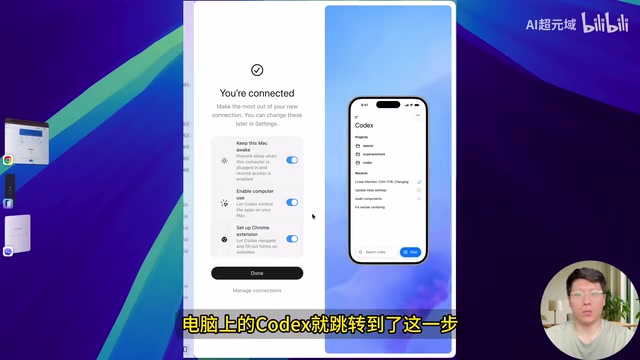
On the mobile side, users can flexibly configure multiple parameters:
- Permission Mode: Supports four options — full guard, auto-review, default permissions, and custom
- Model Selection: Switch between different versions like GPT-4.5
- Response Tuning: Adjust thinking level and response speed, such as setting speed to 1.5x
These granular control options mean the mobile interface isn't just a simple "remote control" — it's a fully functional development command center.
Real-World Testing: Full Coverage from Code Changes to UI Testing
Remote UI Testing and Bug Fixing
In actual testing, a typical development task was issued to Codex via mobile: "Perform end-to-end browser testing of the newly added theme switching feature through Chrome browser." After sending the command, desktop Codex received the task almost simultaneously and immediately began execution.
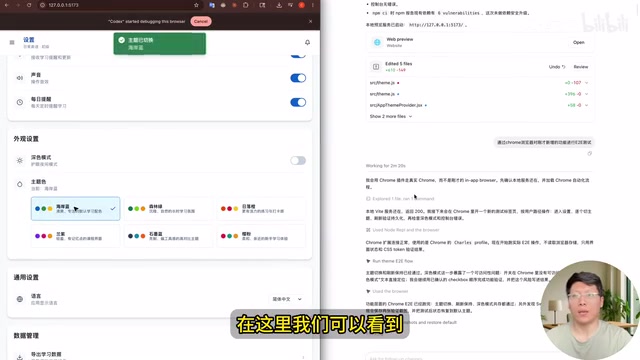
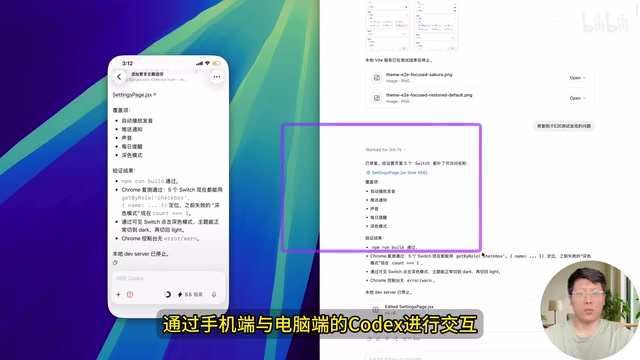
Codex automatically opened Chrome on the desktop, clicked through different themes one by one, and automatically captured screenshots during testing. The entire operation was extremely fast, with the mobile side able to view all response outputs in real-time sync, including issues discovered during testing and corresponding screenshots.
More critically, when testing revealed problems, you could directly type "Fix the issues found in the end-to-end test" on mobile, and desktop Codex would immediately receive and execute the fix. From problem discovery to fix completion, the entire closed loop could be accomplished from your phone with virtually no perceptible delay.
Code Push and Remote Preview
Testing also validated more complex workflows. Typing "Push the changes to GitHub" on mobile, desktop Codex synchronously executed Git operations, completing the commit and push.
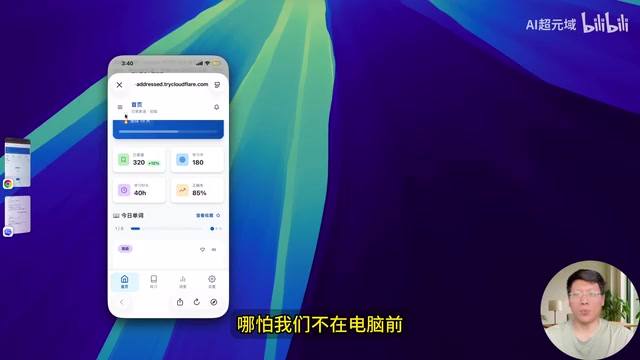
For scenarios where you're away from your computer and can't view development results in real-time, Codex offers a highly practical solution: have it "run the project and create a publicly accessible link." Desktop Codex will automatically start the project server and generate a public URL, allowing users to access and test development results directly in their mobile browser — and even verify mobile compatibility while they're at it.
Advanced Capabilities: Browser Automation and Cross-Tool Orchestration
Computer Use: Letting AI Directly Control Graphical Interfaces
The Computer Use capability integrated into Codex mobile is key to understanding its browser automation performance. Computer Use refers to the technology where AI models directly manipulate computer graphical user interfaces (GUI), including recognizing screen elements, simulating clicks, typing text, and analyzing screenshots. Anthropic was first to publicly demonstrate this capability in Claude in 2024, after which OpenAI deeply integrated it into Codex. The technical core is a Vision Language Model (VLM) providing real-time understanding of screenshots and action planning — essentially automating the human "perceive → decide → execute" loop of computer operation, enabling AI to interact with any software like a real user without relying on dedicated API interfaces.
Browser Automation Tasks
Codex mobile's capabilities go far beyond writing code. During testing, a browser automation task like "Visit my blog, click into the first article, then summarize the article content" was executed cleanly and efficiently — automatically opening the browser on desktop, navigating to the blog page, clicking the target article, and finally outputting a complete content summary. Throughout the process, the mobile side displays tool invocation approval prompts, and users simply tap "Approve" to continue execution.
Cross-Agent Tool Orchestration: From Executor to Dispatch Center
An AI Agent is an AI system capable of autonomously perceiving its environment, formulating plans, and executing multi-step tasks — distinct from traditional single-turn Q&A interactions with large models. Cross-Agent Orchestration (Multi-Agent Orchestration) is a more advanced form: a primary Agent can identify task characteristics and dispatch subtasks to the most suitable specialized Agent for execution. This architecture is similar to the microservices concept in software engineering — each Agent focuses on its area of expertise, with an orchestration layer providing unified coordination, enabling modular capability composition.
The most surprising finding was the cross-tool orchestration capability. During testing, a task was issued through mobile Codex: "Call Claude Code to perform a Code Review of the project." After receiving the instruction, desktop Codex automatically verified Claude Code's availability and login status, then dispatched the Code Review task to Claude Code for read-only review. Within minutes, complete code review results were returned to mobile via Codex.
This means Codex isn't just an executor — it's a task dispatch center. Users can choose to invoke different tools based on the characteristics of different tasks — use Codex for development and testing, use Claude Code for code review — achieving more flexible task orchestration.
Comparison with Claude's Solution: How Codex Pulled Ahead
Claude previously pioneered the mobile remote control solution for computers, but the actual experience was less than ideal. Putting both side by side, the gap is quite apparent:
| Comparison Dimension | OpenAI Codex Mobile | Claude Mobile Solution |
|---|---|---|
| Response Latency | Near real-time sync | Noticeable delay |
| Connection Stability | Stable over extended periods | Occasional disconnections |
| Interaction Experience | Smooth and fluid | Slightly laggy |
| Cross-Tool Orchestration | Supports calling external tools like Claude Code | Limited to own ecosystem |
Codex isn't simply replicating features here — it has done extensive engineering-level optimization, achieving a superior experience overall.
Impact on the AI Agent Ecosystem
Based on testing results, Codex mobile's performance warrants attention across several dimensions:
In terms of feature completeness, Codex mobile covers virtually all development scenarios including code writing, UI testing, bug fixing, Git operations, browser automation, Computer Use, and cross-tool orchestration. This comprehensiveness means that AI Agent tools focused on specific scenarios, like OpenClawAd and Hermes Agent, are seeing their differentiation advantages rapidly eroded.
This trend mirrors the history of independent apps being absorbed by super apps during the mobile internet era. Vertical AI Agent tools like OpenClaw and Hermes Agent typically build moats in niche markets through deep customization, but when leading platforms integrate these capabilities into general-purpose platforms, the differentiated survival space for vertical tools will be forced to shift toward deeper privatized deployments, enterprise compliance scenarios, or highly specialized vertical integrations.
In terms of accessibility, the entire setup process requires only scanning a QR code — no additional software installation or complex environment configuration needed. For users already using ChatGPT, this is essentially a zero-cost capability expansion.
In terms of workflow transformation, developers no longer need to be sitting at their computer to make progress on projects. Spot a production bug during your commute, pull out your phone and have Codex locate the issue, fix the code, run tests, and push to GitHub — the entire flow completed seamlessly.
Summary
The launch of OpenAI Codex on mobile marks the official entry of AI-assisted programming into the "anytime, anywhere" era.
Related articles
 Product Reviews
The Programmer's Desk Setup Guide: Building a Workspace That Feels Like Home
Discover how programmers build productive, comfortable workspaces. From multi-monitor setups to ergonomic design, explore the desk philosophy that drives focus and flow.
 Product Reviews
Qoder vs Cursor Real-World Comparison: Which $20/Month AI IDE Is Better?
Hands-on comparison of Qoder vs Cursor AI IDEs: Agent autonomy, human interaction count, and architecture decisions. Qoder needed only 2 interactions vs Cursor's 8.
 Product Reviews
Cursor Cloud Agent Demo: Eliminating Bottlenecks Across the Entire Software Development Lifecycle
Deep analysis of Cursor's Cloud Agent demo showing how cloud VMs, automated test artifacts, and a full-chain control plane systematically eliminate human bottlenecks across the software development lifecycle.