OpenClaw Hands-On: Can AI Automation Replace Traditional RPA?

AI models are challenging traditional RPA with visual understanding and code generation capabilities.
Through two experiments with the OpenClaw project — scraping comments from an Android short-video app and sending stickers via WeChat on Windows — this article shows how multimodal AI models can achieve zero-code automation through visual understanding and code generation. The AI not only handles screen recognition and decision-making autonomously, but also generates reusable code for unlimited low-cost reruns, demonstrating a clear edge over traditional RPA.
The RPA Dilemma and the Rise of AI Automation
In the automation space, RPA (Robotic Process Automation) has long been the go-to solution for enterprises and individual developers alike. Whether it's AutoJS, macro tools, or scripting frameworks, traditional approaches all require developers to manually write scripts, maintain element selectors, and handle countless edge cases.
RPA Background: RPA emerged in the early 2000s. Its core principle is to simulate human interactions on computer interfaces — including mouse clicks, keyboard input, and UI element recognition — to execute well-defined, rule-based tasks. Leading commercial platforms include UiPath, Automation Anywhere, and Blue Prism. Traditional RPA relies on precise UI element targeting, typically via XPath, CSS selectors, or control IDs. This makes it highly efficient in stable UI environments, but the moment an application updates its layout, scripts can break entirely — driving maintenance costs through the roof.
Now, with the rapid advancement of large AI models, a new question has emerged: Can AI directly replace RPA?
A project called OpenClawAd has recently sparked widespread discussion. It aims to achieve truly "zero-code" automation by leveraging AI's visual understanding and code generation capabilities. This article dives deep into the feasibility and limitations of this technical approach through two real-world demo cases.
Experiment 1: AI Controlling an Android Phone for Automated Tasks
Task Description
The goal of the first experiment was to have AI automatically control an Android phone to: open a short-video app, scroll through videos automatically, and retrieve the comment content for each video. Throughout the process, the phone was mirrored to a PC, with AI acting as the execution agent via a command-line console.
Execution and Results
The AI demonstrated impressive UI analysis capabilities — powered by Multimodal Large Language Models (Multimodal LLMs), with representative models including GPT-4V, Claude 3, and Gemini. Unlike traditional computer vision (which relies on template matching or feature detection), multimodal LLMs possess contextual reasoning abilities. They can interpret natural language instructions like "find the comment section and scroll" and map them to concrete sequences of UI actions. The AI was able to:
- Automatically identify elements and layout on the current screen
- Retrieve video comment content
- Execute swipe gestures to move to the next video
- Loop through three videos, browsing and scraping comments for each
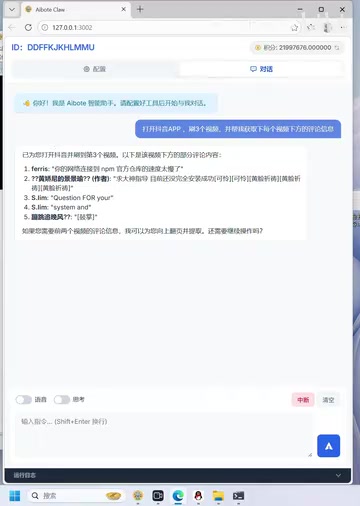
Based on the demo results, the AI successfully retrieved information from ten videos and accurately navigated to the third video to collect its comments. The entire process required no human intervention — the AI autonomously completed the full loop of screen recognition, decision-making, and execution.
Auto-Generating Reusable Automation Code
Here's a key technical highlight: the AI doesn't just execute automation tasks — it can also automatically generate the corresponding source code during execution.
This capability builds on the advances in Code LLMs, with representative models including Codex (behind GitHub Copilot), DeepSeekAd-Coder, and Claude's code generation capabilities. The process unfolds in two phases: first, the AI operates in "exploration mode," using visual understanding to execute tasks while recording control information, coordinates, and interaction types for each step; second, the AI converts these recorded actions into executable code that conforms to the target framework's syntax. This "record-as-code" approach is fundamentally different from traditional RPA recording — traditional recording relies on fixed coordinates, whereas AI-generated code incorporates semantic element-targeting logic, making it significantly more robust.
The specific workflow is as follows:
- Load dependencies: The AI first determines the required tech stack
- Execute and record: During actual operation, the AI logs all control information
- Generate runnable code: Based on official code examples, it outputs a structured automation script
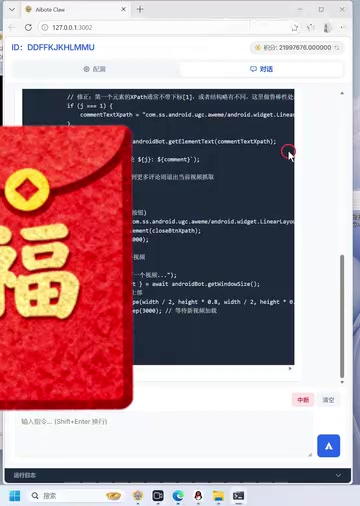
The generated code includes complete logic for launching the app, looping through screen swipes, and retrieving elements — with no syntax errors, ready to run directly. The main potential issue is that element selectors may change if the UI is updated, but this requires only minor manual adjustments.
What does this mean? Once the code is generated, subsequent executions no longer consume AI token costs — achieving a "generate once with intelligence, run unlimited times at low cost" model.
A Note on Token Costs: Tokens are the basic unit of measurement for how large language models process text and images. For images, a single screenshot can consume anywhere from hundreds to thousands of tokens depending on resolution. With GPT-4V, for example, processing a 1080p screenshot costs roughly 800–1,500 tokens, or about $0.01–$0.02. In automation scenarios requiring multiple screen analyses per second, costs accumulate rapidly — and this is precisely the core economic problem that code generation solves: once the code is produced, subsequent execution is completely decoupled from AI inference, bringing the cost structure back in line with traditional RPA.
Experiment 2: AI Controlling a Windows Desktop Application
A More Complex Challenge
The second experiment raised the difficulty level — having AI control a Windows desktop application. The specific task: find a designated group chat in WeChat, select a specific sticker, and send it.
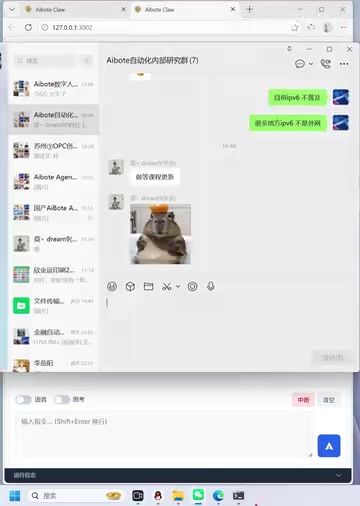
This task is quite complex even for traditional RPA, as it involves:
- Window targeting and switching
- Group chat search and identification
- Opening the sticker panel
- Recognizing and selecting a specific sticker
- Completing the send action
How the AI Handled It
The AI's handling of this task demonstrated remarkable adaptability. The underlying support comes from the attention mechanism in the Transformer architecture, which enables the model to establish semantic associations across different regions of an image — achieving human-level UI comprehension:
- Directly locate the target window
- Analyze the interface structure (consistent with its Android-side capabilities)
- Find the specified group chat
- Open the sticker panel
- Identify and select the "smile" sticker
- Complete the send action
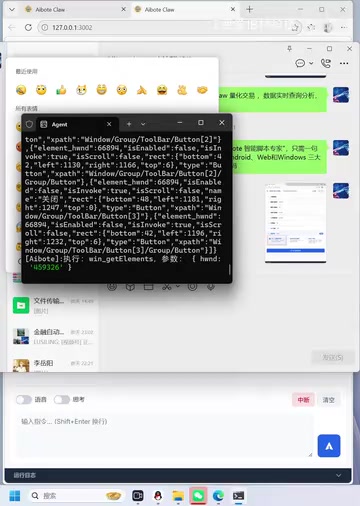
The presenter specifically emphasized that implementing this same workflow with traditional RPA would be "incredibly, incredibly complex."
Related articles
 Product Reviews
The Programmer's Desk Setup Guide: Building a Workspace That Feels Like Home
Discover how programmers build productive, comfortable workspaces. From multi-monitor setups to ergonomic design, explore the desk philosophy that drives focus and flow.
 Product Reviews
Qoder vs Cursor Real-World Comparison: Which $20/Month AI IDE Is Better?
Hands-on comparison of Qoder vs Cursor AI IDEs: Agent autonomy, human interaction count, and architecture decisions. Qoder needed only 2 interactions vs Cursor's 8.
 Product Reviews
Cursor Cloud Agent Demo: Eliminating Bottlenecks Across the Entire Software Development Lifecycle
Deep analysis of Cursor's Cloud Agent demo showing how cloud VMs, automated test artifacts, and a full-chain control plane systematically eliminate human bottlenecks across the software development lifecycle.