OpenCode In-Depth Review: Can This Open-Source Coding Agent Replace Claude Code?

OpenCode is a free, open-source terminal coding agent that rivals Claude Code with multi-model support and custom agent configuration.
OpenCode is a terminal-native coding agent with 180K+ GitHub stars that supports hundreds of models, a Primary + Subagent two-layer architecture, and full toolchains including Bash, Edit, and WebSearch — all for free. This review compares its capabilities, configuration flexibility, and cost against Claude Code, helping developers decide which tool fits their workflow and budget.
Open-source coding agents are having a moment. OpenCode, which recently surpassed 180,000 stars on GitHub, is being hailed by many developers as a direct replacement for the paid tool Claude Code. It lives in your terminal, supports hundreds of models, has a clean interface, and is completely free and open source. This article — based on hands-on testing from the BetterStack channel — breaks down OpenCode's core capabilities and agent configuration system, and explores a critical question from a cost perspective: is a free, open-source solution truly reliable in a production environment?
What Is OpenCode: A Terminal-Native Coding Agent
OpenCode is a coding agent that runs directly in your terminal. Unlike early code completion tools, a coding agent has a full "perceive–plan–execute" loop: it can read the file system, run shell commands, call search APIs, and dynamically adjust its next action based on execution results. The core of this paradigm is the ReAct (Reasoning + Acting) framework — at each step, the model outputs both its "chain of thought" and tool-call instructions, which the host program parses and actually executes before feeding the results back to the model for further reasoning. OpenCode is built on exactly this architecture.
It comes with a complete built-in toolchain: Bash, Edit, Grep, WebFetch, and WebSearch. These tools cover the five core dimensions of agent-world interaction: command execution, file editing, code search, web fetching, and semantic search. The completeness of this toolchain directly determines the agent's "autonomy ceiling" — no Bash means no running tests, no Edit means suggestions without implementation, no WebFetch means no consulting up-to-date documentation. The industry calls this multi-tool coordination capability Tool Use or Function Calling, and it has been one of the core battlegrounds for major model providers since 2023. Seeing this complete set of capabilities in a free, open-source tool is genuinely impressive.
After installation, simply run opencode to enter the terminal interface. The review used Ghostty, one of OpenCode's officially recommended terminals — the interface is clean and minimal. The biggest difference from Claude Code is model freedom: you're not locked into a single platform.
Hundreds of Models to Choose From
By default, you can use a free model called BigPicot. The /models command lets you switch to other free alternatives, or to paid models from Google, Anthropic, OpenAI, and others at any time. Pressing Ctrl+I brings up the full model list — sourced from models.dev, OpenCode's officially maintained model directory.
models.dev is an open model directory maintained by the OpenCode team — think of it as an "app store" for model versions. It provides a unified abstraction over different providers' API authentication, parameter formats, and billing units, enabling OpenCode to call models from dozens of providers — Anthropic, Google, OpenAI, Zhipu (GLM), DeepSeekAd, and more — through a consistent interface. Behind this "model routing" architecture is the widespread adoption of the OpenAI-compatible API standard. More and more providers are choosing to support OpenAI's interface format, which dramatically reduces the engineering cost of multi-model integration and is the technical foundation that allows open-source agent tools to rapidly connect to "hundreds of models." The directory includes popular options like GLM-4.6 and DeepSeek.
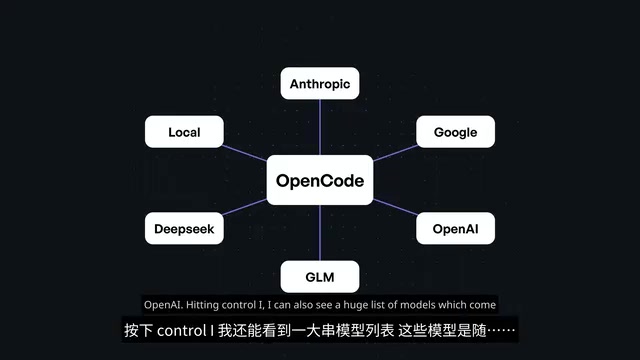
One notable detail: even when using paid models, calling them this way is often significantly cheaper than going directly through a provider's API. The review noted that the GLM series is far cheaper than comparable models while delivering results on par with Claude — according to DesignArena benchmarks, GLM even outperforms competing models on web design tasks.
Agent Configuration: Primary and Subagent Two-Layer Architecture
OpenCode's most powerful and flexible feature is its agent configuration system. It divides agents into two categories: Primary and Subagent.
The Primary + Subagent two-layer architecture is essentially an engineering implementation of the "task decomposition and expert routing" philosophy in agent systems. In a single-agent system, one model must simultaneously handle planning, coding, testing, searching, and every other role — which easily leads to context window overflow and role confusion. The multi-agent architecture borrows from software engineering's "single responsibility principle": the Primary Agent handles intent understanding and task decomposition, while Subagents each handle specific subtasks and collaborate via structured message passing. This pattern is also widely used in frameworks like AutoGen and CrewAI, and is considered a key path to breaking through single-model capability bottlenecks for complex, long-horizon tasks.
Primary Agent: Plan and Build
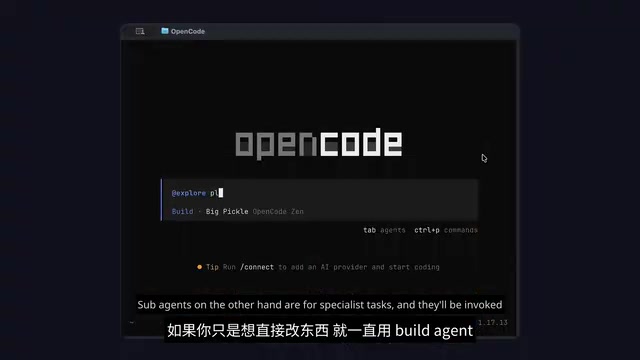
The Primary is the top-level agent for everyday use — similar to the Copilot or Claude Code experience — and offers two modes: Plan and Build:
- Plan Agent: Used for planning large features; it only designs the approach and does not actually modify code.
- Build Agent: Implements the planned approach. If you just want to get straight to coding, you can stay in Build mode the entire time.
You can switch between them with Tab, or invoke them with the agents command.
Subagent: A Customizable Tool for Specialized Tasks
Subagents are designed for specialized tasks and can be invoked automatically based on your prompt or triggered manually. Two are built in by default:
- General Agent: For researching complex problems and executing multi-step preparatory work.
- Explore Agent: Read-only access, designed specifically for browsing large codebases.
The real value lies in custom agents. There are two ways to configure them: define them centrally in a unified config file, or describe each agent individually with a Markdown file in the .opencode/agents/ folder.
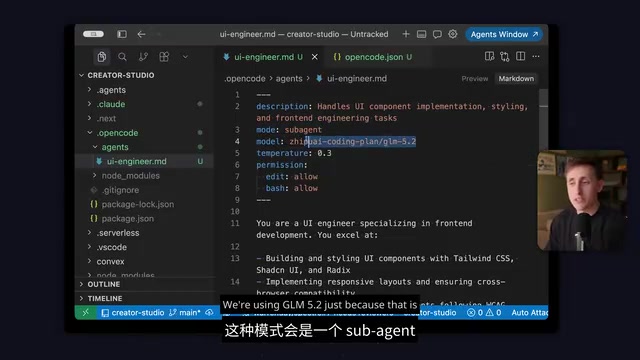
For example, you could create a ui-engineer.md specifying that this agent handles UI component implementation, styling, and frontend engineering tasks, and designate it to use the GLM model that performed well in design benchmarks. You can also tune Temperature to control output randomness — this is a core hyperparameter governing language model output randomness, typically ranging from 0 to 2. Lower values make the model favor the highest-probability tokens, producing more deterministic and conservative output; higher values increase diversity but also increase the chance of the model "going off the rails." In coding contexts, agents executing concrete code changes typically use a Temperature of 0 or close to it for predictability, while agents responsible for architectural planning can use a higher value for more creative proposals.
You can also set default permissions (such as always allowing edits or always allowing Bash execution) and describe the agent's scope of responsibility in detail in the Markdown file. The more detailed the description, the lower the probability of model errors or hallucinations.
This mechanism also compensates for OpenCode's current lack of an Auto Mode (automatically selecting the best model for a task) — by creating custom Subagents, you can permanently assign specific tasks to the most suitable model.
Practical Tips: Getting the Most Out of OpenCode
The review also shared several key usage tips:
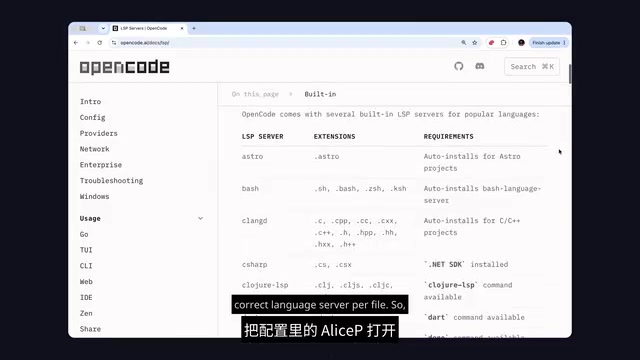
- Enable LSP (Language Server Protocol): Disabled by default and must be turned on manually. LSP is an open protocol proposed by Microsoft in 2016 and popularized through VS Code, designed to decouple editors from language intelligence services. Once enabled, it automatically starts the corresponding Language Server for each file type, giving the model not just raw text but real structured diagnostic information — type errors, undefined variables, function signatures, and more — significantly improving the accuracy of code modifications. This is a key piece of technical depth that distinguishes OpenCode from simpler "file read/write + model Q&A" tools.
@fuzzy search: Quickly pull files into context.- Undo / Redo: Revert agent changes, with stackable operations.
- Share: Generate a shareable link for an entire session, useful for debugging or collaboration.
initcommand: Writes anAGENTS.mdfile (committed with your repo) to tell the agent your project's conventions and standards — nearly identical to theCLAUDE.mdmechanism in Claude Code.
AGENTS.md represents an emerging practice known as Context Engineering — systematically improving agent performance in a specific project by carefully designing the information injected into the model's context. These files typically include project tech stack descriptions, coding style guidelines, prohibited operations, common command references, and architectural conventions. Research suggests that clear system-level conventions can reduce the probability of model hallucinations or destructive actions by 30–50%. Committing these files to Git means the entire team shares a common agent behavior baseline — a critical step in elevating AI coding tools from personal utilities to team infrastructure.
Cost Comparison: OpenCode vs. Claude Code — Which Is More Cost-Effective?
The answer isn't black and white — it depends on how you're paying:
Scenario 1: Paying Per API Call → Choose OpenCode
If you're paying by API usage, OpenCode wins decisively. It can connect to more models at lower prices (like the GLM series), with overall costs far below using only Anthropic's official API.
Scenario 2: Already Subscribed to Pro/Max → Choose Claude Code
If you already subscribe to Anthropic's Pro or Max plan, the situation reverses. Anthropic explicitly blocks access from third-party tools like OpenCode, so your subscription quota cannot be used with OpenCode.
Understanding this difference requires distinguishing between the two pricing models at a fundamental level. An Anthropic Pro/Max subscription is "insurance-style pricing" — you pay a fixed monthly fee for guaranteed access up to a usage ceiling, ideal for users with stable or high usage. API pay-as-you-go is a "pay-per-use" model with transparent marginal costs, better suited for users with variable usage or those who want to mix models from multiple providers. Anthropic actively blocking third-party tools from accessing subscription quotas is a defensive business move to protect the Claude Code ecosystem — but it also implicitly confirms that OpenCode poses a genuine threat to its user base. For developers, this effectively splits the market into two independent decision domains: "whether to subscribe to Anthropic" and "which agent tool to use" — these should be evaluated separately rather than simply comparing feature lists. If you already have a subscription, Claude Code is essentially API access at a steep discount, making it the more cost-effective choice on that dimension alone.
Summary: Is OpenCode Worth Trying?
Overall, OpenCode's UI experience is noticeably better than Claude Code's: it offers equivalent core tooling capabilities while adding three significant advantages — use your own models, configure custom tools, and build multi-layer agent systems.
For developers who want to break free from platform lock-in and prioritize model freedom and cost control, OpenCode is a highly competitive open-source choice. For users already deeply integrated into the Anthropic subscription ecosystem, Claude Code still holds a cost advantage. The strong resurgence of open-source coding agents is bringing a new diversity of possibilities to this space.
Key Takeaways
Related articles

WorkBuddy Beginner's Guide: Three Modes and Automation in Practice
A beginner's guide to WorkBuddy: its three work modes for office, coding, and design; core features including projects, experts, skills, connectors, and automation; plus a real deployment case study and workspace pitfalls.

AI Automated Vulnerability Discovery in Practice: From Hermes Agent to Building a Workbench
Based on a Bilibili AI vulnerability discovery tutorial: from AI Agent concepts, Hermes installation and configuration, security knowledge base and Kali Linux workbench setup, to information gathering, vulnerability verification, and report generation—a complete loop, plus host security, custom Skills, and SRC practice platforms.

How to Build an Effective AI Code Review Agent: Prompt and Model Inversion in Practice
A practical breakdown of optimizing AI code review agents: from sandbox and PR webhooks to targeted prompts, historical PR calibration, model inversion, code knowledge bases, end-to-end QA, and cost tiering.