OpenCode Practical Guide: Installation, Configuration & Usage Tutorial for This Open-Source Claude Code Alternative

A comprehensive guide to installing, configuring, and using OpenCode as an open-source Claude Code alternative.
This article provides a complete practical guide to OpenCode, an open-source terminal AI programming tool that serves as an alternative to Claude Code. It covers two installation methods (desktop and WSL), core configuration including LLM integration, rule files, and Agent settings, plus extensibility through custom commands, tools, and MCP service integration, with a recommended learning path for developers.
What is OpenCode: An Open-Source Alternative to Claude Code
As AI programming assistants increasingly become standard tools for developers, commercial products like Claude Code have won over a large user base with their powerful terminal interaction capabilities. Claude Code is a command-line AI programming assistant developed by Anthropic that allows developers to interact with Claude models directly in the terminal for code generation, file editing, Git operations, and more. Unlike traditional IDE plugin-style AI assistants (such as GitHub Copilot), the design philosophy of terminal AI tools is to embed AI capabilities into the command-line workflow that developers are most familiar with, reducing context switching. These tools typically feature file system awareness, project context understanding, and multi-turn conversation memory, enabling them to understand the entire codebase structure rather than being limited to individual files.
However, for programmers pursuing flexibility, cost control, and local deployment, an open-source alternative is often more attractive. Claude Code's business model relies on Anthropic's API billing, and model choices are limited to the Claude series — this is precisely the market space where open-source alternatives exist. OpenCode emerged in this context as a tool entering developers' field of vision.
OpenCode is an open-source AI programming tool designed for the terminal — essentially an open-source replacement for Claude Code. Its core value lies in enabling developers to collaborate with AI directly in the command-line environment for code writing, debugging, refactoring, and other tasks, while maintaining full control over model selection, rule configuration, and tool extensions. Compared to closed commercial products, OpenCode's greatest advantage is freedom — you can connect to your preferred LLMs, customize commands and tools, and even integrate external MCP services.
From cost and privacy perspectives, the advantages of using open-source AI programming tools are also very clear. Commercial tools like Claude Code typically use subscription models (such as a ~$20/month Pro plan or ~$100/month Max plan), while open-source tools allow developers to connect directly to various APIs and pay based on actual token consumption. For developers with lower usage frequency, pay-per-use may be more economical than subscriptions; for heavy users, they can choose to deploy open-source models locally (such as DeepSeekAd, Qwen, Llama, etc.), reducing marginal costs to hardware electricity levels. On the privacy front, code is a company's core asset, and sending code to third-party commercial APIs carries data leakage risks. Open-source tools combined with local model deployment can ensure that all code data never leaves the internal network, meeting the strict data security requirements of industries like finance and defense.
This article systematically covers the complete path from OpenCode installation, configuration, to practical use, helping programmers quickly get started with this productivity tool.
Two Installation Methods for OpenCode: Desktop and WSL
OpenCode provides two main installation methods, suited to different use cases and operating system environments.
Desktop Installation: The Simplest Entry Path
The first method is desktop installation, which is also the most simple and straightforward approach. For most users, desktop installation has virtually no barrier to entry — just download the installation package for your platform to complete setup. It's ideal for new users who want to quickly experience OpenCode's features.

WSL-Based Installation: The Officially Recommended Method
The second method involves first installing WSL (Windows Subsystem for Linux) on Windows, setting up a Linux virtual system based on WSL, and then installing OpenCode within this virtual environment.
WSL is a compatibility layer technology introduced by Microsoft starting with Windows 10, allowing users to natively run Linux binary executables on Windows. WSL 2 is based on a lightweight virtual machine architecture using a real Linux kernel, offering significant improvements in system call compatibility and file I/O performance compared to WSL 1. For developers, WSL solves the long-standing pain point of poor development toolchain compatibility in Windows environments — many open-source tools were originally designed for Unix/Linux environments, relying on POSIX-standard file path formats (forward slash separators), case-sensitive file systems, and specific system call interfaces. Through WSL, developers can retain the Windows desktop environment while gaining a complete Linux development experience, including apt package management, bash script execution, native Docker support, and more.
You might not have noticed, but this WSL-based approach is actually the officially recommended installation method. The reason is that many command-line AI tools run more stably and with better compatibility in Unix-like environments. Windows native environments sometimes encounter issues with path handling, permission management, or missing dependency libraries, while running through WSL avoids many such compatibility pitfalls, providing a development experience close to native Linux.

For serious daily development use, the WSL approach is recommended; if you just want to quickly try things out, desktop installation is more convenient.
OpenCode Core Configuration: Models, Rules & Agent Settings
After installation, the configuration phase is key to determining the OpenCode user experience. OpenCode's configuration system primarily encompasses three layers.
LLM Configuration and Integration
OpenCode supports connecting to multiple LLMs, which is one of its core advantages over closed commercial tools. Developers can flexibly choose which model services to connect based on cost, performance, and privacy requirements. Whether it's mainstream commercial LLM APIs (such as OpenAI's GPT series, Anthropic's Claude series, Google's Gemini series) or locally deployed open-source models (such as DeepSeek Coder or CodeLlama running via Ollama), all can be connected to OpenCode through configuration, avoiding vendor lock-in. This multi-model support strategy also allows developers to select the optimal model for different tasks — for example, using a high-performance model for complex architecture design and a lightweight model for simple code completion, achieving the best balance between quality and cost.
Rule File Configuration
Rule files are used to define AI behavior constraints and context specifications within a project. By configuring rule files, you can instruct the AI to follow specific coding styles, project structure conventions, or business logic requirements, making generated code more aligned with actual project needs and reducing subsequent manual adjustment costs. The design philosophy of rule files is similar to ESLint configuration files or .editorconfig — they provide the AI with a set of "behavioral guidelines." For example, you can declare in the rules that "this project uses TypeScript strict mode," "all API endpoints require unit tests," or "variable naming uses camelCase style." The AI will automatically follow these standards when generating code, significantly reducing the cost of code review and rework.
Agent Classification and Task Assignment
OpenCode internally divides Agents into several types, with different types assuming different task roles. In the context of AI programming tools, an Agent refers to an AI entity with autonomous planning and execution capabilities. Unlike simple Q&A mode, Agents can decompose complex tasks into multiple sub-steps, invoke tools to complete each step, and dynamically adjust subsequent plans based on intermediate results. Agent classifications in OpenCode typically include: Coding Agent (responsible for code generation and modification), Planning Agent (responsible for task decomposition and solution design), Review Agent (responsible for code review and quality checks), and more. This classification design draws from the separation of concerns principle in software engineering, letting each Agent focus on specific types of tasks to improve output quality. Understanding the Agent classification mechanism helps developers choose appropriate agents for different development scenarios, achieving more precise task assignment.
Custom Extension Capabilities: Commands and Tools
OpenCode's extensibility is a major highlight as an open-source tool, primarily reflected in two dimensions: commands and tools.
Custom Commands for Improved Efficiency
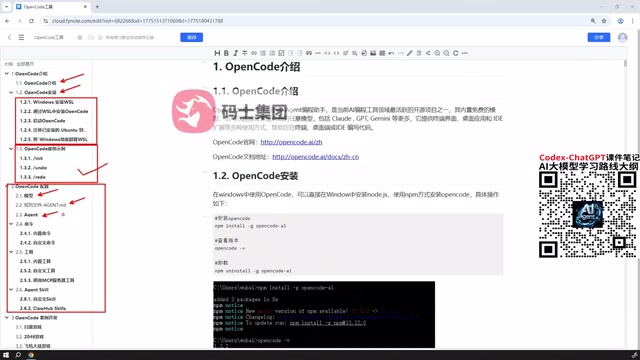
Beyond built-in common commands, OpenCode allows developers to create custom commands. By encapsulating frequent operations as custom commands, you can significantly improve execution efficiency for repetitive tasks, making terminal workflows smoother. The design philosophy of custom commands is similar to aliases in Shell or targets in Makefiles — abstracting multi-step operations into a concise instruction. For example, you could define a "review" command that has the AI automatically read the current Git staging area changes and provide code review feedback; or define a "scaffold" command that has the AI automatically generate the basic code structure for a new module based on project templates.
Custom Tools and MCP Service Integration
At the tool level, OpenCode not only supports custom tools but can also directly connect to tools published by external MCP (Model Context Protocol) services.
MCP (Model Context Protocol) is a standardized protocol open-sourced by Anthropic in late 2024, aimed at solving the connection problem between AI models and external data sources/tools. In the MCP architecture, there are three core roles: Host (the host application, such as OpenCode), Client (the protocol client), and Server (the tool/data provider). MCP servers can expose three types of capabilities: Resources (context data), Tools (executable operations), and Prompts (prompt templates). The significance of this standardized design is that any tool server following the MCP protocol can be called by any MCP-compatible AI client, achieving "write once, use everywhere" tool reuse. Currently, the MCP ecosystem covers hundreds of tool services including database queries, file system operations, browser automation, and API calls, forming a rapidly growing developer community.
By integrating MCP services, OpenCode can leverage the rich tool capabilities already existing in the external ecosystem without reinventing the wheel. For example, after connecting to a database MCP service, the AI can directly query database schemas to generate more accurate data access code; after connecting to a browser automation MCP service, the AI can help write and debug frontend pages.
Agent and External Resource Reuse
Additionally, OpenCode also supports Agent-related extension capabilities. Developers can not only customize Agents but also directly use existing Agent configurations found online. This ready-to-use reuse mechanism further lowers the barrier to entry, allowing developers to quickly build their own workflows based on existing community achievements. This community-driven ecosystem model aligns with the philosophy of npm package management and the VS Code extension marketplace — through standardized configuration formats and sharing mechanisms, excellent Agent configurations can freely circulate and iterate within the developer community.

OpenCode Practical Demo and Recommended Learning Path
After mastering installation and configuration, the final step is conducting simple development demonstrations through practical examples. Only by applying OpenCode to real coding tasks can you truly appreciate its value in boosting productivity.
Overall, OpenCode has a relatively gentle learning curve. For programmers already accustomed to command-line development, it integrates seamlessly into existing development environments; for developers who want to break free from commercial tool limitations and pursue greater freedom, OpenCode's model selection, command and tool customization, and MCP integration capabilities form a complete and flexible AI programming solution.
Recommended Learning Path
For first-time users, the following progressive path is recommended:
- Quick Experience: Start with the desktop installation to run through the basic process and build intuitive understanding;
- Stable Deployment: Transition to the officially recommended WSL approach to build a long-term development environment;
- Model Integration: Configure appropriate LLMs, balancing cost and performance;
- Rule Customization: Write rule files to make AI output better conform to project standards;
- Capability Extension: Gradually integrate custom commands, tools, and MCP services to build your personalized workflow.
At each stage, it's recommended to validate results in actual projects rather than staying at the demo level. True productivity gains come from integrating the tool into your daily development rhythm — when you find yourself no longer needing to frequently switch to a browser to search for API usage, no longer manually writing boilerplate code, and no longer debugging simple bugs line by line, OpenCode's value is fully realized.
Conclusion
As an open-source alternative to Claude Code, OpenCode demonstrates solid potential in both feature completeness and extension flexibility. It can meet beginners' needs for quick onboarding while supporting advanced developers' deep customization through rich customization capabilities. At a time when AI programming tools are increasingly becoming standard development equipment, OpenCode provides a choice worth seriously exploring for programmers who pursue openness and freedom.
It's worth noting that the open-source AI programming tool ecosystem is in a period of rapid evolution. As the MCP protocol gains wider adoption, open-source model performance continues to improve, and community contributors keep joining, the capability boundaries of tools like OpenCode are still expanding rapidly. Choosing an open-source solution is not only a practical choice for today but also an early investment in future ecosystem dividends.
Related articles

OpenAI Shopping Agent Hands-On: How Conversational AI Is Reshaping E-Commerce
Full breakdown of OpenAI's shopping agent demo: natural-language needs, budget-driven substitutions, visual generation, address changes, and upselling—how conversational AI reshapes e-commerce.

New DeepSeek Harness Plugin: Bringing the Cursor-Style Workflow into AI Coding
A Bilibili creator shares the Cursor-like Sidebar plugin, bringing a Cursor-style workspace to DeepSeek Harness: chat on the left, file editing on the right, Ctrl+L to reference code, hunk-by-hunk review of AI changes, plus installation notes.

Cursor Engineer Open-Sources Pstack: A Six-Phase AI Coding Pipeline Breakdown
Cursor's Lauren Tan open-sources Pstack, breaking AI coding into six phases. We detail its multi-agent design arena, TDD build, end-to-end verification, and PR babysitting, and compare it with other spec-driven frameworks.