OpenHands v1.24.0 Update Breakdown: 4 New Features and 7 Key Fixes

OpenHands v1.24.0 polishes tutorial features and restructures the contribution workflow with no breaking changes.
OpenHands v1.24.0, released September 25, 2024, is the first fix-focused release after the v1.13–v1.23 retrospective. With 29 commits and 136 file changes, it delivers 4 new features — centralized workspace folder toggle, per-backend subscription cache isolation, revised homepage copy, and read-only shared automation conversations — alongside 7 key fixes covering canvas runtime connectivity, full ACP tool call rendering, missing model warnings, MCP cloud credential sync, lenient Cron scheduling validation, per-backend settings caching, and preserved failure records on history reload. The 700+ line contribution guide was also split into five actionable skill documents, with seven first-time contributors merging code. No breaking changes; safe to upgrade immediately.
Release Overview: A Small Version That Smooths Out Tutorial Features
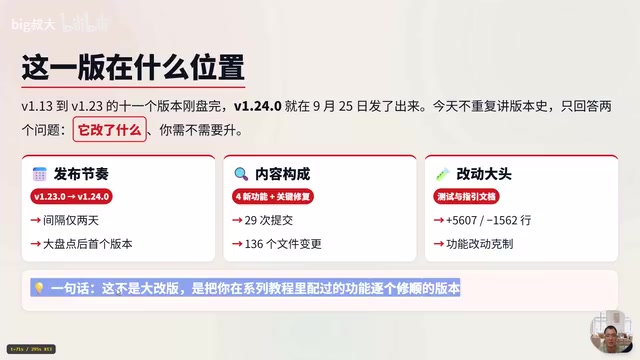
Just two days after completing a major retrospective spanning v1.13 through v1.23, OpenHands released v1.24.0 on September 25th. Looking at the release cadence, this is the first fix-focused version following that retrospective — no rush toward any architectural overhaul.
The release totals 29 commits and 136 file changes, which sounds substantial, but the bulk of the work falls on tests and documentation — 5,607 lines added and 1,562 deleted, with tests and contribution guidelines accounting for the vast majority. In other words, the feature-level changes are restrained; the core value lies in polishing the features that were walked through in the previous tutorial series.
Based on continuous hands-on testing shared by Bilibili creator "大叔大", this release can be summarized along three main threads: smoothing out tutorial features, making multi-backend switching more stable, and restructuring the contribution guidelines. This article breaks down those three threads across 4 new features and 7 key fixes.
Four New Features: Centralized Entry Points and Safer Collaboration
Centralized Workspace Folder Toggle
Previously, toggling a folder required digging through the file tree one by one. v1.24.0 moves the entry point to the top of the conversation, allowing all folders to be managed in one place — no more repeatedly expanding the directory tree. This feature was contributed by CodeepSync19.
Subscription Cache Isolated by Backend
Subscription caches bleeding across backends after switching was a long-standing issue in OpenHands. The new version ties OpenAI and other subscription caches to their respective backends, so cache confusion no longer occurs when switching. This improvement is particularly useful for users who frequently switch between multiple backends, contributed by WoochLTW6.
Revised Homepage Copy
The homepage introduction has been rewritten in a tone closer to everyday engineering work, making it immediately clear what tasks the app can handle for you — lowering the comprehension barrier for new users.
Shared Automation Conversations Default to Read-Only
Accidentally overwriting someone else's automation configuration during cloud collaboration is a real risk. This version sets shared automation conversations to read-only by default, preventing collaborative mishaps caused by accidental edits. Contributed by Hyptail.
First Half: Three Fixes — Canvas, Tool Calls, and Model Warnings
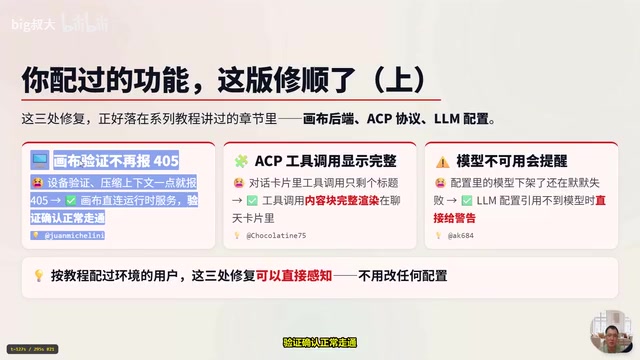
Now for the highlights — these fixes almost all land on chapters covered in the tutorial series, meaning users who followed along can feel the improvements without touching a single configuration.
Canvas directly connected to runtime: Service verification for direct canvas-to-runtime connections now works correctly, confirming the execution chain is functional. Submitted by John Michelini.
ACP tool calls display in full: Previously, tool calls in conversation cards showed only a title with no details. Now the tool call content blocks render completely inside the chat card, making the debugging process more transparent. Submitted by Chocolating75.
Warning when model is unavailable: When a model referenced in a configuration was taken down, the system used to fail silently, leaving users confused. Now a warning is displayed directly when an LLM configuration cannot find the referenced model. Submitted by AK6800.
Second Half: Four Fixes — Cloud Sync, Scheduling, and History
The remaining four fixes also target areas touched in the tutorials.
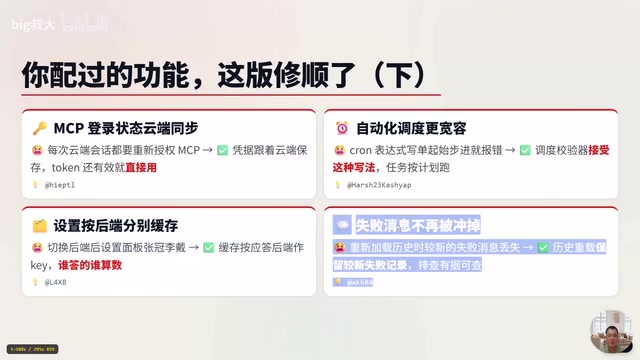
MCP login state syncs to the cloud: Previously, every new cloud conversation required re-authorizing MCP. Now credentials are saved with the cloud session, and as long as a token is still valid, it's reused directly — no repeated authorization needed. Submitted by Hypto.
More lenient automation scheduling: Previously, writing a single starting value in a Cron expression would trigger an error. The scheduler validator now accepts this syntax, allowing tasks to run as planned. Submitted by Harsh R3.
Settings cached separately per backend: Previously, switching backends caused settings from the wrong backend to appear in the settings panel. Settings are now cached independently per backend.
Failed messages no longer overwritten: Previously, newer failed messages would be lost when reloading history. History reloads now retain the most recent failure records, making it easier to trace and debug issues. Submitted by AK6800.
Contribution Workflow Restructured: 700+ Line Guide Split into Skill Documents
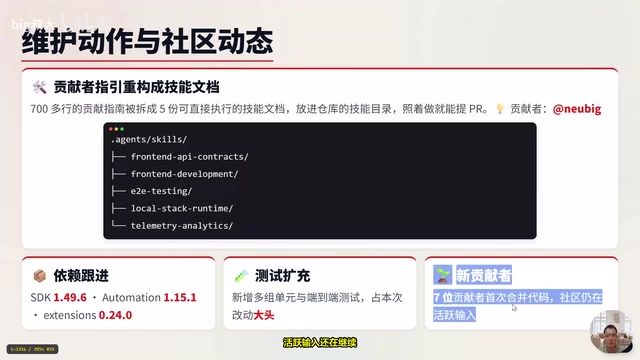
Beyond features, this release also reworked the contribution workflow — useful for anyone looking to get involved in the open-source project. The original 700+ line contribution guide has been split into five directly actionable skill documents, placed in the Agents/Skills skills directory of the repository. You can follow them step by step to submit a PR.
The skills directory is organized across five directions: frontend interface conventions, frontend development, end-to-end testing, local runtime smoke testing, and analytics — pick whichever entry point fits your interests. Seven contributors merged code for the first time in this release, and community activity continues to grow.
Dependencies were also updated: the SDK was bumped to 1.49.6, related extensions to 0.24.0, and multiple new unit and end-to-end tests were added — this test work is the primary source of the 136 file changes in this release.
Splitting a single large contribution guide into separate documents organized by skill area is a well-established practice in open-source project maintenance for lowering the barrier for new contributors. The original 700+ line linear document required readers to read from start to finish just to find content relevant to their area of interest. By splitting it across five dimensions — frontend interface conventions, frontend development, end-to-end testing, local smoke testing, and analytics — contributors only need to refer to the relevant skill document. Each is designed as a directly executable guide. Placing them in the Agents/Skills directory also means the documentation evolves in sync with the codebase, avoiding the common disconnect between docs and implementation that occurs when maintaining a separate Wiki. Seven new contributors merging code in the same release is a reasonable indicator that this structural change has reduced the barrier to participation.
Should You Upgrade?
The answer is straightforward: this release has no breaking changes, config files don't need to be modified, and it's safe to upgrade at any time. Here's a breakdown by user type:
- Users following the tutorial series: Upgrade recommended. The five issues with canvas, ACP, LLM, MCP, and automation are all features covered in the tutorial chapters — you'll feel the improvements right away after upgrading.
- New users: Start directly with v1.24.0; no need to go back and catch up on older versions.
- Multi-backend or cloud users: With caches and settings now isolated per backend, the switching experience is noticeably more stable.
The upgrade command is straightforward:
# Fresh install
uvx install openhands==1.24.0

# Existing users upgrading
uvx upgrade openhands
Overall, v1.24.0 is not an architectural overhaul — it's a pragmatic release focused on polishing commonly used features one by one and clarifying the contribution process. For users who have been following the OpenHands series, this kind of "stable iteration" release is often worth upgrading to sooner than a major overhaul.
Background Notes
ACP (Agent Communication Protocol) is the protocol layer in OpenHands that coordinates interactions between AI agents and external tools. When an agent needs to invoke external capabilities such as search, code execution, or file I/O, the underlying system generates structured tool call requests and writes the results back to the conversation context as "content blocks." Previously, these content blocks only displayed the call name in the card header, with specific input parameters and return values collapsed or truncated. Developers debugging abnormal agent behavior couldn't verify call details directly in the chat interface — they had to dig through backend logs. After this fix, the full request parameters and response content are rendered directly inside the chat card, shortening the debugging loop from "guess → check logs → reproduce" to "read the card → locate the issue." This is particularly meaningful for users who need to fine-tune tool call strategies.
MCP (Model Context Protocol) is an open protocol championed by Anthropic, designed to provide AI models with a standardized way to access context and tools. Third-party services (such as GitHub, Notion, database connectors, etc.) can expose their capabilities to compatible AI clients by implementing an MCP Server, without needing to build a separate integration for each client. In OpenHands' cloud mode, each new conversation effectively starts an independent runtime session. If MCP credentials aren't persisted at the cloud state level, every session requires re-completing OAuth authorization or manually pasting a token. This fix binds valid credentials to the cloud account level — as long as a token hasn't expired, it can be reused across sessions, eliminating the friction of frequent re-authorization.
Cron expressions are a string format for describing scheduled task execution plans, consisting of five to six fields representing minutes, hours, day of month, month, day of week (and optionally seconds), separated by spaces. Standard syntax supports wildcards (*), ranges (1-5), steps (*/2), and lists (1,3,5). This fix addresses the "single starting value" scenario — where a field contains just one specific number rather than a range or wildcard (for example, 0 9 * * 1 meaning every Monday at 9 AM). The old validator incorrectly flagged this as an invalid expression and refused to save it, causing seemingly valid scheduling configurations to fail silently. The updated validator relaxes the judgment logic for such cases, ensuring Cron expressions that comply with the POSIX standard are correctly parsed and trigger tasks as scheduled.
Related articles

How Big Can Stars Really Get? The Physical Limits of the Largest Stars
Red supergiants are the largest stars by volume, with radii up to 2,000 times the Sun, engulfing the inner solar system. But there is no precise upper limit on stellar size—models predict up to 15,000 solar radii. The most massive blue stars are far smaller than red supergiants—biggest and heaviest are two different things.

Apple HomeView Smart Display Full Feature Breakdown: Wall-Mount or Desktop, $299
Apple launches HomeView, a $299 smart display with wall-mount and desktop options, 12MP camera for facial recognition, smart home control, music playback, and recipe step-by-step cooking. Full breakdown of watch faces, apps, privacy, and cooking integration.

Where Did the Promised New Studio Go? Craft Computing Answers After Five Years
Craft Computing's host responds to viewer questions: the new studio promised five years ago was shelved as construction costs soared from $30,000 to $75,000, and was replaced by a 168-square-foot garage conversion.