OpenManus Local Deployment Guide: Real-World Testing with DeepSeek & Troubleshooting Tips

OpenManus local deployment tested with DeepSeek: open-source Manus shows promise but remains immature.
This article details the complete local deployment process for OpenManus, an open-source AI Agent project, including Conda environment setup, DeepSeek model configuration (requiring Chat rather than Reasoner model), and Playwright browser driver installation. Through two real-world tests—news scraping to generate documents and creating a Mario-style game—we found that OpenManus demonstrates basic Agent capabilities but still has significant gaps in task completion quality, execution stability, and Token cost control, requiring human intervention and not yet ready for production use.
Manus AI recently took the tech world by storm, claiming to independently operate virtual machines and autonomously plan and execute complex tasks. However, invitation codes are nearly impossible to get, with scalped prices going through the roof. Fortunately, the open-source community responded quickly—the OpenManus project garnered over 25,000 GitHub stars in just a few days.
This article walks you through the complete local deployment process for OpenManus, with real-world testing using the DeepSeekAd large language model to see how this open-source Manus alternative actually performs.
What Is OpenManus: What Can This Open-Source Manus Alternative Do?
OpenManus is an open-source alternative built by community developers based on the Manus concept. Its core approach is to call large language models, enabling an AI Agent to autonomously plan task steps and leverage tool chains—including browser control, file read/write, and code execution—to complete complex user instructions.
Let me explain the AI Agent concept here—it's one of the most important paradigms in current LLM applications. Unlike traditional "question-and-answer" chatbots, an Agent possesses four core capabilities: Planning, Tool Use, Memory management, and Reflection. Its workflow typically follows the ReAct (Reasoning + Acting) framework: first reason about what to do, then execute the action, observe the results, and repeat until the task is complete. This paradigm transforms AI from a passive text generator into an active task executor—and this is precisely the core technical philosophy behind both Manus and OpenManus.
In simple terms, you just describe a task in natural language, and OpenManus will attempt to automatically break it down into steps, invoke tools, and complete it progressively—this is exactly the hottest AI Agent workflow today.
The project is actively maintained on GitHub, and the installation process is relatively straightforward. For users with some technical background, the barrier to entry isn't high.
Complete OpenManus Local Deployment Tutorial
Environment Setup: Creating a Conda Virtual Environment
The first step in deploying OpenManus is setting up a Conda environment. Conda is a cross-platform package management and environment management tool developed by Anaconda, widely used in the Python and data science communities. The core value of virtual environments lies in isolation—each project can have its own independent Python version and dependencies, avoiding version conflicts between projects. Compared to Python's built-in venv, Conda can also manage non-Python system-level dependencies (such as C/C++ libraries), which is particularly important when deploying AI Agent projects involving browser drivers and system calls.
The overall installation involves five steps:
- Create virtual environment: Run the command to create a Conda environment named
openmanus - Activate the environment: Use
conda activate openmanus - Clone the repository: Pull the OpenManus repo from GitHub
- Enter the project directory:
cd openmanus - Install dependencies: Run
pip installto install required packages
The installation process takes some time—just be patient.
Configuring the DeepSeek Model and API Key
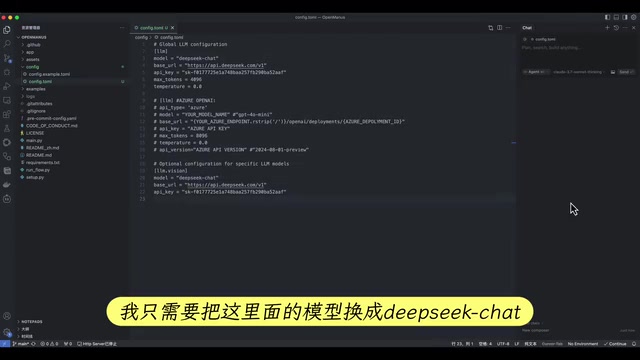
After installation, you need to configure the model and API Key. The project provides a configuration file template—copy it and edit accordingly.
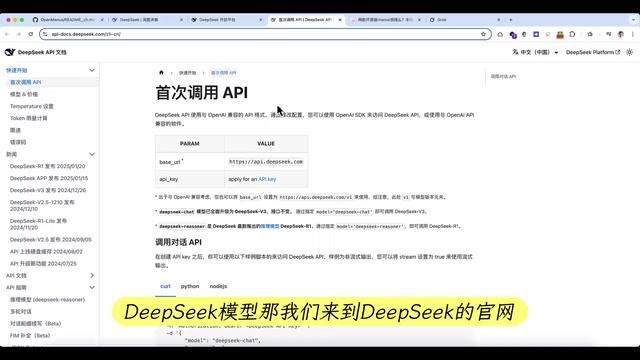
The official recommendation defaults to Claude 3.5, but to reduce costs, we'll use the DeepSeek model for this demonstration:
- Go to the API page on DeepSeek's official website
- Copy the API Base URL and replace the link in the configuration file
- Create a new API Key and enter it in the configuration file
- Set the model name to the corresponding DeepSeek model
Troubleshooting Tip: Testing revealed that DeepSeek Reasoner (R1 reasoning model) is NOT supported by OpenManus—it throws an error immediately on startup. You must switch to the DeepSeek Chat model for it to work properly. This is crucial to note.
Here's the technical explanation for the difference: The DeepSeek Reasoner model uses a Chain-of-Thought reasoning mechanism similar to OpenAI o1, performing extended step-by-step internal reasoning before outputting the final answer. This model's API response format differs from the standard Chat Completion interface—it returns an additional reasoning_content field. Many frameworks built on the standard OpenAI API format (including OpenManus) haven't adapted to this special format, causing parsing errors. The DeepSeek Chat model is fully compatible with the standard OpenAI API format, which is the fundamental technical reason why you must choose the Chat model.
Installing the Playwright Browser Driver
Many OpenManus tasks require browser control, and the first run may fail due to missing Playwright browser drivers.
Playwright is an open-source browser automation framework developed by Microsoft, supporting three browser engines: Chromium, Firefox, and WebKit. Compared to the older Selenium, Playwright offers faster execution, more stable wait mechanisms, and more powerful network interception capabilities. In AI Agent scenarios, Playwright serves as "the AI's hands and eyes"—the Agent uses it to open web pages, click buttons, fill forms, and capture screen content, enabling interaction with the real web.
If you encounter missing drivers, simply run:
playwright install
The first installation requires downloading browser binaries, which are quite large (typically hundreds of MB), so it takes some time. After installation, restart the project and browser-related features will work properly.
Test 1: Automatically Scraping News and Generating a Document
The first test task: Get today's news and generate a .doc file in the project folder.
After launching, OpenManus broke the task into 20 steps and began executing them sequentially. You can see it automatically opened a browser and visited multiple news websites for information scraping—this is a typical AI Agent workflow: the model first plans which information sources to visit, then uses Playwright to open each page, extract content, and finally compiles and writes everything to a file.
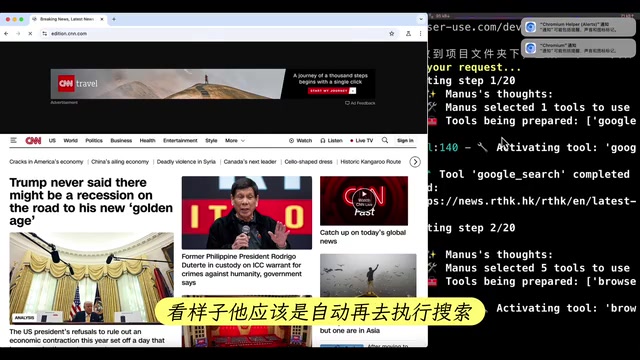
The backend logs clearly recorded each visit to different sources. After some execution time, it finally showed that content had been saved to news.doc.
Result Assessment: The file was indeed generated with news content, but the formatting was messy and readability was mediocre. Timeouts and access failures occurred during the process, but the Agent demonstrated some fault tolerance by attempting to continue with subsequent steps.
Test 2: Generating a Mario-Style Platformer Game
The second test task was more challenging: Write a Mario-like platformer game that runs locally.
OpenManus again broke the task into 20 steps and began writing code automatically. At step six, a game window suddenly popped up.
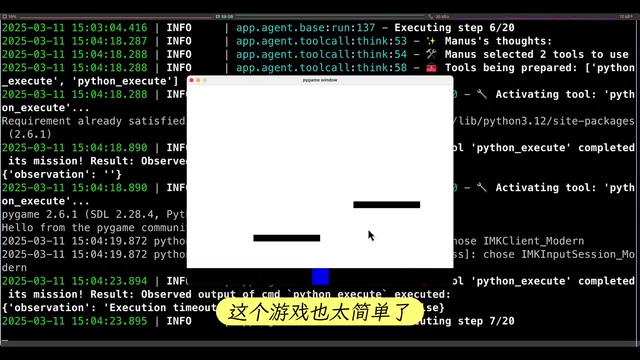
However, the actual experience was quite bare-bones—the character could only move up and down, couldn't jump, and had no platform interaction logic. It was far from "Mario-style." The final task status also showed as failed. Opening the generated code file in Cursor confirmed that code existed, but functional completeness was very low.
This reflects the current limitations of AI Agents when handling complex programming tasks: they can scaffold a basic framework, but detailed implementation and logical completeness remain insufficient. Game development in particular—requiring precise physics engine logic, collision detection, and state management—places extremely high demands on the model's code generation and context understanding capabilities that current Agent frameworks struggle to meet.
Token Cost and Execution Efficiency Analysis
DeepSeek Model Token Consumption
The first news scraping task consumed approximately 0.1 RMB (about $0.014 USD) in Token fees using the DeepSeek model. With Claude or GPT-4, a single task might cost 0.5–1 RMB ($0.07–$0.14 USD).
To understand why Agent tasks consume so many Tokens, you need to understand the underlying mechanism: A Token is the basic unit for LLM text processing—roughly a "word fragment." One Chinese character typically corresponds to 1-2 Tokens, while one English word corresponds to 1-4 Tokens. LLM APIs charge separately for input Tokens (Prompt) and output Tokens (Completion), with output Token pricing typically 2-4x higher. AI Agents consume enormous amounts of Tokens because every operation step requires sending the complete conversation history, system prompts, tool descriptions, and current observations to the model. As steps accumulate, the Token count in the context window grows cumulatively—in a 20-step task, the input Tokens for later steps can be several times or even ten times that of the first step.
While it seems modest, consider the following:
- Each task easily involves 20 steps, each consuming Tokens
- Retries after failures double the cost
- Complex tasks may require even more interaction rounds
The cumulative usage cost adds up quickly. Manus's official version being called a "money pit" isn't without reason. DeepSeek does have a clear advantage in cost control—its API pricing is roughly one-fifth to one-tenth of GPT-4, making it an extremely attractive model choice for Agent scenarios.
Task Execution Efficiency
Both test tasks took relatively long to execute, accompanied by timeouts and errors. For users who prioritize efficiency, the current experience still has significant room for improvement.
Conclusion: Is OpenManus Worth the Effort at This Stage?
Through this real-world testing of OpenManus paired with DeepSeek, we can glimpse the product vision of the official Manus: letting AI Agents directly replace humans in completing end-to-end workflows. This direction is undoubtedly exciting, but two core issues exist at the current stage:
Resource Consumption Cannot Be Ignored
Every task execution consumes significant Tokens, especially complex tasks involving multi-step planning and browser operations. For regular users, the cost of frequent use needs to be evaluated in advance. Choosing cost-effective models like DeepSeek is currently an effective strategy for controlling expenses.
Accuracy and Hallucination Issues Remain Prominent
When the entire workflow is executed autonomously by AI, any "hallucination" or misjudgment at any step can derail subsequent steps. AI Hallucination refers to LLMs generating content that seems reasonable but is actually incorrect or fabricated. In Agent scenarios, this problem is significantly amplified: in traditional chat scenarios, users can immediately identify and correct wrong answers; but when AI autonomously executes multi-step tasks, a hallucinated output from one step becomes the input condition for the next, creating a "snowball effect of errors." For example, an Agent might incorrectly believe a file was successfully created, then continue executing subsequent operations based on this false premise, ultimately causing the entire task chain to collapse.
From testing results, appropriate human intervention remains indispensable at this stage. This is why the industry generally considers the "Human-in-the-Loop" semi-automatic mode more reliable than fully autonomous mode—let AI execute specific operations while retaining human review and confirmation authority at critical decision points.
Overall, OpenManus as an open-source project has demonstrated the basic capability framework of AI Agents, and the deployment barrier isn't too high. For tech enthusiasts, it's a project worth following and trying hands-on. But if you expect it to "do everything for you" as advertised, it's still too early. I recommend keeping an eye on project updates and waiting for further community improvements before committing to production use.
Related articles
 Tutorials
ChatGPT Plus Subscription Guide: Are GPT-5.5, image-2, and Codex Worth the Upgrade?
A detailed look at ChatGPT Plus features — GPT-5.5, image-2, and Codex — with a Plus vs Pro comparison and a complete step-by-step subscription guide for users outside the US.
 Tutorials
Harness AI Engineering in Practice: Using Claude Code to Master Enterprise-Level E-Commerce Development
Deep dive into Harness AI Engineering: master enterprise e-commerce development with Claude Code using the Rules, Skills, Wiki, and Changes framework.
 Tutorials
Cursor + Codex Dual-IDE Collaboration: A Practical Methodology for Open-Source Project Customization
A complete methodology for open-source project customization based on real-world experience, detailing the Cursor+Codex dual-IDE workflow, seven-stage process, MVP validation, and AI source code reading techniques.