OpenMotion: Screenshots + Prompts, AI Automatically Generates Motion Graphics Videos
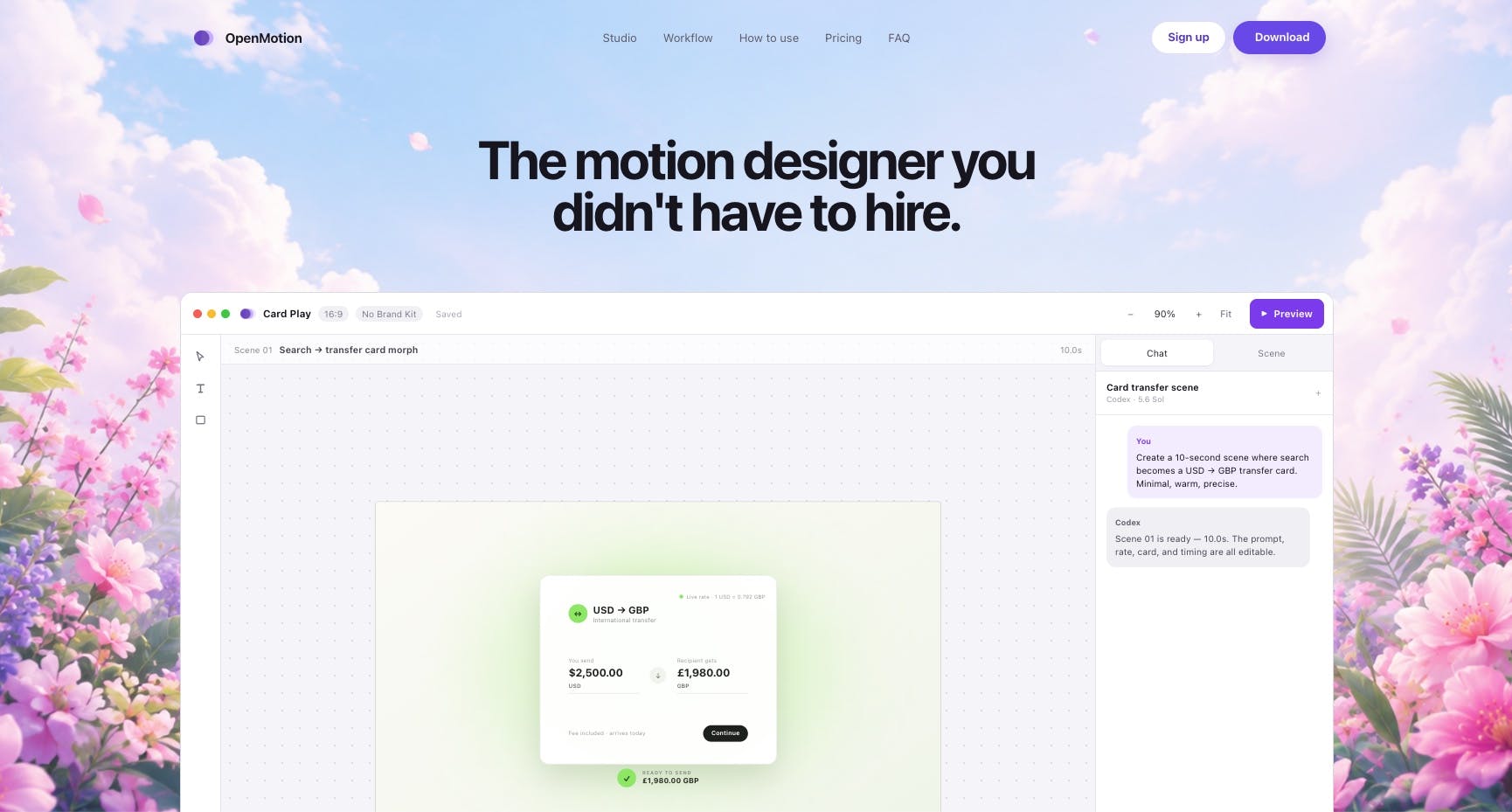
OpenMotion turns screenshots and text prompts into editable motion graphics videos on macOS for free.
OpenMotion is a free macOS motion design studio that lets users generate editable product demo animations by combining screenshots with natural language prompts. Featuring native integration with Codex and Claude Code, it bridges design and development workflows. Ideal for indie developers, SaaS teams, and designers who need professional motion graphics without mastering After Effects.
The Last Mile from Static Screenshots to Dynamic Video
For entrepreneurs, designers, and developers, creating a professional product demo animation is often a painful chore. You either spend big money outsourcing to a professional motion designer or grit your teeth and tackle the steep learning curve of After Effects. Adobe After Effects, released in 1993, has been the industry-standard tool for Motion Graphics, incredibly powerful but notoriously difficult to learn — the keyframe system, expression language, and layer nesting alone are enough to intimidate non-professionals. A 30-second product demo animation typically takes a professional designer 2–5 business days, with outsourcing costs ranging from hundreds to thousands of dollars. And with products iterating as fast as they do today, by the time the animation is finished, the product may have already gone through three versions.
OpenMotion, which recently debuted on Product Hunt with 85 upvotes and a #9 ranking, targets precisely this pain point. Product Hunt is one of the world's most influential platforms for launching new tech products, founded by Ryan Hoover in 2013, and has become the go-to channel for entrepreneurs, investors, and early adopters to discover new tools. An 85-vote, #9 ranking is a solid mid-to-upper performance on a competitive daily leaderboard — top products can receive hundreds or even thousands of votes in a single day. OpenMotion is a free motion design studio for macOS, with a very straightforward core value proposition: Describe a scene in one sentence, attach product screenshots or brand assets, and AI generates an editable motion graphics video.
What Problem Does OpenMotion Actually Solve?
Describe in Natural Language, AI Builds the Motion Graphics
The core workflow of traditional motion tools is "manually building every layer, keyframe, and easing curve." Keyframes originate from traditional hand-drawn animation, where lead animators drew the key frames — in digital motion design, designers mark an object's state (position, opacity, size, etc.) at specific points on a timeline, and the software automatically calculates the in-between frames for smooth transitions. Easing curves control the rhythm of animation movement — for example, an ease-in-out curve makes animations "start slow and end slow," which looks more natural and feels more polished to the human eye. These seemingly minor parameter adjustments often determine whether an animation looks "professional."
OpenMotion flips this workflow on its head — you simply describe what you want in plain English, such as "fade the logo in from the left with a soft background gradient," then drag in your product screenshots or Brand Kit, and the built-in AI Agent automatically constructs an editable animation. A Brand Kit typically includes various logo versions, brand color palettes (with exact color values), designated fonts, icon styles, and other standardized assets. Importing one ensures the generated video stays consistent with the brand in terms of colors, fonts, and overall visual style — a particularly acute pain point for small teams without a dedicated brand designer.
This approach is especially well-suited for three types of content: product motion showcases, product launch videos, and SaaS explainer videos. These three happen to be the most commonly needed asset types for startup teams during marketing and fundraising phases.
Full Editing Control Is Preserved
Unlike many "one-click generation, no fine-tuning" AI video tools, OpenMotion emphasizes retaining professional-grade editing control after generation. Users can further adjust layers, timing, easing, colors, camera movements, and even audio on a real canvas and timeline, then export as MP4.
This is crucial. The first version AI generates is usually only "roughly right" — real polish still requires human hands. OpenMotion doesn't treat AI as a black box; instead, it positions it as a "drafter" that frees people from the tedium of building from scratch while preserving full control over the final product. This "AI draft + human refinement" workflow aligns closely with current best practices for AI-assisted creative tools — AI handles repetitive and structural work, while humans focus on creative judgment and detail polishing.
Deep Integration for Developers
What excites the developer community most is OpenMotion's native integration with Codex and Claude Code — and no separate API Key configuration is required.
Codex is OpenAI's AI coding agent tool (also known as Codex CLI), which allows developers to complete coding, debugging, and automation tasks through natural language commands in the terminal. Claude Code is a similar product from Anthropic, based on the Claude model, also using the command line as its primary interface. Both represent the trend of "AI coding assistants" evolving from IDE plugins to standalone agents. OpenMotion's native integration with these two tools means developers can trigger motion graphics generation with natural language commands while writing code — for example, automatically generating product demo videos for each release within a CI/CD pipeline, something nearly unimaginable in traditional design tool workflows.
This means developers can call upon OpenMotion's capabilities directly within their familiar coding environments or AI programming assistants to generate motion graphics, without switching back and forth between multiple tools. For technical teams accustomed to command-line and code-based workflows, this approach of "incorporating motion graphics generation into the development process" fits their habits far better than traditional graphical design software.
From a product categorization standpoint, OpenMotion is listed under Design Tools, SaaS, and Developer Tools simultaneously, which confirms its ambition to bridge the worlds of "design" and "development."
Who Is OpenMotion Best Suited For?
Overall, OpenMotion's target user profile is very clear:
- Indie developers / small team founders: No dedicated design resources, yet they need to quickly produce high-quality demo videos for product launches.
- Product designers: Want to use AI to accelerate initial motion drafts so they can focus their energy on refinement and creativity.
- SaaS teams: Need to produce product explainers and feature demos at scale and speed.
Its "free" positioning and macOS exclusivity also mean that in its early stages, it's more suited for lightweight scenarios involving individuals and small teams, rather than heavy enterprise workflows.
Worth Watching, but Still Needs Proving
OpenMotion represents a clear current trend: AI is continuously lowering the barrier to professional creative tools. From Figma's design collaboration, to various AI video generators, to OpenMotion's "screenshots + prompts = motion graphics video" model, creation is increasingly becoming about "describing intent" rather than "manual execution."
The AI video generation space has already formed a multi-layered competitive landscape. At the foundational level are general-purpose video generation models like Runway Gen-3, Pika Labs, and Sora, which excel at generating realistic or creative video clips from text or images. In the middle tier are vertical tools targeting specific scenarios, such as HeyGen and Synthesia for digital avatar presentations. OpenMotion's positioning is more unique — it doesn't do general video generation but instead focuses on the niche category of "motion design," emphasizing editability and integration with development workflows. This differentiation strategy avoids head-on competition with large model providers, instead serving a small but clearly defined professional market.
That said, as a new product that just debuted on Product Hunt with only one review, its actual generation quality, AI accuracy in understanding complex motion requirements, and stability of Codex/Claude Code integration all still need validation from more real users. For macOS users looking for a lightweight motion graphics solution, the free price tag makes it at least worth a try.
Key Takeaways
Related articles

Firebase AI Logic + Gemini Nano 4: A Practical Guide to Android AI Development
How Firebase AI Logic and Gemini Nano 4 help Android developers ship generative AI: App Check and prompt templates ensure security, hybrid routing cuts latency and cost, Spend Caps control budgets, and AI monitoring provides observability.

Microsoft AI Agent Breakthroughs: More Efficient, Better at Code and Weather Forecasting
Microsoft Research Focus Issue 97: ForkPilot cuts agent inference costs, Cabra reveals coding agents' code-understanding gap, Teletune learns workflows from logs, PBC improves extended forecasts, BioEMU-2 opens preview.

Prime Intellect Releases Prime Mega MoE: Trainable Fused MoE Kernel with 3.11x Forward Speedup
Prime Intellect releases Prime Mega MoE, adding backpropagation to DeepSeek's fused Mega MoE kernel for trainability. Up to 3.11x forward speedup and 34% faster Qwen3 MoE training steps in prime-rl.