Over 50 Claude Code Plugins Making AI Dumber? A Curated List of Practical Tools

When Claude sees more than ~50 tools, selection accuracy drops—curating high-quality tools matters more than piling on quantity.
The article points out an overlooked fact: when Claude can see roughly 50+ tools at once, it starts choosing the wrong ones and agent performance actually declines, because tool descriptions themselves consume the limited context window. The author clarifies the difference between plugins (containers bundling commands, hooks, MCP servers, skills) and MCP servers (single-function connections), and warns of security risks in unofficial marketplaces. The curated list includes Pyright LSP, a GitHub MCP workaround, Frontend Design, Context7, Composio, and Figma. The core logic: pursue tool quality over quantity—controlling context tool count is itself a performance optimization.
Why Do Too Many Tools Make AI Dumber?
Everyone tells you to install as many Claude Code plugins and MCP servers as possible—the more tools, the more capable. But an overlooked fact is: when Claude can see roughly more than 50 tools at once, it starts choosing the wrong ones, and your agent actually gets worse, not better.
This phenomenon is like handing a novice 50 different screwdrivers at once—he'll likely pick up an unsuitable one. The AI's context window is limited, and tool descriptions themselves consume context. As the number of tools balloons, the model's accuracy at the "which tool should I call" step drops noticeably.
To find the tools truly worth keeping, one creator browsed the entire plugin marketplace and the broader MCP ecosystem, filtering out a curated list. Here are the noteworthy ones.
First, Clarify: Plugins and MCP Servers Are Not the Same
Before diving into the list, we need to distinguish two frequently conflated terms.
An MCP server is a single functional unit—a connection that lets Claude access a specific tool or service, such as GitHub, a database, or a browser.
A plugin is a larger container that can bundle slash commands, hooks, MCP servers, skills, and more together. So a plugin can contain just one MCP server, or far more.
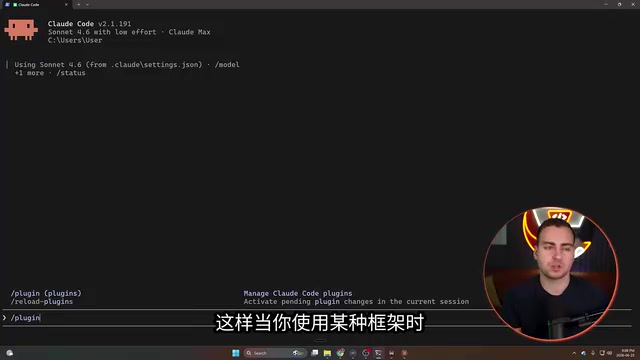
For managing plugins, the terminal-based Claude Code version is recommended over the desktop app alone. Type /plugin in the terminal to open the plugin management interface, which has tabs for Discover, Installed, Marketplaces, and more.
Marketplaces are essentially the app store for Claude Code. Anthropic maintains a small official marketplace, plus there are security-audited community marketplaces. Anyone can host their own marketplace, but unofficial marketplaces may contain harmful or malicious content, so stay cautious.
MCP (Model Context Protocol) is an open protocol released by Anthropic in November 2024 to standardize how AI models connect to external tools and data sources. You can think of it as the "USB interface" of the AI world: whether the backend is GitHub, a database, or a browser, each describes its capabilities (tool names, parameters, return value formats) through a unified protocol, and the model decides when and how to call them. An MCP server is the server-side program implementing that protocol, typically running as a local process or a remote HTTP service. The core value of the protocol is decoupling—tool providers only need to implement the MCP interface once, and any AI client supporting the protocol can use it, without adapting separately for each model. This also explains why tool count consumes context: the tool descriptions (names, purposes, parameter schemas) exposed by each MCP server are injected as text into the model's context window.
Curated List of Plugins and Tools Worth Keeping
1. Language Server (LSP): Improving Code Generation Quality
The first recommendation is a language server for your programming language. Take Python for example: Pyright LSP provides type inference and environment awareness via Pyright, performs static type checking, smart completion, and validates output via commands, resulting in higher-quality code generation.
To install, search for Pyright in the /plugin interface and install it, then type reloadplugins to reload. To verify, generate a fairly complex Python script and have it use the LSP to validate all type checks. In testing, Claude called the plugin multiple times and ultimately returned "all good, fully parsed, static type checks passed." If you're unsure which language server to install, just ask Claude Code directly.
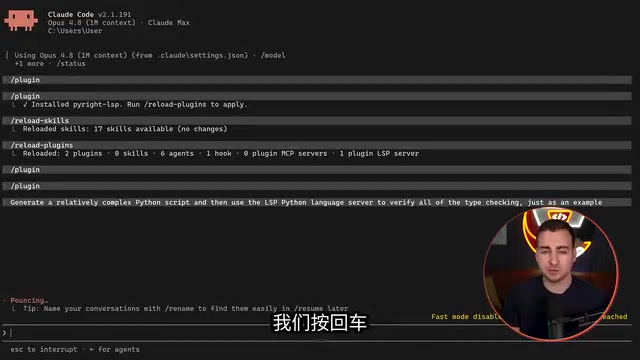
LSP (Language Server Protocol) was originally designed by Microsoft for VS Code to decouple editors from programming language intelligence services: the language server provides completion, go-to-definition, type checking, error diagnostics, and more, while the editor simply sends requests per the protocol. Pyright is Microsoft's open-source Python static type checker and the language server implementation behind Pyright LSP. It infers variable types based on type annotations and control flow analysis, catching type mismatches, undefined attributes, and other issues without running the code. For AI code generation, the value of LSP lies in providing a "verifiable feedback loop": after the model generates code, it can obtain compiler-level diagnostic information via LSP requests and fix errors accordingly, rather than relying solely on the model's own semantic judgment. This essentially turns static analysis tools into the model's "external validator," significantly reducing the pass rate of hallucinated code.
2. GitHub: A Fallback When the Official Plugin Has Bugs
GitHub's importance is obvious—checkpoints, saving code, automatically creating remote repositories, multi-device sharing, progress tracking, version rollback. But the creator found that the official GitHub plugin from Anthropic had bugs and was unusable at the time.
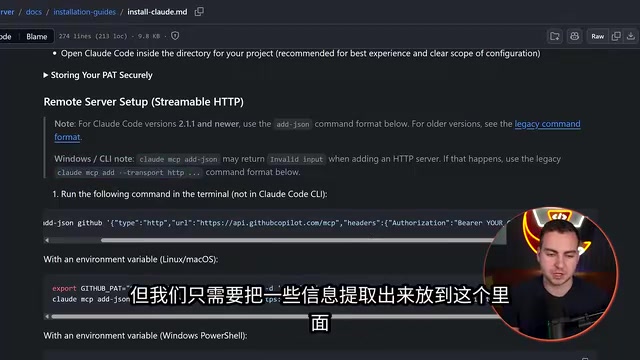
The alternative is to install GitHub as a default MCP server. You need to create a GitHub personal access token (PAT); a classic token is recommended, with all Repo functions enabled, optionally User, but it's not recommended to enable delete-repo permissions.
On Windows you may encounter an "invalid input" error and need to convert the command format. If you don't want to handle the JSON manually, just ask Claude Code to convert it for you. Once configured, run /mcp in Claude to see GitHub and a bunch of available tools.
3. Frontend Design: A Full Design System from a Single Prompt
This plugin is very popular—it makes Claude establish a design system first when building interfaces (color scheme, fonts, design elements) rather than piling up code directly.
In testing, using the Sonnet model with effort set to D, it was asked to create an HTML/JS/CSS frontend for a music streaming app. The result wasn't stunning, but quite good for a single prompt, because it established color and font specifications based on design skills. Without this plugin, Claude wouldn't do this by default.
4. Context7: Pulling Real-Time API Docs to Avoid Outdated Results
Context7 pulls real-time API documentation from the internet, preventing the model from relying on stale training data. Once installed, when you use a framework, it automatically searches for the latest version of relevant docs.
In a demo, asking about the latest changes in React and requesting syntax examples, Context7 queried the docs and returned a response with multiple code examples and key changes.
Large language models have a knowledge cutoff; for frequently updated frontend frameworks and libraries (like React, Next.js, Tailwind), the API usage in the model's memory may be outdated or even deprecated. Retrieval-Augmented Generation (RAG) is a general approach to mitigating this: before generating an answer, retrieve relevant content from external knowledge sources and inject it into context. Context7 is precisely a RAG implementation for technical documentation scenarios—it retrieves official documentation snippets by library name and version, providing the latest usage to the model. Compared with general web search, documentation-specific retrieval has the advantage of highly structured content and clear version correspondence, reducing the chance of the model being misled by blog posts or outdated tutorials. This also reflects a tool design principle: rather than having the model "remember" everything, let it "look it up" when needed.
5. Composio: Connect Once, Reuse Across Multiple Agents
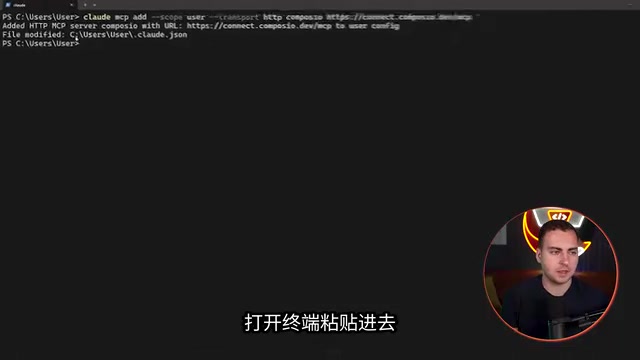
Composio lets you connect multiple tools and accounts (multiple Gmails, Google Drive, Asana, etc.) in a web dashboard, then plug these connections into any AI agent with a single API key or connection string—no need to reconnect in each tool.
It also supports on-demand tool discovery, avoiding stuffing the agent's context window all at once—one solution to the "tool overload" problem mentioned earlier. In testing, after installing via mcp and authenticating, it could read the most recent email, and even send emails, delete content, and create drafts.
"On-demand tool discovery" is typically implemented in engineering via tool retrieval or dynamic tool loading: the agent no longer lists all available tools at once in the system prompt, but instead holds a lean tool catalog (or search interface) first, then retrieves and loads the specific definitions of relevant tools once the task intent is clear. This contrasts with the traditional "full injection" approach. Full injection has the advantage that the model sees all capabilities at a glance, but the downside is that tool descriptions consume a large context budget, and similar tools are easily confused, causing selection accuracy to drop as the number increases. On-demand loading splits tool selection into two steps—coarse filtering then fine selection—saving context and narrowing the candidate space. Composio productizes this mechanism while also hosting OAuth authentication and connection management, so multiple agents can reuse the same set of authorized tool connections and avoid duplicate configuration.
6. Figma: Generating Usable Code Directly from Design Files
For developers whose teams have designers, the Figma plugin can load Figma documents into Claude Code and build directly from them. You can use local files or authenticate and read directly via URL—the latter is obviously more convenient.
In testing, a Figma document for a flight app was used to generate a complete, usable HTML/CSS/JS (or React) version—the output was "almost exactly the same as what you'd get from Figma."
The Core Logic Behind This List
Rather than chasing tool quantity, chase tool quality. The common thread among these tools: they either directly improve code correctness (language servers, Context7), solve connection efficiency (Composio), or convert design assets into code (Figma, Frontend Design).
Another noteworthy detail is Composio's "on-demand tool discovery" mechanism—it doesn't expose all tools to the agent at once, but lets the agent search and call them only when needed. This corroborates the observation that "over 50 tools makes it dumber": controlling the number of tools in context is itself a performance optimization.
If you're building your own Claude Code workflow, it's recommended to start with one language server and one version control tool, then add gradually based on actual needs, rather than installing the entire marketplace at once.
One-line Summary
When Claude sees more than ~50 tools, selection accuracy drops—curating high-quality tools matters more than piling on quantity.
Paragraph Summary
The article points out an overlooked fact: when Claude can see roughly 50+ tools at once, it starts choosing the wrong ones and agent performance actually declines, because tool descriptions themselves consume the limited context window. The author first clarifies the difference between plugins (containers that can bundle commands, hooks, MCP servers, and skills) and MCP servers (single-function connections), and warns of security risks in unofficial marketplaces. Then comes the curated list: Pyright LSP improves code generation quality, the GitHub official plugin's bugs can be worked around via MCP, Frontend Design produces a design system from a single prompt, Context7 pulls real-time API docs, Composio discovers tools on demand and reuses connections, and Figma generates code from design files. The core logic is to pursue tool quality over quantity—controlling the number of tools in context is itself a performance optimization.
Related articles

Chain of Thought Isn't Just for AI: How Humans Can Use CoT to Improve Thinking Quality
Chain of Thought isn't just a prompt trick for large models. Starting from a Hacker News discussion, this article analyzes why CoT works for human thinking too, breaks down actionable ways to transfer it, and highlights the key differences between human CoT and machine CoT.
Cloudflare Teams Up with OpenAI: Closi…
Cloudflare Teams Up with OpenAI: Closing the Loop from Vulnerability Discovery to Defense with AI
Cloudflare uses OpenAI Daybreak to investigate security vulnerabilities and generate reviewable remediation plans, while developers use Codex to boost coding efficiency and quality.

Orca Multi-Agent Orchestration in Practice: A Guide to Parallel Collaboration with Claude and Codex
Orca is Stable AI's free open-source agent workbench supporting 34 agents like Claude Code and Codex in parallel. Learn its Git worktree isolation, multi-model orchestration, and mobile management.