Panda Video Sign Language Translation: Adding a Sign Language Window to Published Videos

Panda Video launches Sign Language, using a player overlay to add a sign language translation window to published videos.
Panda Video launched its "Sign Language" feature on Product Hunt, allowing users to upload sign language translation videos and link them to published videos, with viewers able to open the translation window in the player and freely move and resize it. This avoids the traditional picture-in-picture workflow requiring re-editing and re-uploading, with core value in reducing modification costs for existing content. The product targets online learning and corporate training scenarios with accessibility requirements, handing display control to viewers. However, it only addresses distribution of translation content, not production; interpreters still must record separately, and it depends on platform player support.
Video content accessibility has long faced an awkward reality: once a video is published, adding sign language translation usually means re-editing, re-uploading, and redistributing the link. Panda Video's "Sign Language" feature, launched on Product Hunt, attempts to circumvent this process with an overlay interaction layer in the player—making sign language translation an optional window on top of the video rather than part of the video itself.
An accessibility solution that requires no re-editing
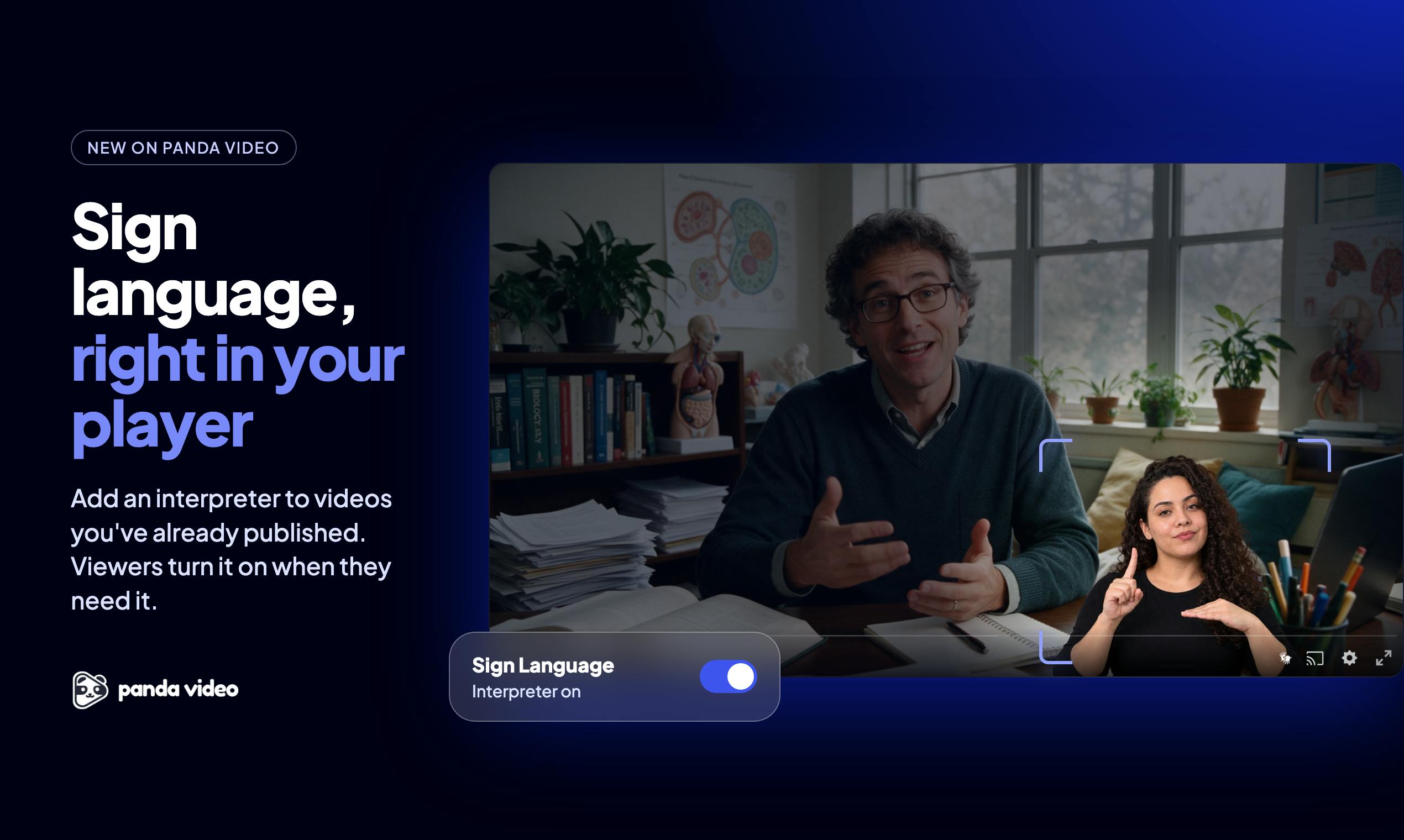
According to the product page description, the workflow is fairly straightforward: upload a video of a sign language interpreter and link it to any already-published video. Viewers actively open the translation window in the player, then can freely move and resize it; viewers who don't open the window still see the original video.
The core value of this design lies in "adding after the fact." In the traditional approach, sign language translation needs to go into the editing timeline together with the main video, made into picture-in-picture or split-screen, and once the final cut is published it's hard to change. Panda Video decouples this relationship: the main video stays untouched, the translation video is mounted as an independent resource, and the player composites the display on the client side. For teams that have accumulated a large amount of existing content, this reduces modification costs rather than production costs.
Picture-in-Picture and client-side compositing
Traditionally, if a sign language translation video is to be shown on the same screen as the main video, the translation footage usually needs to be baked directly into the final video file as picture-in-picture or split-screen. This approach relies on video editing software at the editing stage, and once the final output is rendered, what all viewers see is fixed. Panda Video's approach, by contrast, mounts the translation video as an independent resource and has the player composite it in real time on the client side. This is similar to the picture-in-picture feature commonly found in browsers: the main video and the auxiliary video are transmitted independently, and the player overlays the auxiliary footage on the main picture according to user commands, allowing users to dynamically adjust its position and size. This client-side compositing avoids server-side re-encoding and also allows the same main video to flexibly accommodate sign language versions in different languages or from different interpreters.
The player-layer interaction design is worth noting
Letting viewers move and resize the translation window is a decision that's easy to underestimate. Sign language expression depends on gesture space and facial expressions; a fixed picture-in-picture position may obscure key information in the main picture, or may crop the interpreter's hand movements. Allowing position and size adjustment essentially hands the judgment of "how to see it more clearly" back to the viewer.
The product is categorized under Video Streaming, Online Learning, and Inclusivity—a combination that also illustrates its target scenarios: online courses, corporate training, public speech replays, and other video content centered on information delivery that has accessibility requirements. In these scenarios, the occlusion problem of the sign language translation window is more sensitive than in entertainment content, because the picture may simultaneously contain whiteboard writing, slides, and subtitles.
The spatial dependence of sign language expression
Sign language relies not only on hand movements but also on facial expressions, body posture, and the position and movement trajectories of gestures in space. This grammatical and semantic information is highly dependent on visual completeness, so if the sign language translation window is fixed as a small picture-in-picture, it can easily crop the start or end positions of gestures, or obscure the interpreter's facial expressions. Allowing viewers to freely move and resize the translation window is essentially about ensuring the readability of sign language information. In online course or corporate training scenarios, the main picture may contain slides, whiteboard writing, or subtitles, and a fixed window is more likely to cause key information overlap. Giving control to viewers is a pragmatic design that acknowledges individual differences and scenario differences.
Accessibility tools are shifting from "redoing" to "overlaying"
The thinking behind this product aligns with a broader trend: accessibility capabilities are shifting from post-processing at the content production stage to a configurable layer at the playback and distribution stage. Subtitles followed a similar path—early on they had to be baked into the video, and later independent subtitle tracks became standard. Sign language translation is still at an earlier stage, and Panda Video's approach is to make it a mountable resource rather than pixels rendered into the picture.
It should be noted that this solution doesn't solve all problems. It assumes the sign language translation video already exists, and the interpreter still needs to record it separately; the mounting relationship also depends on platform-side player support. In other words, it optimizes "the distribution of existing translation content" rather than "the production of translation content." From a product positioning perspective, this is a pragmatic entry point rather than a complete sign language accessibility solution.
Independent subtitle tracks and accessibility layering
The development path of subtitles provides a reference for understanding the current state of sign language translation. Early subtitles had to be baked into the video picture, and modifying subtitles meant re-outputting the video file; later, independent subtitle tracks (such as WebVTT and SRT) became mainstream, and players could dynamically load and switch subtitles without changing the video itself. This shift detached accessibility features from the content production stage and turned them into a configurable layer at the playback and distribution stage. Panda Video's sign language translation feature follows the same logic: treating the translation video as a mountable resource rather than pixels rendered into the picture. But sign language translation is more complex than subtitles because it involves synchronization and overlay of video streams, placing higher demands on player performance and synchronization precision. Currently, this solution still depends on platform-side player support and has not yet formed a universal standard like subtitle tracks.
Summary
Panda Video's Sign Language feature uses a player overlay to add a sign language translation window to published videos, avoiding re-editing and re-uploading. Its value is concentrated in low-cost modification of existing content and in handing display control to viewers in scenarios such as online learning. For teams that need to improve video accessibility, this is a lightweight path worth watching; but to truly cover the needs of sign language users, the continuous production of translation content remains an unavoidable prerequisite.
One-line Summary
Panda Video launches the Sign Language feature, using a player overlay to add a sign language translation window to published videos.
Paragraph Summary
Panda Video launched its "Sign Language" feature on Product Hunt, allowing users to upload sign language translation videos and link them to published videos, with viewers able to actively open the translation window in the player and freely move and resize it. This approach avoids the traditional picture-in-picture workflow that requires re-editing and re-uploading, with its core value lying in reducing modification costs for existing content. The product targets scenarios such as online learning and corporate training that have accessibility requirements, handing display control to viewers to alleviate picture-in-picture occlusion issues. However, this feature only addresses the distribution of translation content, not the production of translation videos; interpreters still need to record separately, and it depends on platform player support.
Related articles

Claude Code Reportedly Leaks Secrets to GitHub, Sounding the Alarm for AI Coding Security
Claude Code reportedly exposed passwords and API keys to GitHub, per Ars Technica. We recap the incident alongside Claude Fable 5.2's 20% price cut and Meta Muse Ember, urging developers to check commit settings before granting permissions.

Getting Started with LangChain: Core Concepts of the Agent Development Framework
Starting from the three major limitations of LLMs, this article explains LangChain's positioning and value as an Agent development framework: limited knowledge, external system interaction, and state retention, along with its official documentation system and learning path.

Ring Launches $999 Autonomous Patrol Robot RoverCam
Ring launches RoverCam, an autonomous mobile security camera with a 4K periscope camera, two-way talk, and built-in siren. Priced at $999.99, it targets commercial use and is seen as a de-personified rebirth of the Astro robot.