Paragraph Notes: A Local Mac Markdown Note-Taking App That Never Goes Online
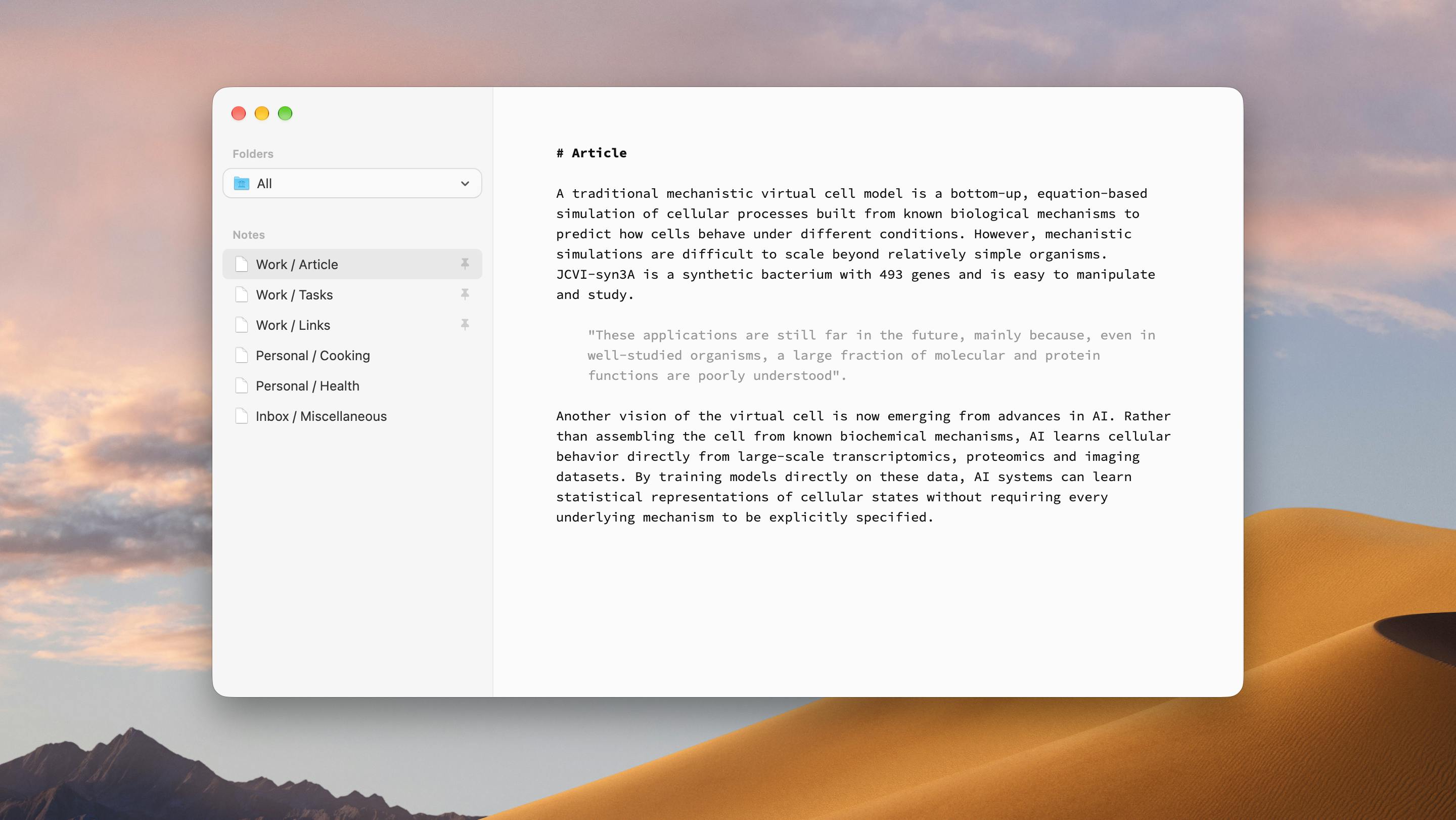
A fully local, offline-only Mac Markdown notes app with a one-time purchase model and zero data collection.
Paragraph Notes is a Mac Markdown note-taking app built by an indie developer around one core idea: complete local storage and uncompromising privacy. It collects no data, never connects to the internet, and stores all notes in open, portable formats on your local disk — giving users full data sovereignty. It offers a 20-note free tier and unlocks unlimited notes with a one-time purchase instead of a subscription. The app earned 104 upvotes and ranked fifth on Product Hunt, validating real demand from privacy-conscious users. It's not built for heavy users who need sync or collaboration, but for those seeking a clean, distraction-free writing experience, it's a compelling minimalist choice.
At a time when cloud-based note-taking dominates, one Mac app is taking the opposite approach — and it landed in fifth place on Product Hunt. Paragraph Notes is built around a single, clear principle: fully local, never online, zero data collection. For users who care more and more about privacy, this "less is more" design philosophy has become its biggest selling point.
A Note-Taking Tool That Takes Privacy to the Extreme
Paragraph Notes is built by indie developer João Alfaiate and positioned as "a privacy-focused Mac Markdown note-taking app." Its core promise is refreshingly straightforward: no data collection, no internet connection, ever. All notes are stored locally in an open, portable format.
This philosophy results in a deliberately restrained feature set. It offers a clean, distraction-free plain text editor that lets users focus entirely on writing — no sync status indicators, no account logins, no cloud pop-ups competing for attention. On Product Hunt, it's listed under three categories — Mac, Writing, and Notes — and has earned 104 upvotes.
For users accustomed to heavyweight tools like Notion or Evernote, Paragraph Notes feels remarkably lightweight. It doesn't try to be a knowledge base, a collaboration platform, or an AI summarizer. It does exactly one thing — lets you write, quietly.
The Value of Local Storage and Open Formats
One of the most notable aspects of Paragraph Notes is its commitment to "data sovereignty." Notes are stored on your local disk in an open, portable format, which means that even if the app is someday abandoned, you can still open your notes with any text editor.
This stands in sharp contrast to many note-taking apps that rely on proprietary formats. Markdown, as a plain-text markup language, is inherently human-readable and cross-platform compatible. Your content isn't locked into a closed ecosystem — migrating and backing up your notes is completely friction-free.
The "never online" design also delivers a security bonus: since the app never communicates with the outside world, there's simply no pathway for your data to be uploaded or leaked. For professionals who handle sensitive information — lawyers, doctors, journalists — the appeal of a tool like this is obvious.
Markdown was designed by John Gruber in 2004, with a core philosophy of "readability first" — even without any rendering, a plain-text Markdown file is perfectly legible to a human reader. A .md file is essentially just a regular .txt file that can be opened in Windows Notepad, macOS TextEdit, or even command-line tools. This makes Markdown a natural fit for applications that prioritize data portability. By comparison, Notion stores content in its own database, Evernote uses the proprietary .enex format, and OneNote uses .one — all of which become significantly harder to parse outside their native apps. The concept of "data sovereignty" is gaining traction in the digital tools world, driven by a simple core demand: users should have complete control over the content they create, without depending on any third-party platform to keep running.
Free Tier and One-Time Purchase
On the business model side, Paragraph Notes also bucks the subscription-first trend. Users can get started for free, with a cap of 20 notes. For unlimited notes, a one-time in-app purchase unlocks the Pro version.
A perpetual license rather than a monthly subscription is becoming an increasingly popular pricing model among indie developers. It avoids the friction that comes with "paying forever" and aligns perfectly with the app's overall "simple and unburdened" personality. The 20-note free tier gives users enough room to genuinely experience the product before deciding whether to pay for long-term use.
The perpetual license model fell out of fashion during the SaaS subscription boom, but it's making a comeback in the indie developer community as users push back against "subscription fatigue." Tools like Sketch, the Affinity suite, and iA Writer have all built strong reputations on the buy-once model. For local-first apps in particular, a perpetual license makes perfect sense: since the software doesn't rely on servers to operate, developers have no infrastructure-cost justification for ongoing subscription fees, and users find the "pay once, use forever" logic much easier to accept. A 20-note free tier is actually quite generous compared to similar tools — it comfortably covers casual users' daily needs while giving power users a clear reason to upgrade.
Who It's For — and Who It Isn't
Paragraph Notes is clearly not a product for everyone. If you need real-time sync across multiple devices, team collaboration, rich media embeds, or a powerful search and tagging system, it probably won't cut it. Its feature set is laser-focused, with very deliberate trade-offs.
But if you're after a pure writing experience, have strong privacy requirements, or are simply tired of note-taking apps that keep getting more bloated, this app is worth a try. It embodies a "less is more" product philosophy — in an era where feature accumulation has become the norm, the courage to do less is itself a statement.
Its Product Hunt performance tells a story: 104 upvotes and a fifth-place ranking confirm that there's a real market of users who identify with this approach. Privacy, local-first, open formats — these three keywords are becoming meaningful criteria for a growing segment of users when choosing their tools.
Related articles

How Big Can Stars Really Get? The Physical Limits of the Largest Stars
Red supergiants are the largest stars by volume, with radii up to 2,000 times the Sun, engulfing the inner solar system. But there is no precise upper limit on stellar size—models predict up to 15,000 solar radii. The most massive blue stars are far smaller than red supergiants—biggest and heaviest are two different things.

Apple HomeView Smart Display Full Feature Breakdown: Wall-Mount or Desktop, $299
Apple launches HomeView, a $299 smart display with wall-mount and desktop options, 12MP camera for facial recognition, smart home control, music playback, and recipe step-by-step cooking. Full breakdown of watch faces, apps, privacy, and cooking integration.

Where Did the Promised New Studio Go? Craft Computing Answers After Five Years
Craft Computing's host responds to viewer questions: the new studio promised five years ago was shelved as construction costs soared from $30,000 to $75,000, and was replaced by a 168-square-foot garage conversion.