Pastea: A Searchable Clipboard History Manager for macOS

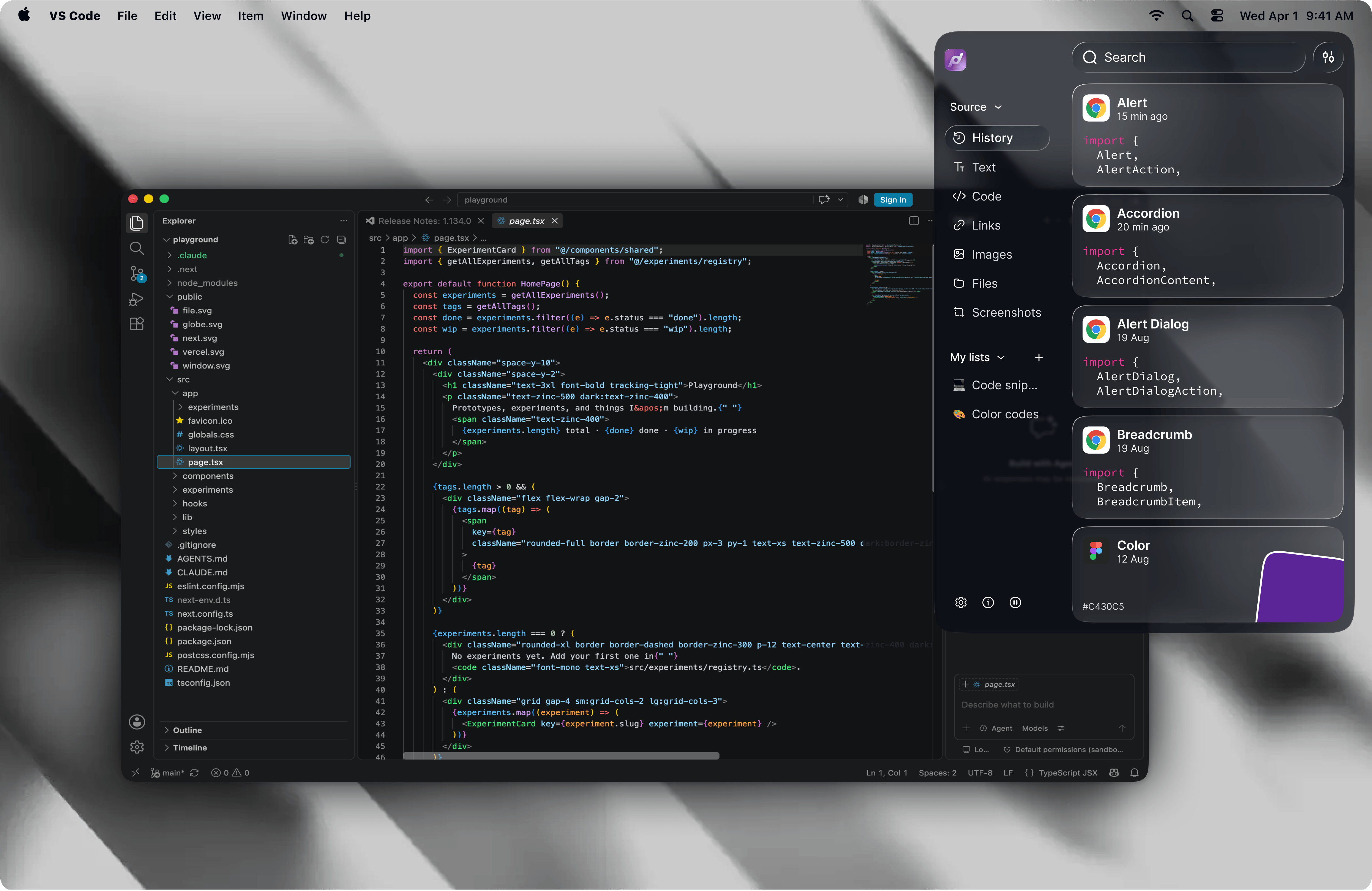
Pastea upgrades the macOS clipboard into a searchable history of links, code snippets, and screenshots.
macOS's native clipboard only stores the last copied item — a long-overlooked bottleneck in multi-tasking workflows. Pastea is a macOS clipboard history manager that automatically saves links, code snippets, and screenshots, offering full-text search and a pin feature to turn the clipboard into a personal knowledge index. It earned 76 upvotes on Product Hunt under Developer Tools and Productivity. However, it enters a competitive space alongside established tools like Maccy, Paste, and Raycast, and its success will hinge on experience quality and how it handles user privacy.
The Hidden Productivity Bottleneck: macOS's Single-Item Clipboard
For anyone who works at a computer all day, copy and paste is probably one of the most frequently used operations. Links, code snippets, screenshots, a paragraph of text — they pass through the clipboard in a flash, and the moment they're overwritten by the next copy action, they're gone forever. You've probably been there: you carefully copied an important piece of content, then accidentally copied something else, and the original vanished instantly — forcing you to track it down all over again.
macOS's native clipboard can only hold the most recently copied item, a design that falls painfully short in multi-tasking workflows. Pastea, which recently launched on Product Hunt, targets exactly this overlooked productivity pain point — upgrading the clipboard from a "temporary buffer" into a "searchable memory bank."
What Is Pastea: A macOS Clipboard History Manager
Pastea is a Clipboard History Manager built exclusively for macOS. Its core idea is straightforward: everything you've ever copied deserves to be saved.
According to its official Product Hunt listing, Pastea automatically saves every link, code snippet, and screenshot you copy, letting you search, pin, and re-paste them in seconds. It earned 76 upvotes on Product Hunt and is categorized under three tags: Mac, Productivity, and Developer Tools.
Pastea's Three Core Features
From a product positioning standpoint, Pastea primarily addresses the management of three content types:
- Links: URLs copied during everyday browsing — no more digging through browser history
- Code Snippets: Terminal commands, functions, and config values that developers copy constantly — save once, reuse indefinitely
- Screenshots: Visual content is included in the clipboard history and can be searched just like text
Bringing all three content types into a single searchable interface is what sets Pastea apart from the system's native clipboard.
Why Developers Especially Need a Clipboard Manager
It's no coincidence that Pastea is explicitly categorized as a Developer Tool. For programmers, the intensity of copy-paste activity far exceeds that of average users: terminal commands, API keys, error stacks, code blocks — these items often need to be retrieved repeatedly.
A clipboard manager that records history and supports full-text search is essentially a personal instant index of knowledge fragments. When you remember "that Docker command I copied last week," you don't need to scroll through chat logs or search again — just type a keyword in Pastea and it comes right back. For developers who value flow state, this "search and use instantly" experience is enormously valuable.
The Smart Design of the Pin Feature
You might overlook the "pin" detail — but it matters. Clipboard history tends to grow endlessly, and if it's simply sorted in reverse chronological order, frequently used items quickly get buried. Pastea lets users pin commonly used snippets to the top, effectively adding a "favorites" layer on top of the history stream. This evolves the tool from passively recording to actively managing — and it's exactly where many competing clipboard tools start to differentiate themselves.
Competitor Comparison: Pastea vs Maccy vs Paste vs Raycast
To be objective, macOS clipboard managers are not a new category. Several mature products are already on the market:
- Maccy: Open-source and free, lightweight and practical — a go-to choice for many Mac users
- Paste: Polished UI, iCloud sync support, subscription-based pricing
- Raycast's built-in clipboard: Integrated into the Raycast launcher, ideal for existing Raycast users
Pastea is entering a competitive market. So where is its differentiation opportunity?
Based on its product description, Pastea's main selling point is unified search across links, code, and screenshots, betting on a more refined user experience. In a crowded tools market, the question is rarely "does it exist?" — it's "which one feels most natural to use?" Launch speed, search accuracy, keyboard shortcut design, and interface clarity are the details that ultimately keep users around.
It's worth noting that Raycast has rapidly gained traction among developers as a macOS Launcher — similar to the built-in Spotlight but with a robust plugin ecosystem. Its built-in clipboard history feature is essentially zero additional cost for users already subscribed to Raycast Pro, which means standalone clipboard tools like Pastea need to offer a clearly differentiated experience. Maccy, on the other hand, is a lightweight open-source tool under the MIT license, installable with a single Homebrew command, runs entirely locally with no telemetry, and has built a solid reputation among privacy-conscious users — making it Pastea's primary competitor in the "lightweight + free" space.
Privacy and Security Considerations Before You Use It
As a product that just debuted on Product Hunt, Pastea's publicly available information is still relatively limited, the community feedback sample is small, and it's too early to fully assess its stability or long-term development trajectory.
For a tool like a clipboard manager that handles large volumes of sensitive data (passwords, API keys, private text), privacy and security are critical factors — whether data is stored locally, whether it's encrypted, and whether anything is uploaded to the cloud are all things worth confirming before use.
Recommendations for Different Users
- Users who have never used a clipboard manager: If you're still putting up with the native clipboard's single-item limit, any history manager will deliver a noticeable productivity boost — Pastea is worth trying
- Users already on Maccy or Paste: Compare Pastea's search experience and screenshot management capabilities before deciding whether to switch
- Developers and content creators: Power users who frequently work with multiple content types are the most direct beneficiaries of tools like this
The security risks of clipboard management tools deserve more attention than most productivity tools. Since macOS Ventura (13.0), Apple introduced a "paste board access prompt" that alerts users when an app tries to read clipboard contents — but this only applies to active cross-app reads, and doesn't prevent a user-authorized clipboard manager from silently recording in the background. Password managers (like 1Password or Bitwarden) typically set a short auto-clear timer after copying a password, but if the clipboard history tool has already captured it before that timer fires, the password will still appear in your history. It's therefore worth checking whether Pastea supports "excluding specific apps" (such as password managers) from being recorded — a feature that Maccy already implements.
Conclusion: Clipboard Management Deserves to Be Taken Seriously
Pastea represents a simple but practical product philosophy: take a high-frequency behavior that users perform every day but that has never been properly managed, and do it deeply and thoroughly. The clipboard seems trivial, yet it's a genuine point of friction in digital workflows. Whether Pastea can stand out in a mature market ultimately comes down to the polish of its user experience details and how seriously it takes user privacy and security.
For efficiency-minded macOS users, whether you ultimately choose Pastea, Maccy, or another clipboard manager, moving beyond the native clipboard's single-item limitation is a meaningful step toward a more productive daily workflow.
Related articles

Xmind 2027 Launches: Mind Mapping Evolves into an AI Thinking Partner
Xmind 2027 launches on Product Hunt as an "AI thinking partner." It adds Xmind Agent for research with local documents and mind maps, and connects mind map context to ChatGPT, Claude, and other AI workflows via MCP. This article analyzes its product logic, differentiation, and open questions.

Display 1.0: Build Docs and Apps with Any Agent
Display 1.0 launches on Product Hunt, letting any Agent create docs, prototypes, and apps in one workspace, organized via Spaces and Folders into a team knowledge base with flat pricing.

UnleashX: Hire AI Employees Like People and Turn Conversations into Deliverables
UnleashX launched on Product Hunt with a pitch to hire AI employees like people: choose a role, connect CRM and tools, set rules, execute workflows end to end, and involve humans only when needed. This article analyzes its positioning, configuration logic, and human-AI collaboration boundaries.