PeakHour 6: A Mac Real-Time Network Monitor with an AI Advisor That Grades Your Connection
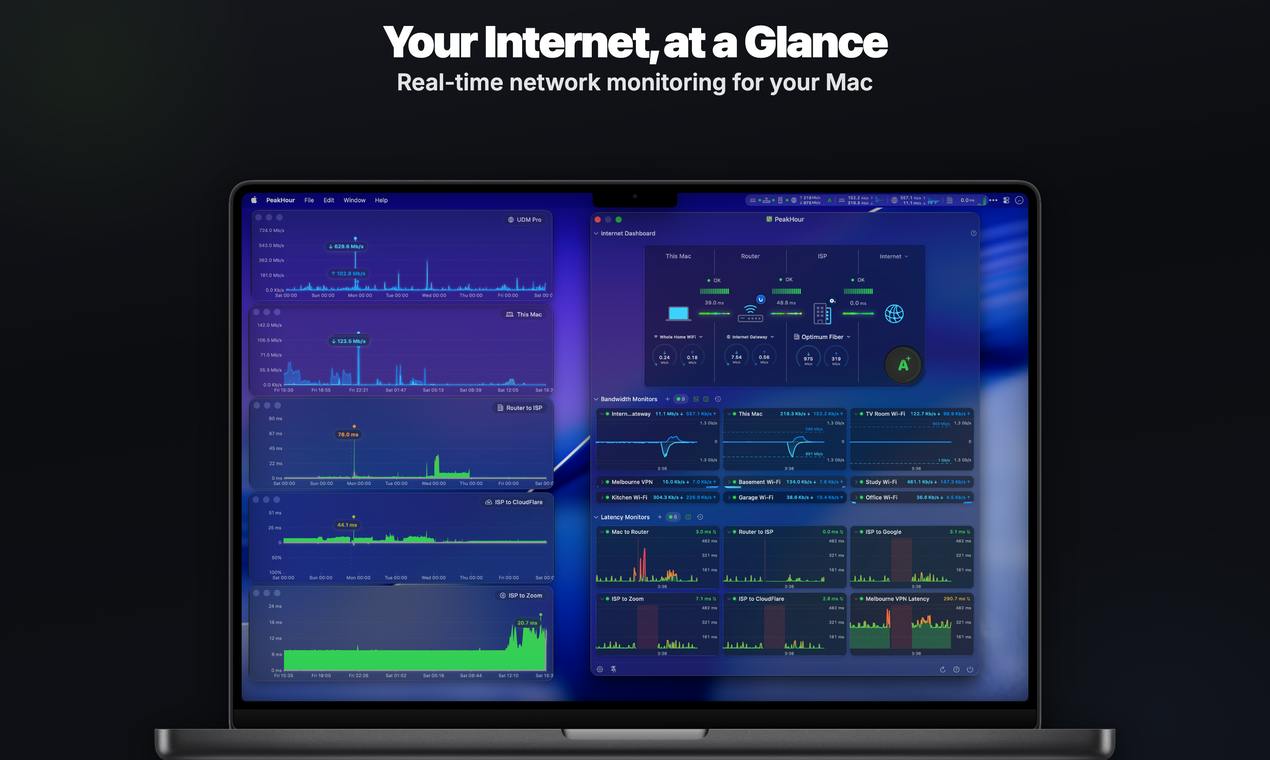
PeakHour 6 is a Mac menu bar network monitor that uses on-device AI to grade your connection from A+ to F.
PeakHour 6 is a real-time network monitoring app for Mac featuring a built-in on-device AI Advisor that analyzes metrics like ping, packet loss, and jitter, then presents a clear A+ to F grade with plain-language explanations. Beyond AI grading, it offers Wi-Fi Intelligence, ISP and router details, speed tests, and outage alerts. All AI processing runs locally with no account required. Built by indie developer Ed Lawford, it earned 70 upvotes on Product Hunt and targets remote workers, non-technical users, and network enthusiasts alike.
Among the many network tools out there, translating complex diagnostic data into language ordinary users can actually understand is no easy feat. PeakHour 6, which recently launched on Product Hunt, tackles exactly this problem. It's a real-time network monitoring app built for Mac, and its standout feature is a built-in on-device AI Advisor that grades your internet connection from A+ to F — like a teacher marking homework — and explains the reasoning in plain, accessible language.
The app was built by developer Ed Lawford. It has earned 70 upvotes on Product Hunt, placing 15th on the daily leaderboard, and is categorized under Mac, Productivity, and Menu Bar Apps.
Turning Network Diagnostics into a "Report Card"
The core design philosophy of PeakHour 6 is lowering the barrier to understanding network diagnostics. For most users, terms like ping, packet loss, jitter, and signal-to-noise ratio are opaque. Even when a tool presents detailed data, it's still hard to answer the fundamental question: "Is my network actually good?"
PeakHour 6's AI Advisor cuts through that by giving you a single, intuitive grade — from the best (A+) to the worst (F), as clear as a test score. It goes a step further by explaining the rating in plain English, helping users understand what's actually wrong. This "conclusion first, then explanation" approach is noticeably more user-friendly than traditional tools that simply pile on raw numbers.
One important detail: the AI analysis runs entirely on-device. That means your data never leaves your machine, protecting your privacy and eliminating any dependency on cloud connectivity — a sensible and necessary design choice for a network monitoring tool.
Ping measures the round-trip time (in milliseconds) for a data packet to travel from your device to a target server and back — the lower, the better. Packet loss refers to the percentage of packets that fail to reach their destination; anything above 1% typically causes noticeable stuttering. Jitter is the variance in ping values over time and has a particularly significant impact on video calls and real-time audio. Signal-to-noise ratio (SNR) appears mainly in DSL or Wi-Fi contexts and measures the ratio of useful signal to background noise — higher values mean a more stable connection. Together, these four metrics paint the basic picture of network health. But for everyday users, remembering the "passing threshold" for each is itself a hurdle. PeakHour 6's AI grading essentially performs this multi-dimensional assessment on your behalf.
Wi-Fi Intelligence and Comprehensive Network Insights
Beyond AI grading, PeakHour 6 offers a full suite of network monitoring features covering common home and office scenarios:
Wi-Fi Intelligence
The Wi-Fi Intelligence feature lets users take a deep look at their wireless network, including signal quality and connection details. For anyone who regularly experiences Wi-Fi slowdowns or unstable connections, these insights help pinpoint whether the issue lies in the wireless environment, the router, or the ISP.
Wi-Fi sluggishness and instability often stem from issues at different layers: the choice between 2.4 GHz and 5 GHz bands affects wall penetration and peak speeds; channel congestion (multiple routers sharing the same channel) causes co-channel interference; physical distance and obstacles between a client and the access point degrade RSSI (received signal strength indicator); and protocol support for technologies like MU-MIMO or Wi-Fi 6 determines how well the network handles multiple simultaneous devices. The value of Wi-Fi Intelligence-type features is that they surface these underlying parameters in one place, letting users identify the problem layer — too far from the router, interference from a neighbor's network, or simply insufficient bandwidth from the ISP — without needing professional packet-capture tools.
ISP and Router Information
The app displays detailed ISP (Internet Service Provider) and router information, giving users a clearer picture of their full network chain. This is particularly useful when reporting issues to your ISP or troubleshooting problems on your home network.
Speed Tests and Outage Alerts
PeakHour 6 includes a built-in speed test so you can check your actual connection speeds at any time. It also provides outage alerts that notify you the moment your connection drops. For remote workers and anyone relying on a stable connection for video calls, these real-time alerts help eliminate the frustration of being disconnected without realizing it.
No Sign-Up Required — Just Open and Use
At a time when privacy is increasingly important, PeakHour 6 emphasizes that no account is needed to use it. There's no registration, no email binding — just download and go. Combined with its on-device AI processing, the product takes a clear and deliberate stance on privacy.
As a lightweight app that lives in the menu bar, PeakHour 6 is designed to be "always available, quietly watching." There's no need to open a complex dashboard — a quick glance at the menu bar is all it takes to check your network's health.
Who Is PeakHour 6 For?
Based on its feature set, PeakHour 6 has a fairly well-defined target audience:
- Remote workers and freelancers: Those who depend on a stable connection for video calls and online collaboration will benefit from outage alerts and real-time monitoring to catch problems immediately.
- Non-technical everyday users: AI grading and plain-language explanations dramatically reduce the need to understand technical details — you don't need to know networking to know whether your connection is healthy.
- Network enthusiasts and power users: Detailed Wi-Fi, ISP, and router data satisfies the need for deep diagnostics.
Conclusion
PeakHour 6 isn't reinventing network monitoring — it's making a meaningful improvement at the experience layer. It uses on-device AI to transform cold, technical network metrics into intuitive grades and plain-language explanations. On top of real-time monitoring, Wi-Fi analysis, speed testing, and outage alerts, its local processing and no-account design are genuine privacy-friendly bonuses. For Mac users — especially those who just want to know at a glance whether their network is healthy — this is a menu bar tool worth checking out.
That said, the real-world accuracy of the AI grading and the depth of its diagnostics in complex network environments are still things users will need to evaluate through hands-on use.
Related articles

AI Agent Fundamentals: The Three Core Components — Brain, Memory, and Tools
A beginner's guide to AI Agents: covering the three core components (brain, memory, tools), four stages of LLM deployment, and why Agents matter for real business use cases.

Boycotting Software That Doesn't Support Linux: One Developer's Philosophy of Choice
A Linux-only developer shares his philosophy of boycotting non-Linux software — without sacrificing productivity — and explains how coding agents like Claude Code are closing the gap with commercial tools.

Why Do All AI-Generated Projects Look the Same? The Aesthetic Homogenization Problem in Vibe Coding
Why do vibe coding projects all use purple gradients and dark glassmorphism? We break down the technical roots of AI aesthetic homogenization and how to escape it.