Pi Agent Complete Guide: How a Minimalist Philosophy Beats Codex and Claude Code
Pi Agent uses just 4 tools and ~1,000-token prompts to outpace Codex and Claude Code by 1.5–2×.
Pi is an AI coding agent built on a "less is more" philosophy — just four tools and a ~1,000-token system prompt compress context overhead to roughly 1/16 of competing tools, delivering 1.5–2× speed gains. In Databricks' million-line repo benchmark, the Pi + Claude Opus 4.8 combo achieved the highest code quality score. This guide covers installation, the dual-loop Steering/Follow-up interaction model, tree-structured session management, the plugin and skills ecosystem, security mechanisms, and Pi's SDK-ready source architecture.
Less Is More: Why Pi Outperforms Codex and Claude Code
Pi is an AI Agent that has been gaining serious traction lately, and its design philosophy can be summed up in four words: less is more. Unlike other coding agents that pile on tools by default, Pi ships with just four core tools and a system prompt of roughly 1,000 tokens. That radical simplicity pays off in direct efficiency gains.
Here's a concrete example: saying "hello" in Pi consumes about 1,100 upload tokens — a tiny fraction of a 4,000-token context window. In Codex, that same greeting burns through 18,000 tokens, wasting roughly 7% of your context before you've done anything useful. Saving context means the model can keep its attention focused on the actual task.
The performance numbers back this up. According to Composio benchmarks, Pi Agent completes coding tasks 1.5 to 2× faster than competing coding agents, with meaningfully lower per-task costs. On code quality, Databricks ran benchmarks on one of their million-line repositories — plotting task cost on the x-axis and pass rate on the y-axis — and Pi outperformed both Claude Code and Codex in most scenarios. The single highest-quality result on the entire chart? The Pi + Claude Opus 4.8 combination.
Installing Pi Agent and Connecting a Model from Scratch
Getting Pi up and running is nearly frictionless. On Windows, right-click the desktop to open a terminal (PowerShell), copy the one-line install command from Pi's official site, paste it, and run. During installation, Pi automatically detects and installs any missing Node.js and Git dependencies (Git Bash serves as its CLI runtime). Once installation is complete, close the window, reopen the terminal, and type pi to launch. On macOS, a single curl command from the official site does the job.
Model configuration happens through the /login command, with two options:
- API Key: Pi supports 40+ model providers, covering virtually every mainstream model available. For DeepSeekAd, for instance, create an API key on their site, paste it, and hit Enter — it defaults to DeepSeek V4 Pro.
- Model Subscription: Choose "Sign in with Account" — for example, sign into OpenAI Codex via browser. After login, press
Ctrl+Lto see ChatGPT-series models in the model selector.
Use /model to switch models, Shift+Tab to adjust reasoning intensity, and Ctrl+L to quickly open the model selector — mix and match based on task complexity.
Core Interaction: Steering and Follow-up Instructions
Once Pi is launched inside your project folder, just give it an instruction and it starts writing code. Use Shift+Enter for multi-line input, or Ctrl+G to open a notepad for composing longer prompts. The bottom of the window shows real-time stats for the current session: input/output tokens, cache hit rate, estimated cost, and context window usage percentage — giving you full visibility into resource consumption.
Pi's two most distinctive instruction modes are central to understanding how it works:
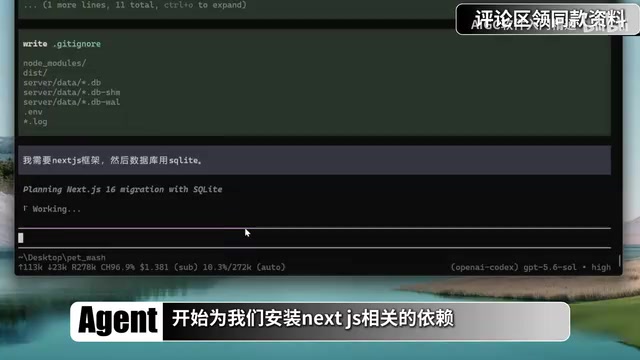
- Steering: When the AI misunderstands something mid-execution, type a correction in the input box and press Enter. The message is tagged as "steering," and the AI immediately changes direction. For example, if it's about to scaffold an Express backend, you can steer with "I need Next.js, with SQLite for the database" and it pivots instantly.
- Follow-up: Send with
Alt+Enter(orOption+Enteron Mac). The instruction queues up and executes only after the AI finishes its current round of work — no interruption. You can pressAlt+↑to retrieve a queued message and edit it before it fires.
Under the hood, this reflects Pi's dual-loop architecture: an inner loop handles model calls, tool execution, result processing, and completion checks — Steering messages are injected into the next inner-loop iteration for real-time responsiveness. Follow-up messages sit in the outer loop and are only read once the inner loop has fully completed.
Pi also supports a non-interactive mode: pi -p "instruction" runs a one-shot task silently in the background, making it an excellent CLI utility.
Session Trees: Pi's Unique Branching System
Pi's basic unit of work is a Session — a continuous multi-turn conversation. /new creates a fresh session and clears context, pi -c resumes the most recent session, and pi -r lets you pick from session history.
The truly distinctive feature is conversation trees. Pi sessions aren't purely linear — they're tree-structured. The /tree command lets you roll back to any historical node and branch off in a different direction from that state. For instance, from a "vegetables" branch, you can rewind and start a separate "seafood" branch, creating two parallel timelines.

One important caveat: rolling back the conversation tree only reverts conversation history, not code that's already been written. To revert code changes, you need Git — find the target commit ID and run git reset --hard <ID> to force-reset. When rolling back conversation history, Pi offers three options: discard entirely, summarize (generate a summary of the discarded branch), or specify a custom summary format.
Three additional session management commands round things out: /clone copies the current session in full, /fork creates a new session branching from a specific node, and /compact manually triggers context compression. That said, there's a widely-held principle in the agent world: clearing beats compressing — finishing a task and running /new generally keeps the AI more focused.
Minimal Core, Unlimited Extension: The Plugin Ecosystem
Out of the box, Pi has just four tools: read file, write file, edit file, and run command. That last one — bash — is effectively a universal tool: it can invoke find for search, grep for text matching, ls for directory inspection, and anything else you'd do in a shell. Pi has no MCP, no subagents, no plan mode, no todo list — by design. The philosophy: the leaner the core, the better the model performs. As the official site puts it: let the tools adapt to your workflow, not the other way around.
So how do you get advanced capabilities? Through packages (plugins) and skills:
Plugin Ecosystem Overview
- pi-web-access: Zero-config web search via XR MCP service — install and use immediately.
- subagents: Run multiple sub-agents in parallel, e.g., generate five differently-styled personal websites in one shot.
- pi-mcp-adapter: Adds MCP support to Pi, enabling services like Amap maps.
- BTW (side conversation), Plan Mode, Go Mode, Dynamic Workflows, WeChat Assistant, and more — essentially replicating all the signature features of Claude Code and Codex.
Plugins can be installed globally or scoped to a project with the -l flag. Uninstalling is as simple as swapping install for uninstall.

Skills Extension
Pi follows a standard Agent Skills protocol. Drop a skill into your project's .agents/skills directory, or into ~/.agents globally. The PlaywrightCLI skill, for example, gives the AI browser automation capabilities — letting it control Chrome to search, navigate, and interact with pages. SkillHub is a useful directory for discovering skills, and you can even paste an installation prompt directly to the AI and let it install the skill autonomously.
Memory, Security, and Custom Configuration
Every new conversation starts with a blank slate — the AI has no memory of your project. The solution is an agents.md file in your project root. This file is compatible across Codex, OpenCode, and other tools; it's loaded as mandatory context at the start of every conversation. You can write it manually, or ask Pi to "read through the current folder and write project knowledge into agents.md" to auto-generate it.

Global system prompts go in agents.md in the config directory, or in the higher-priority append_system.md. It's worth adding a line explicitly prohibiting bulk file deletion as a safety measure.
Security is an area Pi intentionally keeps minimal. The only built-in safeguard is a trust prompt when Pi is launched in an unfamiliar directory — it asks whether to trust and load plugins/skills. Once running, it operates with full permissions and executes file edits and commands automatically without stopping to ask. This is a deliberate design choice to keep the core clean and fast. For higher-security scenarios, two approaches are recommended: run Pi inside a sandbox (Docker container, Hyper-V, WSL, etc.) — Pi's lightweight footprint makes it especially well-suited for containerized batch deployments; or install the pi-permission-system plugin to require approval dialogs for sensitive operations.
Deep customizability is another standout strength. Pi doesn't just support third-party plugins — it can write plugins for itself, with built-in knowledge of its own plugin development protocol. In a live demo, GPT-5.6 successfully built three custom plugins in one session: displaying weather at the top of the conversation window, blocking reads of .env files, and showing a confirmation dialog before any rm command executes. Just describe what you need, and the AI handles the rest.
Source Architecture: A Textbook for Agent Design
Pi's codebase reads like a reference implementation for agent architecture. Several core packages are worth studying:
- ai package: Handles model calls, normalizing dozens of providers into a single unified interface.
- agent package: Implements the core dual-layer agent loop.
- coding-agent package: The concrete implementation of coding functionality — defines the four base tools, system prompt, skills mechanism, and plugin system.
- tui package: Implements the full terminal UI.
More practically, these core packages are already packaged as SDKs. Need multi-model support? npm install and call createModel. The coding-agent is equally plug-and-play — create a session and start dispatching tasks to the agent immediately.
For engineers working in the agent space, Pi is more than a productive coding tool — it's a body of best practices worth studying closely. Its philosophy of restraint — doing less to achieve more — redefines where the boundary between efficiency and flexibility sits for AI agents.
Related articles

WorkBuddy Beginner's Guide: How AI Agents Automate Office Tasks
WorkBuddy tutorial: learn how this desktop AI agent workbench automates files, organizes data, and generates documents, compared with LLMs and Codex, plus a beginner path and cost analysis.

Doubao Work in Practice: Three Modes That Let AI Actually Get Work Done
Doubao Work practical tutorial: from chat mode to Work Mode Lite and Pro, explaining the logic for choosing among three modes with real office task demonstrations. Even complete beginners can learn to use an AI agent to handle local files, organize materials, and generate documents.

AI Agent Runs the Entire GEO Database Mining Workflow with a Single Prompt
Based on a Bilibili creator's demo, this article explains how the WorkBuddy AI agent completes GEO database mining with a single prompt: automatically searching datasets, downloading and organizing data, batch correction, differential analysis, WGCNA, machine learning-based feature gene screening, and regulatory network construction, and generating a complete analysis report.