Pixal3D Hands-On Comparison with Tripl3/Trellis/Hunyuan: Full Analysis of Pixel-Perfect Alignment Pros and Cons

Tencent open-sources Pixal3D: pixel-level alignment achieves breakthrough image-to-3D accuracy
Tencent's ARK Research Lab has open-sourced Pixal3D, an image-to-3D model accepted at SIGGRAPH 2026. Its core innovation is pixel-level alignment technology that directly projects each image pixel into 3D space, outperforming Hunyuan and Trellis 2 in detail preservation and color fidelity while approaching the paid tool Tripl3. However, the technology has limitations with rigid objects and facial processing, requires 24GB VRAM, and weights are restricted to academic use with disputed commercial licensing.
Tencent's ARK Research Lab has just open-sourced Pixal3D — an image-to-3D generation model accepted at SIGGRAPH 2026. SIGGRAPH (Special Interest Group on Computer Graphics and Interactive Techniques) is the most prestigious international academic conference in computer graphics, hosted by ACM annually since 1974, with an acceptance rate consistently around 20%-25%. Being accepted means its technology has earned significant recognition in the academic community. Unlike mainstream approaches such as Trellis, Hunyuan, and Direct 3D, Pixal3D employs a novel pixel-level alignment technique that directly projects each pixel of the input image into 3D space, achieving reconstruction accuracy far beyond traditional methods. This article provides a comprehensive breakdown of this open-source 3D model's real-world performance across four dimensions: technical principles, multi-model comparison testing, deployment workflow, and licensing issues.
Technical Principles: How Pixel-Level Alignment Disrupts Traditional Image-to-3D Approaches
Before Pixal3D, mainstream image-to-3D models — including Trellis, Hunyuan, and Direct 3D — all followed a similar technical pipeline: first constructing geometry in a standard space, then roughly referencing the input image through tensor layers for texture mapping. Specifically, this traditional approach uses a "model first, texture later" two-stage workflow — the first stage predicts the object's geometric structure in a normalized latent space, generating intermediate representations like point clouds, voxels, or implicit surfaces; the second stage roughly projects the input image's texture information onto the generated geometry surface through cross-attention mechanisms or tensor mapping layers. Since geometry reconstruction and texture mapping are optimized separately, alignment errors between them are inevitable, resulting in losses in both contour precision and color consistency in the final model. While 3D models generated this way resemble the input image, they can never achieve a perfect match.
Pixal3D completely abandons this traditional path. Its core innovation lies in directly projecting each pixel of the image into 3D space, achieving true Pixel-Perfect Alignment. The direct result: contour lines perfectly preserve their shapes from the original image, and color and detail fidelity reach unprecedented levels.
In terms of model architecture, Pixal3D uses Trellis 2 and Direct 3D as its Backbone Networks. A backbone network is the foundational architecture in a deep learning model responsible for extracting core features. Pixal3D layers its proprietary pixel alignment module on top of these two existing models' feature extraction capabilities. While this multi-backbone architecture design improves generation quality, it also significantly increases computational overhead — requiring approximately 24GB of VRAM, meaning at minimum an NVIDIA RTX 3090, RTX 4090, or A5000-class professional GPU. Standard consumer GPUs (like the RTX 4060 with 8GB VRAM) are completely inadequate. Model weights are open-sourced on Hugging Face (with licensing restrictions in the EU region), and users can apply for access and receive approval quickly.

Hands-On Comparison: Pixal3D vs Trellis 2 vs Tripl3 vs Hunyuan
To comprehensively evaluate Pixal3D's actual generation quality, we compared it against Trellis 2, Hunyuan, and Tripl3 — currently recognized as the strongest 3D AI generator — across multiple test cases, with all model outputs imported into Blender for unified evaluation. Blender is a free, open-source 3D creation suite widely used for modeling, animation, rendering, and post-production. Importing models generated by different tools into Blender and observing them under identical lighting environments, camera angles, and render settings eliminates interference from each tool's built-in renderer, enabling more objective comparison of geometric precision, texture quality, and overall visual results.
Tree Model Test
In the tree generation test, Pixal3D performed impressively — preserving richer details than Hunyuan, with overall results even slightly superior. Trellis 2 performed mediocrely without an optimizer (theoretically, pairing it with optimizers like Ultra Shape could improve quality). Tripl3 remains the most precise with the highest alignment, but Pixal3D comes very close to this level.
Complex Object Test
In the complex object test, Pixal3D excelled in color reproduction. While there are some artifacts on the back of the model, the overall result is essentially better than or on par with Hunyuan. Tripl3 still outperforms from every angle, but the gap between them has noticeably narrowed.
Fine Structure Test
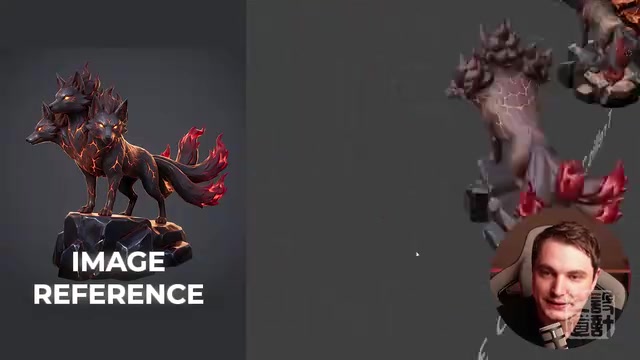
In a model test featuring tail details, Pixal3D's performance was stunning — the generated result perfectly matches the reference image, with all tail structures clearly discernible. In contrast, Tripl3 tends to simplify these detailed sections and even exhibited obvious generation failure in this case. However, Tripl3 remains the most accurate in overall proportional control.
Strengths and Limitations: The Double-Edged Sword of Pixel Alignment Technology
Core Strengths
- Extremely high image fidelity: Pixel-level alignment technology makes the generated 3D model nearly identical to the original image
- Excellent color reproduction: Texture and color reproduction precision surpasses most competitors
- Outstanding detail preservation: Excels in handling complex structures (such as tails, decorative elements)
- Free, open-source, and locally runnable: Weights are open, no dependency on cloud APIs
Limitations to Note
Pixel alignment technology also introduces some inherent issues. The core contradiction is: pixel distribution in a 2D image is the result of perspective projection, not a faithful reflection of the object's true 3D geometry. When the model strictly reconstructs in 3D based on pixel boundaries, it effectively "bakes" perspective distortion into the three-dimensional structure. For organic forms (like trees, decorations), this impact is minimal since these objects have no strict geometric constraints; but for rigid objects requiring precise straight lines and proportional relationships, the deformation from perspective projection gets directly translated into geometric errors.
The pistol test case exposed this weakness — overall proportions were off, with deformation visible from multiple critical angles, making it the only comparison model to fail. This is precisely because the pistol, as a rigid object, had its precise geometric structure distorted under perspective projection, and the pixel alignment mechanism faithfully "replicated" that distortion into the 3D model.
Facial processing is another clear weak point. In testing, Pixal3D-generated faces looked like they were simply cut out from the image and pasted on, lacking true 3D depth — the model directly maps 2D facial pixels onto the 3D surface rather than truly understanding the face's three-dimensional structure. Rotating the viewpoint also tends to cause issues, as the model attempts to repeat the angle information from when the image was generated.

Local Deployment and Commercial License Considerations
Local Deployment Workflow
Pixal3D's GitHub repository provides a complete set of deployment resources. Since the model requires 24GB VRAM (a low-VRAM mode exists in the code but doesn't work in practice), users with insufficient VRAM can create instances through cloud GPU services like RunPod. RunPod is a pay-as-you-go cloud GPU rental platform where users can rent virtual machine instances equipped with high-end GPUs (such as A100, H100) by the hour, connect remotely via SSH (Secure Shell) for operations, and release resources when finished. Similar services include Vast.ai, Lambda Cloud, etc., with typical costs around $0.5-2 per hour — far less than the one-time investment of purchasing a professional GPU. The entire environment setup takes approximately 30 minutes to install all dependencies.
The actual workflow is very straightforward: drag in an image → click preview to generate a preview → confirm the result and click the "Extract Mesh" button to export the final model. The generated mesh structure resembles a lattice/slat design.
Commercial License Controversy
There's a critical issue to be aware of: the official policy explicitly states that model weights are for academic use only, and any form of commercial use is strictly prohibited. While the underlying Trellis 2 and Direct 3D are open-source, the intermediate layer implementing pixel alignment functionality is not truly open-source — it provides open weights but imposes strict restrictions in the license.
It's worth noting that in the AI field, the meaning of "open-source" is becoming increasingly ambiguous. Traditional software open-source means complete openness of code and usage rights (e.g., MIT, Apache 2.0 licenses), but AI model "open-source" often only means releasing model weights (i.e., trained parameter files) while setting strict usage restrictions in the license. Pixal3D's situation is exactly this — in strict terms, it qualifies as "Open Weights" rather than true "Open Source." The OSI (Open Source Initiative) has a clear definition: a true open-source license must not restrict fields of use. This "pseudo-open-source" phenomenon is extremely common in the current AI industry — Meta's LLaMA series also sparked widespread controversy over similar license restrictions.
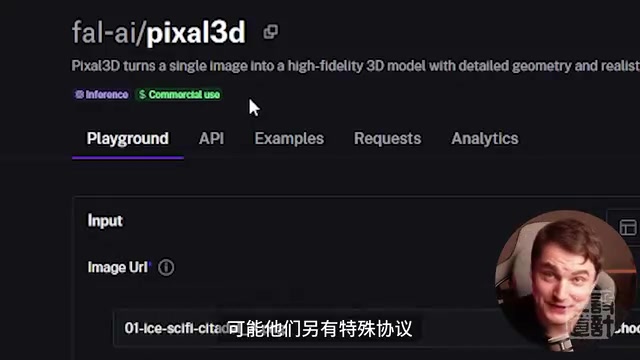
Interestingly, Pixal3D has already appeared on the Fal.ai platform, marked as allowing commercial use, which completely contradicts the license terms on GitHub. The specific situation remains unclear — there may be a special commercial licensing agreement. Users with commercial needs are strongly advised to confirm the licensing status before use.
Conclusion: What Use Cases Is Pixal3D Best Suited For?
Pixal3D isn't perfect, but it represents a significant breakthrough in the open-source local 3D AI generation space. Its ideal application scenarios are concept design, base model creation, and 3D level design — 3D models generated based on the pixel alignment architecture are highly practical for environment building.
From an industry trend perspective, Pixal3D's emergence shows that open-source local 3D generation models are rapidly closing the gap with paid commercial tools. While Tripl3 still leads in overall performance, Pixal3D has already demonstrated the potential to surpass paid tools in specific scenarios like detail reproduction. As the community continues to optimize and iterate, the pace of progress in the open-source image-to-3D space deserves ongoing attention.
Key Takeaways
- Pixal3D uses pixel-level alignment technology, directly projecting each image pixel into 3D space, achieving image reconstruction precision far beyond traditional methods
- In multiple comparison tests, Pixal3D outperforms Hunyuan and Trellis 2 in detail preservation and color reproduction, approaching the level of the paid tool Tripl3
- The limitation of pixel alignment technology lies in insufficient precise geometric shape reconstruction, with imperfections in facial processing and rotated viewpoints
- The model requires approximately 24GB VRAM to run; weights are open-sourced on Hugging Face but restricted to academic use only, with commercial licensing under dispute
- Pixal3D is best suited for concept design, base model creation, and 3D environment/level design applications
Related articles
 Product Reviews
The Programmer's Desk Setup Guide: Building a Workspace That Feels Like Home
Discover how programmers build productive, comfortable workspaces. From multi-monitor setups to ergonomic design, explore the desk philosophy that drives focus and flow.
 Product Reviews
Qoder vs Cursor Real-World Comparison: Which $20/Month AI IDE Is Better?
Hands-on comparison of Qoder vs Cursor AI IDEs: Agent autonomy, human interaction count, and architecture decisions. Qoder needed only 2 interactions vs Cursor's 8.
 Product Reviews
Cursor Cloud Agent Demo: Eliminating Bottlenecks Across the Entire Software Development Lifecycle
Deep analysis of Cursor's Cloud Agent demo showing how cloud VMs, automated test artifacts, and a full-chain control plane systematically eliminate human bottlenecks across the software development lifecycle.