Playwright MCP Explained: Reliable Browser Control for AI Agents

Playwright MCP uses structured accessibility snapshots for deterministic AI browser automation — but it's not a security boundary.
Playwright MCP is Microsoft's open-source browser automation tool whose core innovation is replacing screenshot-based visual recognition with structured snapshots of the web accessibility tree, enabling AI agents to control browsers precisely and deterministically without vision models. The article covers the key architectural trade-off between Playwright MCP and CLI — high-throughput coding agents should favor the token-efficient CLI, while web exploration and testing agents benefit from MCP's persistent context. Configuration flags like isolated, storage state, save session, and caps address environment isolation, auth reuse, session recording, and capability extension. Most critically, the official docs explicitly state that Playwright MCP is not a security boundary: origin blocklists cannot prevent redirects, so any agent-controlled browser session must be treated as having full underlying network access.
Getting AI agents to genuinely operate a browser has always been one of the trickiest challenges in agent engineering. The traditional approach relies on vision models to "see" webpage screenshots and infer button positions — a process that tends to get tormented by CSS layouts and pixel offsets. Microsoft's open-source Playwright MCP takes a different approach entirely: instead of showing the model images, it feeds the model structured data. This article breaks down its core architecture, the trade-offs versus CLI, browser configuration details, and one security boundary issue you absolutely cannot ignore.
Replacing Visual Recognition with Accessibility Snapshots
Playwright MCP fundamentally overturns the traditional approach to AI-driven browser automation. The old way involved screenshotting a webpage and forcing a vision model to infer button locations from a pile of pixels. Playwright MCP feeds the agent an accessibility snapshot — a structured data representation of the page's underlying accessibility tree.
The elegance of this design lies in how it translates highly visual webpages into structured text — precisely the format that large language models are naturally good at processing. The result: no vision model required. The entire automation runs on structured data rather than pixels, making it completely deterministic.
Anyone who has built a screenshot-based agent knows that pain — visual ambiguity causes the agent to click a few pixels to the left of a button, or get completely thrown off by a weird layout. Playwright MCP sidesteps all that visual noise, making tool calls precise and lightweight.

This is not an experimental toy. Playwright MCP is an actively maintained Microsoft project, currently at version 0.0.80, with over 36,700 GitHub stars. It only requires Node.js 18 or later and integrates seamlessly into the standard configuration of mainstream MCP clients like Cursor, Claude Desktop, Windsurf, Goose, and Grok.
The Accessibility Tree is a semantic tree that browsers build in parallel with the visual DOM when rendering a webpage. It stems from operating system and browser implementations of the Web Content Accessibility Guidelines (WCAG) — assistive technologies like screen readers use this tree to "understand" a webpage rather than scanning it pixel by pixel. Each node in the tree carries semantic attributes such as role (e.g., button, link, textbox), name, and state (e.g., checked, disabled) — essentially a structured description of the page's interactive intent. This means Playwright MCP receives deterministic descriptions like "there is a button named 'Submit' here" rather than "there is a blue pixel at row 342, column 178." Large language models handle this kind of structured text far better than they interpret image coordinates, which is the fundamental reason the entire approach is "completely deterministic."
The Architectural Trade-Off: MCP vs. CLI
Having a new tool doesn't mean you should use it in every scenario. There's a fairly counterintuitive trade-off here: which tool actually matches your agent's workload?
High-Throughput Coding Agents: Choose CLI
If your agent is a high-throughput coding assistant — actively writing code inside an IDE, managing large codebases, and doing heavy reasoning within a constrained context window — you're probably better off with the standard Playwright CLI paired with dedicated skills, rather than MCP.
The reason is that CLI calls are extremely token-efficient. The agent only needs to issue concise, purpose-driven commands without loading bulky tool schemas or verbose accessibility trees into context memory. For context windows where every token counts, this is a critical advantage.
Web Exploration and Testing Agents: Choose MCP
Conversely, if the agent's primary job is freely exploring web applications, autonomously running self-healing tests, or powering long-running autonomous workflows, MCP is your go-to choice.
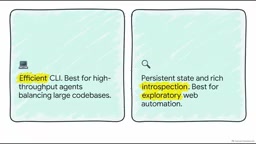
In these tasks, maintaining continuous browser context, preserving persistent state, and performing rich introspection of page structure — these benefits fully outweigh token cost concerns.
The conclusion is clear: use CLI for code-intensive agents that only occasionally need to check a browser; use MCP for agents genuinely focused on web exploration and testing.
MCP (Model Context Protocol) is an open protocol standard proposed by Anthropic in late 2024 and subsequently adopted widely by Microsoft and others. It standardizes the communication interface between AI models and external tools/data sources, defining standard formats for tool descriptions (schemas), invocation requests, and result responses — enabling the same tool server to be seamlessly reused across different clients like Cursor, Claude Desktop, and Windsurf. Compared to directly calling functions or CLI commands, MCP's trade-off is that every tool call requires carrying the full tool schema description in context. With many tools or complex schemas, this significantly consumes the context window. This is the underlying reason for the "token efficiency" trade-off discussed in the article: CLI commands are naturally compact, while MCP's standardization delivers interoperability but at the cost of token overhead for schema descriptions.
Configuring the Agent's Browser
These configuration flags map directly to pain points developers encounter in practice — each one is worth understanding.
isolatedflag: Keeps the browser profile purely in memory, guaranteeing a clean environment for every test run.storage stateflag: Points to a file containing cookies and local storage, letting the agent start in an already-authenticated state — no wasted time or tokens re-logging in when testing user dashboards.save sessionflag: A debugging lifesaver that records the session directly, so you can replay exactly what the agent did when it goes off the rails.caps=testing: Enables specific testing assertion capabilities in the agent's toolset.
The Critical State Management Pitfall
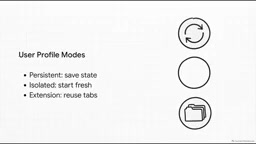
By default, Playwright MCP uses a persistent profile — saving login information between sessions just like your everyday browser. But there's a warning you cannot ignore: a persistent profile can only be used by one browser instance at a time.
If multiple MCP clients share the same workspace, they will inevitably conflict. There are two solutions: either use isolated mode, where each session starts fresh and storage is discarded on close, or assign each client its own independent user data directory. You can also use the browser extension mode with Edge or Chrome, which cleverly connects the agent to an existing tab you're already logged into.
Extending Capabilities with CAPS
Although Playwright MCP's core magic is built on the structured accessibility tree, it's highly extensible. Via the caps flag (short for capabilities), you can enable entirely different categories of tools on demand — such as coordinate-based visual recognition, PDF generation, or deep network and developer tools access — simply by appending them as a comma-separated list.
You can even run the entire configuration as a standalone MCP server over HTTP transport, which works great for headless systems or isolated IDE worker processes.
Security Boundaries: Facing Reality
This is the section that deserves the most serious attention. The official project documentation contains a line worth quoting directly:
Playwright MCP is not a security boundary.
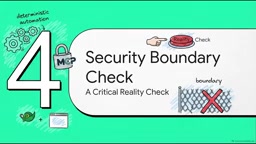
When building agent workflows, you absolutely cannot overlook this. The practical implication: while Playwright MCP does offer options to restrict what origins the browser can request using allowed origins and blocked origins, these mechanisms are not foolproof.
Specifically, these mechanisms cannot prevent redirects. If your agent is tricked into clicking a link that ultimately redirects to a sensitive internal network IP address, those origin blocklists won't save you.
The right mindset: when deploying Playwright MCP, you must treat any browser session under agent control as having the full access permissions that the underlying network allows. Always follow strict MCP security best practices, and never assume the browser automation layer will magically protect your internal network.
The core threat model here is an agent-variant of Server-Side Request Forgery (SSRF). In traditional web security, SSRF refers to attackers tricking a server into making requests to internal network resources. In an agent context, the same attack surface is triggered via Prompt Injection — a malicious webpage can embed text disguised as legitimate instructions in its content, coaxing the agent into clicking links that navigate to http://169.254.169.254 (the AWS metadata service) or other internal addresses. Origin blocklists fail against 302 redirects precisely because the check is performed on the initial request target, not the final destination. A proper defense-in-depth approach includes: running browser processes inside isolated network namespaces (e.g., Docker network policies), restricting their outbound routing, and applying the principle of least privilege to credentials the agent can access — rather than relying on application-layer origin filtering.
Final Thoughts
Giving an AI a browser is essentially giving it a window into your network. Before opening that window, think clearly about whether you're building a high-throughput coder or a digital-world explorer, and choose your CLI or MCP architecture accordingly. The appeal of deterministic control is real — but the reality of security boundaries is equally non-negotiable.
Related articles

Felix Rieseberg Personal Homepage
Felix Rieseberg's personal homepage sparks attention on Hacker News. This article covers the Slack engineer's technical background, the rise and fall of nativefier, and the value of a developer homepage as a tech calling card.

@ai-sdk/vue 3.0.306 Patch Release Syncs with [email protected] Update
@ai-sdk/vue 3.0.306 released, synced with [email protected]. A routine patch release for the Vercel AI SDK ecosystem with no public API changes; the Vue adapter layer stays version-aligned with the core package.

Gemini 4 Argon API Launches: The Era of Million-Token Output Begins
Google launches Gemini 4 Argon with sparse MoE architecture, up to 1M output tokens, and a 68.90% Vals Index score, available across API, AI Studio, and the Gemini app.