Pluno Review: An AI Chrome Extension That Proactively Discovers Automation Opportunities
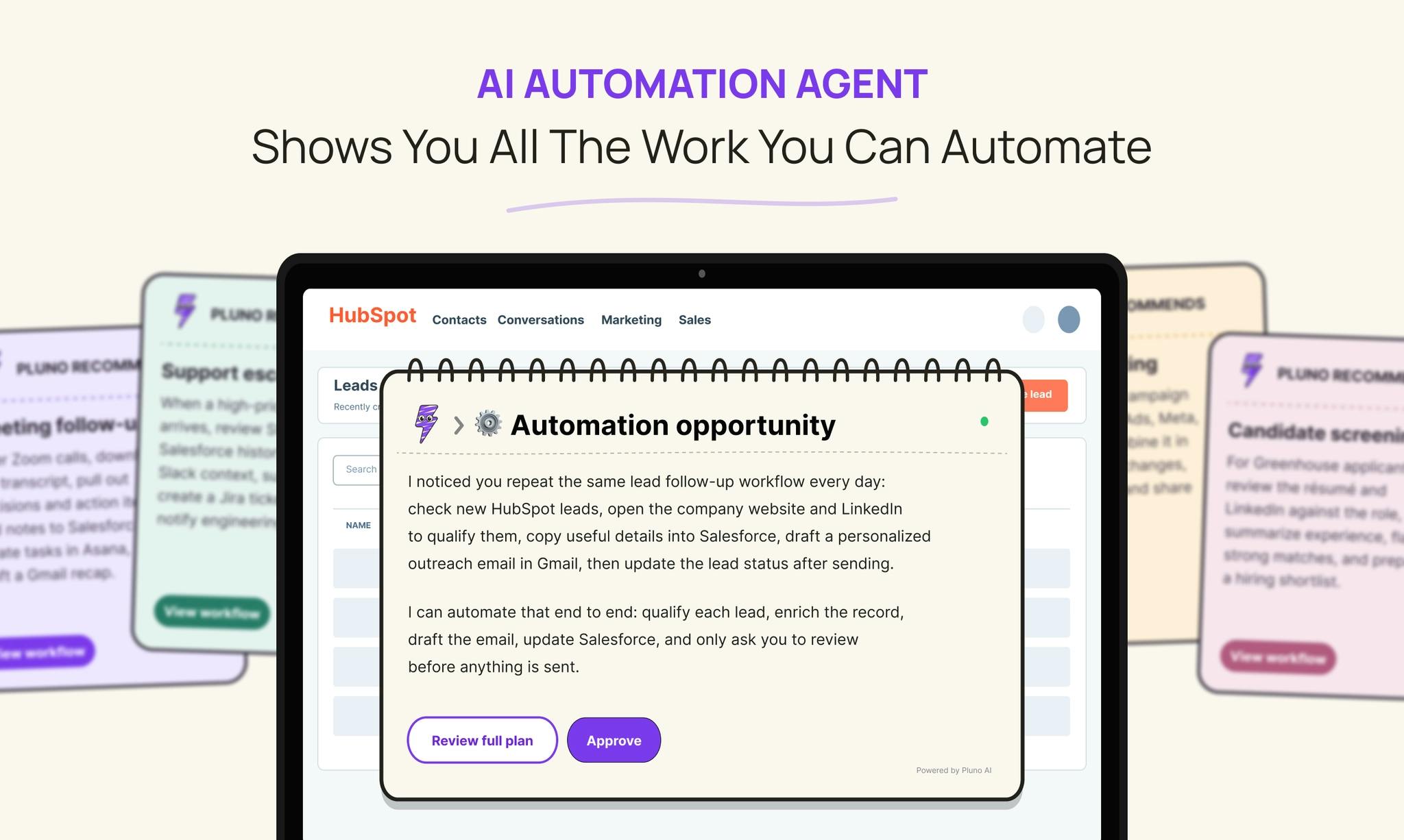
Pluno is an AI Chrome extension that watches your work and proactively discovers automation opportunities.
Pluno is an early-stage Chrome extension that takes a novel approach to automation: instead of requiring users to manually build workflows like Zapier or Make, it observes browser behavior, identifies repetitive patterns that consume billable hours, and proposes automation solutions for approval. Targeting freelancers and SMBs, it lowers the cognitive barrier to discovering automation opportunities, though privacy and reliability concerns remain.
A New Approach to Automation: From Manual Configuration to AI-Driven Discovery
Automation platforms like Zapier, Make, and n8n are already quite mature, but they all share a common barrier: users must first know exactly what they want to automate, then manually build the workflow. Setting up triggers, connecting apps, mapping fields, running tests — for non-technical users, this "zero to one" process is the biggest obstacle.
Zapier, Make (formerly Integromat), and n8n represent three typical forms of today's automation tools. Zapier offers the broadest app integration as a SaaS (over 6,000 apps), using the "Zap" concept to chain triggers and actions together. Make provides more granular visual workflow orchestration with support for complex conditional branches and data routing. n8n is an open-source self-hosted solution, ideal for teams with data sovereignty requirements. While these platforms have brought automation from the realm of programming to visual operation, they are still fundamentally "declarative automation" — users must explicitly declare the logic of every step. This means users not only need to understand their own workflows but also translate them into trigger-condition-action chains the platform can understand, involving concepts like API authentication, field mapping, and data format conversion.
Pluno is a Chrome extension that recently launched on Product Hunt (ranked #18 with 12 upvotes), and it aims to fundamentally change this paradigm. Its core positioning in one sentence: an AI assistant that proactively discovers and runs automation for you.
Unlike traditional tools where "users actively build," Pluno's core approach is "passive observation + proactive suggestion." Through a browser extension, it observes your daily work patterns, understands your operational steps and decision logic, and identifies repetitive tasks that consume billable hours or require paid outsourcing.
Pluno's Three-Step Mechanism
Learn: Cross-Browser User Behavior Observation
Pluno runs continuously as a Chrome extension, observing user actions within the browser. It doesn't just record click trails — it attempts to understand the "steps" and "decisions" behind operations. For example, when you process a certain type of email, it notes which field you check first and what conditions determine your next action.
On a technical level, Chrome extensions gain access to web content and user interactions through the browser's Extensions API. This type of behavioral observation typically involves DOM event listeners (capturing clicks, inputs, scrolling, etc.), page content analysis (understanding the application context of what the user is operating), and cross-tab session correlation (linking actions scattered across different apps into complete workflows). Pluno's ability to "understand the decisions behind actions" means it's not just recording macros — it's performing semantic abstraction on top of behavioral sequences. This requires the intent reasoning capabilities of large language models to distinguish between "what the user is doing" and "why the user is doing it." This leap from behavior to intent is the fundamental difference between Pluno and traditional browser automation tools (like Selenium IDE's record-and-playback).
Identify: Discovering Automatable Repetitive Patterns
By analyzing behavioral data, Pluno identifies workflows that recur with clear patterns. A notable product insight: it specifically focuses on tasks that "consume billable hours" or "require hiring someone to handle." This directly targets the cost pain points of businesses and freelancers, rather than a vague promise of "saving time."
The pain point Pluno addresses is known in cognitive science as "Automation Blind Spot." Research shows that knowledge workers spend an average of 40% of their working hours on automatable repetitive tasks, but most people significantly underestimate this proportion. Several factors contribute to this cognitive bias: habitual blindness (the brain classifies long-repeated operations as "just the way it is" rather than "something that can be optimized"), fragmented workflows (individual operations take only a few minutes, making them hard to perceive as worth automating, yet they can cumulatively consume hours per week), and tool awareness gaps (without understanding what automation tools can do, people naturally can't imagine which tasks could be replaced). By productizing "discovery" itself, Pluno is essentially solving an information asymmetry problem — AI is better than users at extracting patterns from repetitive behavior.
Execute: Proposing Solutions and Managing Execution
When Pluno discovers a workflow worth automating, it generates a clear automation proposal for user approval. Once approved, it runs and manages the automation on its own — all without manual workflow mapping, trigger configuration, or flow building.
Zero Setup: The Biggest Differentiator
Pluno repeatedly emphasizes: without manual workflow mapping, trigger setup, or building. This is the core difference from Zapier-type tools.
Traditional automation tools offer value in the form of "you tell it what you want, and it helps you build it." Pluno's value proposition is "you don't even need to think about it — it discovers and implements for you." This AI-driven discovery approach transforms automation from an engineering task requiring specialized knowledge into a near-zero-barrier managed service.
To understand Pluno's positioning, it helps to place it within the evolution of the RPA (Robotic Process Automation) industry. Traditional RPA (represented by UiPath, Automation Anywhere, and Blue Prism) relies on predefined rule scripts, excels at structured and highly deterministic processes, but comes with high deployment costs, heavy maintenance burdens, and extreme sensitivity to process changes. In recent years, the industry has shifted toward "Intelligent Automation": UiPath launched Autopilot, and Microsoft integrated Copilot into Power Automate — both attempting to use AI to lower the automation creation barrier. However, these solutions still follow a "user-initiated, AI-assisted building" model. Pluno goes further, advancing AI's role from "assisted builder" to "proactive discoverer" — what the industry calls the consumer-grade application of Process Mining and Task Mining. Enterprise-grade process mining platforms like Celonis have already validated the value of "discovering automation opportunities from data" in large organizations, but they target IT departments and process analysts, not end-user knowledge workers. Pluno attempts to bring this capability down to the individual user level.
Who Is Pluno For?
Pluno is categorized under Chrome Extensions, Productivity Tools, and Artificial Intelligence, with a clear target user profile:
- Freelancers and consultants: For people who bill by the hour, any tool that reduces non-core repetitive labor directly translates into income or time freedom
- SMB operators: Without dedicated automation engineers and unable to afford complex RPA solutions, Pluno's automatic discovery fills this gap
- Teams paying for administrative assistance: The product explicitly mentions scenarios where you "pay someone to handle" tasks, meaning Pluno aims to replace part of the human outsourcing cost
For these user groups, Pluno's biggest appeal isn't "more powerful automation capabilities" — it's lowering the cognitive cost of discovering automation opportunities. Many people don't lack the desire to automate; they simply don't know which parts of their work can be automated.
Potential Concerns Worth Watching
As an early-stage product, Pluno faces several unavoidable challenges:
Privacy and Data Security Boundaries
Pluno needs to "observe" all user actions in the browser to learn work patterns, which means it has quite deep access to user behavioral data. For professionals handling sensitive information (client data, financial records, internal systems), this "always-on observation" model inevitably raises data security and privacy compliance concerns. Whether the product can offer local processing, data anonymization, or clear permission controls will directly impact enterprise adoption.
From a technical perspective, Chrome extension permissions operate on a layered system. Under the Manifest V3 specification, extensions must declare required permissions (such as activeTab, tabs, webNavigation, scripting, etc.), and users can see permission requests during installation. However, extensions like Pluno that need continuous behavioral observation typically require "all-site access" permissions (<all_urls>), meaning they can theoretically read all web content the user visits, including login credential pages, banking systems, medical records, and other sensitive contexts. Under privacy regulations like GDPR and CCPA, this type of data collection requires explicit user consent, data minimization principles, and clear purpose statements for data processing. For enterprise users, additional considerations include SOC 2 compliance and data residency requirements. Industry reference practices include: local-first processing (data never leaves the user's device), configurable observation scope whitelists/blacklists, and end-to-end encrypted data transmission.
Automation Reliability and Controllability
AI-driven discovery and execution sounds great, but it also means higher error risk. When automation isn't built by the user's own hand but inferred by AI, misinterpreting a decision logic can lead to results that diverge from expectations. While the approval step provides a safeguard, whether users have enough information to judge if an AI-generated automation plan is safe and reliable remains an open question.
Relationship with Existing Automation Platforms
Pluno isn't trying to replace all automation — it's focusing on the "discovery" phase. Whether it ultimately serves as an independent execution engine or as an "intelligent discovery layer" that feeds into mature platforms like Zapier and Make will determine its position in the ecosystem.
The Next Evolution of Automation Tools
Pluno's votes and comment volume are still modest — it's very much an early-stage product. But the approach it represents — using AI to proactively discover automation opportunities rather than waiting for users to configure them manually — is very likely the next important direction in automation tool evolution.
As large models improve their ability to understand operational intent, the automation paradigm of "observe to learn, approve to deploy" may gradually become mainstream. Whether Pluno can become the representative product of this trend remains to be proven, but by productizing the act of "discovering automation" itself, it has undoubtedly captured a real pain point that has been overlooked for too long.
Key Takeaways
Related articles
AI Game Development in Practice: Audio Buses and Building the Full UI Flow
AI game dev lesson 11 part 2: Godot's audio trio, audio buses and dB conversion, AudioManager's player pool and random pitch, autoload boundaries, the full UI flow from title to clear, fault-tolerant JSON saves, and pixel font anti-aliasing and integer-size rules.

AI Game Dev Acceptance Lesson: Using GUT Tests and Agent Self-Checks to Make Bugs Impossible to Hide
Lesson 12 of AI game development: use GUT automated tests, Agent self-check loops, browser smoke acceptance, and external playtesting to turn "AI says done" into verifiable evidence.

DoorDash Reveals Only Hundreds of Orders from AI Agents, Open Collaboration Seen as Key
DoorDash reveals only hundreds of orders from AI agents and says it is open to working with third-party agent developers. This article analyzes the early state of agentic commerce, platform openness, and transaction trust bottlenecks.