Pocket Mini Apps: Build and Publish Instantly with an Online Claude Code Platform

Pocket Mini Apps lets non-technical users build and publish apps online using Claude Code — no setup required.
Claude Code is powerful, but its technical barriers — command-line setup, environment configuration — turn away most non-developers. Pocket Mini Apps is an online Claude Code platform that removes those barriers, offering multi-project parallel development, instant build-and-publish, full backend capabilities (databases, WeChat/Feishu integrations, custom workflows), and natural language-driven app creation for product managers, designers, and everyday users.
Claude Code Is Powerful — But How Many People Has It Turned Away?
Which company has achieved the fastest revenue growth in human history? Anthropic. In 2024, its revenue was just $100 million — now, two years later, it has skyrocketed to $40 billion, driven almost entirely by a single product: Claude Code. While other companies scramble to acquire users through aggressive marketing, Anthropic keeps blocking and rejecting them. Setting aside its unfriendliness toward users in China, the tool itself is genuinely impressive — after all, it's been chosen by global business users with their wallets.
Background: Anthropic was founded in 2021 by Dario Amodei, former VP of Research at OpenAI, with AI safety as its core mission. It uses Constitutional AI as its training methodology. Claude Code's key competitive advantage lies in its ultra-long context window (up to 200K tokens) and agentic working mode — it doesn't just complete code; it autonomously plans tasks, calls tools, executes multi-step operations, and handles entire large codebases without losing context. These capabilities make it far superior to traditional code completion tools on complex engineering tasks.
For non-technical users, however, Claude Code still presents a significant barrier — command-line operations, environment setup, server deployment — any one of these steps can be enough to make someone give up.
Specifically, running Claude Code locally requires installing a Node.js runtime, completing the installation via npm, configuring an Anthropic API key, and — for Windows users — potentially setting up WSL (Windows Subsystem for Linux). These steps are second nature to developers, but for product managers, designers, and content creators, each one is a potential exit ramp. This is precisely why the low-code/no-code market has been expanding steadily — Gartner predicts that by 2026, low-code development platforms will account for more than 75% of enterprise application development activity.
So a developer built an online Claude Code platform called "Pocket Mini Apps" (口袋轻应用), giving non-technical users the freedom to build tools on their own terms. More importantly, this isn't a simple API wrapper — it's a full-featured online development platform with complete backend capabilities.
Core Features: Build Online, Publish Instantly
Multi-Project, Multi-Session Parallel Development
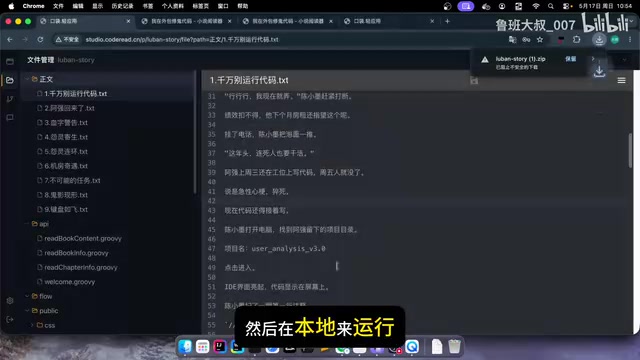
Pocket Mini Apps supports running multiple projects simultaneously, with each project able to open multiple sessions in parallel. For example, you can have AI writing Chapter 10 of a novel in one session while handling something else entirely in another — no interference between them.
The interface is far more user-friendly than a local CMD window. File management, uploads, and downloads are all built in, and you can even package and download an entire project to run locally. But the real convenience? You can direct the AI from your phone while lying in bed.
Apps Go Live the Moment They're Built
The true killer feature of this platform is build-and-publish. Apps built with the online Claude Code require no domain name, no server rental, and no waiting for review — once the build is complete, a shareable link is generated instantly. Copy it and send it to a friend, and they can use it right away.
How it works: "Build-and-publish" relies on cloud-native infrastructure. Traditional deployment involves purchasing a domain → filing for ICP registration → renting a server → configuring a web server → uploading code → setting up an SSL certificate — a process that can take days or even weeks. Modern PaaS platforms compress all of this into a single click using containerization (Docker) and automated CI/CD pipelines — each app instance runs in an isolated container, with the platform automatically assigning a subdomain and HTTPS certificate. Vercel and Netlify have proven this model at scale; Pocket Mini Apps combines it with AI code generation to automate the entire pipeline from natural language description to a live, accessible URL.
In the demo, the developer had AI build a novel-reading website, then asked it to change the cover button text from "Read Now" to "Start Reading" — the whole thing was done and live in under three seconds. The API used here is DeepSeekAd, which responds extremely fast.
This "edit and publish instantly" experience is a game-changer for rapid prototyping and small-scale app development.
Full Backend Capabilities: More Than Just a Frontend Page Generator
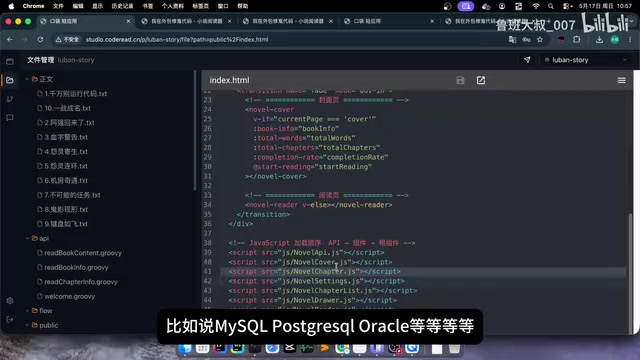
Many people might wonder: can this only generate frontend pages? The answer is no. Pocket Mini Apps has complete backend capabilities, implemented via API Flow, supporting:
- Relational databases: MySQL, PostgreSQL, Oracle, and more
- Third-party platform integrations: WeChat, WeCom, Official Accounts, Feishu, DingTalk, and more
- Custom workflows: Build complex business logic using a dedicated DSL syntax
About DSL syntax: A DSL (Domain-Specific Language) is a programming language designed for a specific application domain — more concise and closer to business logic than general-purpose languages. Common examples include SQL (database queries) and regular expressions (text matching). API Flow's proprietary DSL is essentially a declarative language for describing workflow logic, allowing AI to define data flows, conditional branches, and third-party API calls in a structured way. The advantage of this design: the high level of abstraction means AI can understand and generate it more accurately, and the clear syntax boundaries make automated testing and debugging easier.
Live Demo: Full WeChat Official Account Integration
The most impressive part of the demo was a live WeChat Official Account integration. The entire process was completed in three steps:
Step 1: Connect the Official Account. On the configuration page, add a WeChat Official Account app, enter the APP ID and APP Secret, and click "Test Connection" to finish.
Technical background: WeChat Official Account integration is built on the WeChat Open Platform API. Developers must obtain an access_token via the OAuth 2.0 protocol before calling interfaces for message pushing, menu management, and more. Message handling is based on WeChat's passive reply mechanism — when a user sends a message, WeChat's servers POST it in XML format to the developer's configured server address, and the developer must respond within 5 seconds, or WeChat will retry up to 3 times. The real-time requirements of this mechanism make it one of the more technically challenging aspects of the integration.
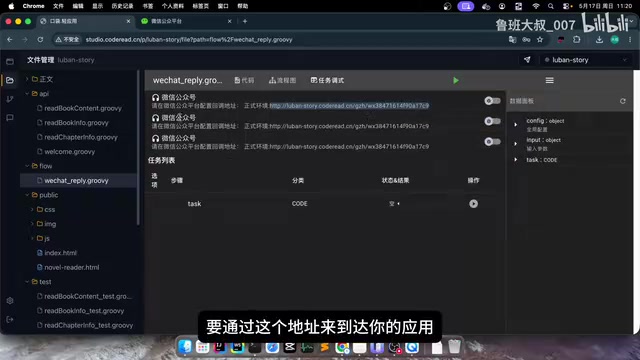
Step 2: Build a keyword-reply workflow. Open a new session and tell the AI
Related articles
 Product Reviews
The Programmer's Desk Setup Guide: Building a Workspace That Feels Like Home
Discover how programmers build productive, comfortable workspaces. From multi-monitor setups to ergonomic design, explore the desk philosophy that drives focus and flow.
 Product Reviews
Qoder vs Cursor Real-World Comparison: Which $20/Month AI IDE Is Better?
Hands-on comparison of Qoder vs Cursor AI IDEs: Agent autonomy, human interaction count, and architecture decisions. Qoder needed only 2 interactions vs Cursor's 8.
 Product Reviews
Cursor Cloud Agent Demo: Eliminating Bottlenecks Across the Entire Software Development Lifecycle
Deep analysis of Cursor's Cloud Agent demo showing how cloud VMs, automated test artifacts, and a full-chain control plane systematically eliminate human bottlenecks across the software development lifecycle.