Postman API Testing for Beginners: From Sending Requests to Parsing Responses

Using Postman as an example, a complete beginner's path for API testing from sending requests to parsing responses.
Based on Bilibili creator "Beifan's" Postman tutorial, this article outlines key points for API testing beginners. It analyzes Postman's pros and cons, explains required and optional request configurations, emphasizes API documentation as the testing basis, and breaks down status codes and response bodies with a 422 error demo showing the send-review-adjust-resend loop.
Postman is one of the most classic tools in the field of API testing. In a tutorial by Bilibili creator "Beifan," the core usage of Postman is broken down from scratch, covering sending requests, parsing responses, and working with API documentation. This article is based on the key content of that tutorial, combined with practical operational logic, to lay out a clear beginner's path.
First, Recognize Postman's Shortcomings and Strengths
Before starting to learn, it's worth understanding Postman's limitations. At the beginning of the course, the creator "threw a bucket of cold water": Postman's official website is overseas, access is unstable, and downloading the installer and getting email verification codes often run into problems; all features require registration and login, and the experience isn't exactly smooth; the CLI tool provided for continuous integration is limited in maturity.
However, these shortcomings don't prevent it from being the top choice for beginners. Postman's UI is clean and intuitive, with complete functionality. For scenarios that don't involve performance testing, it's more than sufficient for functional API testing. More importantly, it supports automatically exporting automation code in multiple languages, including Python, Java, PHP, C#, and more, making it easy to integrate into automation testing frameworks later. Many domestic API testing tools also reference Postman in their UI and feature design.
Logging In vs. Not Logging In: The Difference Isn't as Big as You Think
After installation, opening Postman will prompt you to log in. If the official website is difficult to access, you can choose to skip login and use it directly. The main differences between logging in and not logging in are: after logging in, more protocol types are supported (such as gRPC, MQTT), and API requests can be managed through directories; without logging in, mainly HTTP protocol is supported.
For beginners, HTTP protocol already covers the vast majority of practice scenarios. The creator clearly stated that when not dealing with advanced protocols like gRPC for now, not logging in is completely sufficient.
Sending Requests: The Starting Point of All API Testing
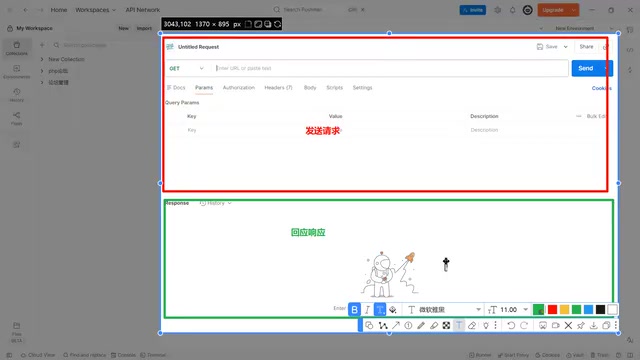
Postman's interface can be clearly divided into two areas: the upper part is the request area, and the lower part is the response area. The creator emphasized that the request area is the core work area where most operations are performed; the response area is the result returned by the API, and the focus is on sending the correct request rather than worrying about how the API responds.
The configuration items for sending a request can be divided into two categories: "required" and "optional." This distinction is very practical—if you receive API documentation and find that required information is missing, you can basically conclude that the API cannot be tested.
Required Items: Method and URL
There are only two required items. The first is the request method. When creating a request, Postman automatically assigns a default value, but you can select GET, POST, PUT, DELETE, and other methods from the dropdown menu. The creator specifically pointed out that Postman allows entering custom method names, which shows that HTTP methods are not fixed, but in actual work, mastering commonly used methods like GET, POST, and DELETE is sufficient.
The second is the URL, which is the API address. Without an address, you cannot send a request, and Postman will indicate this with a red border. The URL determines where the request is sent.
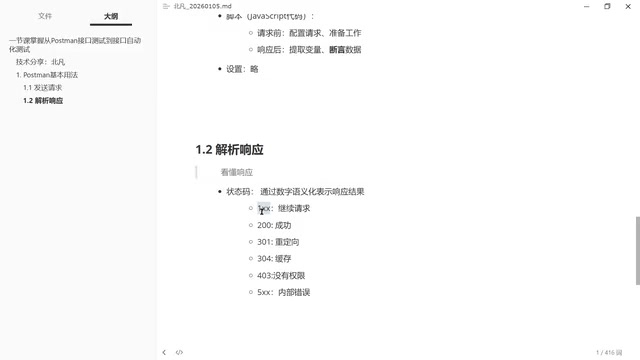
As long as the method and address are filled in, you can click the send button. Even if it returns an error status code like 405, it at least shows that the request was successfully sent.
The structure of a URL deserves a separate breakdown. A complete URL consists of the protocol (such as http/https), hostname (domain or IP), port number, path, and query string. For example, in https://api.example.com:8080/user/login?from=web, https is the protocol, api.example.com is the host, 8080 is the port, /user/login is the path, and ?from=web is the query parameter. The path part usually corresponds to the API route defined on the server side, while query parameters are used for filtering, pagination, or passing simple key-value pairs. After understanding this structure, you can understand why query parameters are "appended to the URL"—they are inherently part of the URL, just graphically broken out in Postman's Params panel to avoid manual concatenation errors.
Optional Items: Configure According to API Documentation
Optional items include query parameters, authentication, headers, body, and scripts, and each API's requirements differ.
Query parameters are appended to the URL, separated by a question mark, and essentially pass parameters through the URL. Authentication is used to identify the requester. Postman lists several common methods, including Basic Auth, Bearer Token, JWT, API Key, and more. The creator mentioned that in internet environments, JWT (JSON Web Token) is widely used. It is a standardized token that conveys identity information and expiration time through encryption. Login APIs typically don't require authentication, because logging in itself is for obtaining identity credentials.
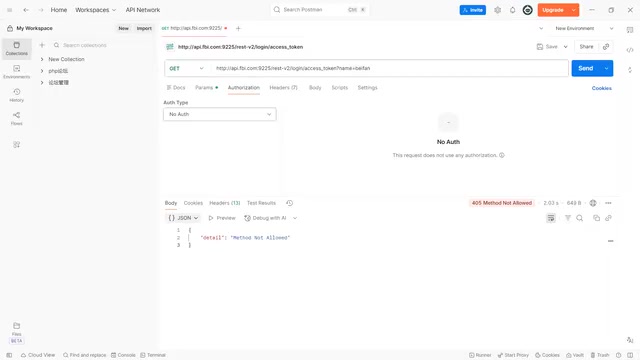
Request headers (Headers) are used to add modifying parameters, such as User-Agent to identify the request source, content compression method, connection keep-alive, and more. Request body (Body) is used to pass the actual parameter content. The creator used an analogy: the request body is like the body of an email, and the request header is like the annotations on the envelope—the body is the core.
There is a linkage relationship between the request body and request headers. When you select different formats in the Body (such as form-urlencoded, JSON), Postman automatically updates the Content-Type header. This linkage mechanism reduces the workload of manual configuration.
Scripts are divided into pre-request scripts and post-response scripts. Pre-request scripts are used for preparation before sending, such as reading variables or encrypting data; post-response scripts are used to extract variables and assert data. The creator pointed out that Postman assertions must be implemented through JavaScript code, and mastering this part gives you the foundation for automated testing.
HTTP protocol and RESTful style are the foundation for understanding API testing. HTTP (Hypertext Transfer Protocol) is the specification for communication between clients and servers. API testing is essentially simulating a client sending HTTP requests to a server and verifying the responses. The GET method is typically used to retrieve resources, with parameters passed through the URL; POST is used to submit data, with parameters placed in the request body; PUT is used to update an entire resource; DELETE is used to delete a resource. This design approach of centering on resources and expressing operations through HTTP methods is called RESTful style, and it is the current mainstream API design paradigm. Postman allows entering custom method names precisely because the HTTP protocol itself does not enforce a fixed set of methods, but in actual production environments, the vast majority of APIs follow RESTful conventions. After mastering these conventions, you can roughly infer the purpose of an API and how parameters are passed just by looking at the API address and method.
JWT (JSON Web Token) is the most frequently encountered concept in authentication and deserves elaboration. It is essentially a Base64-encoded string composed of three parts: the header, the payload, and the signature, separated by dots. The header declares the encryption algorithm (such as HS256), the payload stores user identity information and expiration time (exp), and the signature is generated by the server encrypting the first two parts with a secret key to prevent tampering. After the client successfully logs in and obtains the JWT, each subsequent request carries it in the Authorization header in the form of Bearer <token>, and the server confirms identity upon successful signature verification. Compared to traditional Session mechanisms, JWT requires no server-side storage of session state, making it naturally suitable for distributed and front-end/back-end separation scenarios, and therefore widely used in internet APIs.
Response Parsing: Status Codes and Response Body Are Most Critical
After the request is sent, the focus shifts to the response area. The creator divided the response content into status code, response headers, response body, Cookie, and test results, among which the most important are the status code and response body.
Status Codes: Quickly Determine Request Results
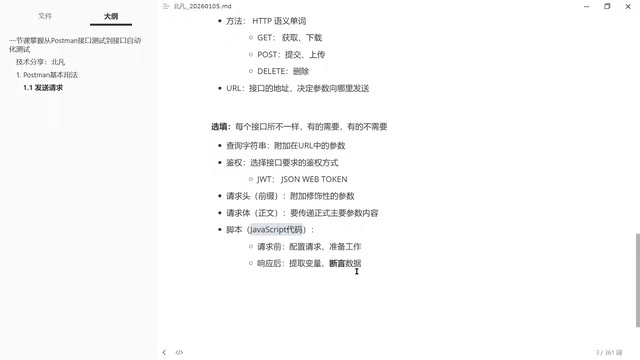
Status codes use numbers to semantically represent response results. The commonly used categories:
- Starting with 2: 200 means success, 201 means creation successful, 204 means success but no response content
- Starting with 3: 301 and 302 are redirects (permanent vs. temporary), 304 means cached
- Starting with 4: 401 means authentication not provided (don't know who you are), 403 means no permission (know who you are but not allowed), 422 means incorrect parameter format, 429 means too many requests
- Starting with 5: Internal server error, just report it to the developers, no need to dig deeper
The creator specifically reminded that status codes starting with 4 require adjusting the request based on the specific meaning—whether it's missing authentication, incorrect parameter format, or excessive request frequency.
Response Body: Pinpoint Specific Issues
Status codes only tell you "what went wrong"; the response body tells you "specifically where it went wrong." The creator used a practical demonstration to illustrate: sending a request with JSON format errors returns status code 422 (incorrect format), but the response body further points out that "the first character does not meet JSON encoding requirements"—JSON must start with a curly brace. After fixing the JSON format, the response body then indicates "missing required fields password and email." After adding the fields, it again prompts "password must be at least 8 characters."
This process shows that the detailed information provided by the response body allows you to gradually adjust request parameters, forming a debugging loop of "send—review—adjust—resend."
The correspondence between Content-Type and request body format is a key clue for troubleshooting API issues. application/x-www-form-urlencoded corresponds to form encoding, with parameters in the form key1=value1&key2=value2; application/json corresponds to JSON structure, where parameters must strictly conform to JSON syntax; multipart/form-data is used for file uploads. When the server reports a 422 parameter format error, besides checking JSON syntax, you should also confirm whether the Content-Type matches the request body format—if the request body is JSON but the Content-Type is still the default form format, the server may fail to parse it. Postman automatically changes the Content-Type when switching Body types precisely to avoid such low-level errors, but when manually constructing requests, you still need to pay attention to this correspondence.
API Documentation: The Basis for Testing
The creator repeatedly emphasized that Postman is just a tool; what truly determines whether testing can proceed is the API documentation. The documentation clearly specifies the API address, request method, required parameters, and optional parameters. Without documentation, you cannot know what parameters to pass or what format to use.
Different API documents come in various formats—they could be web pages, PDFs, or Word documents—but as long as they contain the address, method, and parameter descriptions, they can support API testing. The creator suggested that beginners use the API project provided in the course for practice, because public websites like Baidu don't have corresponding API documentation, making it impossible to verify whether requests are correct.
Mastering Postman's request sending and response parsing is the first step in API testing. Going forward, you'll need to practice assertion writing, variable extraction, and automated testing with specific projects to truly solidify your use of the tool.
One-line Summary
Using Postman as an example, from sending requests to parsing responses, laying out a complete beginner's path for API testing.
Paragraph Summary
Based on Bilibili creator "Beifan's" Postman tutorial, this article systematically outlines the key points for getting started with API testing. It first objectively analyzes Postman's shortcomings (unstable official website access, login required, immature CLI tool) and strengths (clean UI, complete features, support for exporting multi-language code), then explains step by step the required items for sending requests (method and URL) and optional items (query parameters, authentication, headers, body, scripts), emphasizing that API documentation is the real basis for testing. The response parsing section focuses on breaking down the categorical meanings of status codes and the debugging value of the response body, demonstrating the "send—review—adjust—resend" loop through a 422 error practical demonstration. The article also points out the automatic linkage mechanism between request body format and Content-Type, and that the difference between logging in and not logging in is limited in HTTP scenarios.
Related articles

Python 3.15 New Feature: Is the sentinel Type Better Than None?
Python 3.15 adds the sentinel type, using named unique sentinel objects to replace None and bare object(), resolving confusion among missing values, explicit emptiness, and invalid input while avoiding type hint failures.

Deep Learning's Three Architectures and the Universal Approximation Theorem: A Complete Guide to MLPs, CNNs, and Transformers
Explaining the inductive bias differences among MLP, CNN, and Transformer, the existence meaning of the Universal Approximation Theorem (UAT), and the role of Taylor expansion in approximation analysis, while clearing up common misconceptions.

GitLab Emergency Patch Release: Analysis of Critical Security Fixes
GitLab releases critical patch 19.5.1, sparking 355 points of discussion on Hacker News. This article analyzes the background, upgrade steps for self-hosted instances, and verification points to help DevOps teams respond quickly to security updates.