PPT Agent Hands-On: AI Conversational Generation of Editable HTML Slides, Say Goodbye to the "Web Page Look"

An AI Agent generates editable HTML slides via conversation, with rendering optimized to look like real presentations.
A Bilibili creator built a PPT Agent through open-source secondary development that generates editable HTML slides via conversational interaction. By optimizing the HTML rendering engine, the output eliminates the typical "web page look" of AI-generated presentations. The tool supports custom fonts, AI-generated images, style reuse, and token usage monitoring, with plans to add template upload for automated enterprise reporting.
From Workflows to Agents: A New Approach to AI-Powered Presentations
Using AI to generate presentations isn't new, but most existing solutions share a common pain point — the results look too much like web pages. A Bilibili content creator took an open-source project, customized it with their own PPT design standards, and specifically optimized the HTML rendering engine. The result: slides that "look like an actual PPT, not like a web page."
This change might seem simple, but it hits the nail on the head. The creator noted that previous AI-generated PPT workflows universally adopted a web-scale approach, making the output feel "very web-like." By optimizing the underlying HTML rendering engine, the final output more closely resembles traditional presentation aesthetics while retaining the editing flexibility of HTML.
To understand the technical difference here, you need to grasp the fundamental gap between HTML and traditional PPT layout logic. Traditional PPT files (like .pptx) are based on the Office Open XML format, with layouts built around fixed canvas dimensions, absolute positioning, and slide masters. HTML, on the other hand, was born for the web, defaulting to responsive layouts, document flow, and the CSS box model. When using HTML to simulate PPT, without targeted optimization, you get telltale "web page" artifacts: disproportionate font sizes, overly sparse element spacing, and lack of a unified layout grid. The so-called "HTML scale approach" typically scales a web page proportionally to slide dimensions, but scaling alone doesn't resolve the underlying layout logic differences. True optimization requires redefining the spacing system, font size hierarchy, and element alignment rules at the CSS level to conform to presentation — not web page — visual grammar.
Notably, this project architecturally chose the Agent path over a traditional workflow approach. In AI application development, "Workflow" and "Agent" represent two different paradigms. A workflow is a predefined linear or branching process where each step's inputs and outputs are fixed — user inputs a topic → AI generates an outline → fills in content → renders output, running like an assembly line. An Agent, however, has autonomous decision-making capability. It can determine what to do next based on current context: ask the user for more information, call a specific tool, or modify existing output. Core Agent characteristics include environment awareness, autonomous planning, tool invocation, and iterative feedback. This means that for the same task of "making a PPT," a workflow can only generate in one shot, while an Agent can collaborate with you like a real human designer.
Conversational Creation: Making Presentations Like Having a Chat
The entire process starts with a conversation. Taking a "Chinese Language Teaching PPT" as an example, users simply tell the AI their requirements, and the AI proactively analyzes and asks key follow-up questions: Is this PPT for an elementary school class or student homework? How many pages do you need? After confirming the purpose and page count, the AI continues to ask about visual style preferences — such as "Chinese ink wash style."

The AI's "thoughtfulness" is worth highlighting. During the design process, it proactively asks whether you need specialized teaching content like vocabulary flashcard pages. This context-aware proactive guidance helps users unfamiliar with PPT design get step-by-step guidance toward a well-structured final product. This is precisely the core difference between an Agent and traditional one-shot generation tools: it continuously asks questions and progressively refines, rather than mechanically outputting everything at once.
Visual Editing and Deep Customization
After requirement confirmation, the system generates a page outline where users can customize the content, objectives, and key points for each page. The creator mentioned having "not too many requirements" during the demo and went straight to generation, but for users with specific needs, this layer of editability is crucial.
At the style level, the tool offers substantial customization space:
Visual Style Selection
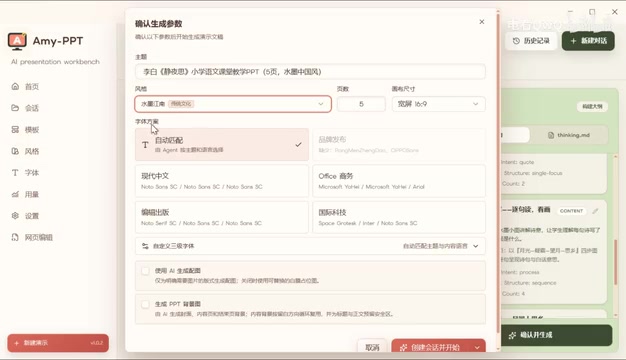
You can choose built-in styles (like "Ink Wash Jiangnan") or create your own exclusive style templates.
Font Configuration
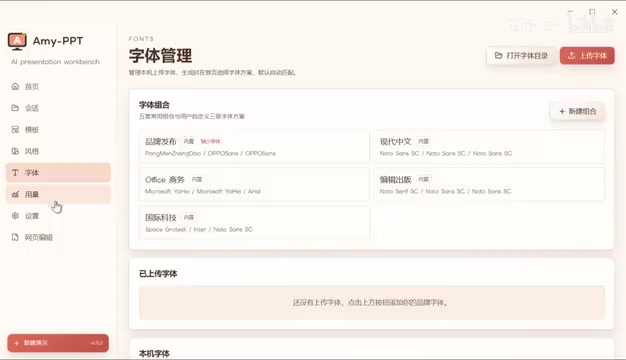
Multiple built-in font schemes are available, with support for uploading custom fonts. You can separately configure font specifications for titles and subtitles, and once configured, reuse them across all future projects.
AI-Generated Images and Backgrounds
The AI image generation feature requires configuring the PPI parameter for image generation in settings. PPI (Pixels Per Inch) determines image resolution precision, which is particularly critical in the PPT context. Slides may ultimately be used in different scenarios such as large-screen projection (typically 72-96 PPI is sufficient) or high-definition printing (requiring 300 PPI). If AI-generated images have too low a PPI, they'll appear blurry and pixelated on large screens; if the PPI is too high, it significantly increases file size and generation time. Setting 150 PPI for presentation purposes is typically a balanced choice, ensuring clarity while controlling resource consumption.
PPT backgrounds also support AI generation — if the background option isn't checked, the output leans toward a minimalist style without background images; checking it provides richer visual depth.
Final Output: Minimalist Pragmatism
Looking at several completed examples (including a "My Little Pony" theme), they all present a consistent minimalist style. The creator acknowledged this largely reflects personal aesthetic preferences: "I just like this style — at least I think it's usable, and with a few tweaks I can use it directly."
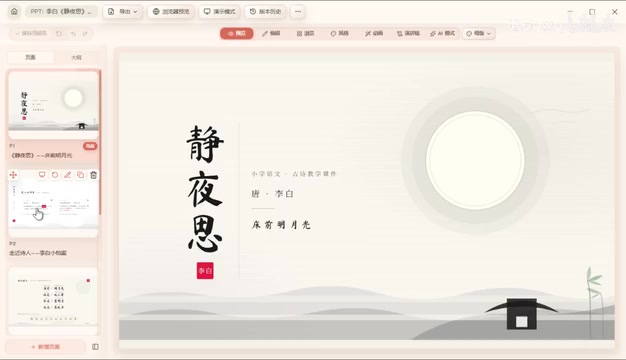
For minor issues like text overflow, since the underlying format is editable HTML, users can directly adjust element positions manually — for instance, "moving it over to the side." This editability is HTML's natural advantage over image-based generation. Of course, the creator also admitted that for more refined and complex effects, "there's still more polishing to be done."
Cost Control: Token Consumption and Model Configuration
As an LLM-based tool, token consumption is an unavoidable topic. The tool provides a token usage monitoring feature, allowing users to track consumption in real time.
Tokens are the basic billing unit for large language models. In Chinese-language scenarios, one Chinese character typically consumes 1.5-2 tokens. Generating a complete PPT involves multiple conversation rounds (requirement confirmation, outline generation, page-by-page content generation, style instructions), with total token consumption potentially reaching tens of thousands or even hundreds of thousands. Using mainstream model API pricing as reference, generating a 10-page PPT might cost between 0.5-2 RMB. If AI image generation is added (calling image generation APIs), each image adds an extra 0.2-0.5 RMB. Therefore, the token usage monitoring feature has direct practical value for controlling costs and evaluating cost-effectiveness.
On the configuration side, users need to set up their own conversation model and image generation model (the latter for AI-generated images). PPT rules also support customization, but the creator suggests — "generally you don't need to change anything, if you don't have very high requirements" — since this mostly involves personal aesthetic preferences and is more of an advanced feature.
Next Phase: Template Reuse and Automated Reporting
The project has currently completed its first phase. The creator revealed a highly practical second-phase plan: template upload functionality.
The envisioned scenario: you upload your company's standard report PPT template, then have AI automatically generate daily reports, weekly reports, and even monthly reports based on that template. This means enterprise users can delegate their routine, tedious report PPT creation to AI, maintaining brand visual consistency while dramatically improving efficiency.
This feature has extremely high practical value in enterprise scenarios. In daily office work, PPT creation involves massive amounts of repetitive work: daily and weekly reports follow fixed templates, project reports have standard frameworks, and brand visuals have strict specifications (designated color codes, logo placement, font families). The traditional approach is maintaining a master template file and manually filling in content — time-consuming and prone to formatting inconsistencies. If AI can understand and reuse enterprise templates, it essentially productizes "template comprehension" capability — the AI needs to parse the template's layout structure, color system, and content slots, then strictly follow these constraints when generating new content. This is more challenging than generic PPT generation, but also more commercially valuable, because it directly addresses the rigid enterprise demand for "maintaining brand consistency."
This approach extends AI PPT tools from generic scenarios like "teaching presentations" into the high-frequency, high-demand workplace productivity domain.
Summary
Although this project is based on open-source secondary development and still has many areas to polish, it validates a clear product path:
- Conversational Agent interaction lowers the barrier to PPT creation
- Editable HTML output balances aesthetics with flexibility
- Optimized rendering engine solves the industry-wide "web page look" problem
The project is currently open-source. Developers and users interested in AI office automation should give it a hands-on try.
Related articles

Workbuddy for Absolute Beginners: How a Desktop AI Agent Fits Into Real Workflows
A beginner's guide to the Workbuddy desktop AI agent: installation, claiming credits, file management, and building automated workflows—compared with CodeX for fit and cost, helping professionals shift from AI question-askers to AI managers.

OpenAI's New Agent Stack: Computer Use, Decisions API, and Ultra-Fast Workflows
OpenAI Dev Day unveiled a new agent stack: Computer Use outperforms humans, Decisions API delivers ultra-low-latency classification via Luna, Agents API opens the same Computer Use capabilities, and GPT-6.1 Sol costs only one-seventh of Astra. Core updates, benchmark data, and developer insights.

Liang Wenfeng Open-Sources DeepInfo Inference Framework, Takes On U.S. Ban
DeepSeek open-sources its DeepInfo inference framework after its models, featuring GPU/CPU cross-pipelining, small-model prediction with large-model verification, and full Huawei Ascend and NVIDIA chip support—facing the U.S. federal ban head-on. This article analyzes its significance for AI deployment and open-source strategy.