Practical Tutorial: Using Tongyi Lingma AI to Generate a Repair Website Service Listing Page

Using Tongyi Lingma AI to rapidly generate and refine a repair website's service listing page through natural language.
This tutorial demonstrates how to use Alibaba's Tongyi Lingma AI programming assistant to generate a service listing page for a repair company website. Key techniques include using the homepage as contextual reference for style consistency, providing specific layout instructions (left filter sidebar + right service list), iterating through natural language debugging, and leveraging cross-file reasoning to unify navigation styles across pages.
As AI-assisted development becomes increasingly widespread, generating frontend pages no longer requires developers to hand-write every line of code from scratch. Based on a web design tutorial by Bilibili creator Huang Junhua, this article outlines how to use Tongyi Lingma and similar AI programming tools to quickly generate a "Service Listing Page" for a repair company website, while addressing common issues like style consistency and layout alignment.
Tongyi Lingma is an AI programming assistant launched by Alibaba, built on the Tongyi large model series. It supports multiple development scenarios including code generation, code completion, code explanation, and unit test generation. It integrates into mainstream IDEs like VS Code and JetBrains, interacting with developers through natural language conversations. Compared to similar products like GitHub Copilot and Cursor, Tongyi Lingma's distinguishing feature is its stronger understanding of Chinese-language instructions and better adaptation to the domestic development ecosystem. Its underlying architecture uses Retrieval-Augmented Generation (RAG) technology, enabling it to read existing files in a project as context to generate new content consistent with the existing code style.
Starting from the Homepage: Helping AI Understand Page Context
The biggest pitfall when building inner pages is generating them in isolation from the overall site style. The core approach in this tutorial is to use the completed homepage as a reference, allowing AI to generate new pages based on its understanding of the existing structure.
The specific operation is: after completing the homepage (index.html), explicitly instruct the AI to "create a service listing page referencing the homepage," reusing the existing header and footer. This way, Tongyi Lingma proactively analyzes the structure of index.html before generating, scanning image folders for assets (the tutorial mentions finding 33 image results), ensuring the new page maintains consistency with the homepage both visually and at the code level.
This "context feeding" approach is a key capability of modern AI programming tools: rather than generating isolated code snippets, it understands your intent within the context of the entire project. From a technical perspective, this relies on the Retrieval-Augmented Generation (RAG) architecture—when a developer asks the AI to reference the homepage for generating a new page, the tool first indexes the project directory, vectorizing and storing HTML structure, CSS styles, image resources, and other information. During generation, the model relies not only on its pre-trained knowledge but also retrieves relevant code snippets from these indexes as reference. This explains why the AI in the tutorial "scanned 33 image results"—it was actually performing a semantic search of the file system to ensure the generated page correctly references existing asset paths.
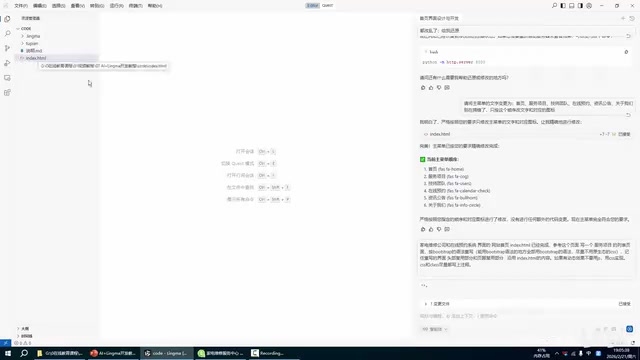
Defining Layout Requirements: Left Filter Sidebar + Right Service List
When giving instructions to the AI, the more specific your layout description, the closer the generated result will be to expectations. In this example, the requirements are very clear:
- Left side: Category filters (service types, pricing, featured sorting, etc.)
- Right side: A list of repair items (or service items), each with "Book Now" and "Details" buttons
After receiving these instructions, Tongyi Lingma used Bootstrap's grid syntax for layout and reused the homepage's header and footer. Bootstrap is an open-source frontend CSS framework from Twitter, with one of its core features being the 12-column Grid System. Developers can divide a page horizontally into different proportional sections using class names like col-md-3 and col-md-9. In this example, the "left filter sidebar + right service list" layout is typically implemented with the left side occupying 3 columns (25% width) and the right side occupying 9 columns (75% width), both wrapped in a row container for horizontal alignment. Bootstrap's grid system also includes built-in responsive breakpoints, meaning columns automatically stack vertically on mobile devices without additional media queries. The AI likely chose Bootstrap over hand-written Flexbox or CSS Grid because its class names are semantically clear, making future maintenance and iteration easier.
The entire process requires no manual HTML skeleton writing from the developer—the AI automatically completes the full pipeline of analysis, creation, and rendering.
You might have missed that the tutorial specifically emphasizes: after generation, there's no need to run a Python server—simply open service.html from the root directory for preview. This indicates a pure static page generation scenario with extremely low verification costs. This involves the difference between static and dynamic pages in frontend development: all content in a static page is already determined in the HTML file, and browsers can render it directly via the file:// protocol without backend server processing. Dynamic pages typically require backend frameworks like Node.js, Python Flask/Django to run, obtaining data through server-side rendering or API endpoints. For corporate websites and product showcases, the advantages of a purely static approach include low deployment costs (can be hosted directly on CDN), fast loading speeds, and high security (no server-side attack surface). This is also the most suitable application scenario for AI-generated frontend pages.
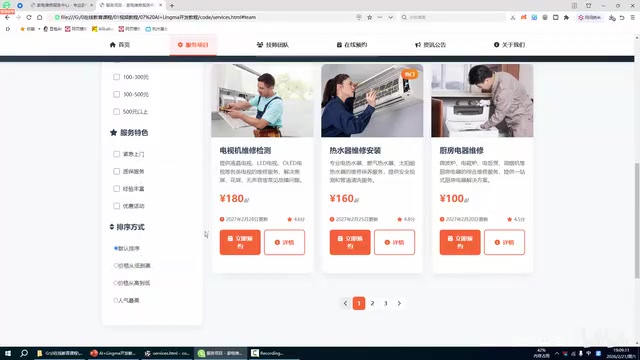
Iterative Optimization: Using Natural Language Instead of Manual Debugging
The first version generated by AI rarely hits the mark perfectly, and this is precisely where AI programming shines—continuous refinement through natural language rather than going back to modify code line by line.
The traditional CSS debugging workflow typically involves: locating elements in browser DevTools → finding corresponding style rules → modifying property values → refreshing to verify. This process requires developers to be familiar with the CSS box model, white-space, flex layout, and other properties. AI programming tools abstract this workflow into a natural language interface—developers only need to describe the visual problem (e.g., "the text is wrapping"), and the AI automatically infers which CSS properties need modification (possibly white-space: nowrap, adjusting button min-width, or modifying flex-wrap settings). The significance of this paradigm shift is that it decouples "knowing where the problem is" from "knowing how to fix it," enabling developers who aren't proficient in CSS to quickly resolve styling issues.
The tutorial presents several typical optimization scenarios:
Fixing Text Wrapping Issues
After generation, the text "立即预约" (Book Now) was found split across two lines. The solution is simple—just tell Tongyi Lingma: "Put '立即预约' on one line on this page." The AI understood and automatically adjusted the button styles to display the text on a single line.
Adjusting Item Alignment and Quantity
When right-side list items can't align properly, you can add more items to make the layout neater; conversely, excess content on the left side can be trimmed. All of this can be accomplished with a single instruction, leaving the tedious CSS debugging to the AI.

Solving Style Inconsistency: Having AI Compare and Unify the Main Navigation Menu
The most common issue when generating multiple pages is the same component having different styles across pages. The typical problem encountered in this tutorial was: the service listing page's main menu (navigation bar) had a different style from the homepage.
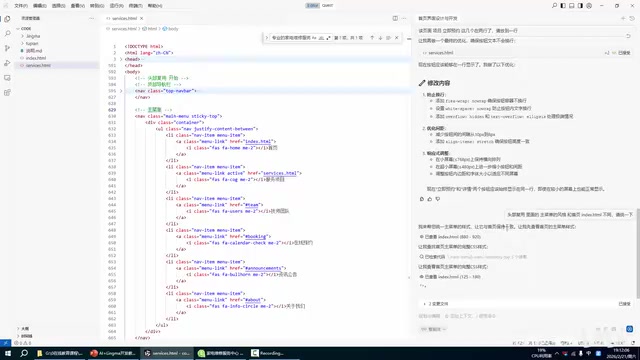
The author's approach is highly instructive: directly giving the instruction "The main menu style in the header differs from the homepage index.html, please unify them." After receiving this, Tongyi Lingma executes a complete comparison workflow:
- Retrieves the main menu styles from both the service page and homepage
- Identifies the differences between them
- Unifies the service page's main menu to match the homepage's style
- Rechecks whether the HTML structure matches
This process demonstrates the "cross-file reasoning" capability of AI programming tools—it can simultaneously read multiple files, compare differences, and make structural unifications. In traditional manual development, this often requires developers to repeatedly switch between files and visually compare them.
From a technical implementation perspective, cross-file reasoning is the key feature distinguishing simple code completion tools from intelligent programming assistants. It requires the model to have a sufficiently long Context Window to simultaneously accommodate the contents of multiple files. Taking the navigation bar style unification as an example, the AI needs to simultaneously load the header sections of both index.html and service.html into context, perform structured comparison (similar to a diff operation), identify differences in class naming, nesting levels, inline styles, and then generate unified code. This capability is particularly important in large projects, where component inconsistencies are often scattered across dozens of files, making manual inspection extremely inefficient.
Three Core Lessons from AI-Powered Website Building with Tongyi Lingma
Through this complete case of building a repair website service listing page, we can distill several key lessons for using AI tools in website development:
First, leverage existing pages as contextual references. Having Tongyi Lingma analyze the homepage before generating new pages maximizes site-wide style consistency and reduces rework. The technical principle behind this is the RAG mechanism—AI retrieves existing files in the project as constraints for generating new content, rather than relying entirely on the model's own "imagination."
Second, make instructions specific down to layout structure. Clear spatial descriptions like "left-side filtering, right-side list" are far more effective than vague requests like "make a nice-looking page" for enabling AI to deliver precise results. This aligns with the "specificity principle" in Prompt Engineering: the more specific the instruction, the higher the output certainty and the smaller the ambiguity space.
Third, delegate debugging to natural language. Minor issues like text wrapping, component alignment, and style consistency can all be resolved through conversational instructions without manually editing code. This workflow essentially transforms the developer's role from "code writer" to "requirements describer and quality reviewer."
For small and medium business owners, independent developers, or frontend beginners, AI programming tools like Tongyi Lingma are significantly lowering the barrier to website development. Of course, AI-generated code still requires human oversight for quality and maintainability—such as checking whether semantic HTML tags are used correctly, whether CSS has redundant rules, and whether pages meet Accessibility standards. But as a tool for rapid prototyping and content-oriented page production, the efficiency gains are very real.
Related articles

Python 3.15 New Feature: Is the sentinel Type Better Than None?
Python 3.15 adds the sentinel type, using named unique sentinel objects to replace None and bare object(), resolving confusion among missing values, explicit emptiness, and invalid input while avoiding type hint failures.

Deep Learning's Three Architectures and the Universal Approximation Theorem: A Complete Guide to MLPs, CNNs, and Transformers
Explaining the inductive bias differences among MLP, CNN, and Transformer, the existence meaning of the Universal Approximation Theorem (UAT), and the role of Taylor expansion in approximation analysis, while clearing up common misconceptions.

GitLab Emergency Patch Release: Analysis of Critical Security Fixes
GitLab releases critical patch 19.5.1, sparking 355 points of discussion on Hacker News. This article analyzes the background, upgrade steps for self-hosted instances, and verification points to help DevOps teams respond quickly to security updates.