Premiere Pro Meets AI Assistants: Automation Agent Brings Editing Automation

Automation Agent plugs ChatGPT/Claude Code into Premiere Pro and combines a local toolchain for efficient editing automation.
Automation Agent is an automation tool for Adobe Premiere Pro that connects AI assistants like ChatGPT or Claude Code with the editor and includes a local toolchain such as FFmpeg and Python. Its core idea is to leave creative judgment to AI while keeping deterministic computation local, reducing token usage and improving privacy. It offers ready-to-use automations like speech-based rough cuts, face pixelation, chapter markers, autoconform, and subtitle proofreading, and users can describe needs in natural language to have AI generate custom workflows. Sold as a one-time purchase, it suits intermediate-to-heavy Premiere users willing to invest time in automating repetitive work.
Editors often lose their time to a mountain of repetitive work—finding footage, adding markers, rough cutting, blurring faces. What would it be like to plug ChatGPT or Claude Code directly into Premiere Pro so AI can understand the timeline and take action? A YouTube channel introduced a tool called Automation Agent, which aims to truly connect the "AI assistant" with the "editing software."
What It Actually Is: More Than a Connector
The core positioning of Automation Agent is to provide a programmable automation layer for Adobe Premiere. According to the video, it is "far more than a bridge between AI agents and Premiere Pro"—the tool ships with a full local toolchain including FFmpeg and Python, and can handle complex image analysis tasks right on your machine.
This design approach is worth noting: it delegates the parts that "require creative judgment" to AI, while keeping "deterministic computation" local. As a result, token consumption is greatly reduced, and users pay only where AI judgment is truly needed, rather than having the model handle pixel-level tasks that could have run locally.
FFmpeg is an open-source multimedia framework capable of decoding, encoding, transcoding, streaming, and playing audio and video files in virtually any format. In editing automation scenarios, FFmpeg is often used to quickly extract video frames, convert formats, generate thumbnails, and analyze metadata. Because it runs entirely locally and is highly scriptable, it is ideal for processing large batches of footage without uploading to the cloud. Python, meanwhile, offers a rich set of image processing and machine learning libraries (such as OpenCV and Pillow) that enable tasks like face detection and scene recognition. Packaging both into a local environment means Automation Agent can complete a large amount of deterministic computation without calling AI models, thereby reducing token consumption and improving privacy and security.
An Out-of-the-Box Automation Library
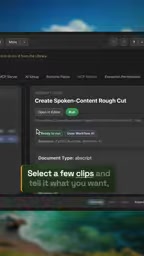
For users who don't want to write code, Automation Agent provides a large set of ready-to-use automation workflows that can be executed with a single selection. The video highlights two examples.
Speech-Based Rough Cut
The first is the "speech content rough cut" tool. Users select several clips and tell it what they want—for example, "cut a five-minute trailer" or "find all segments discussing a certain topic." The tool reads the transcription, hands it to the configured AI for analysis, locates the corresponding timestamps, and then places the clips directly onto the timeline. This essentially offloads the grunt work of "listening to footage and finding the golden quotes" to AI.
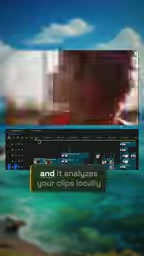
Transcription is the foundation of speech-based rough cutting. The tool first uses speech recognition technology (such as Whisper and similar models) to convert audio into a timestamped text transcript, and then AI analyzes the semantics of the text to locate the target segments described by the user. The timestamps allow AI to precisely map back to the corresponding positions on the original video timeline, so it can automatically cut and arrange the clips. This process combines speech recognition with natural language understanding, saving editors from manual listening, translating, and marking, and greatly improving the efficiency of footage selection.
Face Pixelation
The second is the "pixelate faces" tool. After you select footage, it analyzes the frames locally, then places editable clips and effects onto the timeline to produce the pixelation effect. The key point is that this tool can run entirely without ChatGPT or Claude Code—local compute is enough to perform face detection and effect generation, and what it generates are editable cuts and effects rather than a baked-in video, so you can still adjust it later.
You may not have noticed, but during this part of the explanation the video contains an obvious verbal slip and repetition ("you can create your own automations with it" is said twice), which also shows that such demo content is mostly improvised, and viewers need to judge the details for themselves.
The Local Toolchain Is the Real Differentiator

Many "AI + editing" solutions on the market essentially upload footage to the cloud, have a model return results, and then import them back into the software. Automation Agent takes a different route: it packages general-purpose tools like FFmpeg and Python into a local environment, meaning image analysis, format conversion, and batch processing can all be done on the machine.
This matters for professional editing scenarios. Footage is often huge and involves copyright and privacy concerns, so the more steps that can run locally, the safer and faster the workflow. AI intervenes only at the point of "creative judgment," which is a fairly pragmatic division of labor given current compute costs.
Tool Library and Custom Workflows
The tool library mentioned in the video covers many everyday pain points: automatic YouTube chapter marker generation, autoconform, subtitle proofreading, and more. All tools can be used as-is, or you can have the AI agent customize and modify them for you.
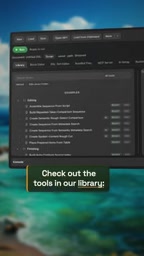
If the library doesn't have the feature you need, you can ask Claude Code or ChatGPT to generate a tool on the spot and save it as a reusable workflow. This "build tools on demand" model extends the boundaries of automation from developers to ordinary editors—as long as you can describe your needs clearly in natural language, you have a chance to turn them into a process that is a one-time investment and can be reused long term.
Autoconform is a key process in film and TV post-production. It refers to automatically applying the edit information from an edit decision list (EDL, XML, etc.) to the original high-resolution footage to rebuild the timeline. Traditionally this requires manually matching footage and timecodes, which is time-consuming and error-prone. Automation Agent parses the timeline data exported from the editing software, automatically locates the source footage, and generates a new sequence, thereby simplifying the transition from rough cut to fine cut. Combined with AI's customization capabilities, users can also adjust autoconform rules to suit different project structures.
One-Time Purchase and Target Users
Automation Agent uses a one-time purchase perpetual license with no subscription, and is sold at ascripts.com. For creators who dislike subscription models, this is a plus.
That said, it should be viewed rationally: the ready-made tools cover high-frequency general needs, but automation that truly fits an individual workflow still requires some debugging effort. AI-generated tools may not be perfect on the first try and may need repeated revisions. It is better suited to intermediate-to-heavy Premiere users who are willing to spend time to "automate repetitive work once and for all," rather than light users who edit occasionally and want zero learning cost.
Overall, Automation Agent demonstrates a clear direction: AI does not have to take over the entire editing process, but can act as a programmable assistant that, supported by a local toolchain, precisely fills in the most time-consuming steps.
One-line Summary
Automation Agent connects ChatGPT/Claude Code to Premiere Pro and combines a local toolchain to deliver efficient editing automation.
Paragraph Summary
Automation Agent is an automation tool designed for Adobe Premiere Pro. It connects AI assistants such as ChatGPT or Claude Code with the editing software and includes a built-in local toolchain with FFmpeg, Python, and more. Its core idea is to leave creative judgment to AI while keeping deterministic computation local, thereby reducing token consumption and improving privacy and security. The tool provides an out-of-the-box automation library, such as speech-based rough cutting, face pixelation, chapter marker generation, autoconform, and subtitle proofreading. Users can also describe their needs in natural language and have AI generate custom tools that can be saved as workflows. The tool uses a one-time purchase license and is suitable for intermediate-to-heavy Premiere users who are willing to invest time in automating repetitive work.
Related articles

Understanding DeepSeek in 3 Minutes: The Rise from a Quant Hedge Fund to an Open-Source AI Leader
DeepSeek's history in 3 minutes: from High-Flyer Quant's compute build-up to V2's MLA inference cost cuts, V3's $5.576M training bill, R1's open-source global shock, and V4 with a $7B Series A.

Local Creative Writing Model Showdown: Fine-tuned Qwen3.8 27B Wins, DeepSeek v4.1 Underwhelms
Bilibili creator tests seven local creative writing models: Hemingway and HumanLike Chat based on Qwen3.8 27B perform best, DeepSeek v4.1 is plain, Dongfang Shuo ranks last with confused characters. Includes three test prompts, scores, and usage advice.

Liang Wenfeng's Three Big Bets: Why Did DeepSeek Open-Source Its 82% Gross Margin?
Why did DeepSeek open-source DeepInfer, its 82% gross margin inference framework, and then launch a hundred-billion funding round? An analysis of Liang Wenfeng's three big bets and the open-source strategy.